
How to Sell WordPress Plugin: Complete Technical Guide
The WordPress ecosystem continues to expand every day. It powers over 61% of the CMS market. Within the WordPress.org open-source repository alone, there are more than 50,000 free plugins.
In contrast, there are over 30,000 paid plugins sold across various marketplaces and individual developer websites. For developers, this represents a massive opportunity, making the WordPress plugin business an incredibly lucrative niche.
Today’s blog is for both aspiring and veteran developers. Whether you’re new to monetizing your premium plugin or an experienced pro seeking a more efficient system for your business, this guide will show you how to sell WordPress plugin in the easiest effective way.
Let’s dive in, but first, here’s a TL;DR for the skimmers.
Key Takeaways
- Distribution Strategy: Use both marketplaces and your own website—marketplaces for exposure, your site for revenue control and customer ownership
- Technical Stack: WordPress 5.0+, PHP 7.4+, MySQL 5.6+, FluentCart for e-commerce, SSL certificate required
- Licensing System: FluentCart SDK handles activation, validation, deactivation, and automatic updates via WordPress core API
- Pricing Architecture: Three-tier pricing maximizes conversion; annual licensing creates recurring revenue, lifetime maximizes upfront value
- Payment Processing: Stripe (2.9%+$0.30), PayPal for global reach, Paddle (5%+$0.50) handles tax compliance automatically
- Customer Communication: Automate purchase confirmations, license notifications, update alerts, and renewal reminders to reduce support load
- Marketing Channels: Content marketing, email automation, WordPress.org freemium model, strategic partnerships, community engagement, paid advertising
- Update Delivery: Automatic updates through WordPress native system with server-side license validation every 12 hours
Decision First: Marketplace or Own Website?
Every plugin developer hits this crossroads sooner or later: sell through a marketplace, or build your own channel?
Marketplaces like CodeCanyon, Codester, or WordPress Plugin Directory give you instant exposure. Your plugin shows up in front of people who are already looking to buy. The catch is steep, 30–50% revenue cuts, strict rules, and heavy competition from similar plugins.
Running sales from your own website flips that equation. You keep more revenue, own your customer data, shape your brand story, and build direct relationships. But you also take on everything else, like site management, payments, marketing, and support.
In reality, the best plugin businesses don’t choose one. They use both. Start with what fits your stage today, but always keep one eye on owning your distribution long-term.
Marketplaces for WordPress Plugins
If you’re exploring the marketplace route, here are the major players:
CodeCanyon (Envato Market) is the largest premium WordPress plugin marketplace with thousands of hand-reviewed plugins from individual developers. Quality varies, but popular items typically offer solid support and regular updates for everything from eCommerce to SEO tools.
Codester: A multi-platform marketplace selling WordPress plugins, themes, and scripts. Developers earn 70% commission with no exclusivity. The selection is smaller than CodeCanyon but offers competitive pricing and responsive support.
WPD (WP Plugin Directory): It is a free, community-driven directory curating active, functional plugins with better categorization than WordPress.org. It includes user-created plugin lists for discovering collections curated by the community.
Creative Minds: It’s a specialized developer offering 120+ premium plugins focused on community building, e-learning, and membership solutions. It’s a direct vendor rather than a marketplace, with bundled packages at discounted prices.
Why You Should Sell from Your Own Website
Let me be direct: if you’re serious about building a sustainable plugin business, you need to own your distribution channel. Here’s why:
- Revenue: Keep nearly everything. Pay nothing instead of splitting 50/50. On a $99 plugin, that’s $100 vs. $49.50. Just double your profit per sale.
- Customer relationship: Own the connection. Build email lists, offer related products, and turn buyers into loyal advocates instead of anonymous marketplace transactions.
- Product narrative: Control your story. No competing plugins on the same page. You decide the messaging, positioning, and presentation without distractions.
- Brand: Build lasting equity. Your domain becomes synonymous with quality and expertise. Marketplace sales strengthen their brand, not yours.
- Scale: Set your own terms. Create pricing tiers, bundles, subscriptions, and promotions. Marketplaces lock you into their rigid structures.
The best part is that in 2026, FluentCart is here, and the technical barriers to selling from your own website have essentially disappeared. Let me show you how.
How to Sell WordPress Plugins from Your Website
Building a plugin sales website isn’t about months of development anymore. With FluentCart, you can have a professional operation running in days. Here’s the complete process.
Get Your Website Running
Start with the foundation: a WordPress website. Choose a reliable WordPress hosting like Cloudways, WP Engine, or Kinsta offer managed WordPress hosting that handles performance, security, and updates automatically.
Install WordPress and select a clean, professional theme. You don’t need anything elaborate. Look for themes designed for SaaS or digital products: they understand conversion-focused layouts, clear calls-to-action, and the importance of trust signals.
Essential pages to create:
- Home/Product Page: Clear headline, compelling benefits, pricing, and a strong call-to-action
- Documentation: Comprehensive guides that show potential buyers you support your product
- About: Your story, your expertise, why users should trust you
- Contact/Support: Make it easy for prospects and customers to reach you
- Terms & Privacy: Legal foundations (use generators if needed, but customize them)
Install security essentials: an SSL certificate (usually free through your host), a security plugin like Wordfence, and automated backups. Your website will handle payments and customer data. So, security isn’t optional.
Install FluentCart
This is where your website transforms from informational to transactional. FluentCart is a lightweight e-commerce solution built specifically for selling digital products like WordPress plugins.
Here’s what makes FluentCart ideal for plugin sales:
- Native WordPress integration: It’s built for WordPress, by WordPress developers who understand the ecosystem
- Digital product focus: No complex shipping calculations or inventory management. Just clean digital delivery
- Licensing infrastructure: Built-in support for license key generation, validation, and management
- Developer-friendly: Extensive hooks, filters, and APIs for customization
- Performance-optimized: Lightweight architecture that doesn’t slow your site
Quick guide to installing FluentCart and activating your Pro license for updates and premium features.
Server Requirements Minimum
- WordPress 5.0+
- PHP 7.4+
- MySQL 5.6+ (InnoDB support)
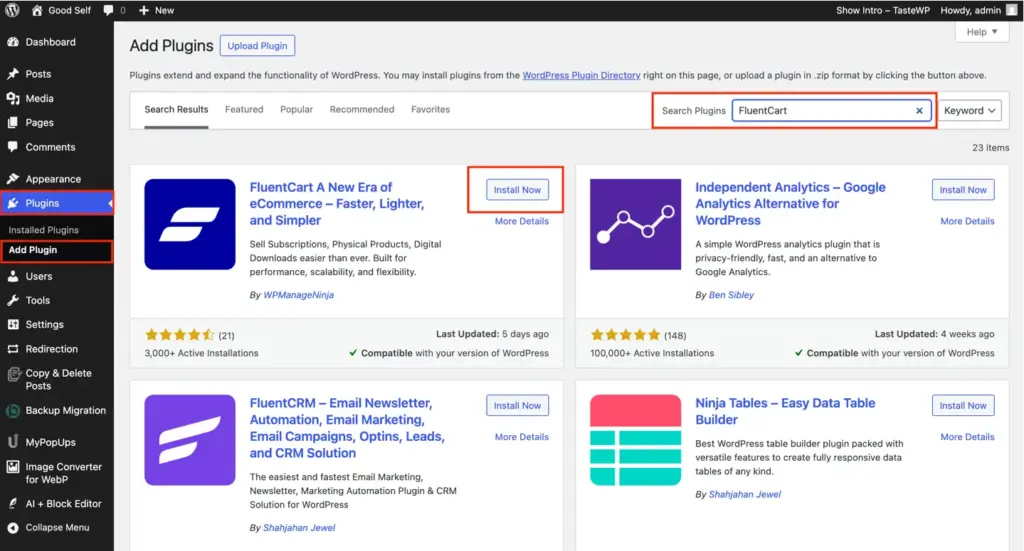
1. Install FluentCart (Free Version)
- Go to Plugins > Add New in the WordPress dashboard
- Search for “FluentCart”
- Click Install Now, then Activate
2. Install FluentCart Pro Addons
Note: The Free base plugin must be installed first
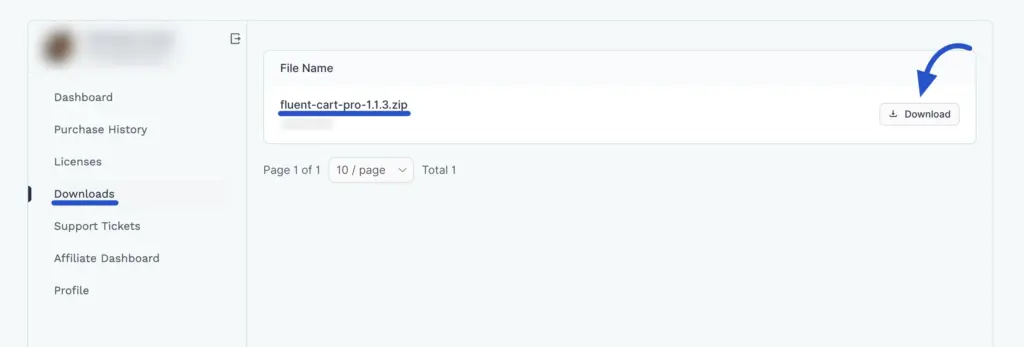
- Download FluentCart Pro Addons .zip from your FluentCart account
- Go to Plugins > Add New > Upload Plugin
- Choose the .zip file and click Install Now
- Click Activate Plugin
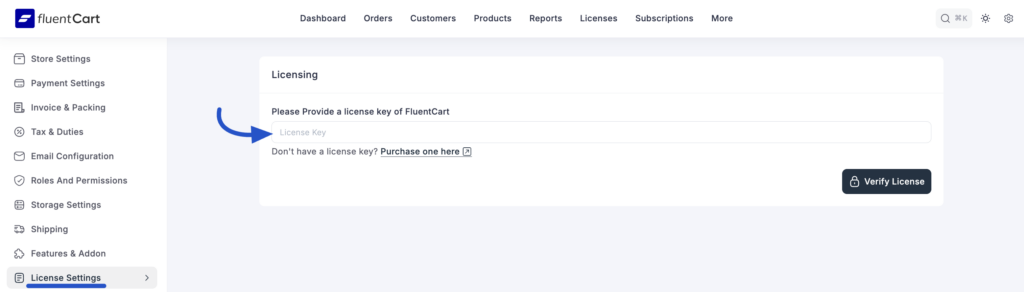
3. Activate Your Pro License
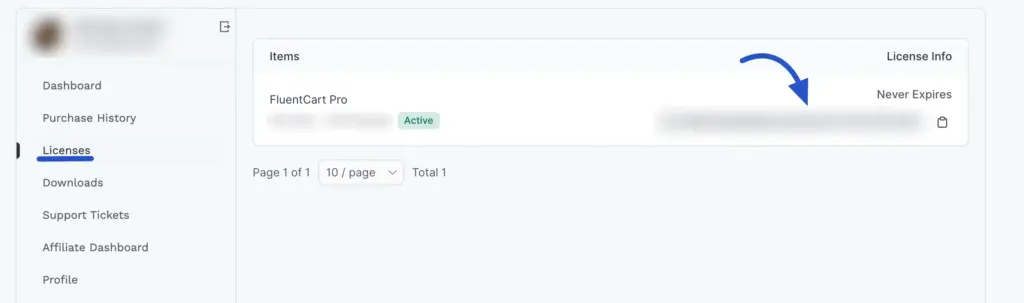
- Navigate to FluentCart Pro > Settings > License Settings
- Enter your license key in the “License Key” field
- Click Verify License
- Confirmation message appears when successful
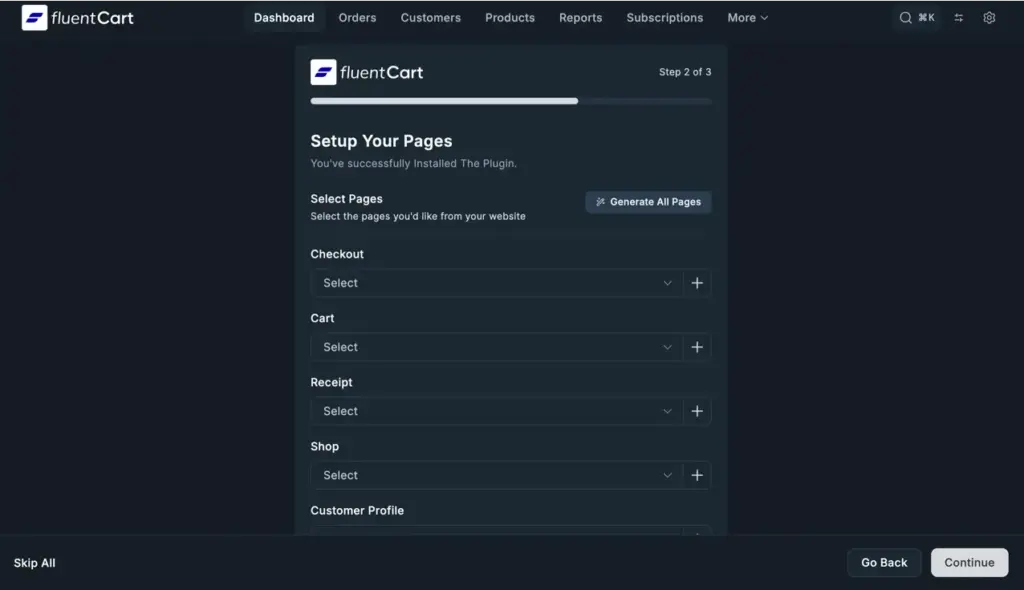
Page Setup
Complete the 3-step setup wizard:
- Store Details: Shop name, country, currency, logo
- Pages: Select existing, auto-create, or use AI to generate
- Template: Start from scratch or choose pre-made (Men’s Shoes, Men’s Wear)
Click Save, and you are all set.
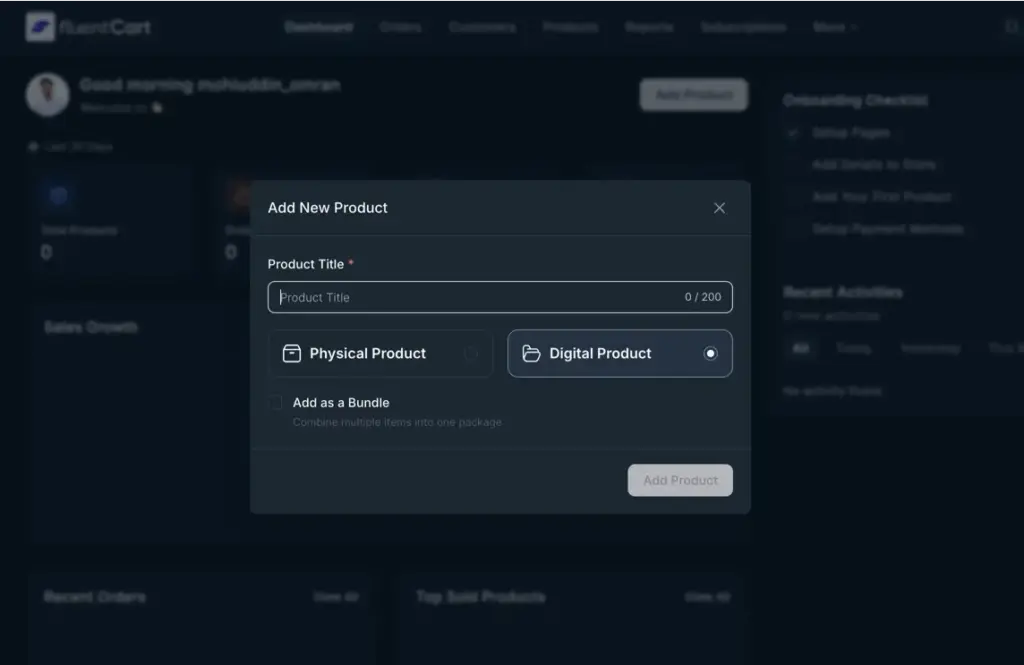
Add Your Product
Navigate to FluentCart > Products > Add New.
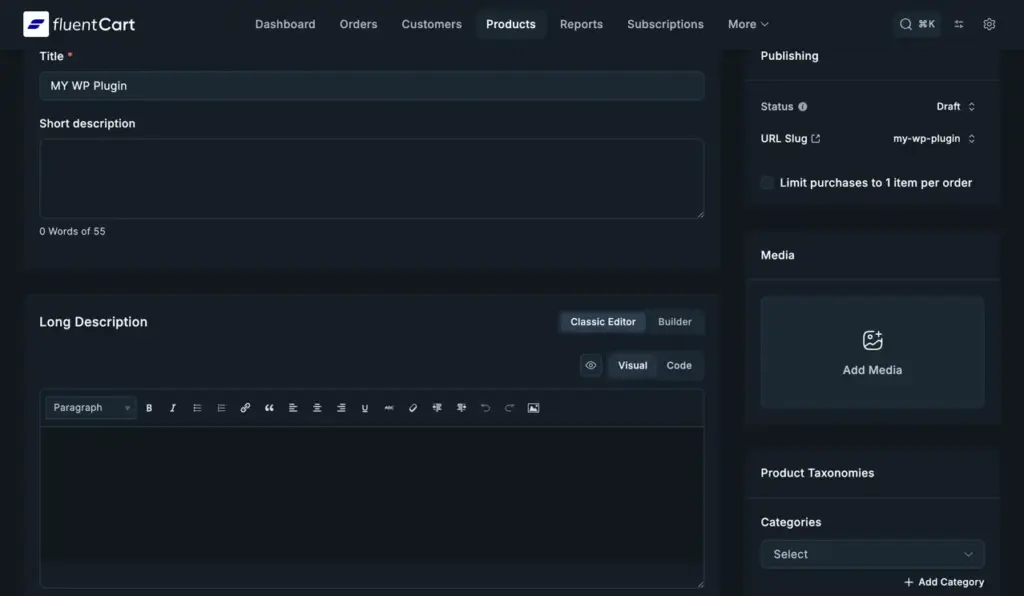
Product Details
- Product Title: Clear, benefit-focused name
- Short Description: Brief overview for listings
- Long Description: Detailed features and benefits
- Product Images: Featured image and gallery
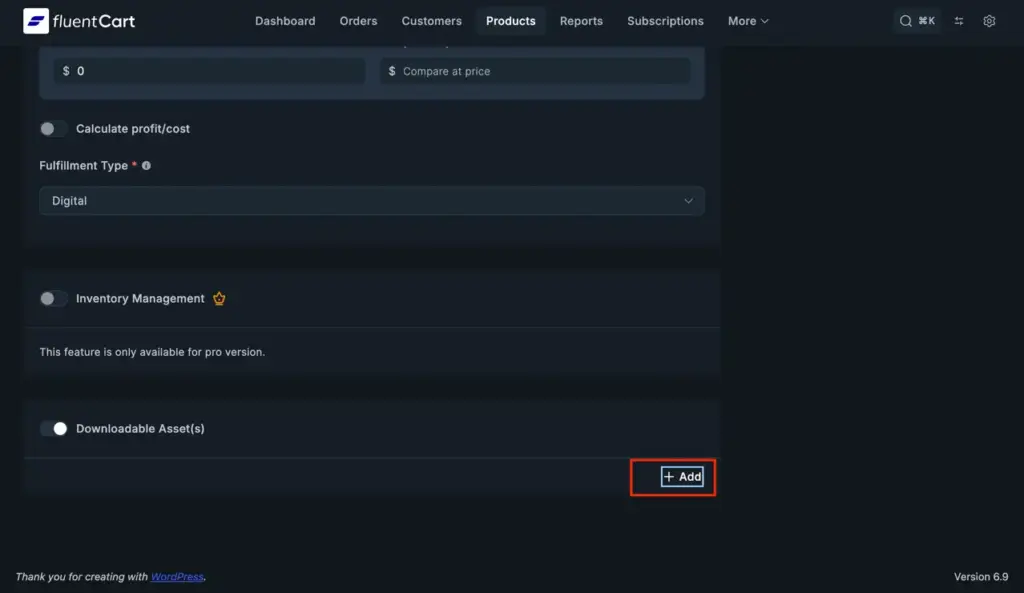
Downloadable assets
Click Add to upload your plugin Zip.
Set Your Prices
Pricing isn’t just a number; it’s psychology, positioning, and strategy combined.
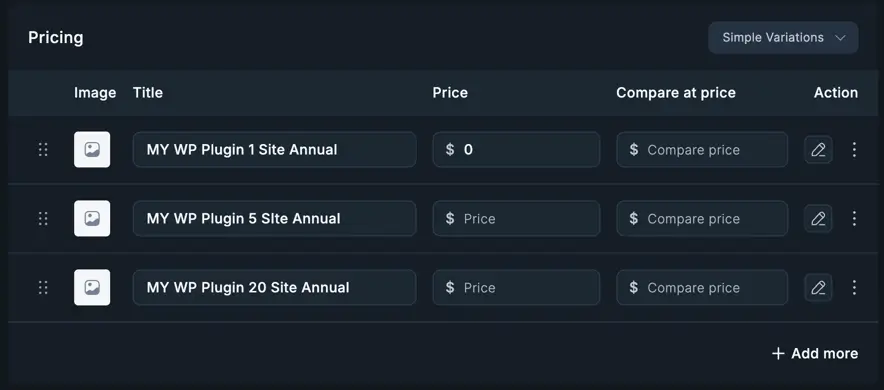
Single Price vs. Tiers: For most plugins, tiered pricing dramatically increases revenue. Create pricing variations based on:
- Number of sites (Single Site, 5 Sites, Unlimited)
- Features (Basic, Professional, Agency)
- Support level (Standard vs. Priority)
- License duration (1 Year, 2 Years, Lifetime)
The Psychology of Three: Three pricing tiers are the sweet spot. Most buyers gravitate toward the middle option. The lowest tier anchors affordability; the highest tier makes the middle tier look reasonable.
Annual vs. Lifetime: Annual licensing creates predictable recurring revenue. Lifetime licenses command higher upfront prices but eliminate ongoing income. Many successful plugin businesses offer both, letting customers choose based on their preference.
In FluentCart, creating price variations is straightforward: define each tier as a product variation, set the price, and specify what differentiates it (license count, features, support duration).
Set Up Licenses
Professional licensing is what separates hobbyist plugins from commercial products. It enables automatic updates, enforces usage limits, and protects your revenue. Here’s how to implement the complete licensing system using FluentCart’s Software Licensing SDK.
Why Licensing Matters
Without proper licensing, you can’t:
- Deliver automatic updates to customers
- Enforce single-site vs. multi-site restrictions
- Validate license authenticity
- Provide premium support to paying customers
- Prevent unauthorized distribution
The Fluent Plugin Updater handles all of this automatically once configured.
Getting the SDK
First, download the latest Software Licensing SDK from the official repository:
GitHub Repository: https://github.com/fluent-cart/software-licensing-sdk
Clone or download the repository and copy the updater folder into your plugin’s directory structure.
Step 1: Include the Licensing Class
In your main plugin file, include and initialize the FluentLicensing class. Important: Replace YourPluginNameSpace with your actual plugin’s namespace throughout the code.
if (!class_exists('\YourPluginNameSpace\FluentLicensing')) {
    require_once plugin_dir_path(__FILE__) . 'updater/FluentLicensing.php';
}

$instance = new \YourPluginNameSpace\FluentLicensing();
Step 2: Register the Licensing System
Configure the licensing system with your plugin details and FluentCart store information:
$instance->register([
    'version'     => '1.0.0', // Your current plugin version
    'item_id'     => "product_id", // Product ID from FluentCart (saved earlier)
    'basename'    => plugin_basename(__FILE__), // Plugin basename
    'api_url'     => 'https://your-store.com/' // Your FluentCart store URL
]);
Configuration Parameters Explained
Required Parameters:
version: Current version of your plugin (must match your plugin header)item_id: The Product ID you saved when creating your product in FluentCartbasename: WordPress plugin basename (e.g., ‘my-plugin/my-plugin.php’)api_url: Your WordPress site URL where FluentCart is installed
Optional Parameters:
license_key: Pre-set license key if managing licenses your own wayslug: Plugin slug (auto-generated from basename if not provided)settings_key: Custom database key for storing license datalicense_key_callback: Custom function to retrieve license keys
Available Licensing Methods
Once registered, the licensing system provides several powerful methods:
Activate a License
Validates and activates a customer’s license key:
$instance = \YourPluginNameSpace\FluentLicensing::getInstance();
$response = $instance->activate('customer-license-key-here');

if (is_wp_error($response)) {
    // Handle activation error
    echo $response->get_error_message();
} else {
    // Success - license is now active
    // Response contains:
    // - license_key: The activated key
    // - status: valid/invalid/disabled/unregistered/error
    // - variation_id: Price tier ID from FluentCart
    // - variation_title: Price tier name (e.g., "5 Sites License")
    // - expires: Expiration date or 'lifetime'
    // - activation_hash: Unique activation identifier

    echo 'License Status: ' . $response['status'];
}
Check License Status
Retrieve current license status from local storage or remote verification:
// Check local status (fast, uses cached data)
$localStatus = $instance->getStatus();

// Check remote status (verifies with FluentCart server)
$remoteStatus = $instance->getStatus(true);

if (is_wp_error($remoteStatus)) {
    echo 'Error: ' . $remoteStatus->get_error_message();
} else {
    echo 'Status: ' . $remoteStatus['status'];
    echo 'Expires: ' . $remoteStatus['expires'];
    echo 'Is Expired: ' . $remoteStatus['is_expired']; // 'yes' or empty
    echo 'Renewal URL: ' . $remoteStatus['renewal_url'];
    echo 'Error Type: ' . $remoteStatus['error_type']; // If any issues
}
Remote status provides additional properties:
is_expired: ‘yes’ if license is expiring/expired, otherwise emptyrenewal_url: Direct link for customers to renewerror_type: Specific error classification (disabled/key_mismatch/validation_error/invalid_license/invalid_activation)message: Human-readable error description
Deactivate a License
Removes license activation from the current site:
$response = $instance->deactivate();

if (is_wp_error($response)) {
    echo $response->get_error_message();
} else {
    echo 'License successfully deactivated';
}
Get Current License Key
Retrieve the stored license key:
$licenseKey = $instance->getCurrentLicenseKey();
echo 'Current license: ' . $licenseKey;
Access Instance Anywhere
Get the licensing instance from any part of your plugin:
$instance = \YourPluginNameSpace\FluentLicensing::getInstance();License Status Values
The system returns these status values:
- valid: License is active and properly licensed
- invalid: License key is invalid or has expired
- disabled: License disabled (usually due to refund or admin action)
- unregistered: No license has been registered yet
- error: Server communication or validation error occurred
Error Handling Best Practices
Always check for errors when communicating with the licensing server:
$response = $instance->activate('license-key');

if (is_wp_error($response)) {
    $error_message = $response->get_error_message();
    $error_code = $response->get_error_code();

    // Log for debugging
    error_log("License activation failed: $error_message (Code: $error_code)");

    // Display user-friendly message
    echo "Activation failed: $error_message";
} else {
    echo "License activated successfully!";
}
Complete Implementation Example
Here’s a full working example integrated into a plugin:
<?php
/*
Plugin Name: Your Awesome Plugin
Description: A premium WordPress plugin with licensing
Version: 1.0.0
Author: Your Name
*/

if (defined('YOUR_PLUGIN_PATH')) {
    return;
}

define('YOUR_PLUGIN_PATH', __FILE__);

add_action('init', function () {
    // Include the licensing class
    if (!class_exists('\YourPluginNameSpace\FluentLicensing')) {
        require_once plugin_dir_path(__FILE__) . 'updater/FluentLicensing.php';
    }

    // Initialize and register
    $instance = new \YourPluginNameSpace\FluentLicensing();
    $instance->register([
        'version'     => '1.0.0',
        'item_id'     => "123", // Your FluentCart Product ID
        'basename'    => plugin_basename(__FILE__),
        'api_url'     => 'https://your-store.com/'
    ]);

    // Now you can use licensing methods anywhere:
    // $instance = \YourPluginNameSpace\FluentLicensing::getInstance();
    // $status = $instance->getStatus();
});
API Endpoints Reference
The licensing system communicates with your FluentCart installation through these endpoints:
Activate License:
https://your-store.com/?fluent-cart=activate_licenseDeactivate License:
https://your-store.com/?fluent-cart=deactivate_licenseCheck License Status:
https://your-store.com/?fluent-cart=check_licenseGet Version Information:
https://your-store.com/?fluent-cart=get_license_versionRequest Parameters (sent in request body):
item_id: Your FluentCart Product IDcurrent_version: Plugin version numbersite_url: Customer’s website URLlicense_key: License key (when applicable)
Built-in License Settings Page
Instead of building your own license management interface, use the included settings page:
require_once plugin_dir_path(__FILE__) . 'updater/LicensingSettings.php';

$licenseSettings = (new \YourPluginNameSpace\LicenseSettings())
    ->register($instance) // Pass your FluentLicensing instance
    ->setConfig([
        'menu_title'      => 'Plugin License',
        'title'           => 'License Settings',
        'license_key'     => 'License Key',
        'purchase_url'    => 'https://your-store.com/pricing',
        'account_url'     => 'https://your-store.com/account',
        'plugin_name'     => 'Your Awesome Plugin'
    ]);
Display Options
Option 1: Add to WordPress Admin Menu
$licenseSettings->addPage([
    'type' => 'submenu', // or 'options' or 'menu'
    'parent_slug' => 'tools.php' // Required for submenu type
]);
This creates a dedicated license management page in your WordPress admin.
Option 2: Render in Custom Settings Page
// In your custom settings page template:
do_action('fluent_licenseing_render_your_plugin/plign_license_form');
This embeds the license form wherever you want in your existing interface.
Testing Your Licensing System
Before launching, thoroughly test the complete licensing flow:
- Purchase Flow: Buy your own plugin through FluentCart
- License Receipt: Verify that the license key is emailed correctly
- Activation: Install the plugin and activate it with the license key
- Update Check: Trigger an update check to ensure it connects properly
- Automatic Updates: Release a minor version update and verify it installs automatically
- Deactivation: Test license deactivation functionality
- Reactivation: Verify you can reactivate on the same site
- Site Limits: Test multi-site restrictions if applicable
- Expiration: Test expired license behavior (restrict updates, show renewal prompts)
- Invalid Key: Test error handling with incorrect license keys
Security Considerations
- API Communication: All licensing requests use secure HTTPS
- License Validation: Server-side validation prevents tampering
- Activation Limits: Enforced server-side, not client-side
- Error Messages: Never expose sensitive system information in error messages
- Database Storage: License data stored securely in WordPress options table
What Happens After Setup
Once licensing is configured, here’s the automatic flow:
- Customer Purchases: FluentCart generates a unique license key
- Customer Activates: License key entered in plugin settings
- Validation: Your server validates against the FluentCart database
- Update Checks: Plugin automatically checks for updates (WordPress standard)
- Automatic Updates: Updates download and install seamlessly
- Renewal Reminders: Customers receive renewal notifications before expiration
- Grace Periods: Expired licenses get a grace period before update access stops
This entire system runs automatically—you focus on building great features, not managing licenses manually.
Common Implementation Mistakes to Avoid
- Forgetting to update namespace: Always replace
YourPluginNameSpacewith your actual namespace - Wrong Product ID: Double-check that the Product ID from FluentCart matches exactly
- Incorrect API URL: Must be your FluentCart installation URL (with trailing slash)
- Missing error handling: Always wrap licensing calls in error checks
- Testing in production: Test the complete flow in a staging environment first
- Hardcoding license keys: Never hardcode customer license keys in your plugin code
Setup Notifications
Communication is where customer experience happens. Configure FluentCart’s notification system to keep customers informed and reduce support burden.
Purchase Confirmation: Immediately after payment, customers should receive an email containing:
- Order confirmation and receipt
- Their license key (prominently displayed)
- Download link for the plugin
- Link to documentation
- How to activate their license
- Support contact information
Make this email clear and actionable. Someone who has just purchased is either excited to implement or anxious about setup—address both emotions.
License Activation Confirmation: When a license is activated on a site, send confirmation. This helps with security (users know if their license is used elsewhere) and provides a reference point.
Update Notifications: Alert customers when new versions are available, especially for major updates or security patches. Even though automatic updates work, proactive communication builds trust.
Expiration Reminders: For annual licenses, send renewal reminders 30 days, 7 days, and 1 day before expiration. Frame it as continuity of service, not as a sales pitch.
Post-Purchase Engagement: Day 7 after purchase, send a “How’s it going?” email. Ask if they need help, offer tips for getting more value, and request feedback. This single email can transform satisfaction rates.
Setup Payments
Money needs to flow securely and reliably. FluentCart integrates with major payment processors. Choose based on your location and customer base.
Stripe: The gold standard for digital products. Supports credit cards, Apple Pay, Google Pay, and dozens of payment methods globally. Fees are typically 2.9% + $0.30 per transaction. Setup is straightforward, and the dashboard provides excellent reporting.
PayPal: Global recognition and trust, especially important for international customers who may not have credit cards. Fees are similar to Stripe. The experience is slightly clunkier (redirects to PayPal), but conversion rates for certain demographics are higher.
Paddle: Merchant of record model, meaning they handle VAT/tax compliance globally. Slightly higher fees (5% + $0.50), but they absorb all tax complexity. Excellent choice if you’re selling internationally and don’t want tax headaches.
Recommendation: Start with Stripe as primary, add PayPal as an alternative. As you scale internationally, consider Paddle for tax simplification.
Security Considerations: Ensure your site runs HTTPS everywhere. Enable payment processor fraud detection. Consider adding reCAPTCHA to checkout to prevent automated fraud. Set up transaction monitoring alerts for unusual patterns.
Tax Handling: Digital products are taxed differently across jurisdictions. If you’re using Stripe or PayPal, you’re responsible for calculating and remitting sales tax. Research requirements for your country and major customer countries.
Market, Promote & Sell WordPress Plugins
You’ve built the infrastructure. Now comes the part that determines success: getting your plugin in front of people who need it.
- Content Marketing: Publish problem-solving content: blog posts, tutorials, case studies, comparison guides. Be visible when prospects search.
- Email Marketing: Build your list with a free version or lead magnet. Automate: welcome sequences, educational content, upgrade campaigns, re-engagement flows.
- WordPress.org Freemium: Release a useful free version with premium upgrade prompts. High ratings build trust and drive premium sales.
- Strategic Partnerships: Partner with complementary plugins/themes for co-marketing and expanded reach.
- Community Engagement: Participate in WordPress forums, Facebook groups, Reddit (r/WordPress), and meetups. Contribute value, not spam.
- Conversion Optimization: Test headlines, CTAs, pricing, guarantees. Use Hotjar/Clarity to identify friction points.
- Social Proof: Collect testimonials, case studies, and before/after screenshots to reduce buying friction.
- Paid Advertising: Scale with Google Ads, Facebook/Instagram retargeting, and WordPress newsletter sponsorships. Start small, measure, scale what works.
Start Selling WordPress Plugins
You have the roadmap and understand the infrastructure. You know the licensing system works because the technical documentation proves it. Now comes execution.
Start simple: get one product selling reliably before expanding to multiple plugins or complex pricing structures. Master the fundamentals—product positioning, licensing automation, customer support, and continuous improvement.
The WordPress ecosystem rewards quality and persistence. Developers who solve real problems, communicate clearly, support their users genuinely, and iterate based on feedback build sustainable businesses.
Your plugin is the product. The website is the platform. Your story is the marketing. The licensing system is the infrastructure that makes it all work seamlessly.
But the real differentiator? The same thing that separates adequate marketing from marketing that converts: understanding that you’re not just selling code. You’re selling transformation. Selling the relief of finding the right solution. You’re selling confidence that it will work, that updates will arrive, that support will respond.
Build that experience, automate what can be automated, and craft narratives that resonate at every touchpoint. The plugin is just the beginning. The business you build around it determines everything.
The open road awaits—every campaign you create, every customer journey you architect, every piece of content you craft is another mile toward building something that endures.
Now go sell something worth buying.

WordPress, automation, eCommerce and growth marketing specialist, a Core Contributor and Media Corps member blending storytelling with technology to craft purposeful strategies in SEO, email marketing, and beyond.

Subscribe now
Related Articles and Topics
-
FluentPlayer: HQ Video Player Comes To WordPress
If you are already building with the Fluent ecosystem, you’re already reaping the benefits of an integrated system.…
-
FluentCart + FluentCommunity Integration: A Complete Solution for Course and Community
If you’re selling online courses, memberships, or digital products, you know how tricky it can be to manage…
-

How to Start a Blog: Easiest Beginner-Friendly way (2025 Edition)
Everywhere, people are turning their stories into content, and content into income. They’re building blogs, growing audiences, and…




Leave a Reply