
Best eCommerce Hosting in 2026: What Actually Matters Before You Pick One
Picking the best eCommerce hosting isn’t really about finding the fastest server or the cheapest plan. It’s about picking the wrong one as rarely as possible. Most stores that underperform aren’t running bad products; they’re running on infrastructure that’s quietly bleeding revenue through slow load times, surprise downtime, and configs that don’t scale.
Here’s the thing nobody tells you upfront: the platform you choose also determines how much control you get over your store long-term. That’s the actual decision you’re making.
TL;DR
Before we go into the important technicalities. Let’s go through the list first. And then we discuss what to look for before choosing a hosting provider, how to choose the best one for your business, and more.
Best eCommerce Hosting Providers
We have tested a few hosting services and listed these hosting providers for your eCommerce business this year.
1. Hostinger, Best Value eCommerce Hosting
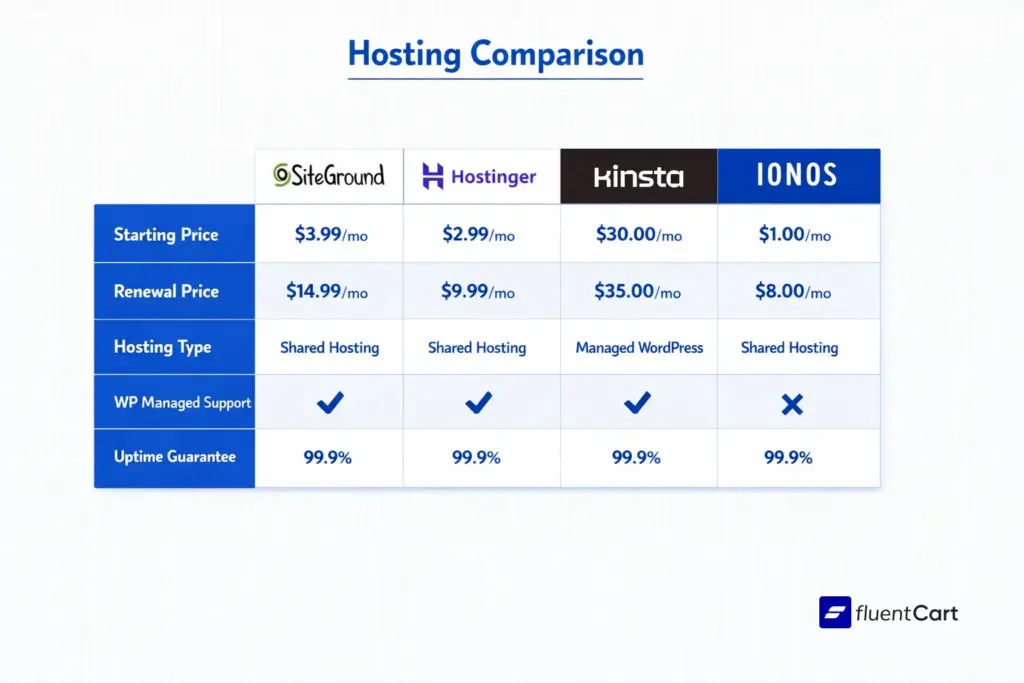
Hostinger’s value proposition is simple: more features for less money, for longer. Their introductory WooCommerce hosting starts at around $2.99–$3.99/mo with a long-term commitment, renewing at roughly $8–$13/mo depending on the plan. That’s genuinely low for managed WordPress hosting that includes LiteSpeed caching, automated backups, and a free domain.
The website builder plan is solid for smaller stores, it includes AI-generated site setup, inventory management for up to 600 products, 20+ payment methods, and email hosting for 100 accounts. The renewal pricing is one of the most competitive in the market.
One caveat worth knowing: customer support runs primarily through an AI chatbot. It’s well-trained, but reaching a human requires patience. If you’re likely to need hands-on technical help, factor that in.
Best for: Small to medium stores watching budget, solo operators, anyone on a four-year planning horizon who wants predictable costs.
2. xCloud, Best Managed Cloud for Performance
xCloud occupies a category the others don’t: it’s a server-management panel and a managed cloud host in one. You can run on xCloud’s own managed cloud servers, or connect your own from AWS, Google Cloud, DigitalOcean, Linode, or Vultr and manage everything from a single panel. Sites run on an optimised NGINX or OpenLiteSpeed stack with FastCGI and Redis caching, NVMe storage, and built-in Cloudflare, the combination that actually moves store load times.
Pricing starts at $5/mo with unlimited sites on every plan and no introductory-rate trap at renewal; premium NVMe servers on 3GHz+ Intel Xeon CPUs start at $7.50/mo. You get 99.99% uptime, free auto-renewing SSL, daily backups, a staging environment on every install, and security through a WAF, malware protection, and per-site isolation. Being WordPress-native, it pairs cleanly with a lean stack like FluentCart.
One caveat worth knowing: xCloud asks a little more upfront than a pure one-click shared host, since you’re connecting a server rather than landing on a pre-built box. Onboarding is guided and migration is free, but if you want zero setup decisions, factor that in.
Best for: Performance-focused WordPress and FluentCart stores, agencies managing multiple sites from one panel, and store owners who want managed-cloud speed without premium-tier pricing.
3. Shopify, Best All-in-One Platform
Shopify is the closest thing to a guaranteed launch. You sign up, pick a template, add products, connect a payment method, and you’re live. No server configuration. No plugin hunting. Their server performance is genuinely exceptional, Shopify reported 99% uptime and an average load speed of 1.71 seconds in independent testing, the fastest of any platform tested.
For physical product sellers especially, the native tools are hard to beat: inventory management, automatic shipping label generation, discounts of up to 88% with USPS, UPS and DHL. Point of Sale functionality if you ever need to sell in person.
The weak spots: starting at $39/mo for Basic, costs escalate quickly. Third-party transaction fees (unless you use Shopify Payments). And the platform’s customisation ceiling is lower than a self-hosted setup, you’ll hit it if you’re building anything complex.
Best for: First-time store owners, physical product retailers, teams that want zero maintenance.
4. SiteGround, Best for WordPress Overall
SiteGround is the go-to recommendation for WordPress-first stores, and not just by convention. Their onboarding flow guides you through choosing themes, installing essential plugins (including FluentCart or WooCommerce), and configuring security, all in one setup process. You also get proprietary speed and security plugins that are competitive with most paid third-party options.
Customer support is genuinely strong. WordPress experts available around the clock, with response times that regularly outperform competitors. If you’re building on WordPress and expect to need support, this matters a lot more than it sounds.
Pricing starts at around $2.99–$3.99/mo for the first year, renewing at roughly $15–$18/mo. Storage starts at 10GB on entry plans with 10,000 monthly visitor bandwidth. Cloud hosting options are available for larger stores from $100/mo.
Best for: FluentCart and WooCommerce store owners who want managed convenience without giving up the flexibility of WordPress.
5. Kinsta / WP Engine, Best for Scaling WordPress Stores
These two sit in the premium managed WordPress tier. Both handle server maintenance, automated WordPress core and plugin updates, daily backups, CDN, and staging environments as standard. If you’re running a WordPress online store doing serious revenue, or expecting to, this tier is where you want to be.
WP Engine includes staging environments across all plans and specialises in agencies managing multiple WordPress sites. Kinsta runs on Google Cloud infrastructure with edge caching globally, and their support team is WordPress-specific.
Pricing reflects the quality: Kinsta starts around $35/mo and WP Engine starts around $20–$35+/mo depending on the plan. These aren’t entry-level options, but the performance headroom and the managed operations make it the right call once you outgrow shared hosting.
Best for: High-traffic FluentCart and WooCommerce stores, agencies, store owners who want zero server management and are willing to pay for it.
6. Hosting.com (formerly A2 Hosting), Best for WordPress Beginners
Hosting.com sits in an underrated middle ground: performance-optimised WordPress servers at a price point that doesn’t require a multi-year commitment to justify. Their WordPress plans come with guided setup for core pages and plugins, solid LiteSpeed-enhanced server performance, and unmetered bandwidth across all tiers.
Entry pricing starts at around $2.99/mo (roughly $8–$12/mo on renewal with a long-term plan). Managed WordPress plans with automated updates start at around $12/mo. The main tradeoff is customer service responsiveness via email and phone, it can be slower than SiteGround or Kinsta.
Best for: Early-stage WordPress stores, budget-conscious builders who don’t want to compromise on performance.
7. Ionos, Best Variety of Hosting Options
Ionos earns its spot for one reason: range. They offer proprietary website builder plans, WordPress store hosting, and specialised hosting for PrestaShop, an eCommerce platform popular in Europe. If you’re running a European-focused store or want to explore options beyond WordPress, Ionos is one of the few providers covering all of these.
Their AI-powered setup tools build a functional site from basic business information. Uptime guarantee is above-average at 99.99%, which they held during independent testing. Customer support response times are among the fastest tested.
Watch the pricing carefully. Some plans have aggressive mid-term price jumps. Their WooCommerce plan runs around $16/mo for the first year and roughly $20/mo after, reasonable, but the website builder plans get complicated.
Best for: European store owners, sellers already on or considering PrestaShop, stores that want variety and multilingual support baked in.
Here is basic picture of hosting provider for eCommecer.
The Two Types of eCommerce Hosting (And Which One You Need)
Before getting into specific providers, it helps to understand the structural difference between your options. This is where most businesses get confused.
All-in-One Hosted Platforms
Shopify, Wix, BigCommerce, Squarespace, these bundle your store builder, hosting, security, and payment tools into one monthly subscription. You don’t manage servers. You don’t worry about SSL certificates expiring. Everything is handled.
The upside is obvious: you can launch in a day. The downside is less obvious until later: every extra feature costs you. Apps, integrations, transaction fees. And if you ever want to migrate, you’ll quickly discover how much of your store lives inside their closed ecosystem.
Good fit for: first-time sellers, physical product stores, teams without technical resources, anyone who values speed-to-launch over long-term flexibility.
Self-Hosted (WordPress)
This is where you pick a hosting provider separately and build your store on top of WordPress. You get full control over your theme, plugins, checkout flow, data, and costs. The technical overhead is higher, but the ceiling is much higher too.
WooCommerce holds around 33.4% of the global eCommerce platform market share, more than any other platform, and FluentCart powers 5000+ businesses. That’s not because it’s the easiest option. It’s because for businesses with any complexity, it’s the most adaptable one.
Good fit for: content-heavy stores, stores already on WordPress, businesses that need deep customisation, and anyone building for long-term ownership rather than convenience.
What to Actually Look for When Comparing eCommerce Hosting
Server Performance and Uptime
The minimum you should accept is 99.9% uptime, that’s roughly 44 minutes of acceptable downtime per year. Every minute beyond that during a peak period is direct revenue loss. Ask providers for their actual uptime data, not just their guarantee.
On load speed: a site loading in under 2 seconds has a bounce rate of around 9%; at 5 seconds, that jumps to 38%. Choose providers that include CDN integration and server-side caching as standard, not as add-ons.
Managed vs Unmanaged Hosting
Managed hosting means your provider handles server software updates, security patches, and WordPress/plugin updates. Unmanaged is cheaper but puts all of that on you. For most eCommerce operators, managed hosting is worth the premium, the time cost of maintenance outweighs the monthly savings.
Security Baseline
At minimum, your hosting should include: SSL certificate (free, auto-renewing), firewall with DDoS protection, and automated daily backups. PCI-DSS compliance matters if you’re processing payments through infrastructure the host controls. Most hosted platforms (Shopify, Wix) handle PCI compliance for you. Self-hosted setups typically offload payment processing to Stripe or PayPal, which handle their own PCI compliance.
Scalability Path
Where is the upgrade path when you outgrow your current plan? Shared hosting to VPS to dedicated or cloud hosting, this trajectory matters more than the starting price. The best eCommerce hosting providers make this transition seamless rather than forcing a full migration.
The WordPress Stack For Online Store
If you’re building on WordPress, hosting is only half of the equation. Your eCommerce plugin determines checkout behaviour, product management, order handling, and a significant chunk of your site’s performance footprint.
WooCommerce is the default choice, but it carries a lot of technical debt and plugin dependencies that add up. If you’re on WordPress and want a leaner, more modern approach to the eCommerce layer, without WooCommerce’s bloat, something like FluentCart handles the core store functions (products, checkout, subscriptions, digital downloads) without stacking plugin overhead that hurts your load times.
Your hosting and your store plugin need to work together. Picking managed WooCommerce hosting but running a plugin-heavy store on top of it is like buying a fast car and filling it with the wrong fuel.
Shared Hosting vs VPS vs Cloud: The Honest Breakdown
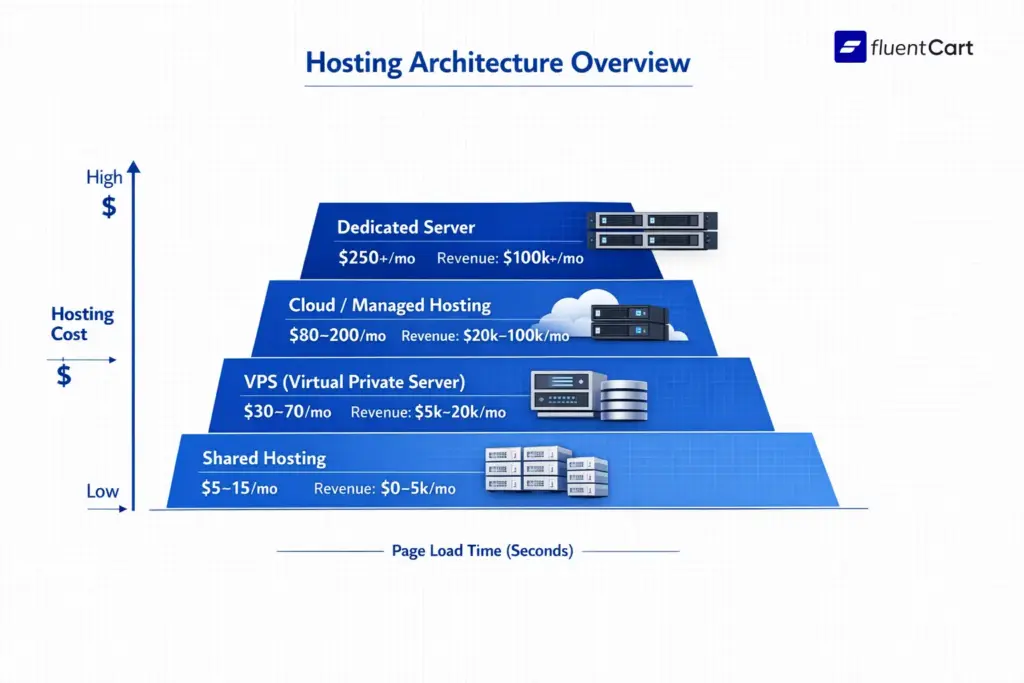
Shared hosting splits server resources with potentially hundreds of other sites. It’s cheap ($3-15/mo), but one bad neighbour on the same server can tank your performance. Acceptable for very early testing. Not for a store doing real volume.
VPS hosting gives you dedicated resources within a virtualised environment. You share a physical server with fewer tenants (typically 5-20 sites), but your CPU and RAM are guaranteed. Costs $20-100/mo depending on spec. Good middle ground for stores doing $25,000-$500,000 annually.
Cloud hosting (AWS, Google Cloud, Cloudways, Kinsta) runs your store across distributed infrastructure. The main benefit: it scales automatically during traffic spikes without manual intervention. You pay for what you use. For most growing stores, managed cloud platforms like Cloudways or Kinsta abstract the complexity while still giving you cloud-level reliability.
Dedicated hosting gives you an entire physical server. Overkill for most, necessary for high-volume operations ($1M+ annual revenue). $200-1,000+/mo.
Common Mistakes When Choosing eCommerce Hosting
A store owner launches on the cheapest shared plan they can find, spends six months building their product catalogue, runs their first real ad campaign, and the site goes down under the traffic. Migrating under pressure is expensive, technically risky, and often costs more in lost conversions than the upgrade would have.
The other common one: optimising for the introductory price rather than the renewal price. A $4/mo plan that renews at $14/mo is still a good value. A $1/mo plan that jumps to $30/mo after year one is not.
And the subtler mistake: not checking what’s actually included. Free SSL? Included. Free domain? First year only, then $15-20/yr. Automated backups? Sometimes daily, sometimes weekly, sometimes an add-on. Read the plan details before you sign.
Why Your Hosting Choice Is Actually a Revenue Decision
Most people treat hosting like a utility. Pay as little as possible, set it up once, forget it exists. That works fine until it doesn’t, and in eCommerce, it tends to stop working right when you need it most. A flash sale, a product that goes viral, a holiday traffic spike.
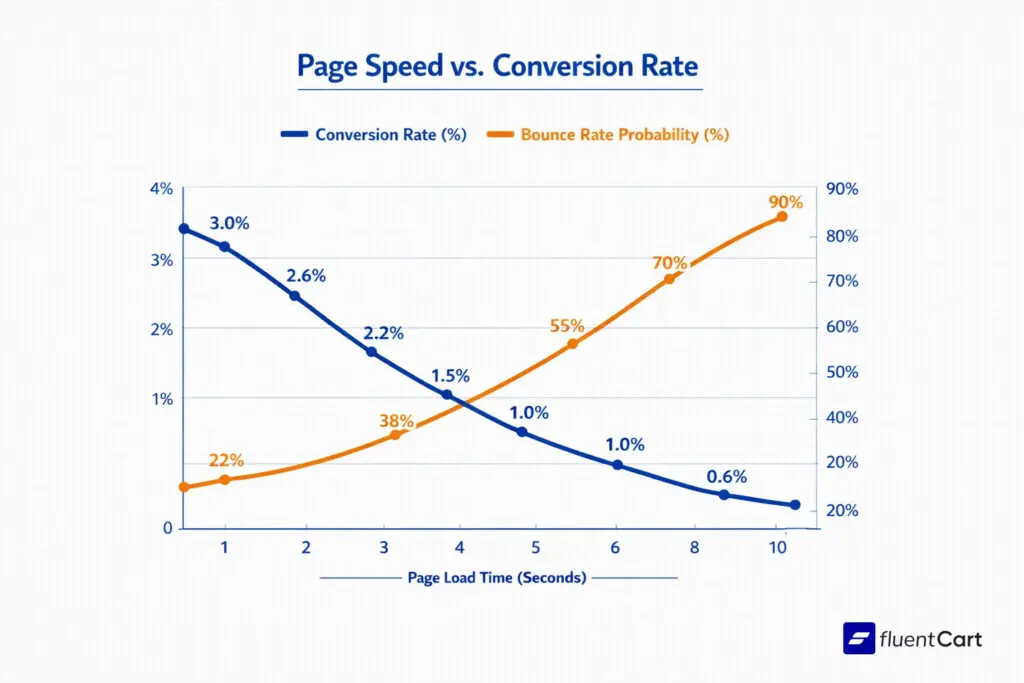
Here’s what’s actually happening when you cut corners on hosting: a one-second delay in page load can reduce conversions by up to 7%. That’s not a hypothetical. That’s compounding, every single day, against every visitor who bounces before they even see your product. 53% of mobile visitors will leave if a page takes more than 3 seconds to load, and mobile is likely where most of your traffic is coming from.
Speed is one side of it. Ownership is the other. Fully hosted SaaS platforms like Shopify give you everything bundled together, but you’re renting, not owning. If they change their terms, pricing, or payment processing rules, you adapt or you move. With a self-hosted setup on WordPress, you own the data and the infrastructure decisions. The tradeoff is you also own the maintenance.
Neither is inherently better. But you should go in knowing which game you’re playing.
eCommerce Hosting for Small Business: Where to Start
If you’re launching your first store with no existing website and no technical background, Shopify is the lowest-friction path to your first sale. Yes, it costs more month-to-month. But the time you save on setup and maintenance has real value.
If you’re already on WordPress, start with SiteGround or Hostinger for managed WordPress hosting. Both have solid onboarding, good performance baselines, and realistic long-term pricing.
If you’re thinking about sustainable costs and long-term ownership, and you’re comfortable with a slightly higher setup overhead, a self-hosted WordPress setup with quality eCommerce management infrastructure is worth it. You’ll spend more time upfront and less money forever.
If you want to understand how a well-optimised eCommerce setup affects performance beyond hosting, the eCommerce CRO audit guide covers the full picture of what drives conversions at the store level.
Common Confusions
The Bottom Line
The best eCommerce hosting in 2026 isn’t a single answer, it’s a function of where you are in your business, what platform you’re building on, and how much control you want over your infrastructure long-term. Shopify wins on ease. Hostinger wins on value. SiteGround wins on WordPress support. The premium managed hosts like Kinsta and WP Engine win on performance at scale. And xCloud wins as a server manager, giving you control over your own cloud server’s performance without the overhead of managing it yourself.
What matters most: don’t optimise for the cheapest plan today if you’re going to outgrow it in six months. The migration cost, in money, downtime, and lost rankings, almost always exceeds what you saved. Pick something from the best ecommerce hosting that we have listed with a clear upgrade path, verify the renewal pricing, and make sure your eCommerce KPIs are something you can actually track once you’re live.
Once In a Lifetime Offer

Hi, this is Abir, a Deputy Marketing Lead, passionate product designer, and WordPress core contributor. Creating interesting content and products that ensure a 360-degree customer experience is my daily job.

Subscribe now
Related Articles and Topics
-
Credit Card Payment Plugins Compared: Which Should You Choose?
Compare 10 credit card payment plugins for 2026. See the hidden 1.9% to 3% fees on free plans,…
-

Membership Affiliate Programs: The Cost-effective, Integrated Setup
Run membership affiliate programs on WordPress with one integrated stack.
-
Best Membership Website Hosting in 2026
Membership website hosting isn’t a separate kind of hosting. It’s regular managed cloud or VPS hosting that happens…




Add your first comment to this post