
Who Owns a Website? How to Find Out
Typing a domain into a search bar and expecting an instant name and address used to work. It rarely does anymore. Domain registration data has become harder to access since privacy rules tightened and the lookup protocol itself changed in 2025. Most guides on this topic still describe steps that no longer work the way they used to.
In this blog, we will look at how website ownership records actually work today, which tools still return real information, and what to do when the trail goes cold.
TL;DR
- WHOIS lookup: Most domains are now checked through RDAP, the protocol that replaced WHOIS for most extensions in 2025.
- ICANN Lookup: A free official tool that shows registrar, dates, and status for almost any domain.
- Privacy protection: Many owners hide personal details behind a proxy service, which is legal and common.
- On-site clues: Footer text, About pages, and legal policies often name the real business behind a site.
- Ownership vs registration: The person who registered a domain is not always the one running the website.
What Does Website Ownership Mean?
Website ownership means who controls a domain name and the content published under it. These are not always the same person. A domain registrant is the individual or company listed in registration records as having paid for and controlling the domain name itself. A website owner is whoever built, runs, and is legally responsible for the content on that domain.
In most cases, the two match. A business registers its own domain and runs its own site. But domains are often registered through an agency, a developer, or a privacy service, while a separate party owns and operates the actual website. This distinction matters before running any lookup, since a registration record only tells part of the story.
How to Find Out Who Owns a Website
There are three practical ways to check who is behind a domain. Each one returns a different slice of information. Combining them usually gives a fuller picture than relying on any single method.
RDAP and WHOIS Lookup
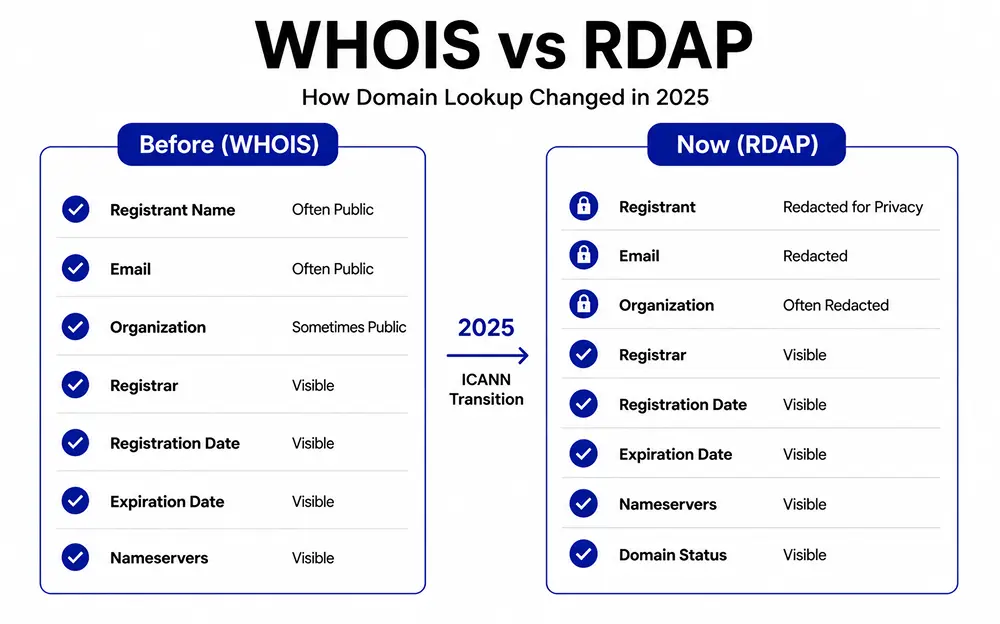
WHOIS was the standard way to pull domain registration data for decades. That changed on January 28, 2025, when ICANN retired WHOIS as the required protocol for most generic domains such as .com, .org, and .net, as confirmed in an official announcement.
Registration Data Access Protocol, or RDAP, took its place. Domains under a different top-level domain category, such as .uk, .de, and .jp, still largely run on WHOIS. Tools still labeled WHOIS lookup usually query RDAP now, and results depend on whether the registrant chose privacy protection.
ICANN Lookup
ICANN Lookup is the official free tool for checking a domain’s registration status. Enter a domain name, and it returns the registrar, creation and expiration dates, nameservers, and status codes such as whether the domain is locked or pending transfer.
It will not usually show a registrant’s name or email unless that person made their details public. For a quick way to confirm who technically registered a domain, this is the most reliable starting point since the data comes straight from registries and registrars.
Check the Website Itself
Registration records only cover the domain. The website running on it is a separate question. Checking on page is often faster and more accurate.
- Footer text: Many sites list a company name or copyright holder near the bottom of every page.
- About and contact pages: These often name the founder, team, or parent company.
- Terms and privacy policy: Legal pages usually name the registered business entity, since this is often a legal requirement.
- Checkout pages: Store receipts sometimes show the operating business name, which can differ from the site’s public branding.
Why Domain Owners Stay Hidden
Since the General Data Protection Regulation took effect in 2018, registrars have had to protect EU registrants’ personal data, and most extended similar protection to everyone by default. This is why many WHOIS and RDAP records now show a line reading redacted for privacy instead of a name.
- Proxy protection: A registrar or third-party service stands in as the public contact and forwards messages to the real owner.
- Business accounts: Some registrars only redact personal accounts and still display company details for business registrations.
- Regional differences: Redaction is more consistent for generic domains than for many country domains, so results vary by extension.
None of this is a red flag by itself. It is standard practice.
Tracing a Privately Registered Domain
When a current record is fully redacted, a historical lookup can sometimes help. Domains registered before privacy protection became common often have older records with a real name attached. A few paid tools, such as a WHOIS history search, archive past records back to the most recent entry that was not redacted.
This will not always work, since newer domains may have no public registrant on file at all. When it works, the outcome is usually a past name or email pointing toward a current owner. A direct message through the site’s contact page is often faster than digging further.
Website Owner vs Domain Registrant
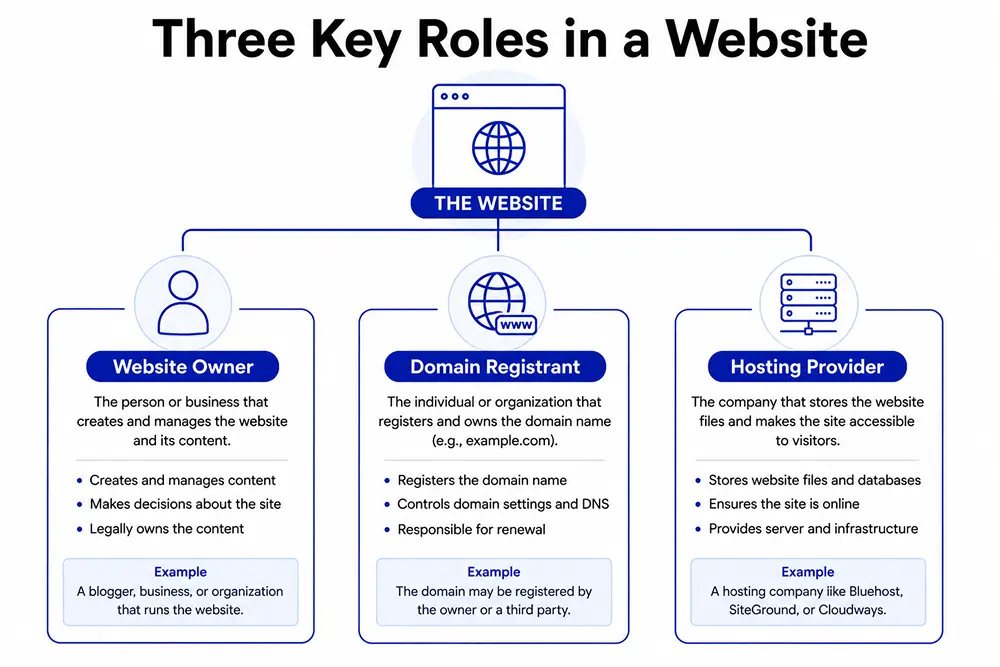
These two roles get confused constantly. A clear separation helps.
- Domain registrant: The name attached to the domain’s registration record, responsible for renewal and technical control.
- Website owner: The person or company that built the site, owns its content, and is legally responsible for what gets published.
- Hosting provider: The company storing the website’s files and serving them to visitors, unrelated to who owns the domain or the content.
A single website can involve three separate parties across these roles. An agency might hold the registration, a business might own the content, and a different company entirely might host the files. No single lookup tool shows all three at once.
Is It Legal to Look Up Domain Ownership?
Yes. Domain registration data has been publicly queryable since the WHOIS system was created in the 1980s, and RDAP continues that same public access model today. Looking up a domain through ICANN
Lookup, a registrar’s own tool, or a WHOIS-style search does not require permission and breaks no law in most countries.
What is restricted is what you do with the data. Scraping large volumes of registrant information for spam or harassment violates most registrars’ terms of service.
Depending on the jurisdiction, it may also violate data protection law. A single lookup on a single domain carries no such risk.
Wrapping Up
Finding out who owns a website rarely comes down to one search anymore. A domain lookup shows registration details. The site itself often shows the rest.
When both are hidden, a historical record or a direct message is usually the fastest path forward. Start with the simplest option before reaching for anything more advanced.
FAQs
How do I contact a website owner if the WHOIS is private?
Use the contact form or email on the website itself. Privacy-protected domains usually forward messages to the real registrant.
Is WHOIS or RDAP information always accurate?
Not always. Registrars must keep records updated, but outdated and abandoned entries are common on older domains.
Does the domain registrar own the website?
No. A registrar such as GoDaddy WHOIS only manages registration and holds no ownership stake in the site or its content.
Can a website change owners without the domain changing?
Yes. A business can be bought or sold while the domain stays registered under the same name for months, especially when paperwork lags behind the sale.

Deputy Marketing Lead, published literary author, and musician. I thrive on marketing for tech companies while composing music, collecting books of lasting depth, exploring cinema with a discerning eye, and studying the arts and history.

Subscribe now
Related Articles and Topics
-

Credit Card Payment Plugins Compared: Which Should You Choose?
Compare 10 credit card payment plugins for 2026. See the hidden 1.9% to 3% fees on free plans,…
-

Membership Affiliate Programs: The Cost-effective, Integrated Setup
Run membership affiliate programs on WordPress with one integrated stack.
-
Best Membership Website Hosting in 2026
Membership website hosting isn’t a separate kind of hosting. It’s regular managed cloud or VPS hosting that happens…




Add your first comment to this post