

Buy Now Pay Later for Small Business: BNPL vs. Installments

A shopper loves your $400 product. They add it to the cart, look at the total, and close the tab. Nothing was wrong with the product. The pricing probably scared them off. Big purchases are big decisions. Sometimes it’s not even the money! It’s the commitment to spend a big number that gives people second thoughts. The answer could just be the “buy now pay later” option.
This guide explains “buy now pay later” (BNPL) for small business owners in plain terms. You will learn how BNPL works, how it differs from the installment plans you run yourself, and which one fits your store. Then we’ll show you how to offer both on WordPress without a separate BNPL add-on.
TL;DR
What is Buy now Pay later (BNPL)?
“Buy now, pay later” is a short-term financing option offered at checkout. The customer splits the price into smaller payments, often four or more payments over 3-6 months. A third-party provider such as Klarna, Afterpay, or Affirm pays the merchant in full and collects the rest from the shopper.
For you, a BNPL sale looks a lot like a card sale. The money arrives upfront. The provider runs the approval check, handles repayment, and chases late payments. Your job is to offer the option and fulfill the order.
For the shopper, BNPL changes how the price feels. Paying $70 four times feels lighter than paying $280 once, even though the total is the same. That shift is the whole reason BNPL exists.
How BNPL Works at Checkout
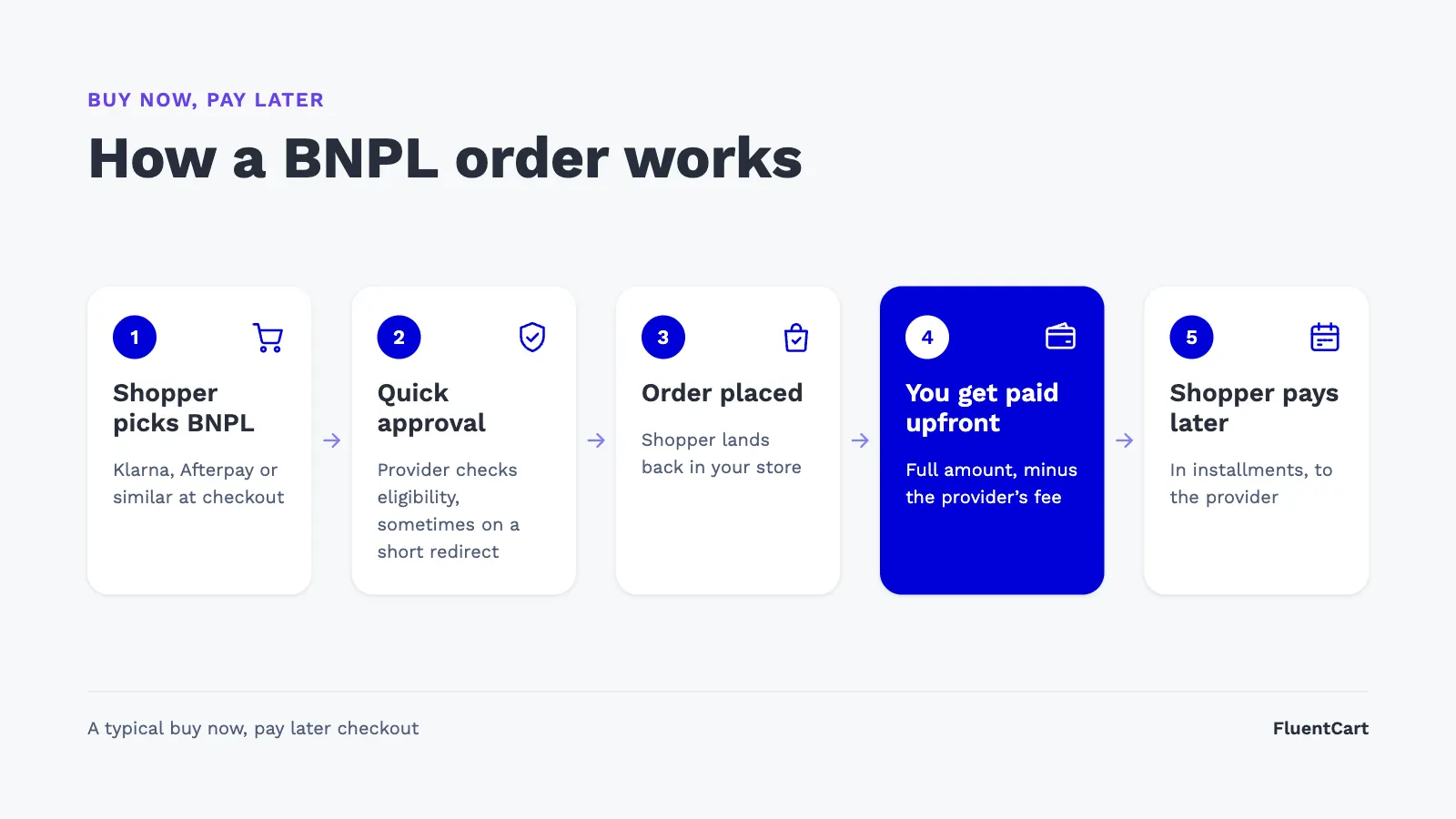
BNPL works in four quick steps: the shopper picks a BNPL method, the provider approves them in seconds, you get paid in full, and the shopper repays the provider on a schedule. Your store never manages the repayment plan or the credit decision.
Here is what the flow looks like on a typical order:
Providers set their own limits. Each one has minimum and maximum order values, and those vary by country. A low-priced item may not qualify, and a very large B2B order may not either. If a shopper is not eligible, they still see your other payment methods, so the sale is not lost.
BNPL vs. Installments: what’s the difference?
The difference between “Buy now Pay Later” and installments comes down to who runs the plan. With BNPL, a provider pays you upfront and collects from the buyer. With installments, your store bills the buyer on a schedule and you collect each payment yourself.
Both let a customer spread out the cost. The money, the risk, and the control move in different directions.
BNPL vs. Installments Comparison
| BNPL | Store installments | |
|---|---|---|
| Who pays you | The BNPL provider, upfront | The customer, one payment at a time |
| Who carries risk | The provider | Your store |
| Who approves the buyer | The provider | No credit check, you set the terms |
| Cost to you | A provider fee on each sale | Your normal gateway fees |
| Plan length | Set by the provider | Set by you |
| Eligibility | Country, currency, and order value rules | Any customer you choose to offer it to |
| Best for | One-off purchases | Courses, software, and high-ticket items |
*Table Powered by NinjaTables
A simple way to remember it: BNPL is financing you rent from a provider. Installments are a payment plan you own.
Buy Now Pay Later for Small Business: Pros and Cons
Buy now pay later for small business owners trades a higher fee for upfront cash and zero repayment risk. Installments flip that trade: lower cost and more control, but you wait for the money and handle missed payments. Neither is free of tradeoffs, so here is how they compare.
BNPL Pros
BNPL Cons
Installment pros
Installment cons
Which Option is Better for Your Small Business?
BNPL is better when you sell one-off physical products and want cash upfront. Installments are better when you sell digital products, courses, or services and want control over the plan. Many stores do best by offering both and letting the buyer choose at checkout.
Here is how that plays out for different sellers.
Store managers and solopreneurs selling furniture, electronics, or fitness gear tend to benefit most from BNPL. The order is a one-time purchase, the price causes hesitation, and you want the cash now. Add an installment plan for loyal repeat buyers who do not qualify for BNPL.
Plugin and course sellers usually get more from installments. A $600 course split into three payments of $200 keeps the full margin in your pocket. You can also tie access to payment status. Pricing plays a part here, too, so it helps to set your product price with the payment plan in mind.
Developers and agencies building stores for clients should set up both. Clients rarely know which option their buyers prefer. Giving them a store that supports both avoids a rebuild later.
Why Not Have Both on Your Store?
You can offer BNPL and installments on the same WordPress store. FluentCart handles installments natively and connects to BNPL through supported payment gateways, so shoppers pick the option that suits them. No separate BNPL plugin is required for either path.
FluentCart Built-in Installments
FluentCart Pro includes installment plans. You set a product price as an installment plan with a minimum of two payments. The customer pays the first installment at checkout, and the store bills the rest on your schedule.
Customers can also pay off installments early. That helps buyers who want to finish sooner, and it gets you paid faster. Installments sit inside FluentCart’s subscription engine for WordPress sellers, so you get the same reporting, emails, and customer dashboard.
Store-managed Subscriptions
FluentCart supports store-managed billing, a free feature. Instead of the gateway charging each renewal, your store creates a renewal order and emails the customer a payment link before the due date.
The lead time matches the billing interval. Weekly renewals go out three days early, monthly ones a week early, and quarterly through yearly ones fifteen days early. The customer can pay with any gateway on your checkout, including cash on delivery or bank transfer.
This matters for installment sellers in regions where gateways lack recurring billing. Reminder emails, failed-payment retries, and past-due notices come built in. Pro adds automatic charging of saved Stripe and PayPal payment methods.
BNPL through Stripe and Mollie
For BNPL, FluentCart works through the gateways you already use. The free Stripe integration supports Klarna, Affirm, Afterpay/Clearpay, and Zip through Stripe’s automatic payment methods. Mollie, available in Pro, supports Klarna, Billie, in3, and Riverty.
FluentCart does not lend money or run the buyer’s repayment plan. The BNPL provider does that. FluentCart also charges no transaction fee on top of your gateway, on Free or Pro.
How to set up BNPL on WordPress
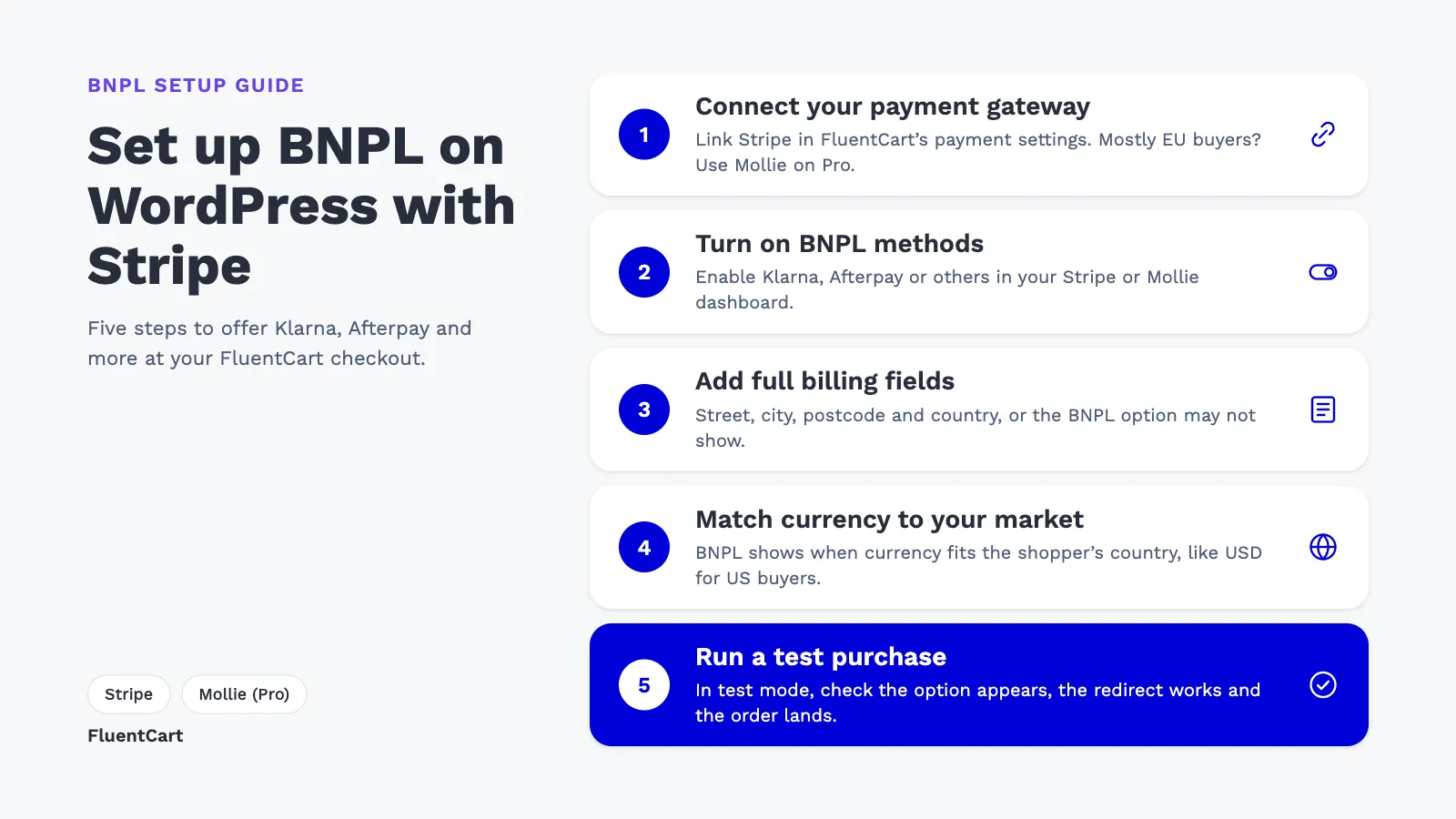
To set up BNPL on WordPress with FluentCart, connect Stripe or Mollie, turn on the BNPL methods in that gateway’s dashboard, add the checkout fields the provider needs, and run a test order. You do not need a separate add-on or custom code.
Step 1: Connect your payment gateway
In your WordPress dashboard, open FluentCart’s payment settings and connect Stripe. Use Mollie instead if your customers are mostly in Europe and you are on Pro. If you are unsure which gateway fits your market, read our guide on choosing a payment gateway for your store.
Step 2: Turn on BNPL methods in the gateway dashboard
Log in to your Stripe or Mollie dashboard and enable the BNPL methods you want, such as Klarna or Afterpay. Stripe lists which BNPL methods are available in each country. FluentCart’s Stripe settings documentation walks through the connection side.
Step 3: Add the checkout fields providers need
BNPL providers need full billing details to approve a buyer. Mollie’s BNPL methods require street address, city, postcode, and country. Make sure those fields are on your checkout form, or the option may not show.
Step 4: Match currency to your market
Most BNPL methods only appear when the checkout currency matches the shopper’s country. A US shopper needs to see USD, for example. Set your store currency with your main market in mind.
Step 5: Run a test purchase
Place a test order for an eligible amount, in an eligible country, using test mode. Confirm the BNPL option appears, the redirect works, and the order lands in FluentCart. Remember that turning a method on does not guarantee it appears on every checkout.
Tips to get more from BNPL
Frequently asked questions
Do I get paid the full amount with BNPL?
Yes. The BNPL provider pays you the full order amount, minus its fee. The provider then collects the payments from the customer.
Can I use BNPL for subscription products?
Treat BNPL as a one-time purchase option. Do not assume it supports recurring products. For recurring revenue or split payments on digital goods, use installment plans or subscriptions instead.
Is BNPL worth it for a small business?
It is usually worth testing if your products cost enough to cause hesitation and your buyers live in countries the provider covers. If most of your traffic sits outside those markets, installments may serve you better.
Do I need a separate plugin for BNPL on WordPress?
Not with FluentCart. BNPL runs through supported gateways like Stripe and Mollie, so you turn it on in the gateway rather than installing an extra plugin.
Give Buyers a Reason to Say Yes Today
You now know how BNPL and installments differ, who carries the risk in each, and how to offer both on one store. The best choice depends on what you sell and where your buyers live. Many small businesses end up running both.
Start with one high-priced product. Turn on BNPL through Stripe, add an installment plan in FluentCart Pro, and watch which option your buyers pick. When you’re ready, compare FluentCart plans and choose the one that fits your store.

Rasel leads the marketing function at FluentCart, driving both high-level strategy and ground-level execution across the product’s growth engine. He plays a central role in defining how FluentCart is positioned, how it enters the market, and how it evolves based on user behavior and feedback. His responsibilities span go-to-market planning, funnel architecture, conversion strategy, and narrative development. He works across teams to ensure that product decisions, marketing efforts, and customer experience stay tightly aligned.

Subscribe now
Related Articles and Topics
-
7 Lemon Squeezy Alternative: Solid Picks Before the March 2027 Shutdown
Lemon Squeezy shuts down on March 31, 2027. Compare 7 alternatives by how you sell, and pick yours…
-
Custom Checkout Page: How to Build One That Converts
Build a custom checkout page that cuts drop-offs: icluding chekcout types, checkout steps, best practices and best platforms…
-
What Is a Digital Download? (Plus How to Sell Your Own)
A digital download is a file you buy online and keep on your device, like an ebook or…




Add your first comment to this post