
Composable Commerce Explained: A Practical Guide for WordPress Stores

Online stores keep hitting the same wall. A business adds a new payment method, wants a faster checkout, or needs a different CRM, and the whole platform has to catch up before anything ships.
That frustration is the real reason composable commerce has become such a common term in ecommerce circles lately.
In this blog, we will break down what composable commerce actually means, how it compares to headless commerce, what it takes to adopt it, and how WordPress store owners can apply the same modular thinking without enterprise-level cost or complexity.
TL;DR
- Composable commerce means building a store from separate, swappable tools connected through APIs instead of one bundled platform.
- It differs from headless commerce because headless only separates the front end from the back end, while composable breaks every function into its own piece.
- Enterprise composable setups use packaged business capabilities from multiple vendors, stitched together by a dedicated engineering team.
- WordPress already runs on similar modular logic through its plugin ecosystem.
- FluentCart, FluentCRM, Fluent Support, and other Fluent tools let store owners build a modular commerce stack without hiring a dedicated engineering team.
- Composable is not a fit for every business, and checking the requirements first prevents an expensive rebuild later.
What Is Composable Commerce?
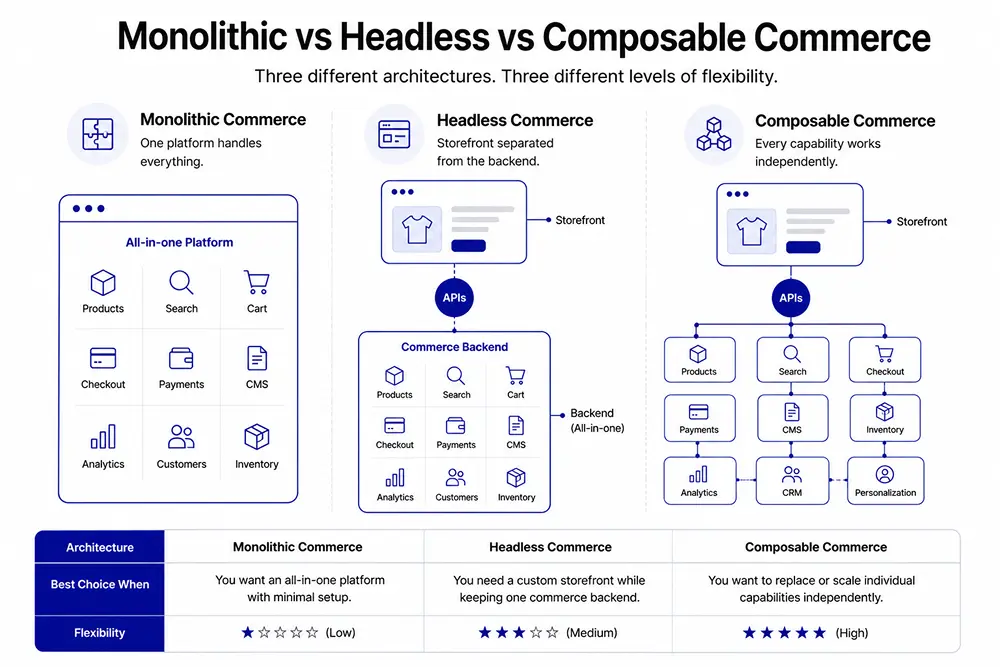
Composable commerce is an approach to building an online store where a business picks separate tools for each job. For example, checkout, search, or content, and connects them through APIs instead of buying one all-in-one platform.
Each piece works on its own and can be replaced without breaking the rest of the store.
This is different from a monolithic setup, where product pages, cart, and payment processing all live inside a single closed system. Composable ecommerce gives a business the freedom to upgrade one part, say the checkout, while keeping everything else exactly as it is.
What Is a Composable Commerce Platform?
A composable commerce platform is a system built entirely from independent components, often called packaged business capabilities, that a business can mix, match, and scale on its own terms. Instead of one vendor owning checkout, search, and content together, each capability comes from whichever provider does that job best.
This setup works well for large retailers with dedicated engineering teams, since stitching together many services still takes real development work. Smaller and mid-sized businesses rarely need this level of complexity.
A simpler path exists: use a platform, like WordPress, that is already modular by design, then add and swap tools as the business grows.
Composable Commerce vs Traditional Commerce
| Traditional Commerce (Monolithic) | Composable Commerce |
|---|---|
| Catalog, cart, checkout, and reporting are bundled into one application from a single vendor. | Independent commerce components are connected through APIs, allowing businesses to choose and combine the tools they need. |
| Simple and quick to launch. | Requires more planning and setup initially. |
| Updating one feature often affects the entire system. | Individual components can be updated or replaced without impacting the whole stack. |
| Changes are slower and carry a higher risk of downtime. | Faster iterations with lower risk when making changes. |
| Less flexible as business needs evolve. | Highly flexible and adaptable to changing business requirements. |
| Easier to get started but can become difficult to maintain over time. | Takes longer to configure initially but offers easier long-term maintenance and scalability. |
Composable Commerce vs Headless Commerce
| Headless Commerce | Composable Commerce |
|---|---|
| Separates the storefront (front end) from the commerce engine (back end). | Breaks the entire commerce ecosystem into independent, replaceable services. |
| Front end and back end communicate through APIs. | Every capability, such as search, checkout, payments, personalization, and inventory, connects through APIs. |
| Allows businesses to redesign the storefront without changing back-end commerce logic. | Allows businesses to replace or upgrade any individual service without affecting the rest of the stack. |
| Focuses primarily on decoupling the presentation layer. | Extends modularity across every layer of the ecommerce stack. |
| Offers greater flexibility than traditional monolithic commerce. | Provides maximum flexibility, scalability, and vendor independence across the entire commerce architecture. |
| Often serves as the first step toward a more flexible architecture. | Builds on the headless approach by making every commerce function modular and composable. |
Composable Commerce Architecture
A composable commerce architecture, also called a composable commerce technology stack, rests on three building blocks working together.
- Microservices: Microservices are small, focused programs that each handle one job, like calculating tax or validating a coupon.
- APIs: APIs are the rules that let those microservices, and the tools built around them, talk to each other and share data.
- Packaged business capabilities: Packaged business capabilities bundle several microservices into a ready-to-use feature, such as a full checkout flow, so a team does not have to build one from scratch.
These three building blocks work together to keep every capability independent. Microservices perform individual tasks, APIs let those services exchange information, and packaged business capabilities group related services into complete features like checkout or search.
Together, they create a commerce stack where one capability can evolve without forcing changes across the entire platform.
Why Businesses Choose Composable Commerce
Composable commerce has moved from a buzzword to a real budget line for a reason. Businesses that invest in composable architecture are projected to earn up to 30 percent higher revenue than traditional-minded competitors, according to Gartner-cited research on composable adoption.
The reasons line up with what teams actually experience day to day.
- Flexibility: Flexibility means swapping one weak tool for a better one without a full replatform.
- Faster iteration: Faster iteration happens because teams can test a new checkout flow or search tool in isolation.
- Lower long-term lock-in: Lower lock-in comes from owning the pieces instead of renting one closed suite.
- Better personalization: Better personalization is possible when best-in-class tools handle search, content, and recommendations separately.
Composable Commerce Requirements
Composable is not the right starting point for every business. A few signals suggest it is worth exploring.
- Frequent change: Frequent change means the business regularly adds new sales channels, regions, or promotions.
- Technical capacity: Technical capacity means a developer or agency is available to manage integrations.
- Clear pain points: Clear pain points mean specific parts of the current platform, like checkout or reporting, are already causing friction.
- Growth pressure: Growth pressure means the business is scaling fast enough that a rigid platform is starting to show cracks.
If none of these apply yet, a simpler modular setup, like WordPress with a dedicated ecommerce plugin, usually delivers most of the same benefits without the added complexity.
When You Don’t Need Composable Commerce
Composable is a genuine advantage for a business hitting real friction, but plenty of stores work better staying simple. A single-product store selling one course or one digital download rarely gains anything from wiring together five separate tools.
The same applies to a business still validating an idea, where the priority is shipping a working store fast rather than building an architecture meant for scale that may never arrive.
Watch for a specific trap: adding tools because they exist, not because a real problem needs solving. Every additional plugin is one more thing to update, one more integration that can break, and one more login to manage.
If checkout works, if support tickets are manageable, and if the current setup is not slowing the business down, there is rarely a reason to add complexity for its own sake.
A useful rule covers most cases. Introduce one new modular piece at a time, and only when an existing tool is causing a specific, named problem, like a checkout that keeps losing customers or a CRM that cannot handle current order volume.
A business that keeps its stack lean until growth actually demands more spends less time maintaining plugins and more time serving customers.
Composable Commerce for B2B
B2B sellers often deal with more moving parts than B2C stores: custom pricing, bulk ordering, account-based catalogs, and multiple approval steps before a purchase completes. A composable setup lets a B2B business connect its ordering system, its CRM, and its quoting tool separately, then adjust each one as contracts or pricing rules change.
This matters because B2B buying cycles shift often, and a bundled platform rarely keeps pace with custom workflows. A modular structure means a pricing change does not require touching the checkout code, so the sales team keeps moving without waiting on a development sprint.
A wholesale distributor is a good example. One customer segment might need net-30 invoicing, another needs instant card payment, and a third orders on a recurring schedule.
Handling all three inside one rigid checkout usually means custom development every time a new segment appears. A modular setup lets each payment behavior live as its own configurable piece, added when the business needs it rather than built in advance on guesswork.
While composable commerce benefits many types of businesses, it becomes especially valuable in B2B environments where workflows are often more complex.
Composable Commerce Solution: Enterprise vs WordPress
| Enterprise Composable Commerce | WordPress Modular Commerce |
|---|---|
| Designed for large retailers and enterprises with complex commerce operations. | Designed for small and mid-sized businesses looking for flexibility without enterprise complexity. |
| Often combines dozens of specialized vendors and services. | Uses WordPress core with modular plugins that can be added, replaced, or removed as needed. |
| Requires a dedicated engineering team to build and maintain integrations. | Can typically be managed without a full-time engineering team. |
| High implementation and maintenance costs. | More affordable while still offering a modular architecture. |
| Best suited for businesses processing millions of orders annually. | Well suited for growing online stores that need flexibility without enterprise-scale investment. |
| Offers maximum customization and scalability at enterprise scale. | Delivers many composable principles through the WordPress ecosystem with significantly lower complexity. |
How WordPress Applies Composable Principles
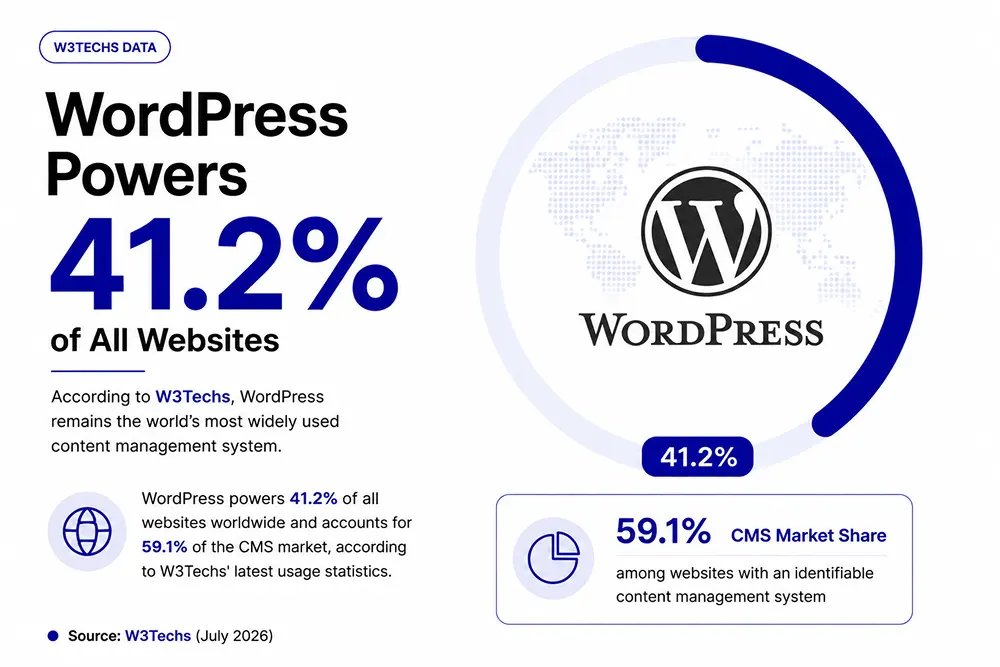
WordPress already runs on modular logic, even outside ecommerce. Around 42 percent of all websites use WordPress, according to W3Techs data, largely because its plugin architecture lets site owners add exactly the functionality they need and nothing more.
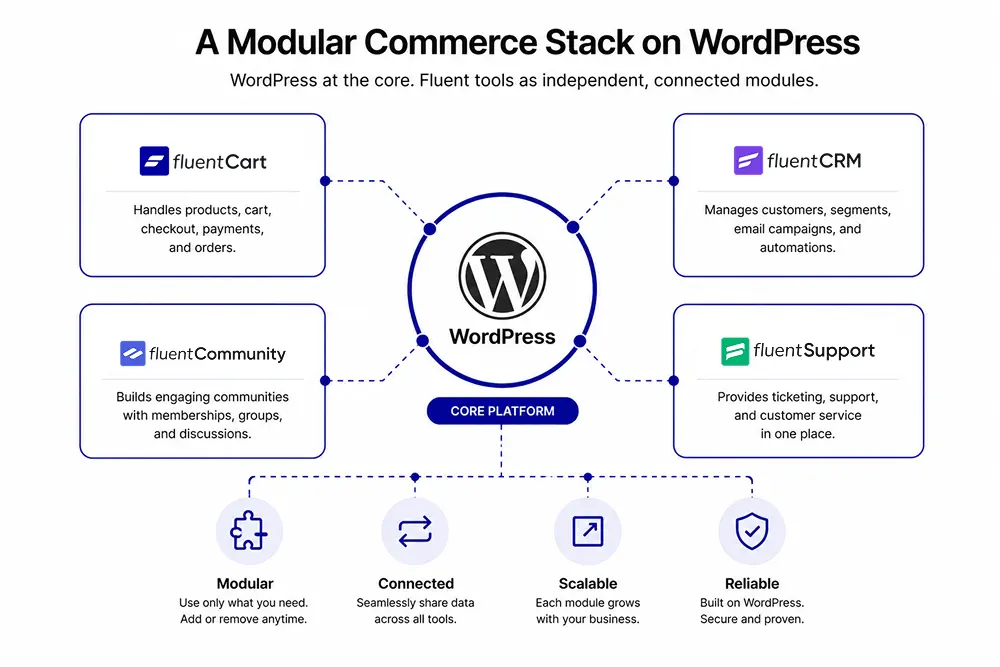
A store owner does not install one giant suite. They choose a CMS core, an ecommerce engine, a CRM, a support tool, and a page builder, each as a separate plugin that can be updated or replaced on its own schedule.
In other words, many WordPress stores already follow composable principles without calling them “composable commerce.”
Where FluentCart Fits in a Composable WordPress Stack
1. A Modular Commerce Engine, Not a Closed Suite
FluentCart is not a composable commerce platform in the enterprise sense. It does not compete with the multi-vendor stacks that large retailers build with dozens of connected services.
What FluentCart does instead is give WordPress store owners a commerce engine that fits naturally into a modular stack. Products, checkout, subscriptions, and licensing all live inside FluentCart.
Everything else, email marketing, support, community, or booking, can plug in through a dedicated Fluent tool, or stay separate if the store owner prefers a different vendor entirely.
2. Built for Open Access, Not Lock-In
FluentCart ships with a REST API covering more than 130 endpoints, plus a separate set of event webhooks, so a development team can pull product data, push order updates, or trigger automations without waiting on a plugin update.
That same API layer supports a full headless setup, where the storefront runs on React, Vue, or any framework a team prefers, while FluentCart manages checkout, licensing, and customer data in the background.
Building a Modular Stack With FluentCart
Rather than relying on one all-in-one platform, a modular FluentCart stack lets each tool focus on a specific responsibility while working together throughout the customer journey.
| Customer Action | What Happens Behind the Scenes |
| Customer purchases a course | FluentCart processes the checkout, creates the order, and stores the customer record. |
| Purchase is completed | FluentCRM tags the customer and triggers onboarding emails or marketing automations based on the purchase. |
| Membership is activated | FluentCommunity grants access to the private community for paid members. |
| Customer books a coaching session | FluentBooking schedules appointments using the existing customer data, eliminating the need for a separate database. |
| Customer needs support | Fluent Support connects support tickets to the customer’s purchase history, giving agents the context they need to resolve issues faster. |
The full integration list shows how the pieces connect.
In this example, every tool has one clear responsibility, but none operates in isolation. They share customer data through the same WordPress ecosystem. This allows each component to evolve independently. That is what composable commerce looks like in practice.
A Modular Course Business (Practical Example)
Picture a coaching business selling video courses, live coaching calls, and a paid community, all from one WordPress site. FluentCart handles the storefront, checkout, and subscription billing for course access.
LearnDash or LifterLMS structures the actual course content and tracks student progress. FluentBooking manages calendar bookings for one-on-one coaching calls, synced with the same customer record FluentCart already created at checkout.
FluentCommunity gives paying members a private space to ask questions and stay engaged between sessions. None of these tools were built as one product.
Each one plugs into the same WordPress core and the same customer data. That is composable commerce at a scale built for a solo creator instead of a retail chain.
A setup like this brings real, practical benefits.
- Full ownership: Full ownership means the business owns its data, its store, and its content instead of renting all three from one closed vendor.
- Lower cost: Lower cost comes from paying for each plugin once or through a simple license, instead of stacking multiple SaaS subscriptions.
- No forced migration: No forced migration is likely because swapping one plugin rarely requires touching the rest of the store.
- Developer freedom: Developer freedom means any WordPress developer, not a specialized vendor team, can extend the store.
These benefits explain why so many small and mid-sized brands are choosing modular WordPress setups over enterprise composable contracts they do not actually need yet.
Challenges to Consider
Composable commerce, even on WordPress, is not free of tradeoffs. Managing several plugins means keeping each one updated and compatible with the others.
A store relying on many third-party tools needs someone watching for conflicts after every update. Enterprise composable setups face a bigger version of the same problem, often needing a dedicated integration team just to keep services talking to each other.
The upside still tends to outweigh the maintenance cost for businesses that value flexibility over convenience, but it is worth planning for that ongoing work rather than assuming a modular stack runs itself.
A simple habit helps here: review the active plugin list every few months, retire anything no longer earning its place, and confirm the remaining tools still talk to each other cleanly after each major update.
Wrapping Up
Composable commerce is not a trend that only applies to enterprise retailers with unlimited engineering budgets. The same modular thinking, separate tools connected through open APIs, already exists inside the WordPress ecosystem.
A store built on FluentCart and the Fluent suite gets much of that flexibility without a dedicated development team or a six-figure platform contract. For teams that want to go deeper into the technical side, the FluentCart developer resources walk through the API and hooks available for building a truly custom store.
For most growing businesses, the real win is simple: improve one part of the stack at a time, without needing to rebuild everything else. Composable commerce isn’t about using more tools, rather to choose the right tools and making sure each one can evolve as your business grows.
FAQs
Why is it called composable commerce?
The term borrows from software design, where “composable” describes small, independent parts that combine into a larger system. Gartner popularized the phrase for ecommerce to describe a store built from separate, interchangeable capabilities instead of one fixed platform.
It sits opposite “monolithic,” the term used for a single, all-in-one platform built by one vendor. The name reflects the process itself: a business composes its store from individual parts rather than adopting one predefined structure.
What does composable mean in business?
In a business context, composable means built from independent, interchangeable parts that can be swapped without redesigning the whole system. It applies beyond ecommerce, including software architecture and internal operations.
Do I need a developer to build a composable WordPress store?
Basic modular setups, like connecting FluentCart with FluentCRM, work without coding. Deeper customization, such as a headless storefront or custom API workflows, benefits from developer support.
Is composable commerce only for large enterprises?
No. Enterprise composable setups are more complex because of scale, but the same modular principle works for small stores through platforms like WordPress, just with far fewer moving parts to manage.
Is composable commerce the same as using plugins?
No. Plugins are one way to build a modular WordPress store, but composable commerce is an architectural approach. It depends on independent services, clean APIs, and the ability to replace one capability without disrupting the rest of the system.
How long does it take to move to a composable setup?
On WordPress, connecting a few modular tools can happen in a single afternoon. A full enterprise composable migration, by contrast, often takes several months of planning, data migration, and integration testing.

Deputy Marketing Lead, published literary author, and musician. I thrive on marketing for tech companies while composing music, collecting books of lasting depth, exploring cinema with a discerning eye, and studying the arts and history.

Subscribe now
Related Articles and Topics
-
Teachable vs Kajabi vs MemberPress: Which One Fits You Best in 2026?
Teachable vs Kajabi vs MemberPress compared on pricing, fees, and features to help you choose the right platform…
-

eCommerce Platform Migration: Guided Migration w/ Checklist
Ecommerce platform migration checklist: move WooCommerce to FluentCart Free.
-

How to Build an Online Community With FluentCart
Learn how to build an online community with FluentCart and FluentCommunity, from planning access levels to testing the…




Leave a Reply