
SKU: Definition, Examples, and How to Use It for Your Store

Running a store without a proper SKU system is a bit like managing a library with no catalog. You know the products are there. Finding the right variant under pressure, without selling the wrong one or running out of the right one, is where things fall apart.
SKU meaning is simple on the surface. A stock keeping unit is the code you assign to track each product in your inventory. But the way you build that system, what you put in the code, how you structure it, and how consistently you apply it. That determines whether your store runs cleanly or constantly firefights inventory problems.
In this blog, we will cover what a SKU is and what it stands for, how it differs from a UPC and barcode, how to create SKU codes step by step, real SKU examples by business type, common mistakes to avoid, and how FluentCart handles SKU management directly inside your product editor.
TL;DR
- SKU stands for Stock Keeping Unit. A unique alphanumeric code you assign internally to each product or variant
- Every size, color, or style needs its own separate SKU
- SKUs are internal; UPCs are universal and manufacturer-assigned; barcodes are the visual format for scanning either one
- A well-built SKU system prevents stockouts, reduces fulfillment errors, and gives you real visibility into what is selling
- FluentCart supports SKU fields on all products and variants, with an auto-generate option built into the product editor
What Is a SKU? Definition and Full Form
A SKU, pronounced “skew,” stands for Stock Keeping Unit. It is a unique alphanumeric code that a business creates internally to identify, track, and manage each product or product variant in its inventory. No external authority assigns your SKUs. You build them to reflect your own product logic.
Every distinct version of a product needs its own SKU. A navy blue t-shirt in size medium is a different stock keeping unit from the same shirt in large, or in white. That separation is the entire point. Without it, your inventory system cannot tell two similar items apart, which leads to picking errors, overselling, and inaccurate stock counts.
SKUs typically run between 8 and 12 characters, combining letters and numbers to represent key product attributes like category, color, size, and brand. The format is flexible. The consistency is not.
SKU vs UPC vs EAN vs Barcode: What Is the Actual Difference?
These three terms appear together on product labels, and that proximity creates real confusion. They are not the same thing and they do not do the same job.
SKU
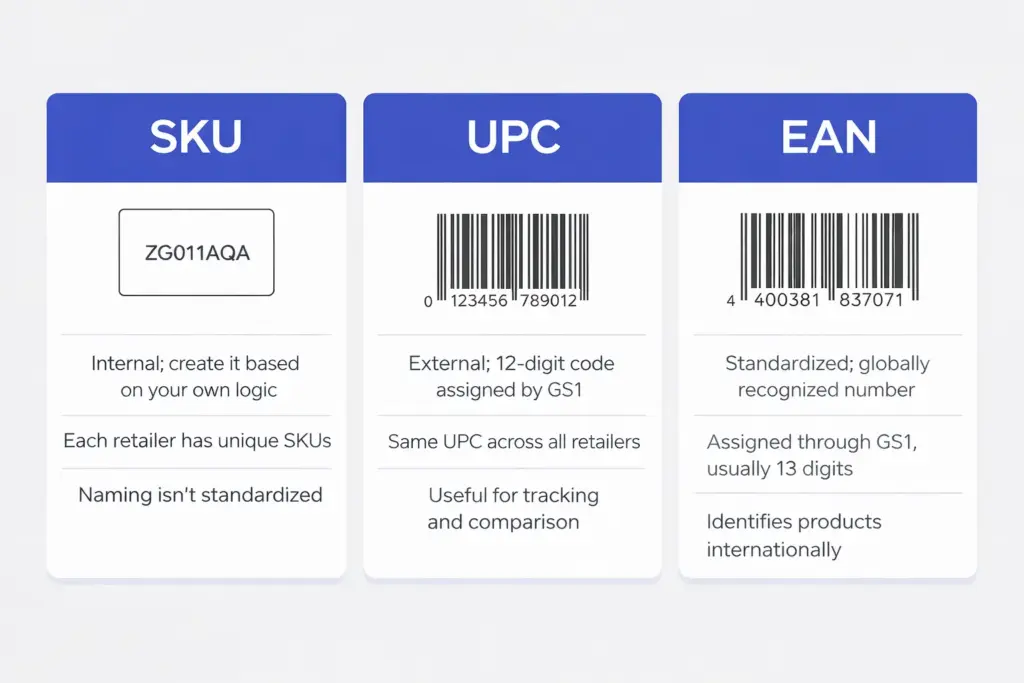
SKU (Stock Keeping Unit) is internal. You create it based on your own naming logic. Two retailers selling the same running shoe will have entirely different SKUs for it. Customers never see your SKUs, and no external authority controls them.
UPC
UPC (Universal Product Code) is external and standardized. It is a 12-digit numeric code assigned by the manufacturer through GS1. The same product carries the same UPC at every retailer on earth. This makes UPCs useful for supply chain tracking and cross-retailer price comparisons. SKUs cannot do that job. They are not designed to.
EAN
EAN (European Article Number) is a standardized product code. An EAN identifies a product using a globally recognized number. Unlike SKUs, which retailers create internally, an EAN is assigned through GS1 and remains consistent across stores and marketplaces. The most common format is EAN-13, a 13-digit numeric code used widely in international retail.
Like a UPC, an EAN is typically encoded into a barcode so scanners can read it instantly at checkout or in warehouses. The EAN is the number that identifies the product. The barcode is the visual pattern that allows machines to scan that number quickly and accurately.
Barcode
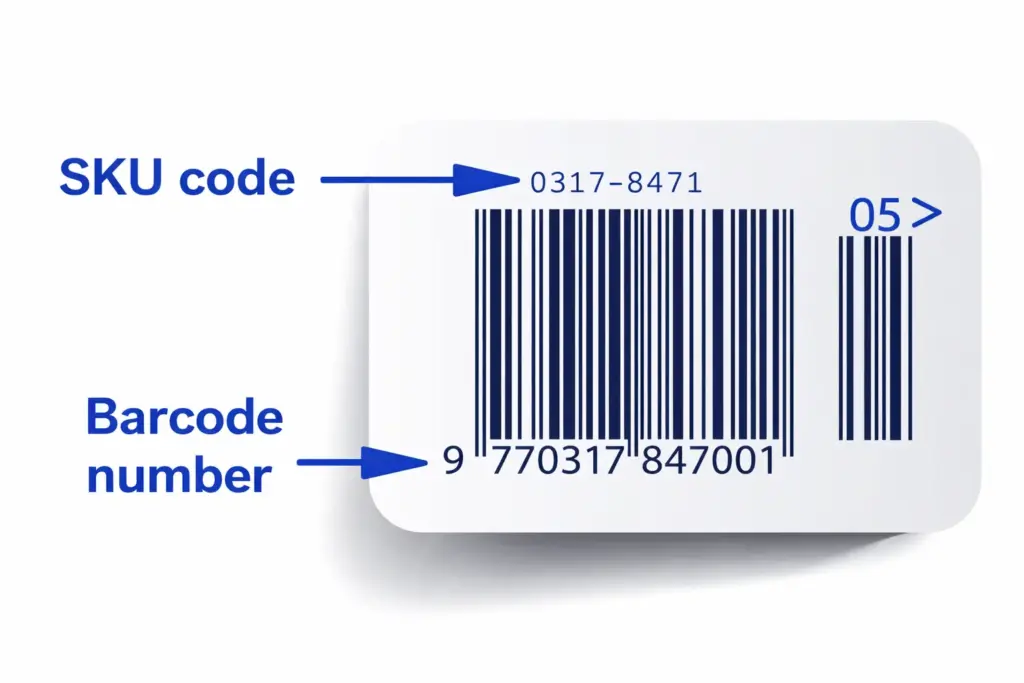
Barcode is a visual format. A barcode encodes data, whether that is your SKU, a UPC, or something else, into a scannable image. The barcode is the container. The SKU or UPC is the content inside it. You can generate a barcode from your SKU for warehouse scanning without that making your SKU a UPC.
Note: One thing many store owners ask on forums is whether SKU is the same as a model number. It is not. A model number is assigned by the manufacturer and stays the same regardless of which retailer sells the product. A SKU is assigned by you for your internal tracking. The two can overlap, but treating them as identical creates data problems.
Why SKU Meaning Goes Beyond Just a Code
Poor inventory management is an expensive problem at any scale. According to research by IHL Group, “global inventory distortion, the combined cost of out-of-stocks and overstocks, amounts to $1.73 trillion annually, equivalent to 6.5% of global retail sales” (IHL Group, 2025).
President of IHL Group, put it bluntly:
“We’re witnessing a fundamental transformation in how successful retailers manage inventory. The data shows a clear bifurcation emerging: retailers deploying AI and machine learning are achieving sales growth 2.3 times higher and profit growth 2.5 times higher than competitors. It’s becoming an existential issue — evolve or get left behind.”
— Greg Buzek, President, IHL Group
A well-structured SKU system is the foundation that makes that kind of visibility possible. Here is what it does in practice.
- It prevents overselling: When each variant has its own SKU, your system knows exactly how many units of each version remain. Without that distinction, you are selling from guesswork.
- It speeds up fulfillment: Staff can locate and pick products faster when every item carries a short, human-readable code. Fewer picking errors means fewer returns and fewer customer complaints.
- It reveals what is actually selling: SKU-level data shows which specific variants move and which ones sit. That information shapes smarter buying decisions, better markdown timing, and accurate reorder points. Understanding eCommerce fulfillment at the SKU level is what separates reactive stores from proactive ones.
- It supports multichannel consistency: Whether you sell through your FluentCart store, a marketplace, or in person, consistent SKUs keep inventory counts aligned across every channel.
How to Create SKU Codes: A 5-Step Framework
Creating a good SKU system takes 20 minutes of planning and saves hundreds of hours of inventory firefighting later. Follow this process and your system will scale cleanly.
1. Choose Your Key Attributes
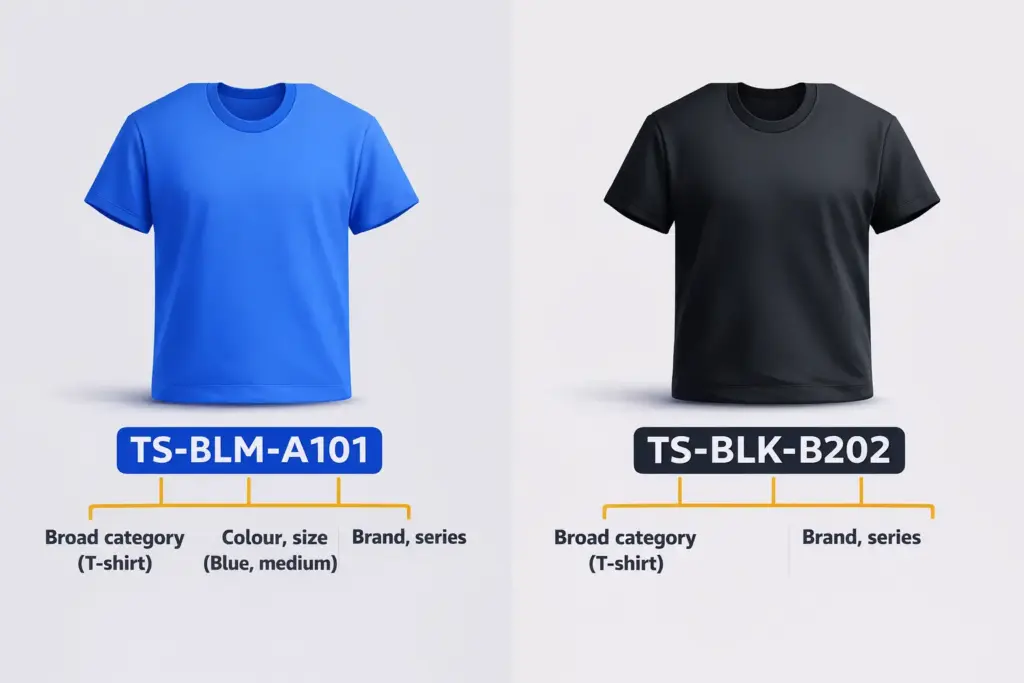
Decide which product details your SKUs need to communicate. For most product-based businesses, that means category, style or brand, color, and size. Three to five attributes is the practical ceiling. Beyond that, SKUs become too long to read quickly, which defeats the purpose.
2. Build a Standard Abbreviation List
Assign 2 to 3 letter codes to each attribute value and document them somewhere your entire team can access. BLK for black, WHT for white, LRG for large, SM for small. The specific abbreviations matter less than applying them uniformly. Using BLU in one SKU and BL in another creates the kind of inconsistency that multiplies into real problems across a large catalog.
3. Choose a Structure and Lock It In
A common format is, [Category]-[Style]-[Color]-[Size].
For example, TSH-CRW-BLK-L for a large black crew-neck t-shirt. The order of attributes is your call. The rule is to apply the same order to every product in your catalog without exception, from day one.
4. Always Start with a Letter, Never a Zero
Many spreadsheet applications drop leading zeros from numeric strings, which silently corrupts your SKU data. Starting each SKU with a letter avoids that problem entirely. It also helps staff visually identify product categories at a glance before even scanning.
5. Test Before You Roll Out
Create SKUs for a small sample of products, run them through your system, and have team members use them in real picking and packing workflows. Fix anything awkward or unclear before applying the format to your full catalog.
SKU Examples by Business Type
The right SKU format depends on which attributes matter most for your type of product. Here are practical examples across common categories.
| Business Type | SKU Format | Example SKU | What It Means |
| Fashion retail | Category-Brand-Color-Size | TSH-NKE-NVY-M | Nike t-shirt, navy, medium |
| Electronics | Type-Brand-Model-Storage | LAPT-HP-15-256 | HP 15″ laptop, 256GB |
| Home goods | Room-Category-Material-Size | LVG-CUSH-LNN-LRG | Living room linen cushion, large |
| Food products | Category-Brand-Flavor-Weight | SNK-LAY-BBQ-200 | Lay’s BBQ chips, 200g |
| Marketplace sellers | Channel-Category-Brand-Variant | AZ-EL-AP-I15-BLK | Amazon, Electronics, Apple, iPhone 15, Black |
For a direct-to-consumer brand that only sells its own products, you can drop the brand segment entirely. For a multi-location business, many store owners add a location prefix like NYC or SG to the front of the SKU to immediately identify where stock is held.
Common SKU Mistakes to Avoid
Even stores with good intentions end up with messy SKU systems. These are the mistakes that cause the most damage.
- Reusing discontinued SKUs: When a product is retired, its SKU must stay inactive permanently. Reusing it corrupts historical sales data and can trigger mistaken reorders. The cost of keeping old SKUs dormant is zero. The cost of reusing them compounds over time.
- Building SKUs that are too complex: Encoding every possible product detail into one code looks thorough but slows down daily operations. Warehouse staff make more errors with long codes. Limit attributes to what your team actually needs for picking, shipping, and reporting.
- Using ambiguous characters: The letter O and the number 0 are nearly identical in many fonts. The same applies to I and 1. Avoid both pairs to prevent scanning errors and manual entry mistakes.
- Starting SKUs with a zero or number: Spreadsheet programs silently drop leading zeros, which corrupts your data without any warning. Always begin each SKU with a letter.
- Not documenting your system: If a team member builds SKUs from memory or their own interpretation, your catalog becomes inconsistent within weeks. Write down your format, your abbreviation rules, and your structure, and enforce them.
- Skipping scalability planning: A structure built for 50 products often breaks at 500. Design your SKU framework to accommodate new categories, new suppliers, and new variants without a full overhaul later.
SKU Meaning in Sales, Retail, and eCommerce: Does It Change?
A question that comes up often especially from people searching for “sku meaning in sales” or “sku meaning in retail”, is whether the term means something different depending on the industry. It does not. The definition of a stock-keeping unit is the same across retail, eCommerce, wholesale, and manufacturing.
What changes is how you structure the SKU. A retailer selling physical goods across multiple locations might include a location code. A manufacturer might include a batch or production code. A marketplace seller might prefix their channel. But in every case, the purpose is the same: unique internal identification and tracking of each product unit.
For understanding what inventory actually means in your business and how stock flows through your system, SKUs are the identifier that makes every other process possible.
Managing SKUs in FluentCart
FluentCart includes SKU fields directly inside the product editor, so your codes stay connected to your actual inventory rather than living in a separate data table.
When you add a physical product in FluentCart, the SKU field appears in the pricing section. You can type your own code or click “Generate SKU” to have FluentCart create a unique identifier automatically. For products with variations: different sizes, colors, or configurations; each variant gets its own dedicated SKU field with the same generate option to track inventory individually.
This matters most when you connect FluentCart to external fulfillment systems or run product exports. A consistent SKU on every variant ensures your data stays clean from the moment an order is placed to the moment it ships. For stores selling both physical and digital products, keeping SKUs organized across all product types from day one prevents audit headaches and integration mismatches later.
Proper shipping and tax compliance also becomes far easier when your products are precisely identified at the variant level. Without it, multi-region tax rules and shipping class assignments become harder to apply correctly.
Wrapping Up
SKU meaning starts with a simple definition: Stock Keeping Unit. But the real value of a SKU system is in how you build and maintain it. A consistent structure, a documented abbreviation list, and disciplined application across your full catalog turns a simple code into powerful inventory control.
The stores that build this right from the start spend far less time untangling errors later. FluentCart makes it easy to do exactly that, with SKU fields on every product and variant and an auto-generate option so you can move fast without losing accuracy.
Once In a Lifetime Offer
Frequently Asked Questions
What is the difference between a parent SKU and a child SKU?
A parent SKU groups related product variants together under one umbrella code. It is not a sellable item itself. It is an organizational layer.
The child SKUs are the individual codes attached to each specific variant: each size, color, or configuration; and those are what get tracked, picked, and fulfilled when an order comes in. Think of the parent as the folder and the children as the files inside it.
Do SKUs need to stay consistent across all sales channels?
They do not have to be identical everywhere, but keeping them consistent is the right call. When the same product carries different SKUs on your store, a marketplace, and your warehouse system, inventory counts stop syncing and fulfillment errors follow fast.
Multichannel sellers on Reddit raise this exact problem repeatedly. Using one master SKU per variant, or at minimum mapping each channel code back to a master, prevents the kind of stock mismatches that are very expensive to untangle later.
Are SKUs case sensitive?
In many platforms and integrations, yes. The SKU “TSH-BLK-L” and “tsh-blk-l” can be treated as two completely different codes, which causes product matching failures and sync errors.
This catches a lot of sellers off guard during platform migrations or when connecting fulfillment tools. Always use uppercase letters and stay consistent from day one.
How should I handle SKUs for product bundles?
A bundle needs its own unique SKU assigned to the bundle as a whole, separate from the individual SKUs of the items inside it. When a bundle order is placed, your inventory system should deduct one unit from each component SKU automatically.
Without a dedicated bundle SKU, stock counts for the individual items never update correctly.

Deputy Marketing Lead, published literary author, and musician. I thrive on marketing for tech companies while composing music, collecting books of lasting depth, exploring cinema with a discerning eye, and studying the arts and history.

Subscribe now
Related Articles and Topics
-

What Is FIFO? How It Works in Retail & eCommerce
Learn what is FIFO (First In, First Out), how it works, and also why it matters for your…
-

What Is Liquidation? Process, Types & Who Gets Paid
Understand what liquidation means, its types, step-by-step process, and who gets paid first when a company is dissolved.
-

What is Retail? Definition, Types, and How It Works in 2026
Learn what retail means, how the supply chain works, types of retail businesses, and what makes a successful…



Leave a Reply