
What Is a Use Case? How to Write One (+ Examples) in 2026

Whether you’re building a product, managing a software project, or planning an eCommerce workflow, you keep running into the same term: use case.
Teams throw it around in meetings, business analysts write them for stakeholders, and developers reference them during sprint planning. Yet a surprisingly large number of people still aren’t sure what a use case actually means in practice, or why it matters beyond the theory.
In this blog, we will break down what a use case is, the different types, how to write one, and where it fits into real business and software development scenarios.
TL;DR
- A use case describes how a user interacts with a system to reach a specific goal
- There are two main types: business use cases and system use cases
- Use cases include actors, goals, triggers, preconditions, and alternate flows
- They are foundational tools for planning, development, and testing
- Use cases differ meaningfully from user stories and test cases
- Writing good use cases reduces scope creep, miscommunication, and development costs
What Is a Use Case?
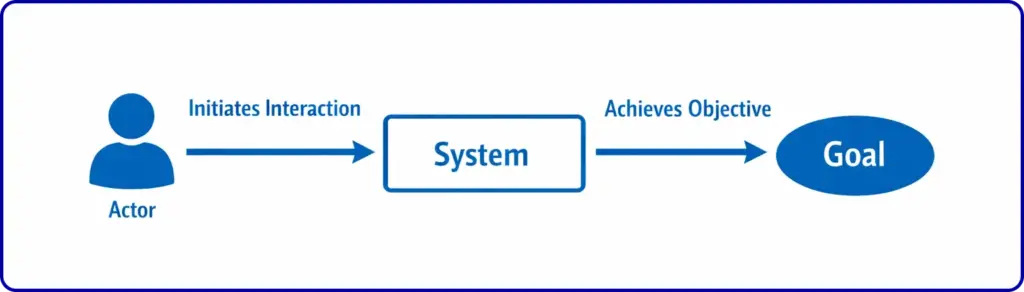
A use case is a structured description of how a user, or any external entity, interacts with a system to achieve a specific goal. It documents the sequence of steps, the possible outcomes, and the conditions that must be in place for those interactions to happen.
The term was introduced in the late 1980s by Swedish computer scientist Ivar Jacobson, who developed the concept to help define requirements for IT systems at Ericsson. Jacobson later co-created the Unified Modeling Language (UML), which gave teams a standardized, visual way to represent use cases through diagrams.
At its core, a use case answers three questions: who is doing something, what are they trying to accomplish, and how does the system respond.
It is not a feature list, nor a technical specification. It is a goal-oriented narrative of interaction.
7 Key Components of a Use Case
Before writing a use case, you need to understand its building blocks. Every complete use case includes the following elements.
1. Actor
The user or external entity interacting with the system. This could be a customer, an admin, another software system, or even a piece of hardware. Actors are divided into primary actors, who initiate the interaction, and secondary actors, who support it.
2. System
The product, service, or software that responds to the actor’s inputs. Defining what falls inside and outside the system boundary is critical to avoiding scope creep.
3. Goal
What the actor is trying to accomplish. Goals drive the entire use case. Writing from the actor’s perspective, not the system’s, keeps use cases grounded in real user needs.
4. Preconditions
The conditions that must be true before the use case can begin. For example, a user must be logged in before accessing account settings.
5. Trigger
The event that kicks off the use case. This could be a user clicking a button, a scheduled system event, or an external signal.
6. Basic Flow
The standard, successful path through the interaction. This section is written as numbered steps that describe the main sequence from trigger to goal. This is often called the “happy path,” though some practitioners avoid that label because it implies all other paths are failures.
7. Alternate Flows and Postconditions
Every variation that leads to a different outcome, whether that is an error, an edge case, or a valid but non-standard path. These branch from specific steps in the basic flow and describe how the interaction changes. Postconditions define what the system state looks like after the use case concludes, regardless of which path was taken.
Types of Use Cases
Not all use cases serve the same purpose. Knowing which type fits your situation determines how detailed and technical the document needs to be.
1. Business Use Case
A business use case describes a high-level process from the organization’s perspective, without getting into technical details. It focuses on what the business needs to accomplish and the actors involved in making that happen. Business use cases are typically written early in planning and serve as communication tools for non-technical stakeholders.
For an ecommerce store, a business use case might describe how a customer places an order: the customer selects items, enters payment information, and receives a confirmation. No system architecture required.
2. System Use Case
A system use case goes deeper. It documents the specific technical interactions between actors and individual system components. It includes functional specifications, dependencies, internal processes, and what happens when something breaks. Developers and QA teams rely on system use cases to understand exactly what the software must do in every scenario.
The same order placement example becomes much more granular at the system level: how the payment gateway communicates with the order management system, what triggers the inventory update, how the confirmation email gets queued and sent.
| Aspect | Business Use Case | System Use Case |
|---|---|---|
| Audience | Non-technical stakeholders, business teams | Developers, QA teams, technical stakeholders |
| Level of Detail | High-level, no technical implementation details | Detailed, technical, includes dependencies and internal processes |
| Focus | What the business needs to accomplish | How the system technically achieves the goal |
| When Used | Early planning and stakeholder communication | During development, implementation, and testing |
Use Case vs. User Story vs. Test Case
These three terms often get confused, especially in agile environments. They are related but serve different purposes.
Use Case
Use case is a full narrative of how a user interacts with a system to reach a goal. It covers multiple scenarios and alternate flows. It is usually longer, more structured, and built for planning and documentation.
User Story
User story is a short, plain-language statement of what a user wants and why. The format is typically: “As a [role], I want [feature] so that [benefit].” User stories are lighter, faster to write, and used primarily to spark conversation in sprint planning rather than to document a complete process.
Test Case
Test case checks whether a specific feature or function works correctly in isolation. While a use case might describe an entire checkout process, a test case might verify only that the coupon code field rejects expired codes. Test cases are derived from use cases and validate their individual steps.
According to the Project Management Institute, use cases help manage project scope and structure the requirements process, making them valuable for gathering and organizing customer requirements early.
How to Write a Use Case (Step-by-Step)
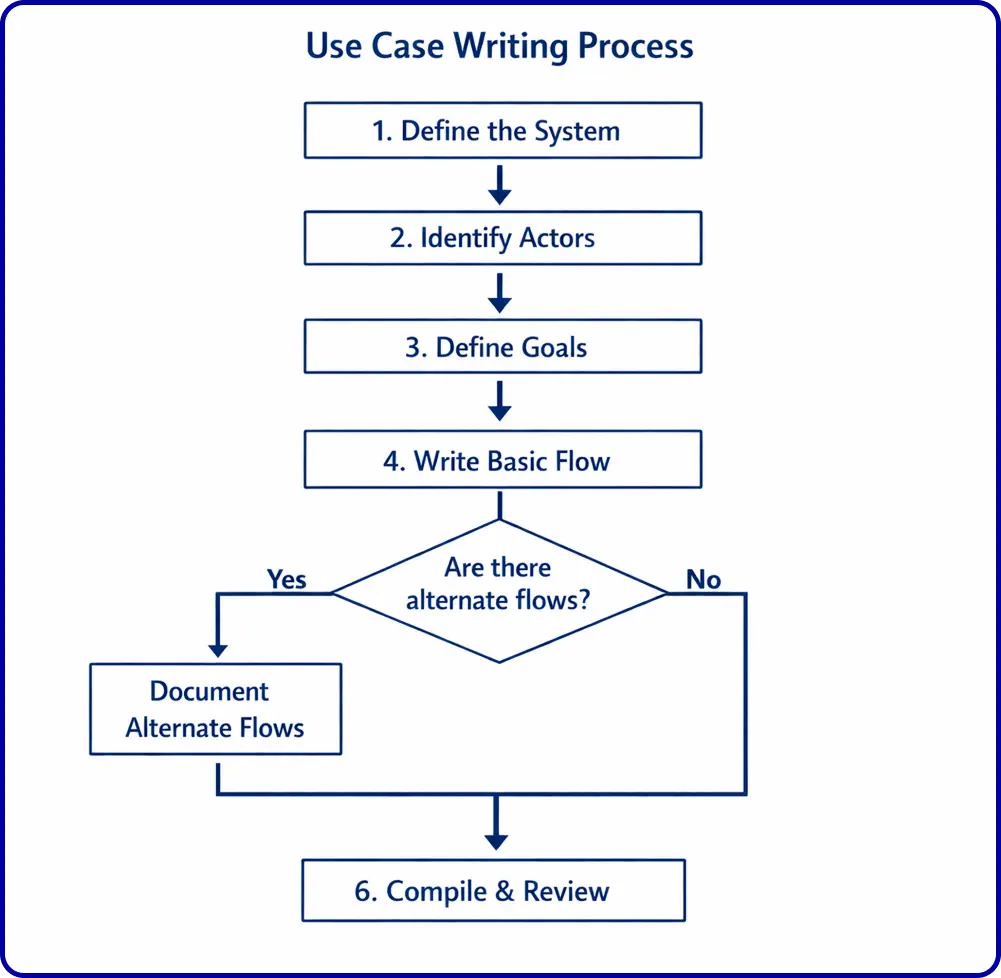
Writing a use case does not require a specialized tool or a formal background. It requires a clear understanding of who is using your system and what they need from it. Here is a practical six-step process.
- Define the system: Describe what the product or service does and what lies outside its boundaries. Be specific. Vague system definitions lead to bloated use cases.
- Identify the actors: List every user type, external system, or hardware component that interacts with your system. Clarify whether each is a primary or secondary actor.
- Define the goals: For each actor, determine what they are trying to accomplish. Each distinct goal becomes its own use case. Resist the urge to combine goals that belong separately.
- Write the basic flow: Document the step-by-step sequence of actions and system responses under normal conditions. Keep it action-oriented and precise.
- Document alternate flows: Map every deviation from the basic flow, including errors, edge cases, and unexpected inputs. This is where teams discover hidden requirements and potential failure points.
- Compile and review: Combine the flows, components, and metadata into a complete document. Review it with stakeholders and developers to verify that nothing is missing or misrepresented.
Use Case Example: eCommerce Order Checkout
To make this concrete, here is a use case written for an eCommerce checkout flow.
- System: Online store checkout
- Primary actor: Customer
- Goal: Complete a purchase
- Trigger: Customer clicks “Proceed to Checkout”
- Preconditions: Customer has items in their cart and is logged in
1. Basic Flow
- Customer reviews cart contents
- Customer enters shipping address
- System calculates shipping cost and estimated delivery date
- Customer selects a payment method
- System processes payment
- System confirms order and sends confirmation email
- Customer receives order ID and delivery estimate
2. Alternate Flow
- Payment is declined. The system notifies the customer, retains cart contents, and prompts them to try a different payment method.
- The selected item goes out of stock during checkout. The system alerts the customer before payment is processed and allows them to remove the item or wait for restock.
- The customer applies a coupon code. The system validates the code, adjusts the order total, and proceeds with the updated amount.
Postconditions: Order is confirmed, inventory is updated, and a confirmation email is delivered.
This is the kind of use case that helps development teams build a checkout experience without gaps. If you are building or scaling an online store on WordPress, having clear use cases like this before development begins significantly reduces rework and misalignment.
For store owners using FluentCart, this level of planning maps directly to real features: from flexible payment handling to subscription and licensing management, the product is built around the kinds of actor-goal interactions that well-written use cases define in advance.
Why Use Cases Matter in Product and eCommerce
Use cases are not just software documentation. They are strategic planning tools. Here is why teams that skip them pay for it later.
- Prevents Scope Creep: By defining system boundaries and actor goals explicitly, use cases give teams a firm line to hold against feature requests that do not serve documented user goals.
- Surfaces Hidden Requirements: Alternate flows force teams to ask: what happens when this fails? The answer often reveals requirements that would have been discovered only after launch.
- Creates Shared Understanding: Because use cases are written in plain language rather than technical jargon, they work as communication tools across business stakeholders, designers, developers, and QA teams alike.
- Reduces Development Costs: Research consistently shows that catching requirement gaps before development begins is dramatically cheaper than fixing them after. A study by the Systems Sciences Institute at IBM found that fixing a defect in production can cost up to 100 times more than fixing it during design.
- Generates Test Cases: Each flow in a use case maps to one or more test scenarios. Teams that write use cases early reduce the effort needed to build a comprehensive test plan.
For eCommerce teams managing complex order management workflows, digital product delivery, and subscription billing, having clear use cases aligned with each customer journey is not optional. It is what separates stores that scale from stores that constantly firefight.
Use Cases in Agile and Business Analysis
There is a persistent myth that use cases belong only to traditional, waterfall-style development and have no place in agile. That is not accurate. Use cases and user stories are complementary. Many agile teams use user stories at the sprint level and maintain use cases for system-level requirements that span multiple stories.
In business analysis, use cases are considered a core deliverable. Business analysts use them to document functional requirements, validate designs, and create onboarding documentation. They are particularly valuable in larger projects where multiple systems interact, such as integrating a CRM, support platform, and eCommerce plugin into a unified workflow.
Platforms like FluentCart are built with this kind of interconnected architecture in mind, integrating natively with tools like FluentCRM for email marketing and Fluent Support for customer service, making it easier to map end-to-end use cases across the entire customer lifecycle.
Once In a Lifetime Offer
Use Case Diagrams
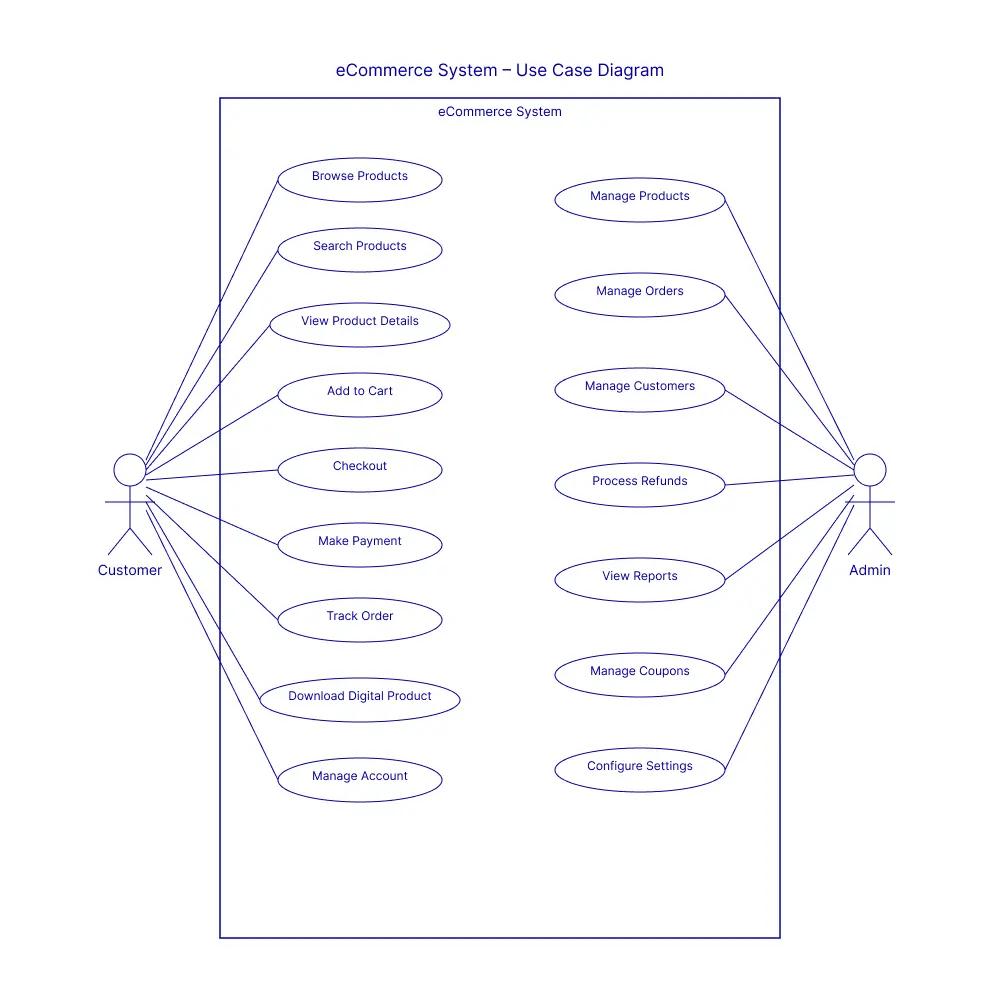
A use case diagram is a visual representation of one or more use cases, showing actors, goals, and the relationships between them. Diagrams use UML conventions: stick figures for actors, ovals for use cases, rectangles for system boundaries, and lines for associations.
Diagrams are optional for simple systems but become valuable when multiple actors interact with overlapping use cases, or when you need to communicate system architecture to stakeholders who prefer visuals over text. They are not a replacement for written use cases. They are a complement to them.
Wrapping Up
A use case is one of the most practical tools in product development, project management, and business analysis. It turns vague goals into structured, testable, stakeholder-ready documentation. It connects what users need with what systems must do.
Whether you are writing your first use case for a new product or revisiting them to address gaps in an existing system, the principles are the same: start with the actor, define the goal, map the flows, and document every variation worth knowing about.
For eCommerce builders working with WordPress, having that kind of clarity before you build is what good store architecture looks like in practice.
Once In a Lifetime Offer
FAQs
What is the difference between a use case and a scenario?
A scenario is one specific path through a use case, a single sequence of actions leading to one outcome. A use case contains all possible scenarios for a given actor-goal combination, including the basic flow and all alternate flows.
Can use cases be used in agile development?
Yes. Use cases and user stories serve different purposes and can be used together. User stories work well for sprint-level planning, while use cases are better suited for capturing complete system behavior across multiple sprints or releases.
How long should a use case be?
There is no fixed length. A simple use case for a straightforward interaction might be a single page. A complex system use case covering multiple alternate flows and dependencies can run several pages. The rule is to include everything necessary and nothing unnecessary.
What tools are commonly used to write use cases?
Use cases can be written in any word processor or document tool. Visual use case diagrams are typically created using UML tools like Lucidchart, draw.io, or built-in diagramming features in project management platforms.

Deputy Marketing Lead, published literary author, and musician. I thrive on marketing for tech companies while composing music, collecting books of lasting depth, exploring cinema with a discerning eye, and studying the arts and history.

Subscribe now
Related Articles and Topics
-

Membership Affiliate Programs: The Cost-effective, Integrated Setup
Run membership affiliate programs on WordPress with one integrated stack.
-

Best Membership WordPress Plugin: 8 Options Compared for 2026
Compare the best membership WordPress plugin options for 2026 by use case.
-
Best WooCommerce Plugins: For Physical and Digital Sellers
Skip the 30-plugin lists. 12 WooCommerce add-ons sorted by store type, with an honest note on what’s free,…




Add your first comment to this post