
How to Create Affiliate Links: A Step-by-Step Guide
Every product review, YouTube description, and Instagram bio you scroll past probably hides a link that earns someone a commission. Learning how to create affiliate links sounds technical, but the actual process takes minutes once you know where to click.
Which platform do you use? Where do you paste the link? How do you make sure a sale gets credited back to you, and how do affiliates actually get paid once it does?
In this blog, we will cover how to make affiliate links, how to set up affiliate links the right way, how the tracking behind them works, and where to place them so they actually earn.
TL;DR
- An affiliate link carries a unique tracking code that credits a sale to the right partner.
- You create one by joining a program, grabbing your unique URL, and customizing it.
- Tracking usually runs on cookies or URL parameters with a set expiry window.
- Placement matters. Links belong inside relevant content, not scattered everywhere.
- Disclosure is a legal requirement, not a suggestion.
- Brands can also set up their own affiliate program to hand out links to partners.
What Is an Affiliate Link
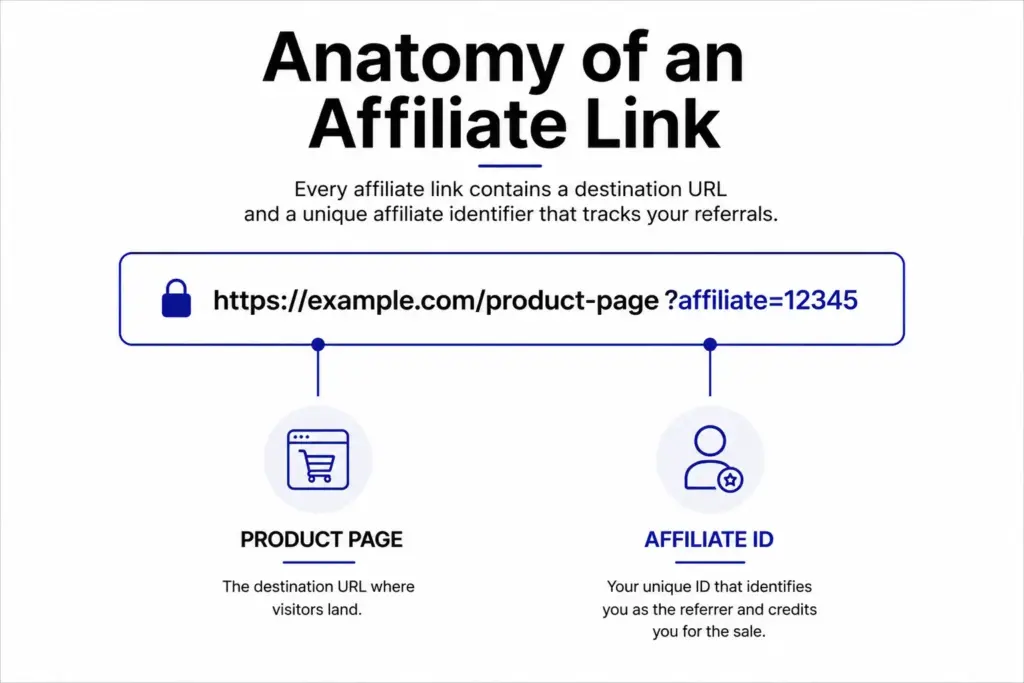
An affiliate link is a trackable URL that connects a sale, sign-up, or click back to the person who shared it. It carries a unique code, often an ID number or short tag, that tells the seller’s system exactly who sent the traffic.
When someone clicks the link and completes the required action, the platform logs the referral and pays the affiliate a commission. That is why the same product page can carry dozens of different affiliate links, one for every partner promoting it.
So what are affiliate links used for in practice? They show up in blog posts, YouTube descriptions, social bios, and email newsletters. They look like ordinary URLs, but the extra characters at the end do the real work of attributing the sale.
How Affiliate Tracking Works
Most affiliate links rely on cookies, small files a browser stores after a click. The cookie holds the affiliate ID and a timestamp, so if the visitor buys later, the sale still gets credited within the cookie window.
Some programs use URL parameters instead, such as UTM tags, which pass the affiliate ID directly in the link rather than through a cookie. This method still works when a browser blocks cookies.
Cookie windows vary widely, from 24 hours on some retail programs to 60 days or longer on software and subscription programs. Longer windows favor affiliates, since a reader who bookmarks a product and buys weeks later still counts.
How to Create Affiliate Links in 4 Steps
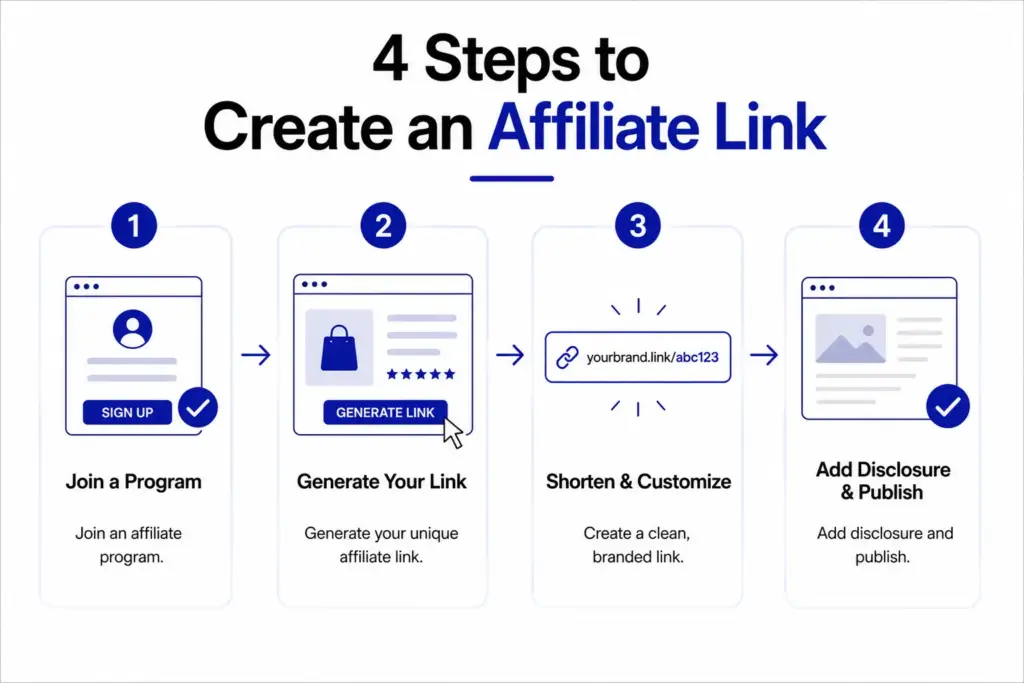
Creating an affiliate link does not require technical skill. Most of the work happens inside a dashboard, and the same four steps apply no matter which program you join.
1. Join a Program or Network
Start with brands you already trust. Check the footer of their website for a link labeled affiliate or partners. FluentCart’s own affiliate program, for example, pays a flat 20 percent commission with a 60-day cookie window, and sign-up takes just a few clicks.
If a brand does not run its own program, networks such as ShareASale or Rakuten list thousands of merchants in one place, which saves you from applying to each brand separately.
2. Grab Your Unique Link
Once approved, log into the affiliate dashboard and search for the product or page you want to promote. The dashboard generates a link with your affiliate ID already attached.
Choose a specific product page rather than a homepage, since specific links tend to convert better than general ones. Some dashboards also let you generate bulk links for an entire catalog at once.
3. Shorten and Customize It
Raw affiliate URLs are long and can look untrustworthy. Tools like Bitly or a WordPress plugin can shorten the link and give it a branded look. Cloaking also hides your affiliate ID, which lowers the risk of someone removing it and buying without giving you credit. A branded short link also reads better on business cards, podcasts, and any place a long URL would look out of place.
4. Add Your Disclosure
Every affiliate link needs a disclosure near it. The FTC guidelines require a clear statement whenever a financial relationship might influence a recommendation. A short line such as “this post contains affiliate links” placed before the link satisfies most requirements. On social platforms, a simple hashtag such as #ad works just as well.
Where to Use Affiliate Links
Placement decides whether a link gets clicked or scrolled past.
- Blog content: Blog content works best when the link sits inside a genuine review or comparison, not attached to unrelated text.
- Social bios: Social bios only hold one clickable link, so many creators use a link-in-bio tool to list several offers at once.
- Video descriptions: Video descriptions let creators pin the link in the first comment and mention it out loud during the video.
- Email newsletters: Email newsletters convert well because subscribers already trust the sender’s recommendations.
A fitness coach who reviews a resistance band set would place the link inside a workout guide instead of a generic homepage link, since readers already arrive with buying intent.
Affiliate Link vs Referral Link
The two terms get mixed up often, though they work differently.
A referral link rewards an existing customer for inviting a friend, usually with a discount or credit rather than cash. No blog, channel, or audience is required, since the link just gets shared personally.
An affiliate link rewards a third-party marketer, someone with a blog, channel, or following, for sending new customers to a business. The reward is typically a cash commission rather than store credit, and payouts continue as long as the partnership stays active.
Some programs blend both models. They offer a smaller reward to casual sharers and a larger commission to dedicated affiliates.
Common Affiliate Link Mistakes
A few habits quietly reduce conversions and trust.
- Overlinking: Overlinking a single page with the same offer five times feels spammy and hurts readability.
- Broken tracking: Broken tracking happens when a link expires or a program shuts down, so links need periodic checks.
- Skipping disclosure: Skipping disclosure risks FTC penalties and damages reader trust once discovered.
- Irrelevant products: Linking irrelevant products lowers click-through rates and weakens future recommendations.
- Ignoring performance data: Ignoring performance data means missing which links actually convert, so regular reviews of click and sale numbers matter.
- Relying on one program: Relying on one program leaves your income exposed if that brand changes its terms or shuts the program down, so spreading effort across a few relevant partners adds stability.
How Affiliates Get Paid
Commission structures vary based on the program and product type.
- Pay per sale: Pay per sale is the most common model, where the affiliate earns a percentage or flat fee once a purchase completes.
- Pay per lead: Pay per lead rewards actions such as a form submission or free trial signup, even without an immediate purchase.
- Pay per click: Pay per click pays a small amount for traffic alone, though it is less common due to fraud risk.
Most affiliate programs favor pay per sale or pay per lead, since both models tie the payout to a real business outcome rather than raw traffic.
Building Your Own Affiliate Program
Some readers land on this topic not to promote a product, but to launch their own program and hand out links to partners. US affiliate marketing spending crossed $10 billion for the first time in 2024, according to eMarketer, “a sign of how many brands now treat this channel as worth the setup.”
For a WordPress store, that setup usually means a dedicated plugin rather than a spreadsheet of partner names. A tool such as FluentAffiliate can generate tracking links automatically, track clicks and conversions in real time, and set commission rules per partner or product.
Since the plugin lives inside WordPress, there is no separate platform fee taken from every sale, which keeps more of the commission budget with the affiliates themselves.
Wrapping Up
Creating an affiliate link takes minutes once you understand the moving parts. The harder work is placement, disclosure, and choosing products your audience actually wants.
Understanding how tracking and payouts work also helps you pick programs worth your time. Get those pieces right, and the link itself becomes the easy part.
FAQs
Are affiliate links free to create?
Yes. Most programs and networks let you generate links at no cost. You only pay if you choose a paid link shortening or cloaking tool.
Do affiliate links expire?
Some do. Cookie-based tracking can expire after a set window, often between 24 hours and 60 days, so a purchase made after that window may not be credited.
Can I use affiliate links without a website?
Yes. Many creators share affiliate links directly through social bios, video descriptions, or printed QR codes without ever building a website.
How many affiliate links should a blog post include?
There is no fixed number. A short review might need one or two well-placed links, while a longer comparison guide can include several, as long as each one stays relevant to the surrounding content.

Deputy Marketing Lead, published literary author, and musician. I thrive on marketing for tech companies while composing music, collecting books of lasting depth, exploring cinema with a discerning eye, and studying the arts and history.

Subscribe now
Related Articles and Topics
-
WordPress Coupons: How to Create and Manage Discounts
Set up a WordPress coupons plugin and manage discount codes in minutes.
-
Buy One Get One Free: A FluentCart Guide for WordPress Store Owners
A complete buy one get one free setup guide in FluentCart, using three methods, so you can pick…
-

What Is a Business Proposal? Things to Know in 2026
A business proposal is a formal document that pitches your product or service to a client. Learn its…




Leave a Reply