
Pros and Cons of Shopify: Which Should You Choose
Everyone says Shopify is the easiest way to start selling online. But easy to start and cheap to run are two very different promises, and Shopify only keeps one of them. A merchant on Reddit put it simply after months of running a real store on it: “Nothing comes close to Shopify in terms of pricing versus features.” Another, a few threads down, was paying for apps he didn’t remember installing. Both of them were right. That’s the part most Pros and Cons of Shopify roundups skip.
TL;DR
- Shopify is genuinely fast to launch, no coding needed, live in under an hour
- The $29/month sticker price rarely matches what you actually pay once apps and themes stack up
- Third-party gateways cost you 0.6% to 2% extra on top of processing fees, Shopify Payments included
- The old “100 variants” limit got quietly bumped to 2,000 in 2025, but the 3-option cap is still there
- Blogging and on-page SEO tools lag behind WordPress by a wide margin
- 24% of Shopify’s own customers came from WooCommerce, and 7% of people who leave Shopify go back to it
- Data and design don’t travel with you if you ever decide to leave
The Pros of Shopify
So let’s start with the part that’s true. Shopify earns its reputation here, and pretending otherwise would be dishonest.
It gets you live fast
Let’s say you’ve never built a website before. You pick a theme, drop in your products, connect a payment method, and you’re selling. No developer, no server config, no waiting on a hosting ticket. That’s the whole pitch, and it holds up.
It handles the boring infrastructure for you
Hosting, SSL, PCI compliance, uptime. All of it sits behind the scenes and you never have to think about it. That’s a real weight off a solo founder’s shoulders, especially one who just wants to sell candles or t-shirts without becoming a part-time sysadmin.
It’s still the strongest option for dropshipping and POS
If your business model leans on dropshipping or you need to ring up sales at a market stall on a Saturday, Shopify’s app ecosystem is built for exactly that. Point of sale comes bundled even on the cheapest plans, and the dropshipping integrations are the deepest in the industry.
The app store covers almost anything
Need abandoned cart recovery? There’s an app. Need loyalty points? There’s an app. The sheer range is Shopify’s biggest structural advantage over most competitors.
Just be honest with yourself about what that convenience actually costs. We’ll get there.
The Cons of Shopify Nobody Puts in the Headline
Well, let’s be real here. Shopify is genuinely a powerful system, no doubt there. But here’s where things break. It’s because the $29 number on the pricing page and the number on your actual bill six months in are rarely the same thing.
The subscription price is the smallest part of your bill
Shopify’s Basic plan runs $29 to $39 a month depending on billing cycle, according to Shopify’s own pricing breakdown reported by Shero. That’s the entry ticket, not the total cost. Apps for reviews, upsells, SEO, and email marketing each carry their own monthly fee, and most stores end up running five to ten of them within the first year.
Most businesses don’t figure this out until the second or third billing cycle, when the app subscriptions have quietly stacked into a bill that’s double what they budgeted for.
Transaction fees are a tax on not using Shopify Payments
This is the one that catches people off guard. If you use a third-party payment gateway instead of Shopify Payments, Shopify adds its own surcharge of 0.6% to 2% on top of whatever your gateway already charges, depending on your plan tier, confirmed directly on Shopify Site. On the Basic plan, that’s a full 2% just for the privilege of picking your own processor.
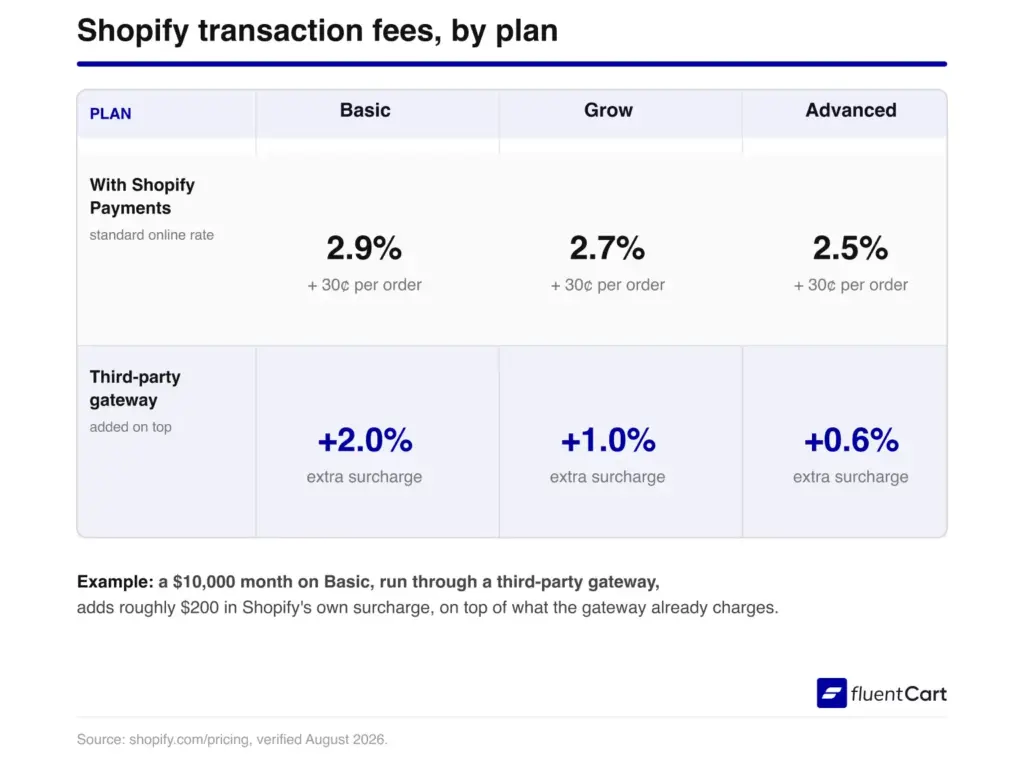
Here’s how it can go: a $10,000 month in sales, run through Stripe instead of Shopify Payments on the Basic plan, adds roughly $200 in Shopify’s own cut, separate from what Stripe already takes. That way, the “we don’t charge transaction fees” claim only holds if you use their processor, and their processor isn’t even available everywhere.
The variant limit story is more nuanced
Almost every roundup on this topic still repeats the same old number. A hundred variants, three options, end of story. That’s outdated. Shopify quietly raised the default cap to 2,000 variants per product in 2025 for stores on Basic and above, per Rubikify’s breakdown of the current limits.
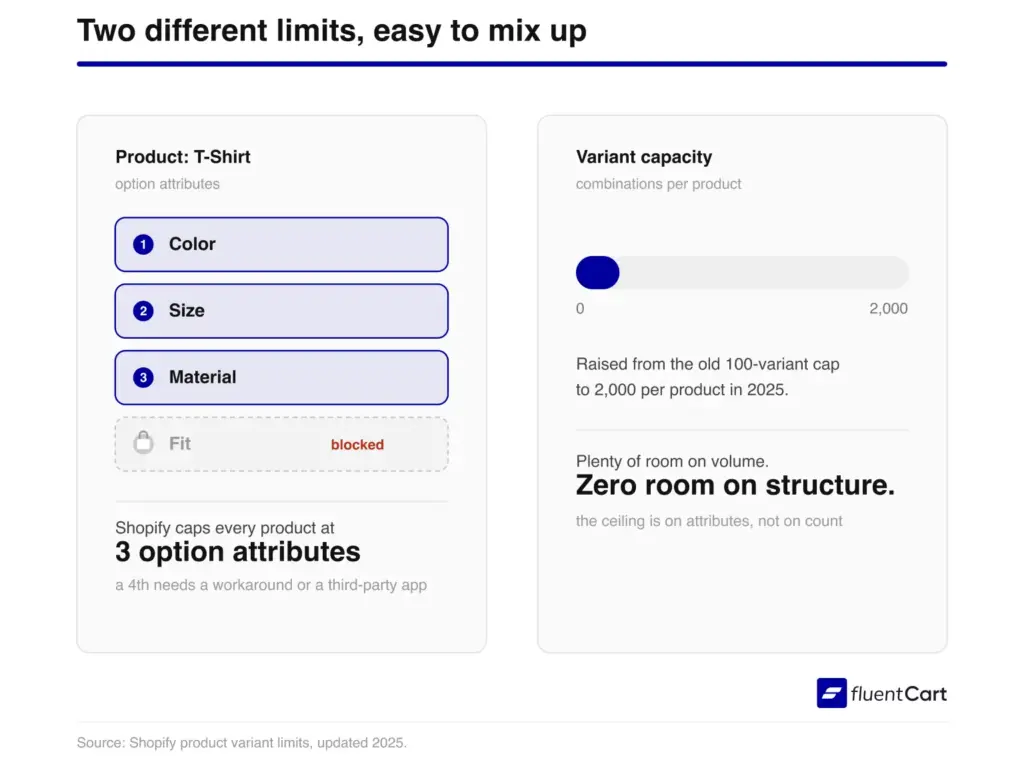
But the three-option ceiling never moved. So if you’re selling a t-shirt in ten colors and ten sizes, you’re fine on volume but you still can’t add a fourth attribute like fabric or fit without splitting the listing or reaching for a third-party app. This is where things break. Not on scale, but on structure.
Content marketing takes a back seat
Shopify is commerce first, content second, and the blog editor shows it. No categories, limited formatting blocks, and no autosave. If your growth strategy leans on SEO content, this becomes a real bottleneck fast, not a minor inconvenience.
If you’re running on WordPress instead, as a good Shopify alternative something like FluentCart just handles this for you. Your store and your blog share the same dashboard and the same SEO plugin, so a product page can link straight to a buying guide without stitching two separate systems together. It’s also why store owners moving off platforms like Easy Digital Downloads or a hosted cart tend to bring their whole content history with them instead of starting from zero.
We’re putting together a free checklist that will help you migrate from one system to another without missing anything vital. This checklist will help you plan ahead before the migration process starts.
Get the free printable migration checklist.
Nothing missed, nothing left to chance.
Print 3 copies and check them off by hand.
And if you want to discuss it with a real store owner, then you should join the FluentCart community, where store owners are already trading real notes.
Real store owners. Real problems. Real answers. Join the FluentCart Community.
Leaving is harder than joining
Product data exports as CSV, but customer history, themes, and design work don’t travel with you. If you ever decide to migrate off the platform, you’re rebuilding the storefront from scratch somewhere else. That’s a real cost businesses rarely price in until they’re already stuck.
What Real Shopify Users Say
Numbers from a demo page are one thing. What thousands of people actually experience running a live store is another, and the two don’t always match.
G2’s aggregated review data across 5,126 verified Shopify users shows the pattern behind the pros and cons of Shopify pretty clearly. The single biggest complaint tag is “Expensive,” logged 156 times, well ahead of every other con category.
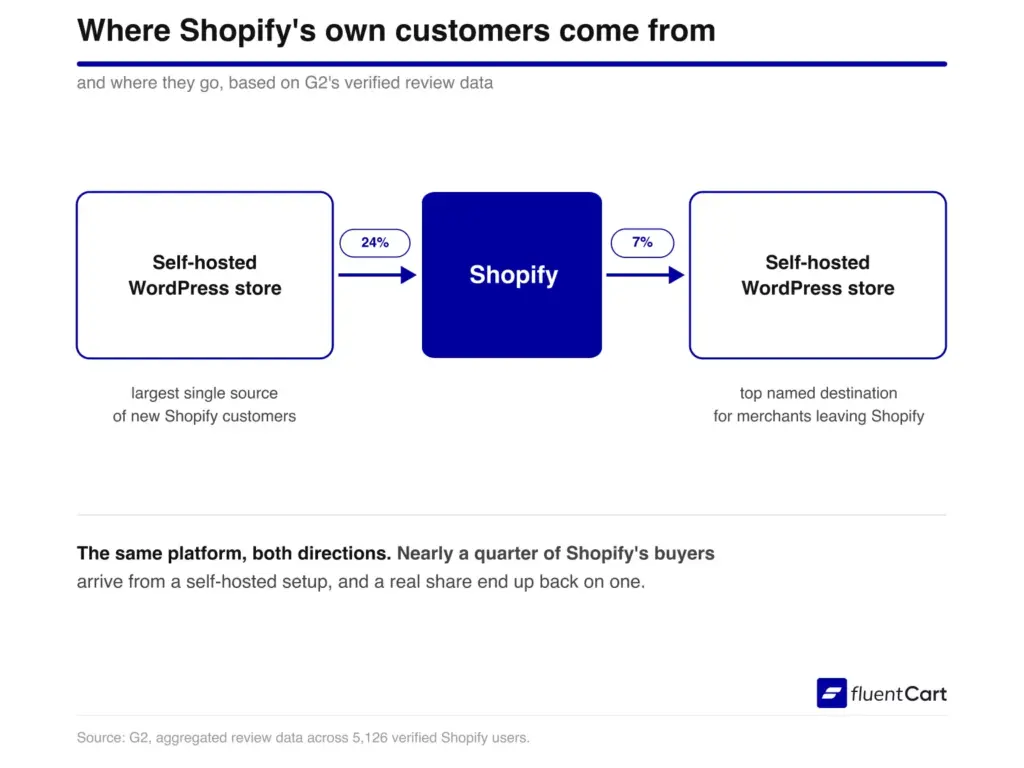
The same data shows something else worth sitting with. 24% of Shopify’s own customers arrived after leaving WooCommerce, a self-hosted eCommerce system built on WordPress, the single largest source of any platform. And 7% of the people who eventually leave Shopify go straight back to it. That’s not a coincidence. That’s a pattern worth knowing before you build on either side of it.
Reddit tells a similar story in plainer language. In a thread on r/shopify titled “Pros & Cons of using Shopify for your E-commerce Store?”, one longtime user summed up the pricing debate in one line: “Nothing comes close to Shopify in terms of pricing versus features.” Right below it, another user flagged the exact opposite worry, describing how the app costs added up until the monthly bill barely resembled the $29 sticker price. Both were talking about the same platform. Neither was wrong.
Who Shopify Is Actually Built For
So who should actually use it? Let’s be specific instead of vague here, since the pros and cons of Shopify only matter in relation to what you’re actually trying to build.
Good fit if you:
- Want to launch fast without hiring a developer
- Run a dropshipping or print-on-demand business
- Need in-person POS alongside your online store
- Sell in multiple currencies and countries regularly
Worse fit if you:
- Already run WordPress and don’t want two separate systems
- Lean heavily on blog content and SEO for traffic
- Sell products with more than three customizable attributes
- Want full ownership of your storefront design and data
That’s the real split. Not good platform versus bad platform. Just a fit question, and most Pros and Cons of Shopify articles skip straight past it. If you’re already leaning toward Shopify alternatives because of what’s above, that’s usually a sign you already know your answer.
FAQ: Pros and Cons of Shopify
The Bottom Line
So here’s the real takeaway. The pros and cons of Shopify don’t cancel each other out, they just apply to different businesses. If speed and dropshipping are your priority, Shopify still earns its reputation. If you’re already invested in WordPress or building something content-heavy, the math starts working against it fast.
It’s a strong platform for a specific kind of store, not a universal answer. Know which kind you’re building before you commit.
Still weighing it? Join the FluentCart community to talk it through with store owners with operational expertise. And if you want to discuss the pros and cons of Shopify further, just start a discussion; we can all join in.
Real store owners. Real problems. Real answers. Join the FluentCart Community.

Hi, this is Abir, a Deputy Marketing Lead, passionate product designer, and WordPress core contributor. Creating interesting content and products that ensure a 360-degree customer experience is my daily job.

Subscribe now
Related Articles and Topics
-
Best Membership Website Hosting in 2026
Membership website hosting isn’t a separate kind of hosting. It’s regular managed cloud or VPS hosting that happens…
-

Best Membership WordPress Plugin: 8 Options Compared for 2026
Compare the best membership WordPress plugin options for 2026 by use case.
-

How Much Does WooCommerce Cost? Real Budget Calculation
How much does WooCommerce cost? The plugin is free, but your store isn’t. See what each store type…




Leave a Reply