
Bundle Marketing: An eCommerce Guide for Store Owners
Plenty of store bundles lose money, and the owner never notices. The bundle sells. Orders look bigger. But nobody checked the discount against the costs, so each sale earns less than the single product it replaced.
This guide fixes that. You will learn what bundle marketing is, why it works, how to price a bundle so it still pays you, and how to build a promo bundle in FluentCart. Done right, marketing bundles are the friendliest upsell your store can offer, because the customer gets a better deal too. The guide runs in three acts: the ideas, the numbers, and the build. At the end, you can download a free Bundle Offer Setup Template that turns the whole process into a fill-in worksheet.
TL;DR
What is Bundle Marketing?
Bundle marketing is the practice of selling two or more products together as one offer, usually at a single price lower than the items cost separately. The bundle gets its own name, price, and product page. The store gets a bigger order, and the customer gets an easier, better-value purchase.
Some marketers call it bundling marketing or bundle selling. You have bought bundles your whole life. A fast-food value meal is a bundle. So is a skincare “routine set,” a camera kit with a lens and a bag, or a software suite. Each one takes a decision the customer would have made three times and turns it into one decision.
Bundle pricing definition
Bundle pricing is the price you set for the whole package. In most stores, it sits below the combined price of the parts. The gap between the two numbers is the customer’s saving. That visible saving is the main reason a bundle sells.
Bundles vs. grouped products vs. coupons
Store owners mix these up, so here is the difference in one table.
| Method | What the customer sees | Best use |
|---|---|---|
| Bundle | One listing, one price, one “Add to cart” | A fixed package you want to sell as a single offer |
| Grouped products | Several related items on one page, each added separately | Browsing related items without a set price |
| Coupon on a set | Separate items, discount applied at checkout | Short promos where you do not want a new listing |
*Table Powered by NinjaTables
A bundle is the only one of the three that becomes its own product. That matters for your pages, your ads, and your reports.
Why Bundling in Marketing Works
Bundling in marketing works because customers value products differently. One shopper loves your coffee and shrugs at the mug. Another is the opposite. A single bundle price can capture both shoppers at once, which separate prices cannot. Economists described this effect in the 1970s, and it still explains most bundles today.
The idea comes from a 1976 paper by William Adams and Janet Yellen, Commodity Bundling and the Burden of Monopoly. They showed that a seller can often earn more by offering a package than by pricing each item alone. The table below walks through a simplified version with two shoppers.
| Shopper | Would pay for beans | Would pay for mug | Would pay for both |
|---|---|---|---|
| Ana | $20 | $8 | $28 |
| Ben | $12 | $16 | $28 |
*Table Powered by NinjaTables
Now try to price the items separately. If beans cost $20, only Ana buys them. If beans cost $12, both buy, which brings in $24. The mug works the same way, and its best separate result is $16. So the best you can do with separate prices is $40.
Offer both items as a bundle for $28, and both shoppers buy. That is $56 from the same two people. Nothing about the products changed. Only the offer did.
This is the core of bundling economics. Bundles pay off most when tastes differ item by item but the total value feels similar. It also explains why digital bundles can get so big. A later study by Yannis Bakos and Erik Brynjolfsson on bundling information goods found that large bundles of digital goods make buyer demand easier to predict. Extra copies of a file cost almost nothing, so a big library at one price can beat selling each file alone.
Types of Product Bundles (and When to Use Each)
There are seven common types of product bundles: pure, mixed, mix and match, tiered, cross-sell, promo, and clearance-assist bundles. They differ in two ways. The first is whether customers can still buy the items separately. Second, who picks what goes inside?
1. Pure bundling
The items are only available together. You cannot buy one piece alone. Software suites and cable TV packages are classic examples. Pure bundles suit limited editions and exclusive drops, where the package itself is the product.
2. Mixed bundling
Customers can buy each item alone or save by buying the set. This is the most common type in eCommerce, because it keeps every door open. A shampoo and conditioner duo is a mixed bundle.
3. Mix and match bundles
The customer chooses the items from a set you define, such as “any 4 pastries” or “build your own snack box.” You control the count and the price. The shopper controls the flavor.
4. Tiered bundles (good, better, best)
You offer the same bundle in sizes, like Starter, Pro, and Complete. Each tier adds items and adds value. Tiers give shoppers a choice between packages instead of a choice between yes and no.
5. Cross-sell bundles
A main product ships with the accessories people buy for it anyway. Think of a phone with a case and a screen protector, or a camera with a memory card. The companions make the main product more useful on day one.
6. Promo bundles
A promo bundle is a time-limited package built for a campaign, such as a holiday gift set, a back-to-school kit, or a buy one get one offer. It creates urgency through dates and stock limits, not through a deeper discount.
7. Clearance-assist bundles
You pair a slow-moving item with a bestseller so the slow item finds buyers. This works only when the pair makes sense to the customer. A random leftover taped to a hit product looks like a dump, and shoppers can tell.
| Type | Can buy items alone? | Best for | Watch out for |
|---|---|---|---|
| Pure | No | Limited editions, suites | Shoppers who want only one item |
| Mixed | Yes | Everyday stores | Cannibalizing single sales |
| Mix and match | Yes | Food, beauty, gifts | Stock planning across flavors |
| Tiered | Yes | Digital goods, software | Too many tiers confuse buyers |
| Cross-sell | Yes | Electronics, hobby gear | Weak accessories drag down value |
| Promo | Varies | Seasonal campaigns | Ending the promo on time |
| Clearance-assist | Yes | Moving old stock | Pairs that make no sense |
*Table Powered by NinjaTables
Benefits of Marketing Bundles for Your Store and Your Customers
Marketing bundles raise your average order value, move slow stock, and help launch new products, while giving customers a simpler, cheaper way to buy a complete solution. Both sides win when the bundle solves one clear problem. They stop winning when the bundle exists only to clear shelves.
For the store, the main benefits are these:
For the customer, a bundle saves money, saves time, and removes guesswork. A beginner does not know which grinder fits which beans. Your “Home Brew Starter Kit” answers that for them.
Bundles have costs too. Each one lowers your price per item, adds a listing to manage, and ties up stock. Next we cover how to keep those costs in check.
How to Pick Products for a Bundle
Pick one anchor product that already sells well, then add one to three companions that make the anchor more useful. Check your order history for items bought together, and test each pair with a simple question: would a customer use these in the same week? If the answer is no, drop the item.
Before bundling products, start with data you already have. Your order history shows which products land in the same cart. Your support inbox shows what new buyers ask for right after they buy. Both point to natural companions.
Then run each candidate through three tests:
If a product fails two of the three tests, leave it out. A tight bundle of three items beats a loose bundle of six.
Bundle Pricing Strategy: How to set a Bundle Price
A sound bundle pricing strategy starts from cost, not from the discount. Add up the retail prices and the unit costs of every item. Set a floor price that protects your target margin. Then choose a bundle price between the floor and the full retail total, and confirm the bundle earns more profit per order than the anchor product alone.
Here is the four-step method, using a coffee roaster’s starter kit as the example.
| Item | Retail price | Unit cost |
|---|---|---|
| Grinder (anchor) | $30 | $14 |
| Whole bean coffee, 12 oz | $18 | $7 |
| Ceramic mug | $12 | $4 |
| Total | $60 | $25 |
*Table Powered by NinjaTables
Step 1: Total the retail prices and the costs.
Retail total is $60. Cost total is $25.
Step 2: Find your floor price
Use this formula: floor price = total cost ÷ (1 − target margin). With a 45% target margin, the floor is $25 ÷ 0.55, or about $45.45. Never price below it.
Step 3: Pick a price between the floor and the retail total
A bundle price of $49 gives the customer an $11 saving (about 18%). Your margin on the bundle is ($49 − $25) ÷ $49, or about 49%.
Step 4: Run the contribution check.
This is the step most guides skip. Sold alone, the grinder earns $30 − $14 = $16 in gross profit. The bundle earns $49 − $25 = $24. So each bundle sale brings in $8 more profit than the anchor alone, even after the discount. If you want to go deeper on this idea, read our guide to contribution margin.
If the bundle fails the contribution check, raise the price, swap in a higher-margin companion, or skip the bundle. For the pricing basics behind these numbers, see how to price a product for profit.
How deep should a bundle discount be?
Deep enough that the saving is obvious at a glance, and shallow enough that the contribution check still passes. Start on the shallow side. You can always deepen a discount later, but raising a bundle price reads to customers as a price hike.
Show the saving, do not make shoppers do math
Put the full retail total next to the bundle price with a strikethrough. “$60, now $49” does the selling for you. Charm prices like $49 instead of $50 also help the price feel lighter.
Price tiers as a ladder
When you sell tiers, make the middle one the obvious choice. Give it the best saving per item. The top tier makes the middle look reasonable, and the bottom tier gives cautious buyers a way in.
Product Bundling Strategies by Store Type
The right product bundling strategy depends on what you sell. Physical stores should bundle around shipping and use, digital sellers around libraries and tiers, software sellers around license levels, and course creators around outcomes. Match the bundle to how your customer buys, not to what sits in your warehouse.
Physical goods stores
Build bundles around one use case, like “first aquarium” or “weekend hiking.” Watch weight and box size, since one heavy item can wipe out the saving through shipping. Keep stock in mind too, because a bundle cannot sell when one part runs out.
Digital product sellers
Digital files cost nothing to copy, so your bundles can be bigger. Preset packs, template libraries, and ebook series all bundle well. Tiers work best here: a small pack for beginners, a full library for power users.
Software and license sellers
Bundle by team size or use case. A “Freelancer” bundle might cover one site, while an “Agency” bundle covers many sites and adds more tools. Each product in the bundle should still issue and track its own license, so renewals stay clean.
Course creators and coaches
Bundle around the result the student wants. A course plus templates plus a community space turns “learn this” into “get this done.” The bundle name should describe the outcome, not the parts.
Bundle pricing examples you can copy
The five bundle pricing examples below cover physical, digital, and software stores. Each shows the separate total, the bundle price, and the saving, so you can see how the discount scales with the offer. Use them as starting points, then run your own costs through the floor price formula before you publish.
| Bundle | What is inside | Separate total | Bundle price | Saving | Type |
|---|---|---|---|---|---|
| Home Brew Starter Kit | Grinder, beans, mug | $60 | $49 | $11 | Cross-sell |
| Lightroom Preset Library | 3 preset packs | $87 | $59 | $28 | Tiered (digital) |
| Glow Routine Set | Cleanser, serum, moisturizer | $74 | $62 | $12 | Mixed |
| Plugin Agency Bundle | 3 plugins, 25-site licenses | $447 | $299 | $148 | Tiered (software) |
| Holiday Gift Box | Candle, tea, card | $42 | $36 | $6 | Promo |
*Table Powered by NinjaTables
Notice the pattern in these examples of bundle pricing. Digital and software bundles carry deeper savings, because an extra copy costs almost nothing. Physical bundles stay shallower, because every item has a real unit cost and a shipping weight.
Well-known product bundling examples follow the same logic. Fast-food value meals are mixed bundles. Office software suites have long worked as pure bundles. Streaming services pair apps into one monthly plan. Each one sells a complete answer at one price.
When Bundling Backfires: 6 Mistakes to Avoid
Bundling backfires when the bundle hides a bad product, discounts past your margin, or confuses shoppers. The fix is the same each time: pick items that belong together, price from cost, and review results after 30 days. Here are the six mistakes that sink most bundles.
What FluentCart Bundles Can Do
FluentCart bundles work in two parts. First, you create the bundle as its own product, with a price, images, stock, and a checkout link. Second, you map existing products into it, which is a FluentCart Pro feature. Customers can only buy a bundle after its items are mapped.
Each mapped item keeps its own identity, so reporting, downloads, and licenses keep working for every product in the bundle. You can build bundles from physical or digital products.
Bundle products arrived in FluentCart version 1.3.4. A bundle in FluentCart is a real product, not a coupon trick or a grouped page. That brings a few practical perks:
What works on FluentCart Free vs. Pro
On FluentCart Free, you can create the bundle product and set up its page, price, and stock. You cannot map items into it, so shoppers cannot buy it yet. Think of it as a draft bundle. Mapping comes with FluentCart Pro, and it is the step that makes the bundle sellable.
How to Create a Promo Bundle in FluentCart
To create a promo bundle in FluentCart, add a new product, check “Add as a Bundle,” map the items you want to include, set the price and compare at price, then publish. Every step works on FluentCart Free except mapping the items, which needs FluentCart Pro. Without mapped items, customers cannot buy the bundle. The steps below follow the official FluentCart documentation.
Before you start, make sure each product you want to include already exists in your store, since the bundle pulls from your existing catalog. You also need FluentCart Pro active for Step 3, where the bundle gets its items. With both in place, the whole setup fits in one sitting.
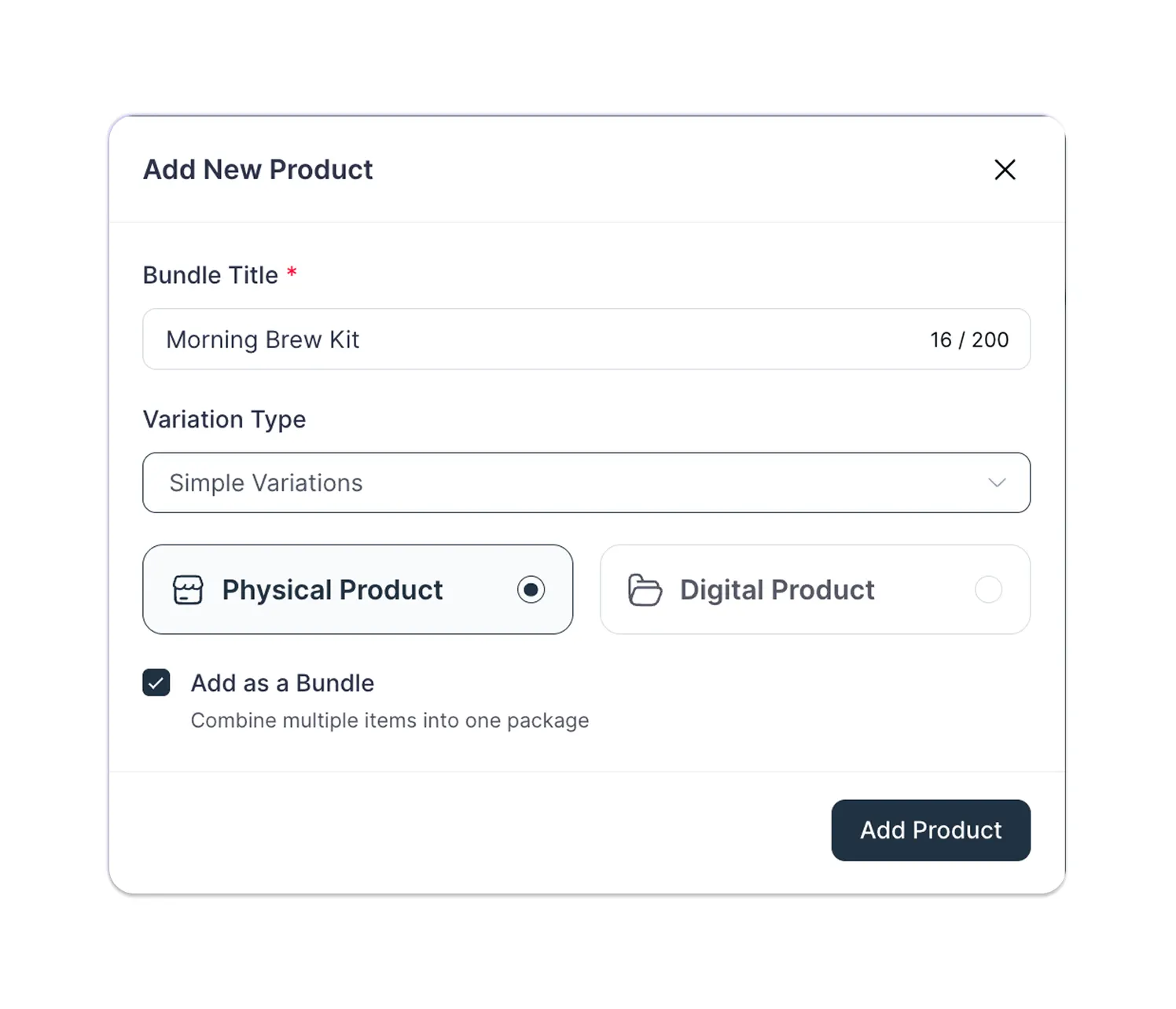
Step 1: Add a new bundle product
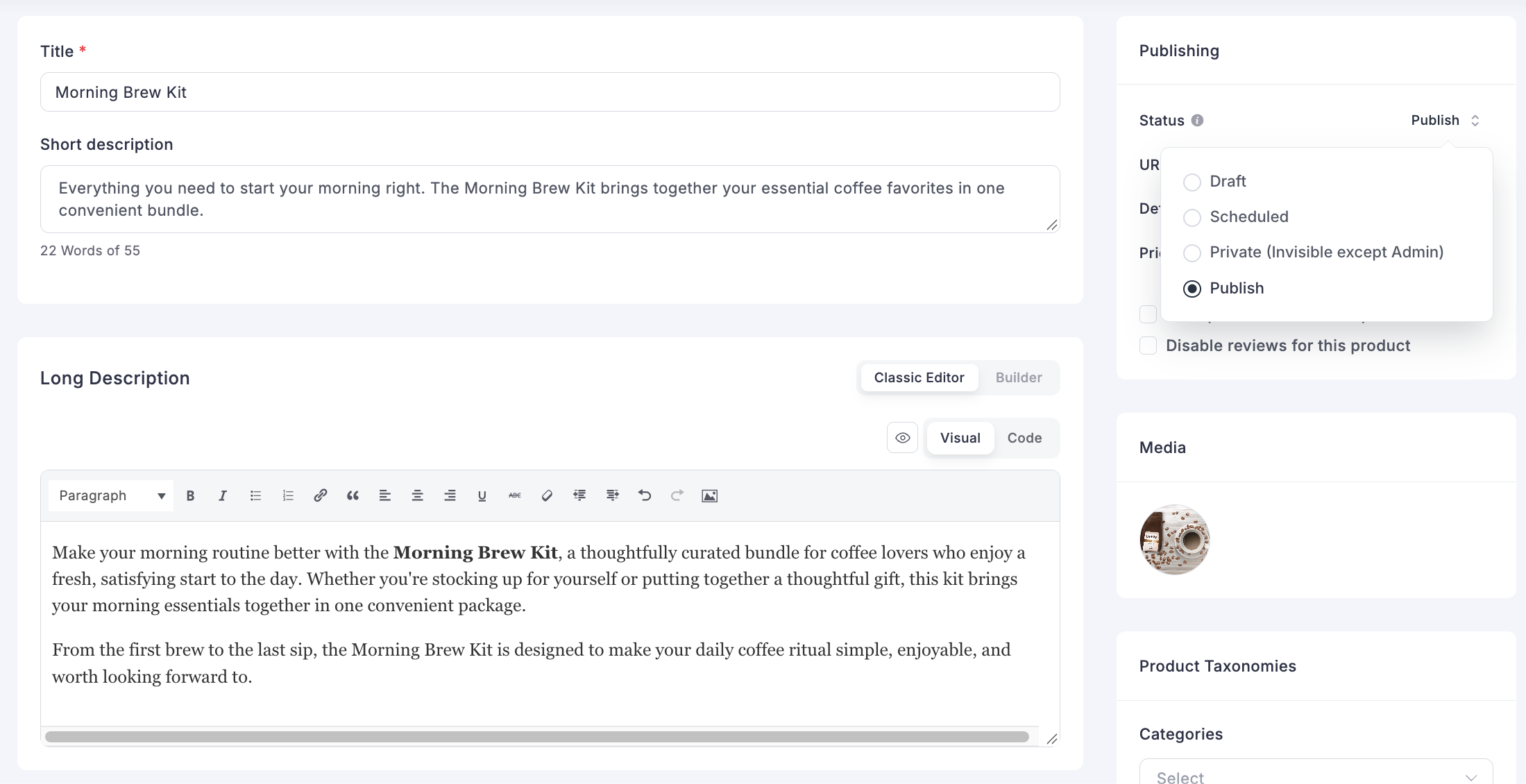
Step 2: Write the title and descriptions
Step 3: Map the bundle items (Pro)
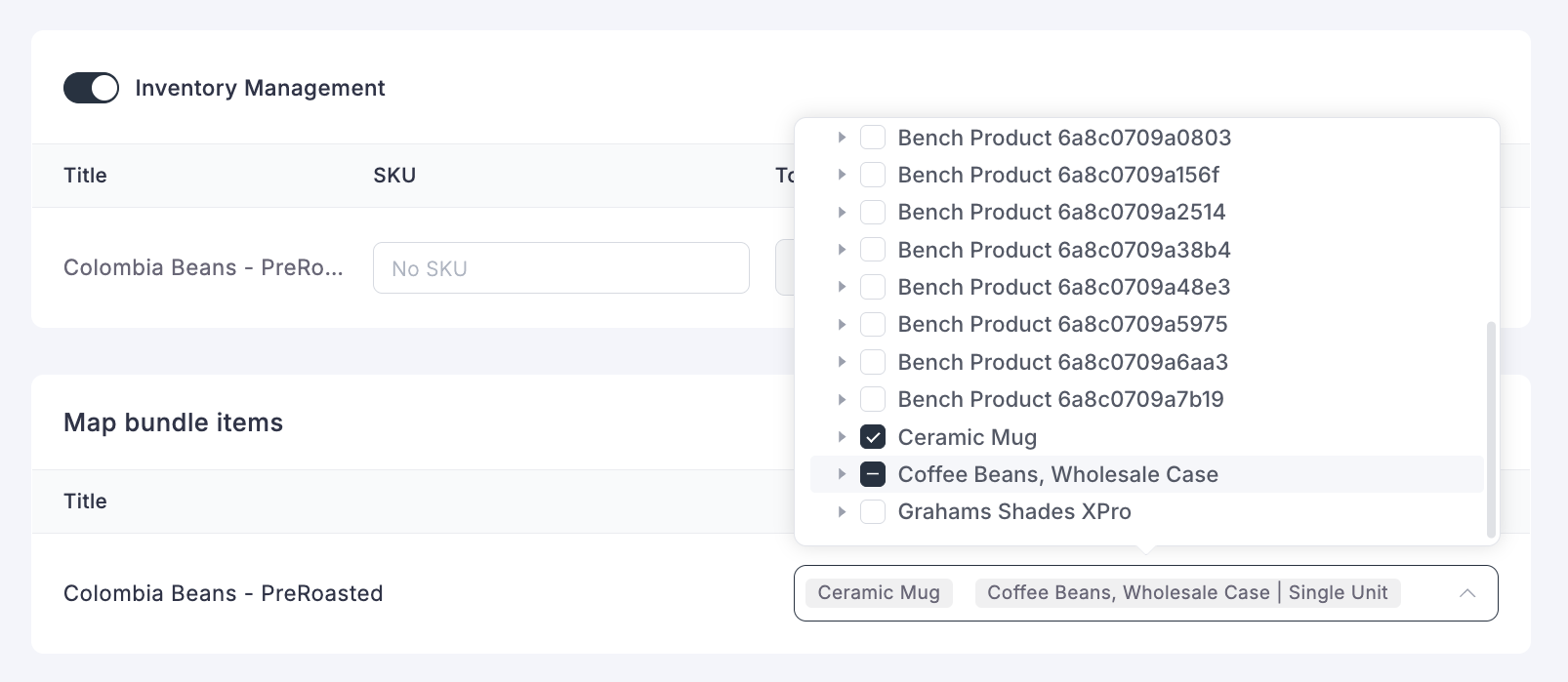
Bundle mapping is a FluentCart Pro feature, and it is the step that turns your bundle into something customers can buy. This section only appears on bundle products. Scroll to Map bundle items, then use the Bundle Items dropdown to pick the existing products you want to include. Each product keeps its own identity behind the scenes, so its reports, downloads, and licenses still work.
On FluentCart Free, you can finish every other step and keep the bundle in Draft until you upgrade.
Step 4: Add media and taxonomies
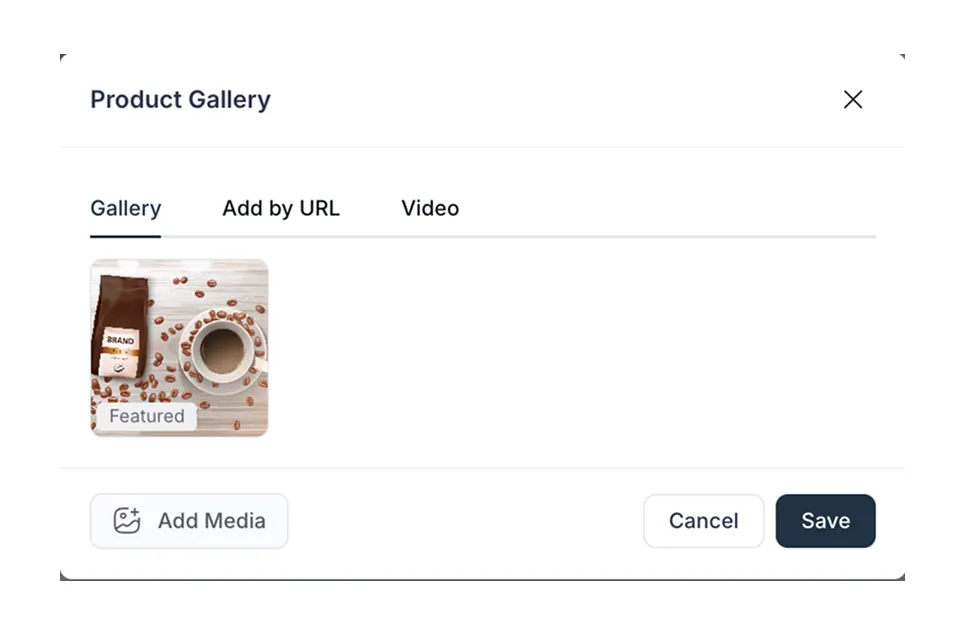
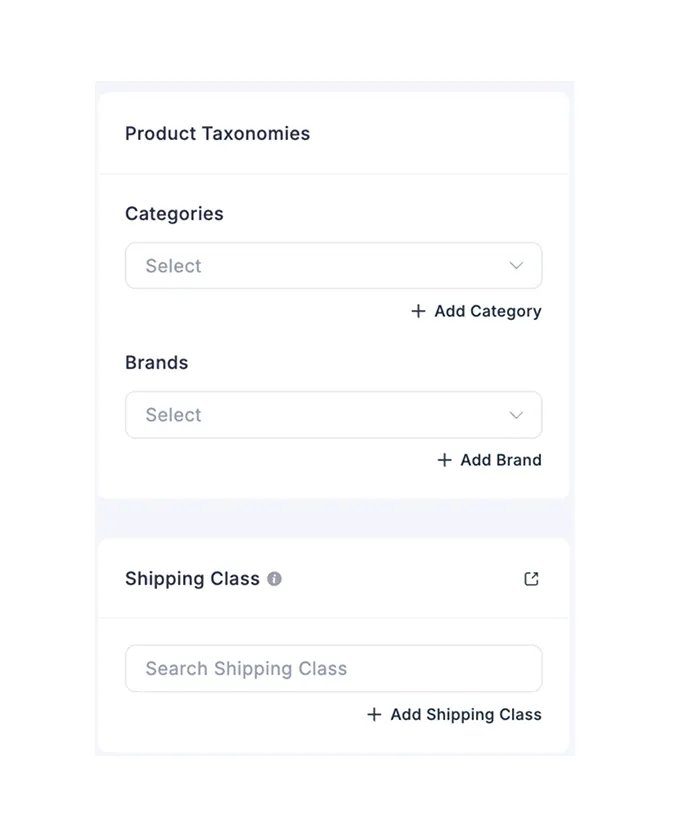
Step 5: Set the bundle price and compare at price
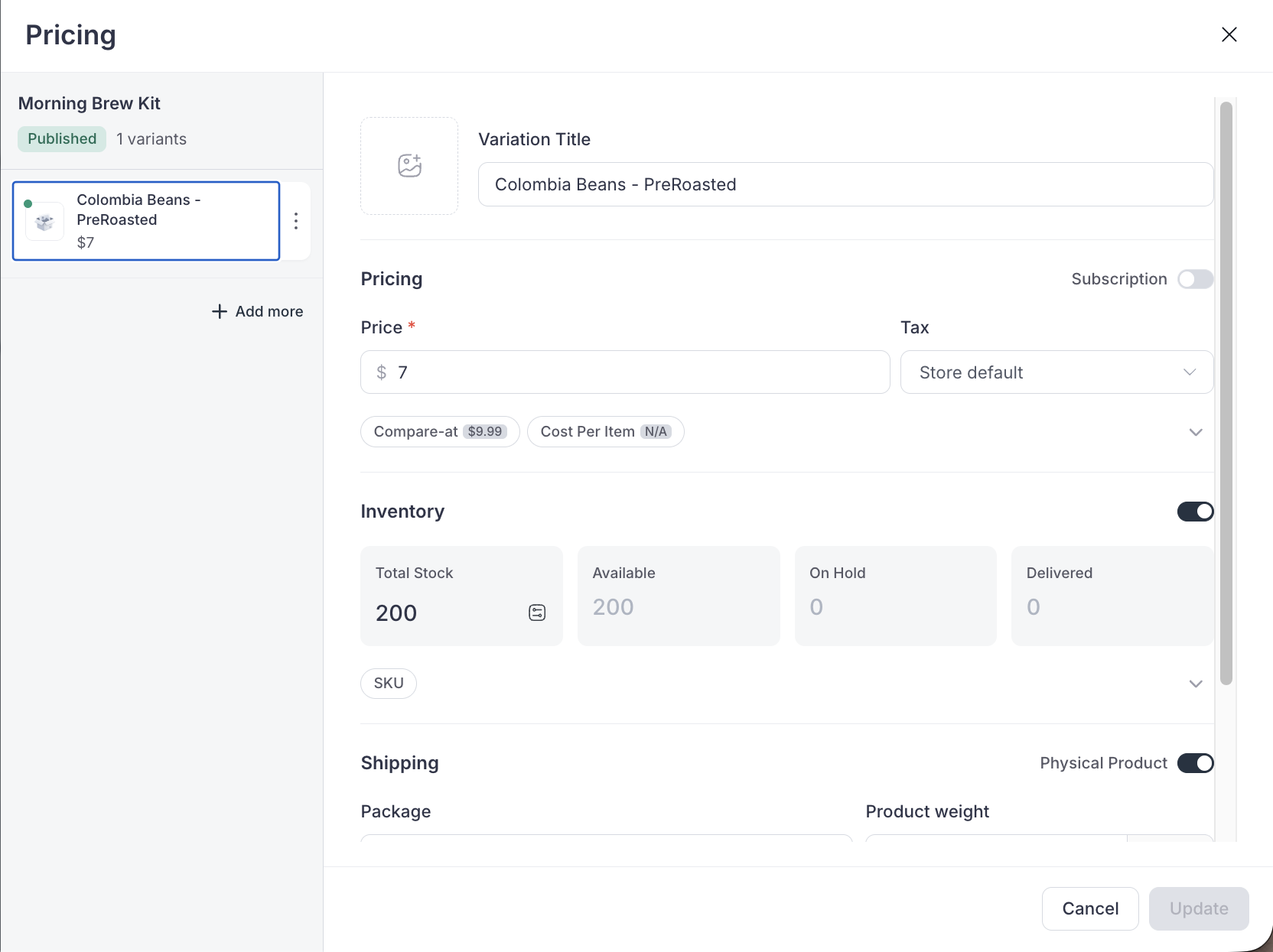
Open the Pricing panel and choose Simple from the dropdown in the top right corner. Then fill in these fields:
Step 6: Set inventory, shipping, and tax
Step 7: Publish and copy the direct checkout link
For every field in detail, see the official FluentCart guide to creating product bundles.
Build a bundle ladder with Simple Variations
A bundle ladder is one product with several tiers, such as Starter, Pro, and Complete. In FluentCart, switch the Pricing dropdown to Simple Variations, add one row per tier, and give each row its own title, price, and compare at price. Buyers then choose a tier instead of choosing whether to buy.
Here is how to set it up:
Use a variation image that shows exactly what is in each box. When shoppers can see the Complete tier holds two more items than Pro, the price gap explains itself.
Optimizing Bundle Sales in FluentCart
To optimize bundle sales in FluentCart, show the saving with compare at price, send buyers straight to checkout with the direct checkout link, add related offers with order bumps, and run time-boxed promos with scheduled coupons. Then review the numbers after 30 days and adjust one thing at a time.
Let the compare at price do the selling
The FluentCart docs give a neat example. Three products worth $45, $30, and $25 add up to $100. Set the compare at price to $100 and the bundle price to $69, and shoppers read the deal in one glance.
Send traffic straight to checkout
The Direct Checkout link skips the product page and opens checkout with the bundle loaded. Use it in launch emails, social posts, and landing pages where the buyer already knows the offer. With Simple Variations, each tier gets its own link, so your “Pro” email can point to the Pro tier.
Add a companion offer with an order bump
Order bumps are a FluentCart Pro feature. They show a one-click offer on the checkout page. To turn them on, go to Settings > Features & Addon, switch Order Bump to Active, and click Save Settings. Then open More > Order Bump, click Add New, enter a Bump Name, and pick the Order Bump Product.
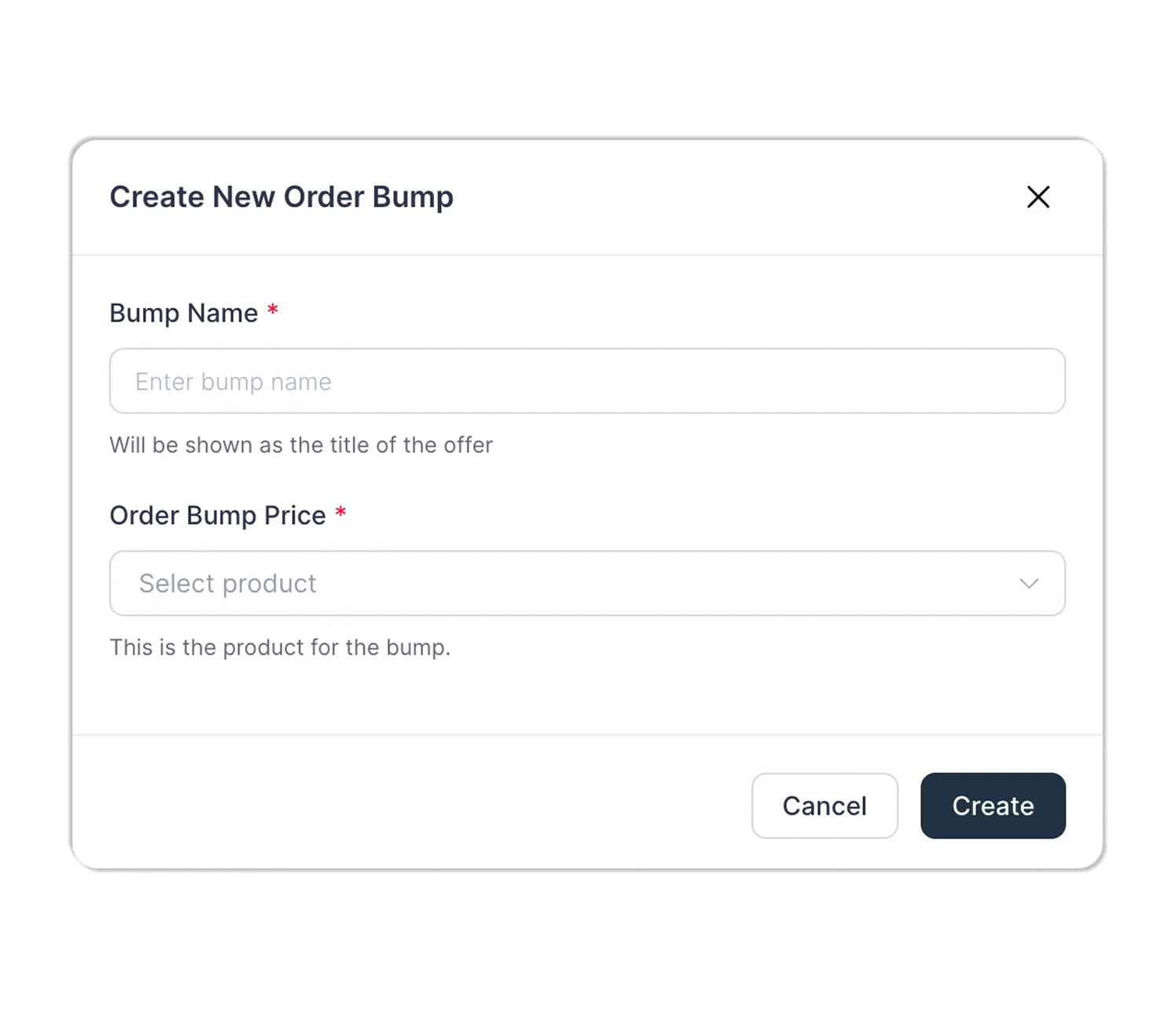
On the configuration screen, you can set a fixed or percentage Discount Amount, allow or block coupon stacking, and offer free shipping on the bump item. Under Display Conditions, show the bump only when a certain product Exists in the cart, or when the Items Subtotal passes a threshold. If several bumps overlap, the lowest Priority number wins.
A smart pairing: when the grinder is in the cart, bump a “Refill Pack” of beans at a small discount. It adds to the order without undercutting the bundle.
Run a Limited-time promo with coupons
FluentCart coupons support product-specific targeting, start and expiration dates, total usage limits, and per-customer limits. You can also apply a coupon through a URL. Pair a scheduled coupon with a promo bundle for a weekend sale, then let it expire on its own.
Make the bundle page do its job
Show every item, explain who the bundle is for, and put the saving near the price. Our guide to eCommerce product page design covers layouts that help buyers decide faster.
Real-world Bundle Setups in FluentCart
The four setups below show how different stores configure a FluentCart bundle: a physical starter kit, a digital tier ladder, a software agency bundle, and a limited holiday drop. Each lists the exact fields to use, so you can copy the setup and swap in your own products and prices.
Coffee roaster: Home Brew Starter Kit
| Field | Setting |
|---|---|
| Product type | Physical Product, Add as a Bundle |
| Bundle items | Grinder, 12 oz beans, ceramic mug |
| Pricing mode | Simple |
| Price / Compare at price | $49 / $60 |
| Cost per item | $25 (FluentCart shows about 49% margin) |
| Extras | Order bump for a beans Refill Pack when the grinder is in the cart |
| Plan needed | Pro, for bundle mapping and the order bump |
*Table Powered by NinjaTables
Digital template shop: Brand Kit ladder
| Field | Setting |
|---|---|
| Product type | Digital Product, Add as a Bundle |
| Pricing mode | Simple Variations |
| Tiers | Starter (logo pack), Pro (logo + social pack), Complete (all packs) |
| Target tier | Pro, dragged to the top |
| Extras | Direct Checkout link per tier in the launch email |
| Plan needed | Pro, for bundle mapping |
*Table Powered by NinjaTables
Plugin seller: Agency Bundle
| Field | Setting |
|---|---|
| Product type | Digital Product, Add as a Bundle |
| Bundle items | Three licensed plugins |
| Why it works | Each plugin keeps its own identity, so each keeps its own license and downloads |
| Extras | A coupon that expires at the end of the launch week |
| Plan needed | Pro, for bundle mapping and license keys |
*Table Powered by NinjaTables
Gift shop: Holiday Gift Box (promo bundle)
| Monthly store revenue | Annual store revenue | SureCart Launch plan fee/yr (2.9%) | SureCart Pro plan/yr | WooCommerce core plugin/yr | Cheaper SureCart option |
|---|---|---|---|---|---|
| $500 | $6,000 | $174 | $199 | $0 | Launch |
| $572 | $6,864 | $199 | $199 | $0 | Break-even point |
| $1,000 | $12,000 | $348 | $199 | $0 | Pro |
| $2,500 | $30,000 | $870 | $199 | $0 | Pro |
| $5,000 | $60,000 | $1,740 | $199 | $0 | Pro |
| $10,000 | $120,000 | $3,480 | $199 | $0 | Pro |
| $25,000 | $300,000 | $8,700 | $199 | $0 | Pro |
*Table Powered by NinjaTables
Trade bundle ideas with other store owners. Wondering what bundles other sellers run, or how they price tiers? Join the FluentCart community to swap setups, ask questions, and see what works in stores like yours.
Get the Free Bundle Setup Template
The Bundle Offer Setup Template is a free, fill-in PDF that walks you through one bundle from idea to launch. It includes a bundle brief, a pricing worksheet with the floor price and contribution check, a tier planner, a FluentCart build checklist, a promo plan, and a 30-day scorecard.
Reading about bundles is one thing. Pricing your own is where most owners stall. The template turns this guide into a worksheet you can finish in one sitting. Inside you get:
It is a fillable PDF, so you can type into it on screen or print it out.
How to Measure Bundle Performance
Measure a bundle by five numbers: bundle units sold, the bundle’s share of all orders, average order value before and after launch, bundle margin, and refunds on bundle orders. Review them 30 days after launch. Keep bundles that lift order value and margin, and fix or retire the rest.
Here is what each number tells you:
FluentCart reports cover average order value, product and variation performance, and order sources with UTM tracking. For a wider list of store metrics worth tracking, see our guide to eCommerce KPIs.
Change one thing at a time. If a bundle sells slowly, test a clearer name or a better photo before you cut the price.
Frequently asked questions
What is a promo bundle?
A promo bundle is a bundle built for a specific campaign and time window, such as a holiday gift set or a launch-week kit. It relies on dates and stock limits to create urgency. When the campaign ends, you retire the bundle or switch it back to draft.
What is the difference between pure and mixed bundling?
With pure bundling, customers can only buy the items together. With mixed bundling, customers can buy each item alone or save by buying the set. Most online stores use mixed bundling because it keeps single-item sales open.
How much should I discount a bundle?
Enough that the saving is clear at a glance, and never below your floor price. Use the formula floor price = total cost ÷ (1 − target margin), then confirm the bundle earns more gross profit per order than the anchor product alone.
Do bundles hurt profit margins?
Bundles lower the price per item, so the margin percentage can drop. But a well-priced bundle often earns more total profit per order than a single item. The contribution check in Act 2 tells you which case you are in.
Do I need FluentCart Pro to sell bundles?
Yes. On FluentCart Free, you can create the bundle product and set its title, descriptions, media, price, and compare at price. Mapping products into the bundle is a Pro feature, and customers cannot buy a bundle without mapped items. Compare at price, direct checkout links, stock tracking, and coupons all work on Free. Pro also adds order bumps and license keys.
Can I bundle digital products in FluentCart?
Yes. When you add a bundle, choose Digital Product as the type, then map your digital items into it with FluentCart Pro. Each digital item keeps its own downloads inside the bundle. License keys for licensed software are a Pro feature too.
Build Your First Bundle this Week
You now know what bundle marketing is, why a single bundle price can earn more than separate prices, and how to price a bundle so it pays you. You also know the exact clicks to build one in FluentCart. The only step left is to pick your anchor product and run the numbers.
Start with one bundle, not five. Use the template to price it, build it in one sitting, and send the direct checkout link to your email list. Review the results in 30 days.
If you are not selling on FluentCart yet, try FluentCart and build your first bundle on a store with 0% transaction fees.

Rasel leads the marketing function at FluentCart, driving both high-level strategy and ground-level execution across the product’s growth engine. He plays a central role in defining how FluentCart is positioned, how it enters the market, and how it evolves based on user behavior and feedback. His responsibilities span go-to-market planning, funnel architecture, conversion strategy, and narrative development. He works across teams to ensure that product decisions, marketing efforts, and customer experience stay tightly aligned.

Subscribe now
Related Articles and Topics
-
Membership Affiliate Programs: The Cost-effective, Integrated Setup
Run membership affiliate programs on WordPress with one integrated stack.
-
WordPress Coupons: How to Create and Manage Discounts
Set up a WordPress coupons plugin and manage discount codes in minutes.
-
Buy One Get One Free: A FluentCart Guide for WordPress Store Owners
A complete buy one get one free setup guide in FluentCart, using three methods, so you can pick…




Add your first comment to this post