
Membership Affiliate Programs: The Cost-effective, Integrated Setup

Most membership affiliate programs don’t break on the first sale. They break on the renewal.
A partner sends you a new member. The first payment clears, the partner earns a commission, and everyone is happy. Then month four arrives. The member asks for a refund, or the card fails, or they upgrade to a higher tier. Now your billing tool, your access rules, and your affiliate plugin each have their own idea of what happened. Somebody ends up fixing it by hand.
This guide shows you how to run membership affiliate programs on WordPress where billing, access, and commissions all read from the same order. You’ll set up FluentCart and FluentCommunity together for paid access, add FluentAffiliate for partners, and price the whole stack against MemberPress, Paid Memberships Pro, and AffiliateWP. You’ll also get the caveats most vendor guides leave out.
TL;DR
What Are Membership Affiliate Programs?
Membership affiliate programs pay partners a commission when someone they refer buys a membership on your site. Partners share a tracked link or coupon. When a visitor subscribes, the sale is credited to that partner. Many programs also pay a smaller commission each time the membership renews.
The partners can be bloggers, podcasters, YouTubers, coaches, or your own members. What they share with you is an audience that looks like your ideal customer.
The model is simple on paper. You pay only after a sale happens, so there’s no upfront ad spend. The hard part is keeping three records in agreement: who paid, who has access, and who earned what.
Why Recurring Memberships Make Stronger Affiliate Offers
A recurring membership lets you pay a partner more than once for a single referral. That changes the pitch. Instead of a one-time $10 commission, a partner can earn from every month a referred member stays. Good partners care about that math, and it attracts people who send buyers who stick around.
Memberships also tend to have healthy margins. You sell access to content, a community, or courses, not a physical item you have to ship. That margin is what funds a generous commission. Before you pick a rate, work out your contribution margin per member so you know how much room you have.
There is a trade-off. Recurring commissions keep costing you for as long as the member pays. That’s why this guide recommends a renewal cap, which we cover below.
Is Your Membership Site Ready for an Affiliate Program?
Your site is ready for an affiliate program when three things are true. Members stay long enough to be worth paying for. Some members create content for an audience like yours. And your margin can absorb a cash commission on every sale and renewal. If any of these is missing, fix it first.
Here’s a quick way to check each one:
The Stack: FluentCart, FluentCommunity, and FluentAffiliate
The Fluent stack splits a membership affiliate program into three jobs. FluentCart sells and bills the membership. FluentCommunity delivers the gated spaces and courses. FluentAffiliate tracks partners and pays them. Each plugin works alone, but together they react to the same order events inside one WordPress database. Reducing the number of moving pieces in your membership affiliate stack.
FluentCart: Subscription billing
FluentCart is the checkout and billing layer. It supports subscriptions with trials, setup fees, multiple billing intervals (including quarterly and half-yearly), pause and resume, proration, and failed payment retries. Members manage their plans in a built-in customer portal. FluentCart also charges 0% transaction fees, so your commission math isn’t eaten by a platform cut.
FluentCommunity: Access control for spaces and courses
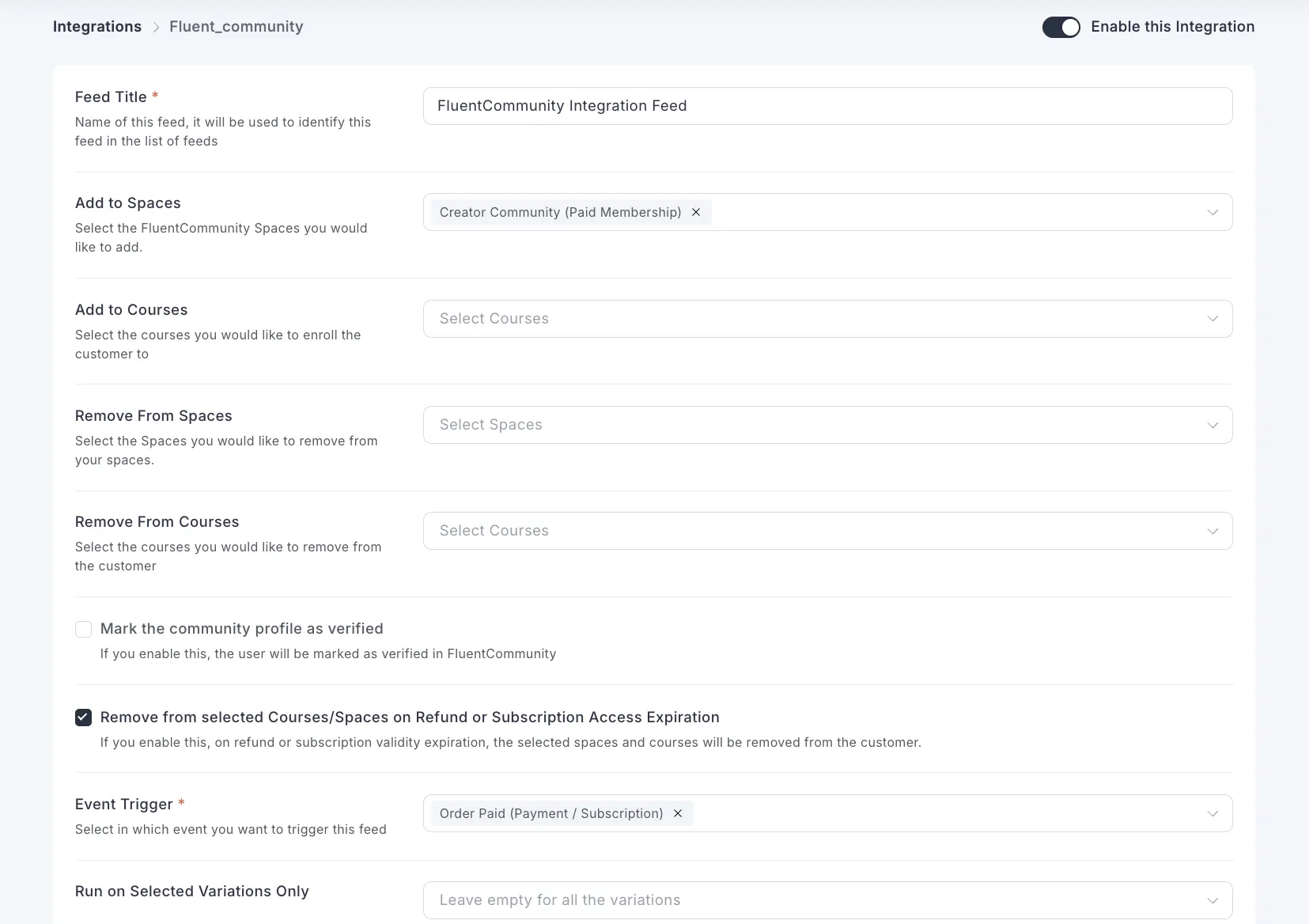
FluentCommunity turns your site into a members area with spaces, courses, chat, and profiles. You set a space or course to private, then link a FluentCart product as its paywall. When someone buys, FluentCart adds them to the right spaces and courses. According to the FluentCart documentation for FluentCommunity, you can also remove members automatically when an order is refunded or a subscription expires, and mark paying members as verified.
FluentAffiliate: Partners, commissions, and payouts
FluentAffiliate runs the affiliate side. It gives each partner a dashboard, referral links, QR codes, and optional branded coupons. You set a default rate, renewal commissions, cookie duration, and payout method (PayPal or bank transfer). It connects to FluentCart with a toggle, then lets you set custom rates per product or category. Every paid plan includes all features. Learn more about how FluentAffiliate approaches affiliate management.
How the Fluent Stack Compares With MemberPress, Paid Memberships Pro, and AffiliateWP
For one site with recurring commissions, the Fluent stack costs less each year and needs fewer add-ons than the common alternatives. MemberPress and Paid Memberships Pro are mature membership plugins with large user bases. AffiliateWP is a well-known affiliate plugin. They work well together, but you pay for each piece every year, and recurring commissions sit on AffiliateWP’s top plan.
Cost comparison: one site, recurring commissions on
The table below uses published prices as of September 2026. Prices change often, so confirm them before you buy.
| Setup | Membership layer (per year) | Affiliate layer | Year one | Year two | Other fees |
|---|---|---|---|---|---|
| MemberPress Launch + AffiliateWP Pro | $399 (renewal price) | $262.15 first year, $749 renewal | about $661 | about $1,148 | 4.9% transaction fee on Launch |
| Paid Memberships Pro Standard + AffiliateWP Pro | $499 | $262.15 first year, $749 renewal | about $761 | about $1,248 | None listed |
| FluentCart + FluentCommunity Pro + FluentAffiliate | $199 + $199 | $199 one-time (1-site lifetime) | $597 | $398 | 0% transaction fees |
| All-lifetime Fluent stack | $249 + $399 one-time | $199 one-time | $847 | $0 | 0% transaction fees |
Why the affiliate layer costs more on the other setups
With AffiliateWP, recurring referrals and lifetime commissions sit on the Pro plan. For a membership site, recurring commissions are the main reason to run a program at all. So the cheaper tiers don’t fit this use case.
FluentAffiliate doesn’t gate features by plan. Pricing changes only with the number of sites. The caveat is that recurring commissions need the paid version, so the free plugin alone won’t pay on renewals.
Where the other tools still make sense
To keep this fair, here’s where the alternatives win:
How to Set Up a Membership Site Affiliate Program in WordPress
You can set up a membership site affiliate program in WordPress in eight steps. Build the subscription products in FluentCart, gate content in FluentCommunity, connect FluentAffiliate, set your rules, and test every order path before launch. Most sites can finish the setup in an afternoon. The testing takes longer, and it should.
Step 1: Build your membership tiers as FluentCart subscriptions
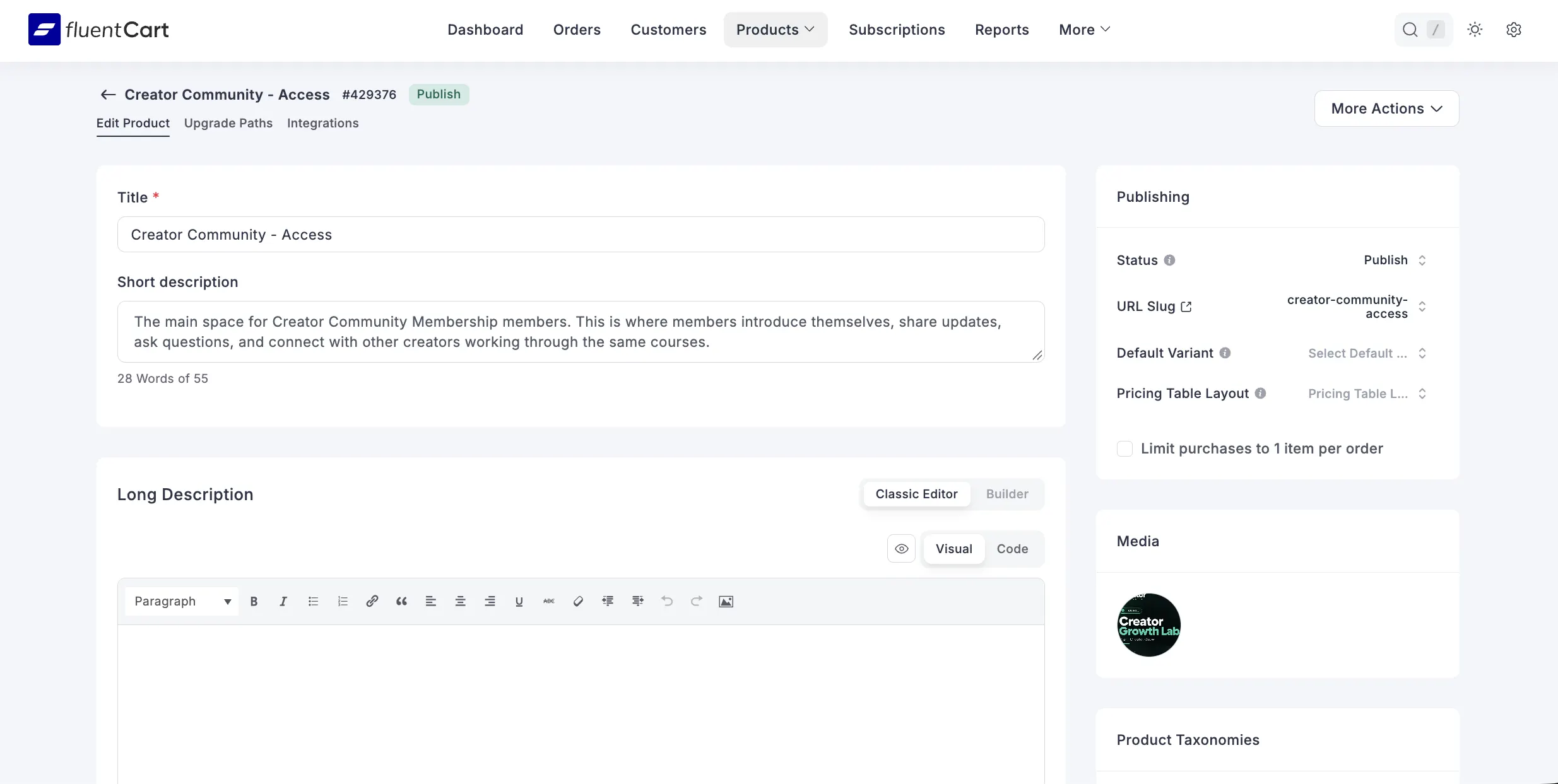
Create one subscription product per tier, such as Monthly and Annual, or Basic and Inner Circle. Set the billing interval, any trial, and any setup fee. Use variations if one tier comes in monthly and yearly versions. Keep tier names clear, because affiliates will reuse them in their content.
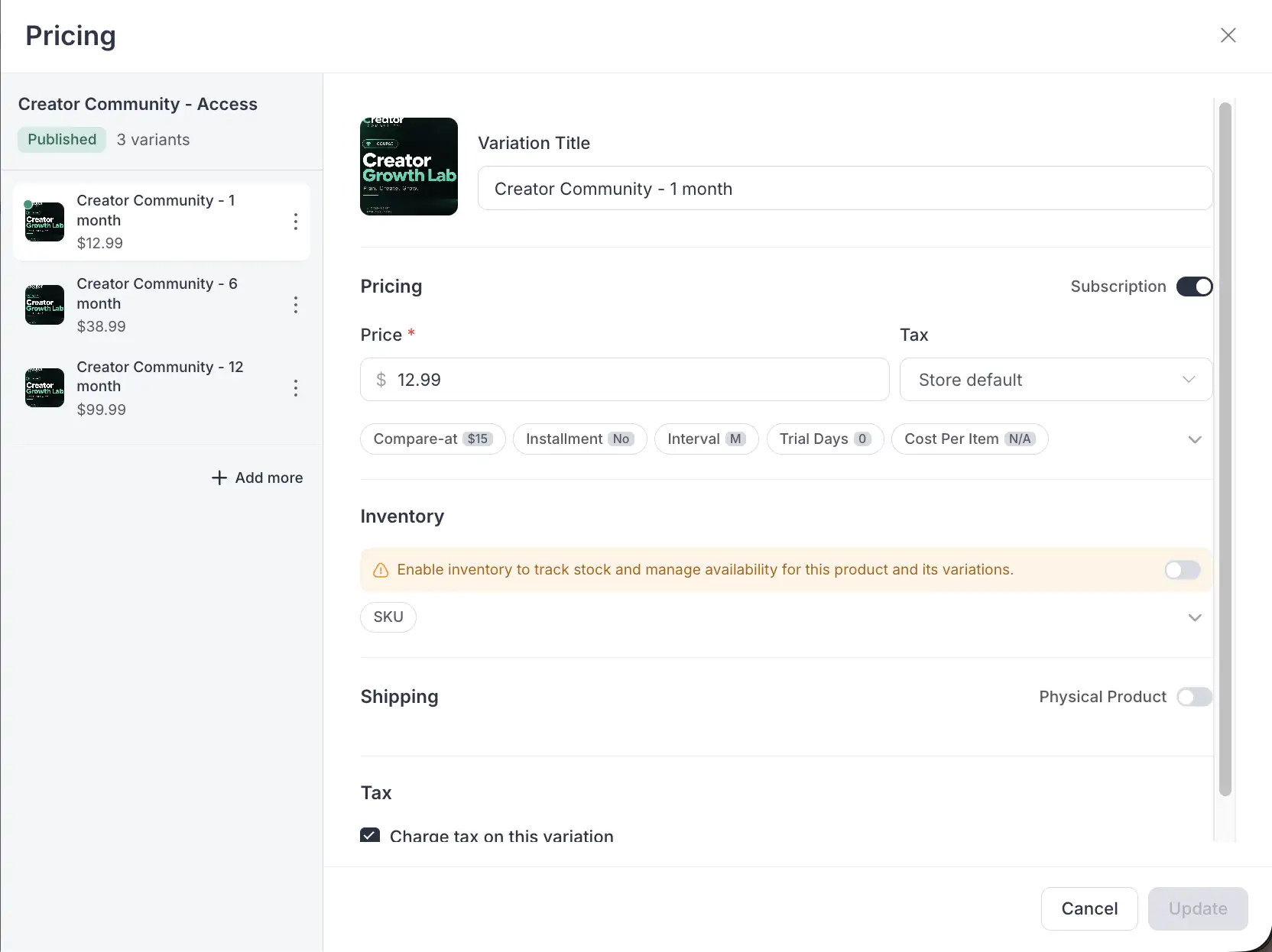
Step 2: Gate spaces and courses in FluentCommunity
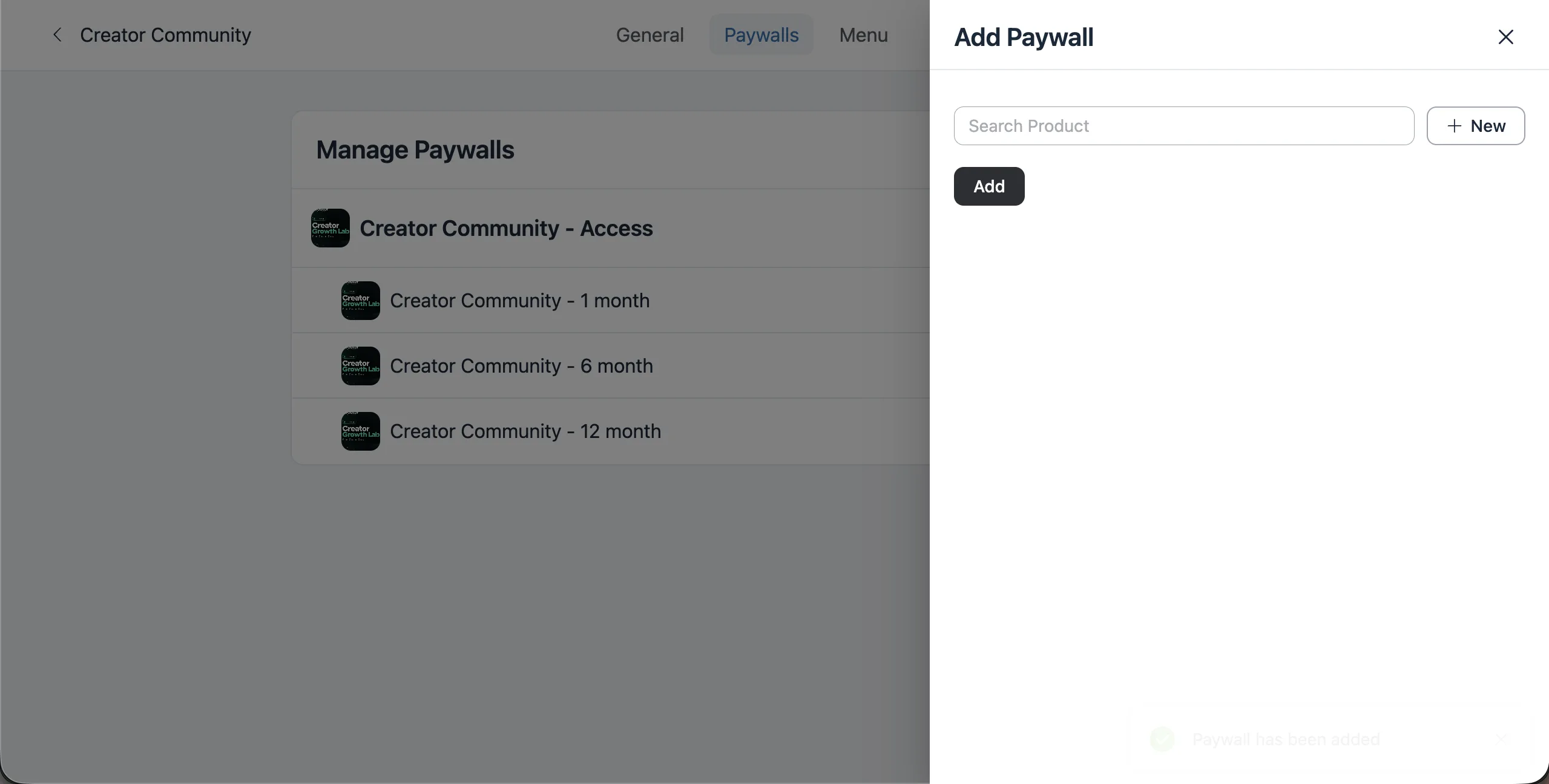
Set each members-only space or course to Private or Secret. Open the Paywalls tab and link the matching FluentCart product. FluentCommunity creates the integration feed in FluentCart for you.
Step 3: Turn on access removal for refunds and expirations
In the FluentCart integration settings, enable removal from selected spaces and courses on refund or subscription expiration. Without this, a refunded member keeps access, and your affiliate still looks like they sent a paying customer.
Step 4: Install FluentAffiliate and enable the FluentCart integration
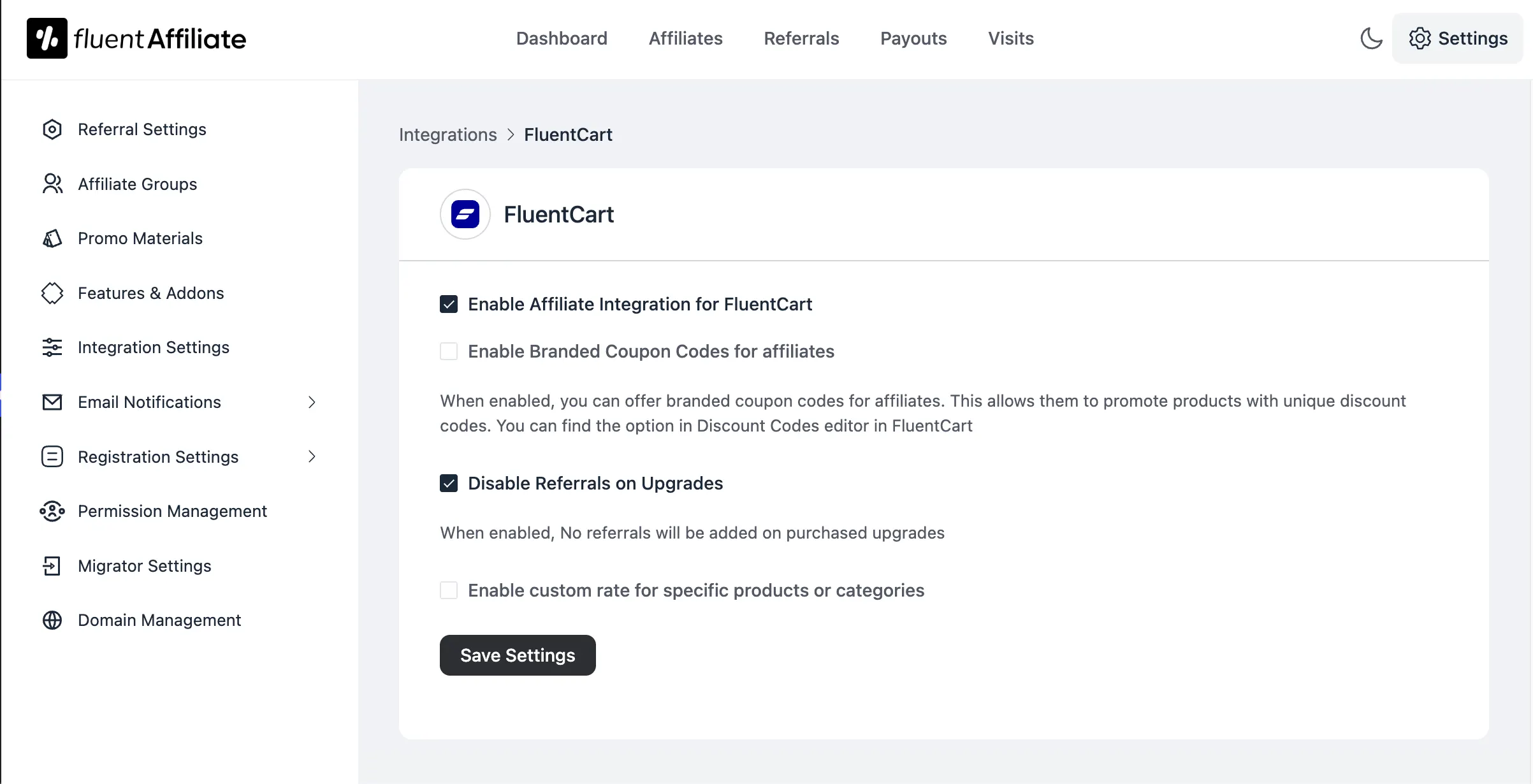
Go to FluentAffiliate, then Settings, then Integration Settings. Toggle FluentCart on and click Manage. Check the master switch for the integration. Decide now whether to enable branded coupons and whether to disable referrals on upgrades.
Step 5: Set your referral rules
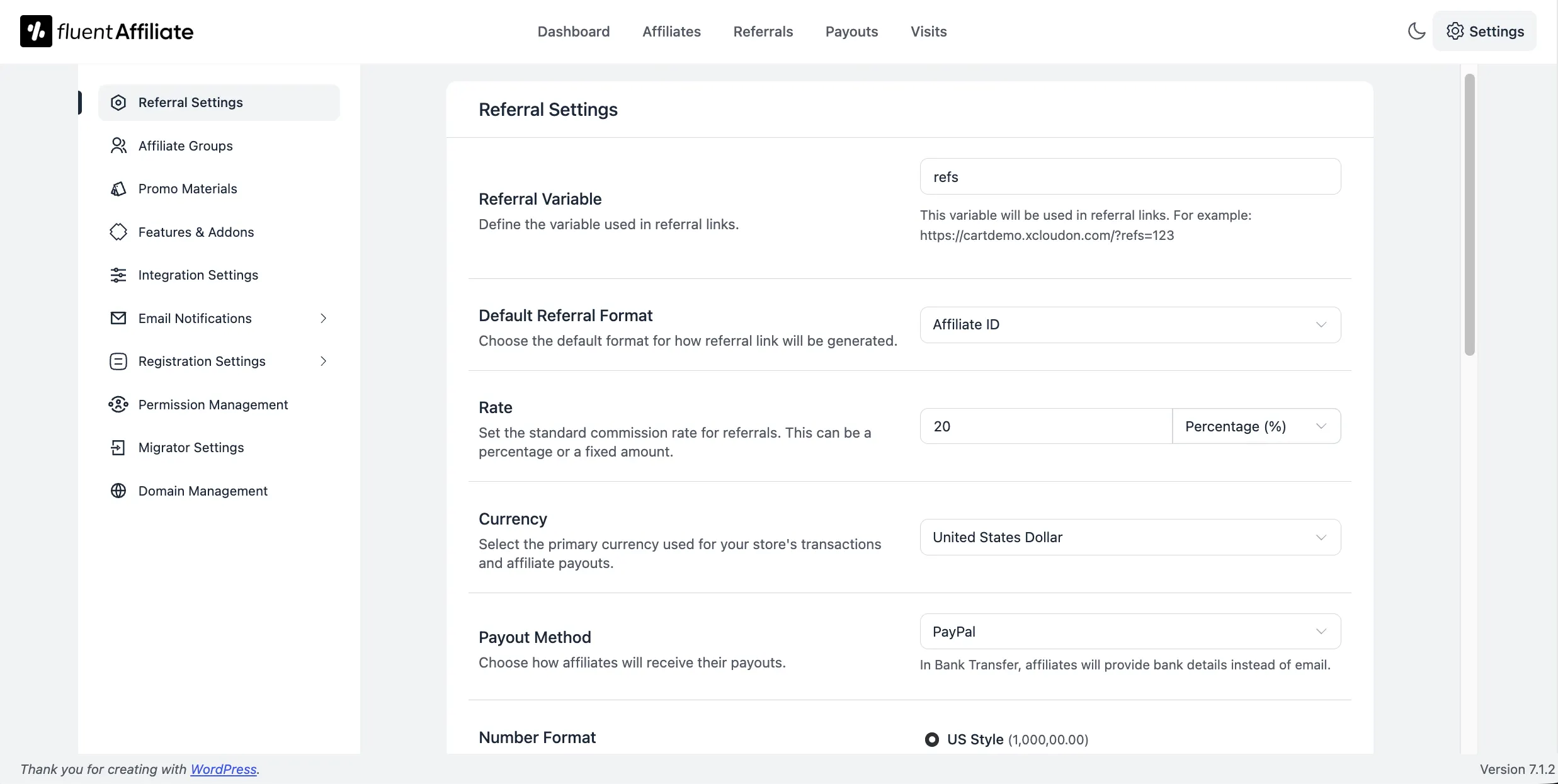
Open Referral Settings and set:
Step 6: Add custom rates for Product
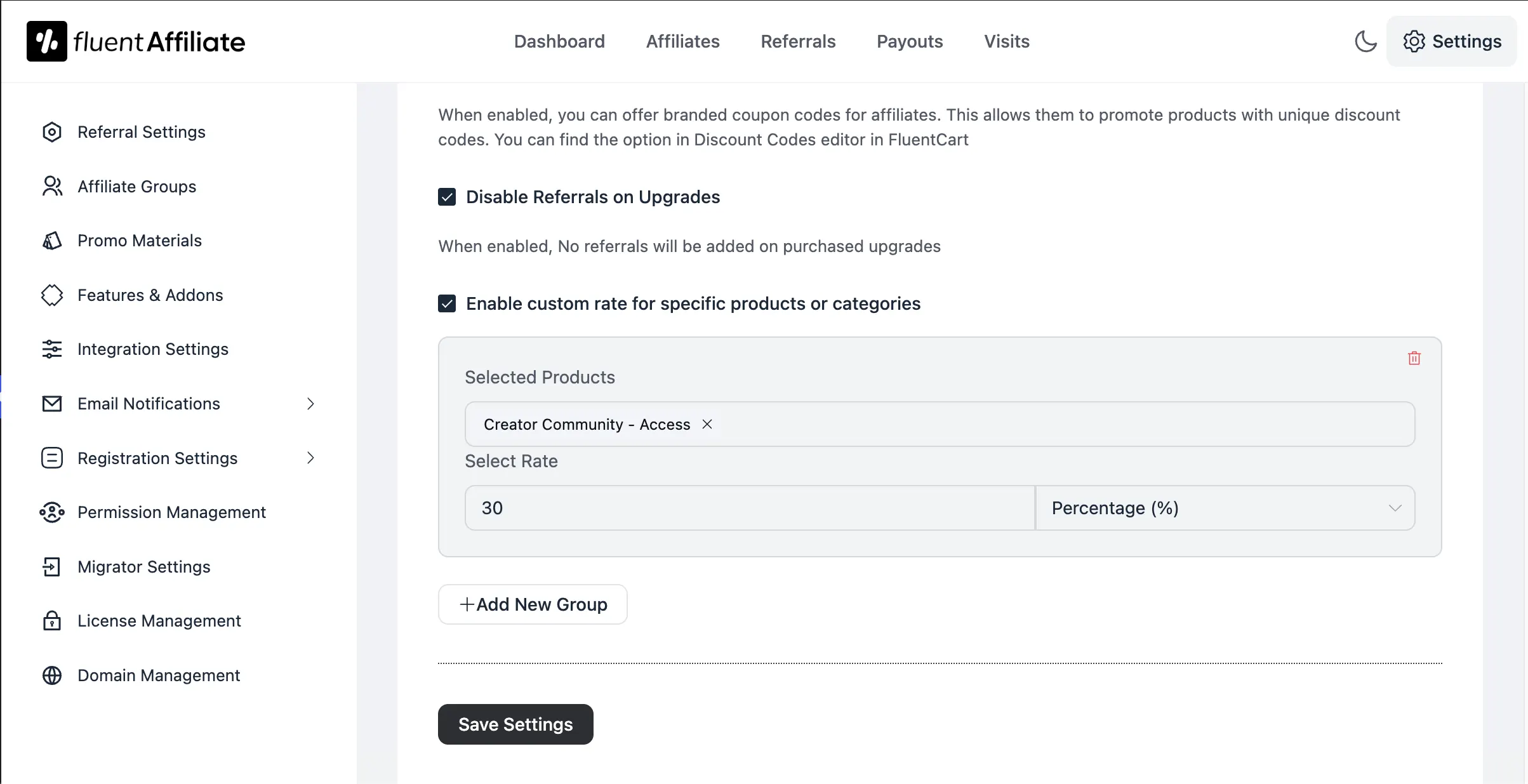
In the FluentAffiliate integration panel, enable custom rates for specific products or categories. This is the closest match to “commission groups” in other plugins, and we cover its limits in the caveats section.
Step 7: Build the affiliate area and registration form
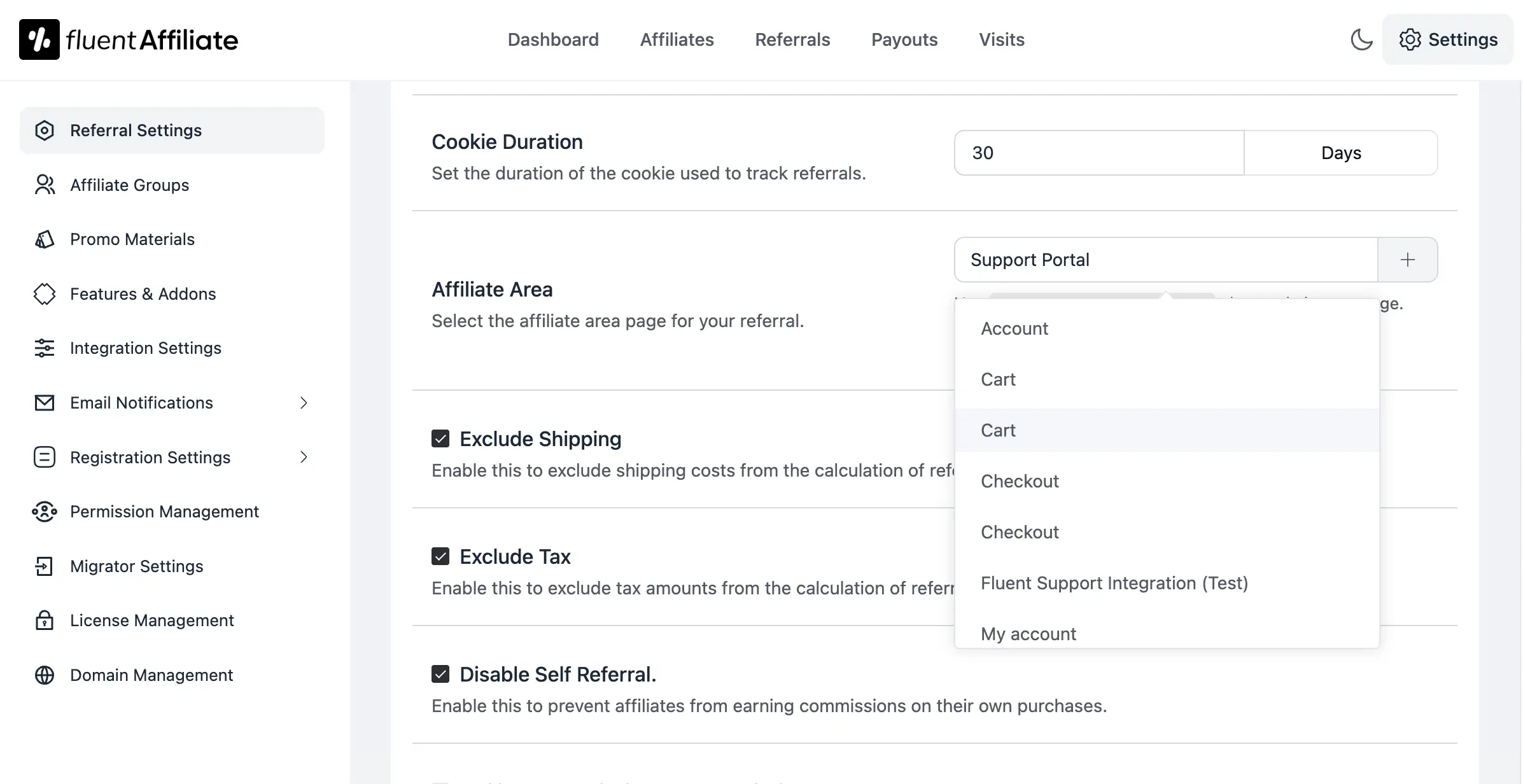
Create an affiliate page with the following shortcode.
[fluent_affiliate_portal]In Registration Settings, decide whether new affiliates need your approval. Add a field such as “How will you promote us?” so you can screen applicants.
Step 8: Run test orders before launch
Place test orders through a test affiliate link for every path: new subscription, renewal, refund, failed payment, trial, and upgrade. Check the FluentAffiliate referral status and the FluentCommunity access for each one. Fix anything that doesn’t match before you invite partners.
Choosing Commission Rates, Renewal Caps, and Cookie Windows
A good starting point is a 20% to 30% recurring rate, a renewal cap of 12 payments, and a 30-day cookie. FluentAffiliate’s own documentation uses a 20% rate and a 30-day cookie as example values. Adjust from there based on your margin and how long members stay.
Work the math on one referral
Say your membership costs $30 per month and you pay 25% on the first payment and on renewals, capped at 12 renewals.
The cap protects you if a member stays for years. It also keeps payouts predictable for your books. In FluentAffiliate, setting maximum renewal referrals to 0 removes the cap, so only do that on purpose.
Cookie windows and credit rules
A cookie window is how long after a click a purchase still counts. Thirty days suits most memberships. If you sell an annual plan that people research for weeks, try 45 or 60 days.
Credit rules decide who wins when a buyer clicks two affiliate links. First-click rewards the partner who introduced you. Last-click rewards the partner who closed the sale. Pick one, write it into your terms, and don’t change it mid-quarter.
Lifetime commissions
FluentAffiliate also offers lifetime commissions, which credit future direct purchases from a referred customer. For memberships, this can overlap with renewal commissions. Use one or the other for subscriptions, not both, unless you’ve run the numbers.
Recruiting Affiliates From Your Own Member Base
Your best affiliates are usually current members who already create content. They can describe the membership from the inside, which reads as a recommendation, not an ad. Start by inviting them personally, then open a public application once your terms and assets are ready.
Automate member signups
FluentAffiliate includes Auto Signup Affiliates on every plan, and its FluentCart integration can invite customers and subscribers to join your program. Pair that with approval turned off for existing members, so a happy member can start sharing the same day. Keep approval on for public applicants.
Give partners something to share
Affiliates promote more when they don’t have to write from scratch. Prepare a short kit:
Put the rules in writing
Write a short affiliate agreement. Cover how commissions are earned, when they’re paid, what counts as spam, whether partners can bid on your brand name in ads, and how they must disclose the relationship. In the US, the FTC’s endorsement guides require clear disclosure of paid relationships, so make that a condition of joining.
Caveats the Vendor Guides Skip
Every vendor guide, including this one, is written from the vendor’s side. These are the edge cases that cause real disputes between site owners and partners. Test each one on your own site before launch, because behavior can change between plugin versions.
Refunds and commission reversals
Some membership suites advertise automatic commission reversal on refunds. With the Fluent stack, FluentCart removes access on refund when you enable that rule. On the affiliate side, confirm how your FluentAffiliate version treats a refunded order. The safe habit: keep new referrals in Pending, and only pay commissions older than your refund window.
Free trials
If you offer a free trial, check what the $0 trial order creates. You may get a $0 referral, and the first paid charge may count as a renewal at the renewal rate. Decide which rate you want on that first paid charge, then test it.
Upgrades and downgrades
A member moving from Basic to Inner Circle can trigger a new referral. FluentAffiliate has a “Disable Referrals on Upgrades” option for FluentCart. Turn it on if you don’t want to pay twice for the same member.
Tier-based affiliate rewards
MemberPress promotes Commission Groups in Easy Affiliate, which raise an affiliate’s rate based on their own membership level. FluentAffiliate gives you affiliate groups and per-product rates, but check whether a group can be assigned automatically from a member’s tier. If not, assign groups by hand for now.
Coupons that stack
If members already have a discount and affiliates get branded coupons, a buyer might stack both. Set coupon rules in FluentCart so affiliate codes don’t combine with deep member discounts.
Self-referrals
Members who become affiliates may try to buy through their own link. Turn on Disable Self Referral in Referral Settings.
Lifetime deal availability
FluentAffiliate’s current pricing is listed as introductory. Lifetime offers across WordPress plugins tend to end, so check the pricing page on the day you buy.
Tracking What Matters After Launch
Track four numbers each month: referred signups, referred member retention, commission cost as a share of referred revenue, and active affiliates. Sales count alone is misleading for memberships. An affiliate who sends ten members who stay a year beats one who sends thirty who leave in a month.
For more metrics worth watching, see our list of ecommerce KPIs to track.
Frequently asked questions
How do membership affiliate programs work?
A partner shares a tracked link or coupon. When someone subscribes through it, the affiliate plugin records a referral and a commission. If recurring commissions are on, each renewal creates another referral until the cap is reached.
What is a good commission rate for a membership site affiliate program?
This guide suggests starting between 20% and 30% of the subscription price, paid on renewals with a cap. Your margin and average retention should set the final number.
Can I use FluentAffiliate with MemberPress or Paid Memberships Pro?
Yes. FluentAffiliate lists integrations with both. You can keep your membership plugin and switch only the affiliate layer.
Do I need FluentCommunity to run a membership affiliate program with FluentCart?
No. FluentCart and FluentAffiliate can run a subscription affiliate program alone. FluentCommunity adds the gated spaces, courses, and member profiles, with access tied to the subscription. You can use LearnDash and LifterLMS too in thius exact setup.
Where does my affiliate data live?
All three plugins run on your own WordPress site, so member, order, and referral data stays in your database. That helps with privacy reviews and GDPR requests.
Wrapping Up
You now know what makes membership affiliate programs hold up past the first sale: billing, access, and commissions reacting to the same order. You’ve seen what the setup costs, where it saves money, and which edge cases to test.
Don’t launch with five tiers and a complex rate table. Launch with one tier, one recurring rate with a cap, and a refund you’ve already tested end to end. Invite ten members who create content. Expand once the first payouts go out cleanly.
Ready to build it?

Rasel leads the marketing function at FluentCart, driving both high-level strategy and ground-level execution across the product’s growth engine. He plays a central role in defining how FluentCart is positioned, how it enters the market, and how it evolves based on user behavior and feedback. His responsibilities span go-to-market planning, funnel architecture, conversion strategy, and narrative development. He works across teams to ensure that product decisions, marketing efforts, and customer experience stay tightly aligned.

Subscribe now
Related Articles and Topics
-

Bundle Marketing: An eCommerce Guide for Store Owners
Bundle marketing guide: types, pricing math, examples, and a FluentCart setup.
-

Best Membership WordPress Plugin: 8 Options Compared for 2026
Compare the best membership WordPress plugin options for 2026 by use case.
-

How to Build an Online Community With FluentCart
Learn how to build an online community with FluentCart and FluentCommunity, from planning access levels to testing the…




Add your first comment to this post