
FluentCart Q3 2026: 12 Releases and the Problems They Solve

While using the first versions of FluentCart, selling subscriptions meant your payment gateway had to support recurring billing. By end of September, that rule was gone. So was the need for a separate Review plugin, the shortcode workarounds for people building with Divi, and the limitations that kept WooCommerce stores from moving.
From 1.5.2 on July 1 to 1.7.0 on September 29 we shipped 12 releases. That literally averages out to one major release every week. We’ve done our best to make each of these features solve a pressing and specific problem for fast growing stores. Each feature required us to make some decisions about development and user experience. Today we take you on a tour of what shipped, why it was necessary and some musings from the development team that put our decisions in context.
TL;DR
What the FluentCart Team Worked On
The work centered on five problems store owners raised again and again. These include things from gateway-bound subscriptions and the cost of switching platforms, to page builders that needed workarounds, and trust signals that lived in other plugins.
In this quarter, the Cart team worked on:
Ofcourse that isn’t all. Every release also carried payment fixes, tax accuracy work, and security hardening. Some of those changes matter more to a busy store than the headline features, so they get their own sections below.
Here is every Q3 release at a glance, with a link to its full notes.
| Version | Date | Headline |
|---|---|---|
| 1.5.2: more ways to get paid | Jul 1 | SSLCommerz, Elementor widget library, Paddle reconciliation |
| 1.5.3: a store that answers | Jul 9 | AI profit and forecast answers, tax display styles |
| 1.5.4: new blocks, steadier rails | Jul 17 | Bricks Blocks add-on, cross-site attribution, AI search |
| 1.5.5 | Jul 17 | PayPal confirmation hardening (see changelog) |
| 1.6.0: subscriptions on your terms | Jul 29 | Store-managed subscription engine |
| 1.6.1: built into the Divi Builder | Aug 11 | Divi 5 modules, saved payment methods |
| 1.6.2: bring your WooCommerce store | Aug 20 | WooCommerce migration, data export |
| 1.6.3 | Aug 22 | Advanced Variations price fixes (see changelog) |
| 1.6.4: product videos | Sep 11 | FluentPlayer video, test-mode protection, Cart block |
| 1.6.5: in your own colors | Sep 24 | Appearance settings, verified accounts, gateway audit |
| 1.6.6 | Sep 25 | Theme color matching follow-up (see changelog) |
| 1.7.0: reviews, built in | Sep 29 | Product reviews and star ratings |
*Table Powered by NinjaTables
Store Managed Subscriptions
FluentCart subscriptions in Q3 moved from gateway-managed to store-managed. Since 1.6.0, the store can create renewal orders, email payment links, retry failed charges, and track every state itself. Any gateway you offer at checkout can collect a renewal, and 1.6.1 added saved cards and PayPal accounts on top.
The Problem:
Your gateway decided whether you could sell subscriptions
Before 1.6.0, recurring billing worked only if your gateway supported it. Many smaller and regional gateways offer no subscription feature at all. Others that do often charge an extra fee for it. Having to work subscriptions this way never sat right with me. So we built it to be better.
We Built a Store-managed Subscription Engine (1.6.0)
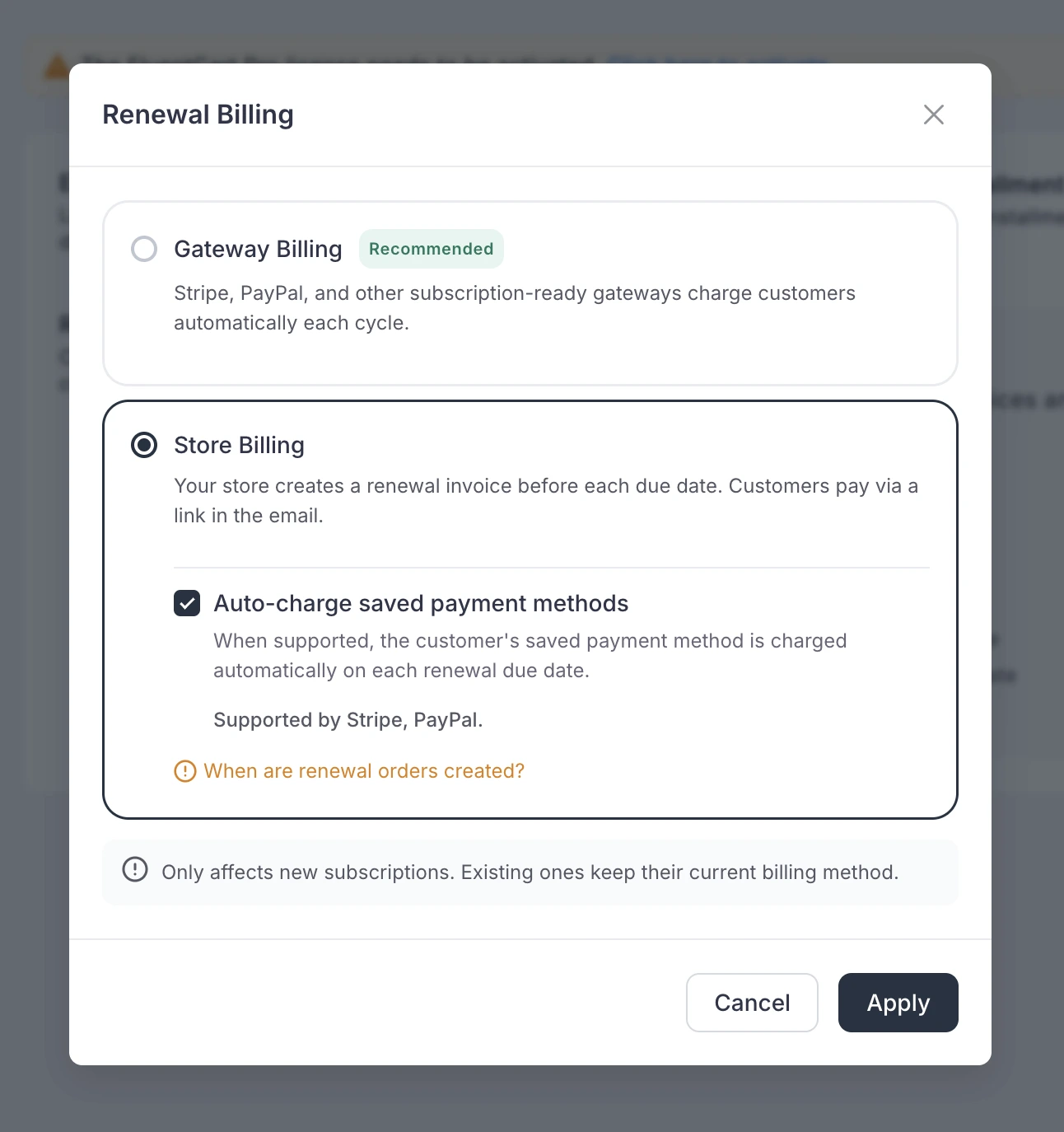
A new setting asks one question: who manages subscriptions, the gateway or your store? The default leaves everything as it was. Switch to store-managed mode, and FluentCart runs the renewal cycle. It creates a renewal order ahead of the due date and emails the customer a payment link.
The lead time follows the billing interval. Weekly renewals appear three days early, monthly ones a week early, and quarterly through yearly ones fifteen days early. Each renewal goes through as a normal one-time payment. That is why recurring billing now works over cash on delivery or bank transfers too.
Your subscriptions charges aren’t tied to any particular gateways capabilities. That’s the freedom we wnated to give store owners. To be able to recieve payments under any circumstance.
This is a store-wide billing decision, so changing it takes a confirmation step. It also only affects subscriptions created after the switch. A customer already mid-cycle keeps billing the way their subscription started. Flipping the setting never disturbs live revenue.
To find it, update FluentCart and go to Settings → Subscription Settings. The subscription engine ships in free core.
Renewals that Charge Automatically (if you allow it)
Some stores want automatic renewals without handing the whole cycle to the gateway. 1.6.0 added an opt-in middle path on Stripe and PayPal. The store saves the customer’s payment method at checkout and charges renewal orders on the due date.
It is off by default, so no store starts saving cards until you, as in the owner decides it should. Free trials still save the payment method up front, so the first real renewal charges cleanly. When a charge fails, the engine retries on a schedule matched to the interval and escalates from past due to expired if nothing lands.
The subscription screen was rebuilt around this. Admins can pause, resume, skip a period with a reason, reactivate, and edit the amount, schedule, and next billing date.
Two quick actions, Charge Now and Charge Next Renewal Now, handle timing. A badge on every subscription shows how it bills: gateway, store-managed, or auto-charge.
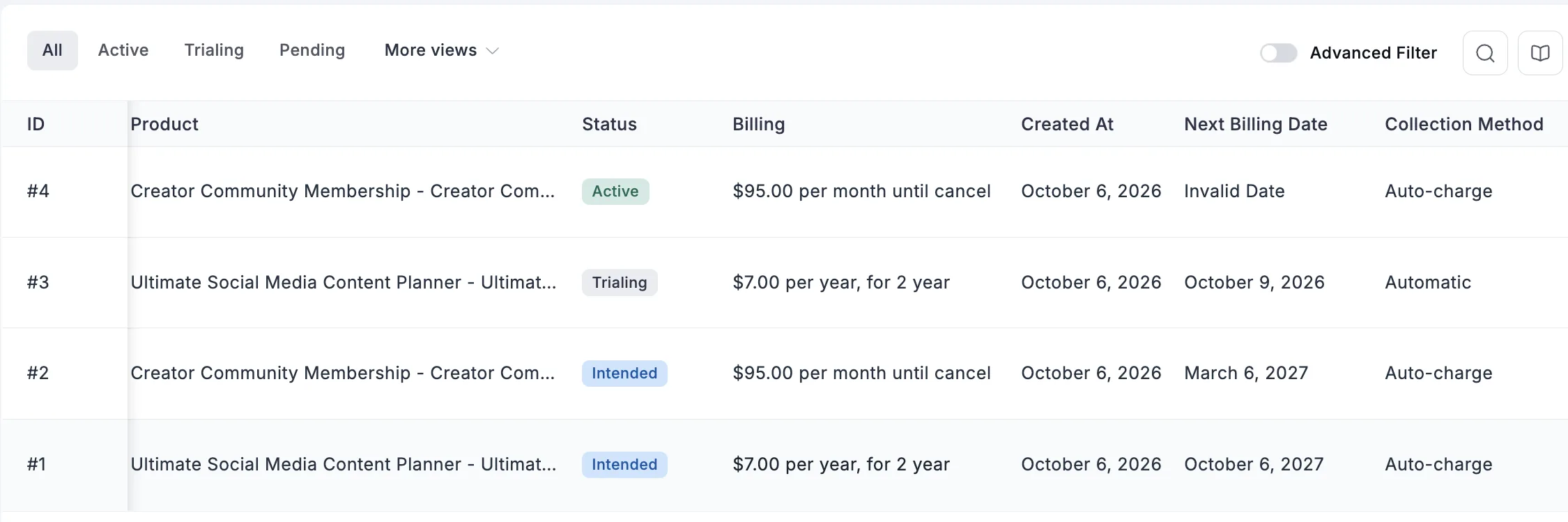
For Pro stores, a renewal paid through Mollie, Authorize.Net, or Paddle can move the subscription from manual to automatic billing on the spot. Paddle subscriptions also gained pause and resume.
Saved Cards and PayPal Accounts (1.6.1)
Repeat customers pay a small tax on every order: find the card, type the digits, get the expiry right. For invoice-driven stores, that friction shows up as slow payments and abandoned renewals. FluentCart Pro 1.6.1 added Saved Payment Methods for both cards and PayPal accounts.
Customers save a method at checkout and manage it from a Payment Methods page in their account. Open invoices and renewals get an instant Pay Now button. A saved PayPal account completes payment in place, with no trip to PayPal and back.
The design choice: removing a saved PayPal account also revokes it at PayPal. Nothing stays chargeable after the customer takes it away. Saving is always opt-in, and the store owner controls the whole feature from one setting. If a PayPal account isn’t approved for saving, the owner sees a message instead of silent failure.
Failed Renewals No Longer Pass in Silence
Failed renewal charges used to slip by without a word. 1.6.1 sends a notification when a renewal fails, to the customer by default and optionally to the store owner, with the reason the payment provider gave. A Stripe renewal that succeeds after an earlier failure now records properly.
In 1.6.4, overdue reminders became three stages: first, follow-up, and final. Each has its own template and subject and follows the schedule you configure. Next billing dates and license validity now anchor on the day an order was paid, not the day it was created. An invoice paid weeks late no longer shortens the customer’s term.
Staging Sites can No Longer Bill Live Subscribers (1.6.4)
Cloning a live store to staging is routine. The trouble starts when the copy keeps doing live work: charging saved cards, creating invoices, and emailing customers. 1.6.4 added test-mode protection. On a test-mode site, billing, reconciliation, and reminder emails run only for subscriptions that match the site’s mode.
Live subscriptions on a test copy are held, and the Charge Now button explains why. The setting is on by default. The money line is short though.
Your staging site can’t bill your live customers anymore.
The Gateway Work under The Engine
A subscription engine is only as good as the gateways under it. Much of the quarter’s quiet work went there.
The audit had a specific goal: bad days. A timeout that swallows a response, a card declined on the first cycle, a refund notice that arrives late. Authorize.Net now adopts a charge that succeeded even when the response never came back. Mollie deduplicates charges so one checkout produces one payment.
WooCommerce Migrator
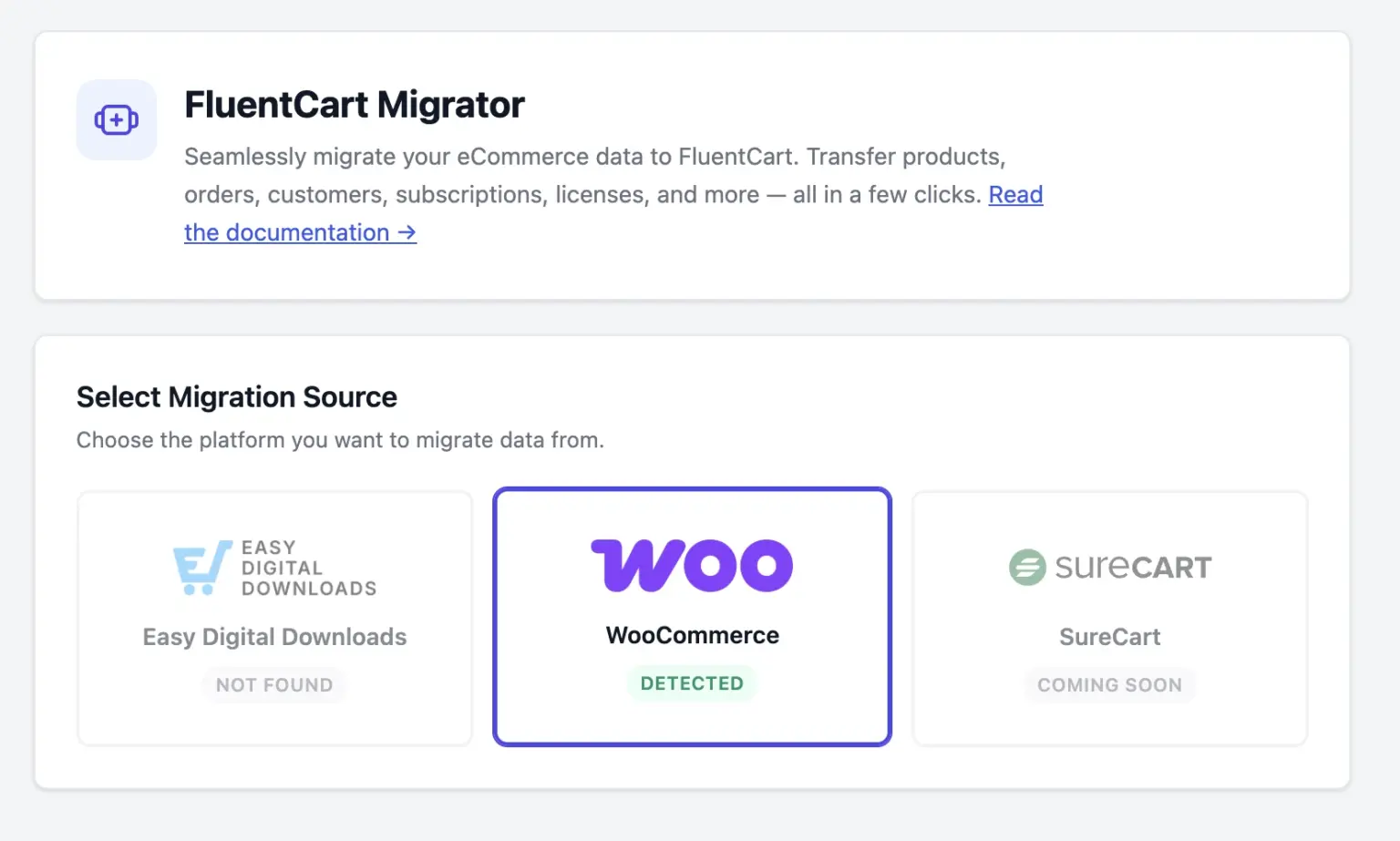
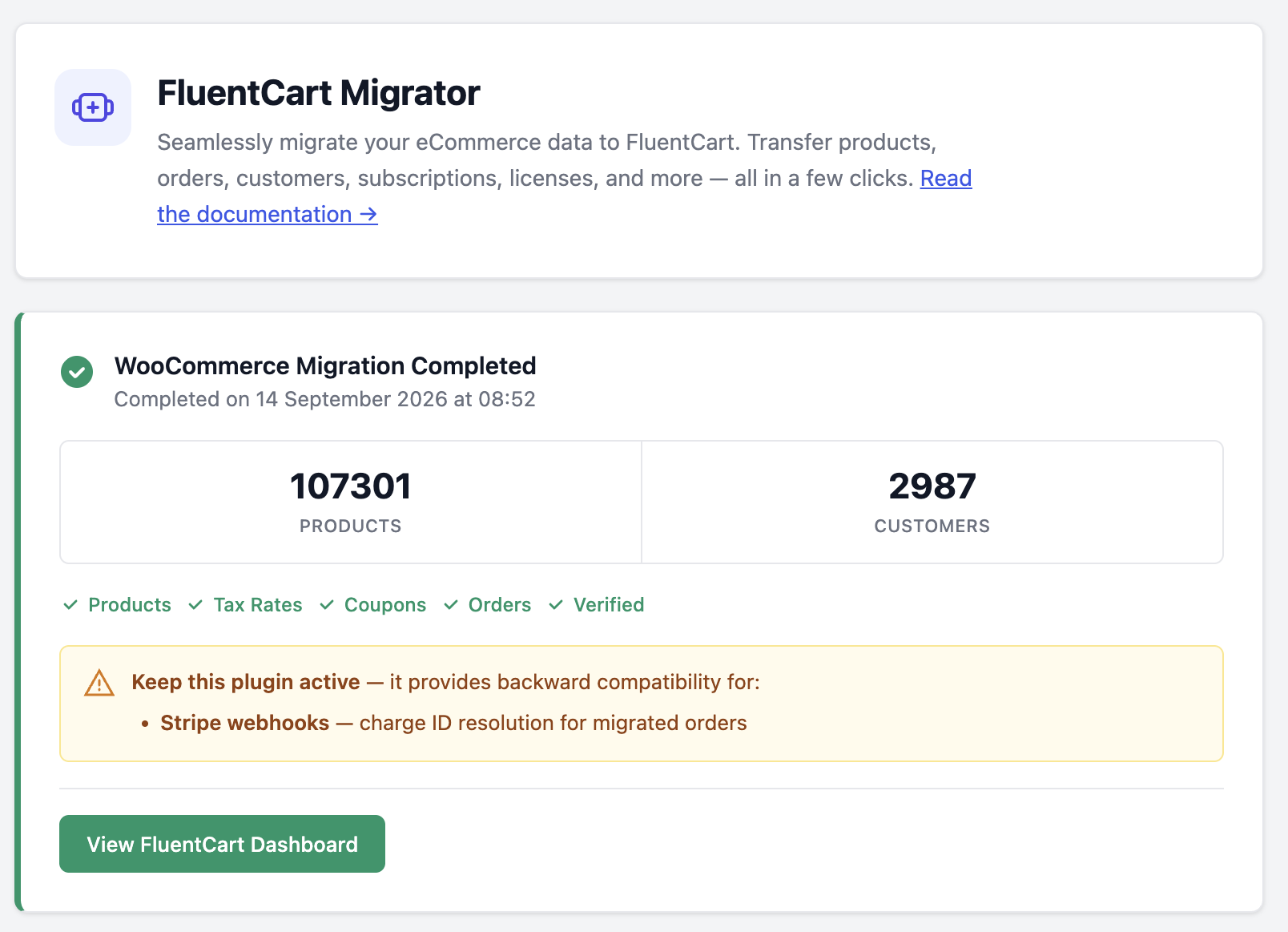
The WooCommerce to FluentCart migration shipped in 1.6.2 through FluentCart Migrator 1.1.0. It moves products, orders, customers, coupons, tax rates, and WooCommerce Subscriptions, keeping original order numbers, Stripe payment intents, and PayPal transaction IDs. Large stores can run it from WP-CLI, and every step is resumable.
The problem:
Years of eCommerce records are hard to rebuild
Switching platforms is the decision store owners put off. The new platform isn’t the risk. The move is. Order history, coupons printed on flyers, tuned tax rates, and live subscriptions can’t be rebuilt by hand. A migration is only worth doing if all of it arrives.
What The Migrator Moves
The wizard checks compatibility first, then shows what it found: products, orders, customers, coupons, subscriptions, gateways in use, and order statuses. You see the shape of the move before anything is written. It then runs seven steps in order, ending with a recount that rebuilds coupon usage and customer lifetime value.
Orders arrive with original numbers, line items, refunds down to the line, addresses, coupons, tax breakdowns, and shipping status. Every order note moves into the FluentCart activity log. Grouped products and WooCommerce Product Bundles become FluentCart bundles. Categories keep their hierarchy.
The design choice: WooCommerce attributes map into one shared attribute library. A store with color and size across two hundred products ends up with two attributes, not four hundred. The migrator also fills store settings only where FluentCart has no value yet, and payment API keys never move. Transaction records transfer; credentials don’t.
Why Subscriptions were The Hard Part
WooCommerce Subscriptions bills from the store, not from a gateway-side plan. That meant FluentCart needed its own store-managed billing first. Subscriptions were the hard part, and that’s the real reason we needed to build the Store-managed Subscriptions
That is the link between 1.6.0 and 1.6.2. The subscription engine was the foundation for migration paths, and it shipped three weeks before the migrator. Migrated subscriptions land on store-managed billing with status, interval, amounts, trial, and dates intact.
A subscription with a saved Stripe card keeps auto-charging from FluentCart on its next due date. Everyone else moves to invoice-based renewals through the payment link flow. Nobody’s renewal falls into a gap if they choose to migrate through the offical migrator addon.
Why Ship It as Its Own Plugin
The migrator is a separate plugin that runs beside FluentCart. We decided to keep it separate so it can improve fast without waiting on core releases. It is in beta and available as a download, on GitHub, or from Settings → Features & Addons → Plugin Addons.
The same wizard already carries Easy Digital Downloads stores, as covered in the EDD to FluentCart migration guide. For large stores, one command runs the whole move:
wp fluent_cart_migrator migrate_from_woo --allAs with all things WordPress we recommend backing up, testing on staging, and connecting the same Stripe account WooCommerce used before hitting migrate all!
Building with The Community
Paul Charlton from WPTuts took a real WooCommerce store through the migrator and recorded the process. His WooCommerce to FluentCart migration walkthrough shows what comes over, including variations, order notes, and subscriptions.
Store owners shaped the scripts too. Before launch, we invited WooCommerce and SureCart owners to migrate with the team on a call, so real stores could test and improve the migration scripts. He also asked readers which migrator they want next.
I share all this and more on the FluentCart community first!

Data Exports (1.6.2)
The amount of data a mdoern eCommerce store generates is massive to say the least. And that data needs to fulfil a lot of requirements. Finance wants last quarter’s orders. Support wants every active license.
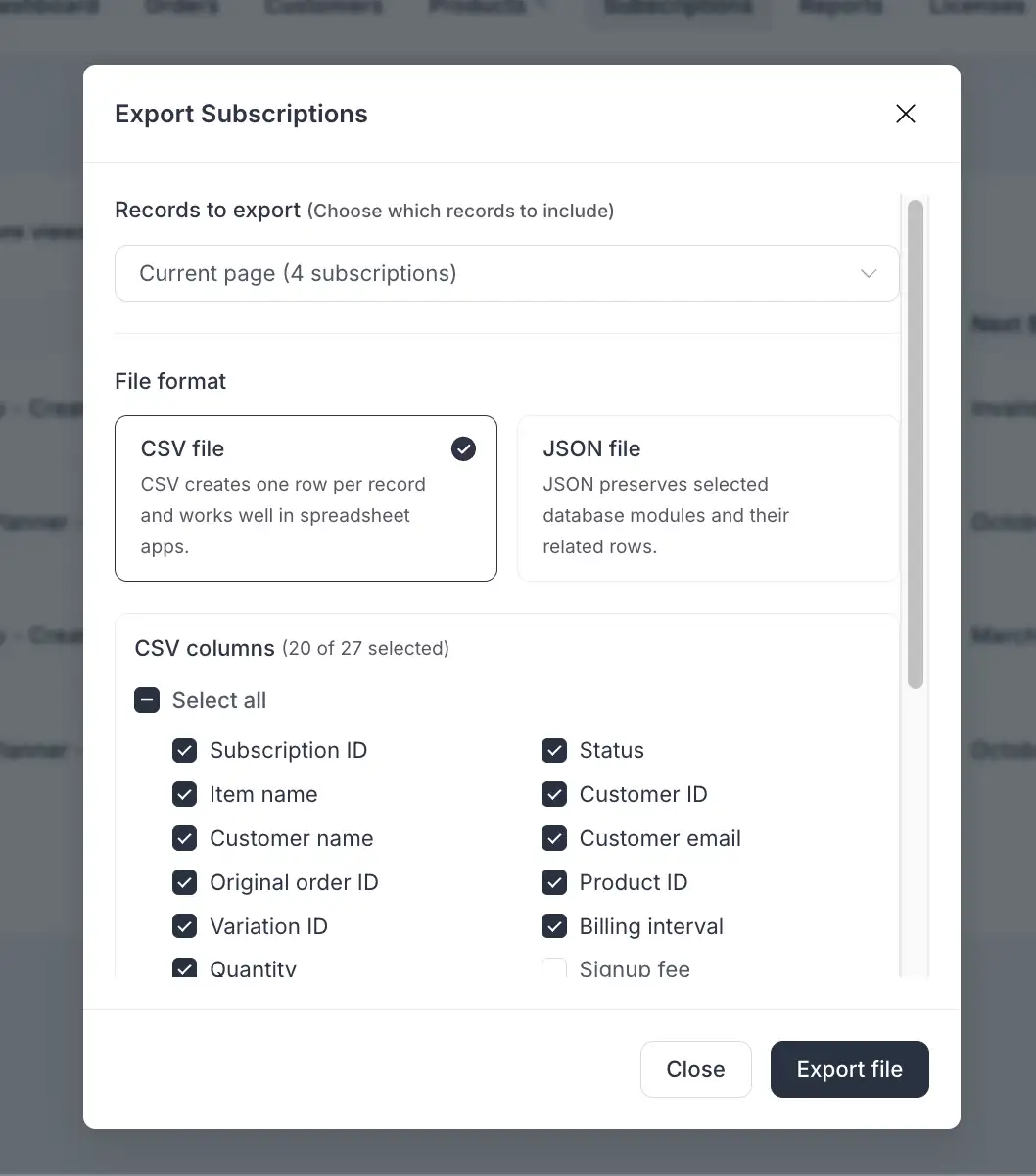
Before 1.6.2, these requests meant a workaround. Now Orders, Customers, Subscriptions, and Licenses each have an Export action under More actions on the list screen.
Pick the current page, a selection, everything matching your filters, or all records. Choose CSV with a column picker or JSON with related data. The dialog warns when a filter is active, so a partial export is never a surprise.
The design choice: exports never include payment credentials or activation secrets, and spreadsheet formulas can’t be smuggled in through a cell. New role permissions control who may export. The export engine ships with Pro, and on a free store the dialog says so plainly.
FluentMCP
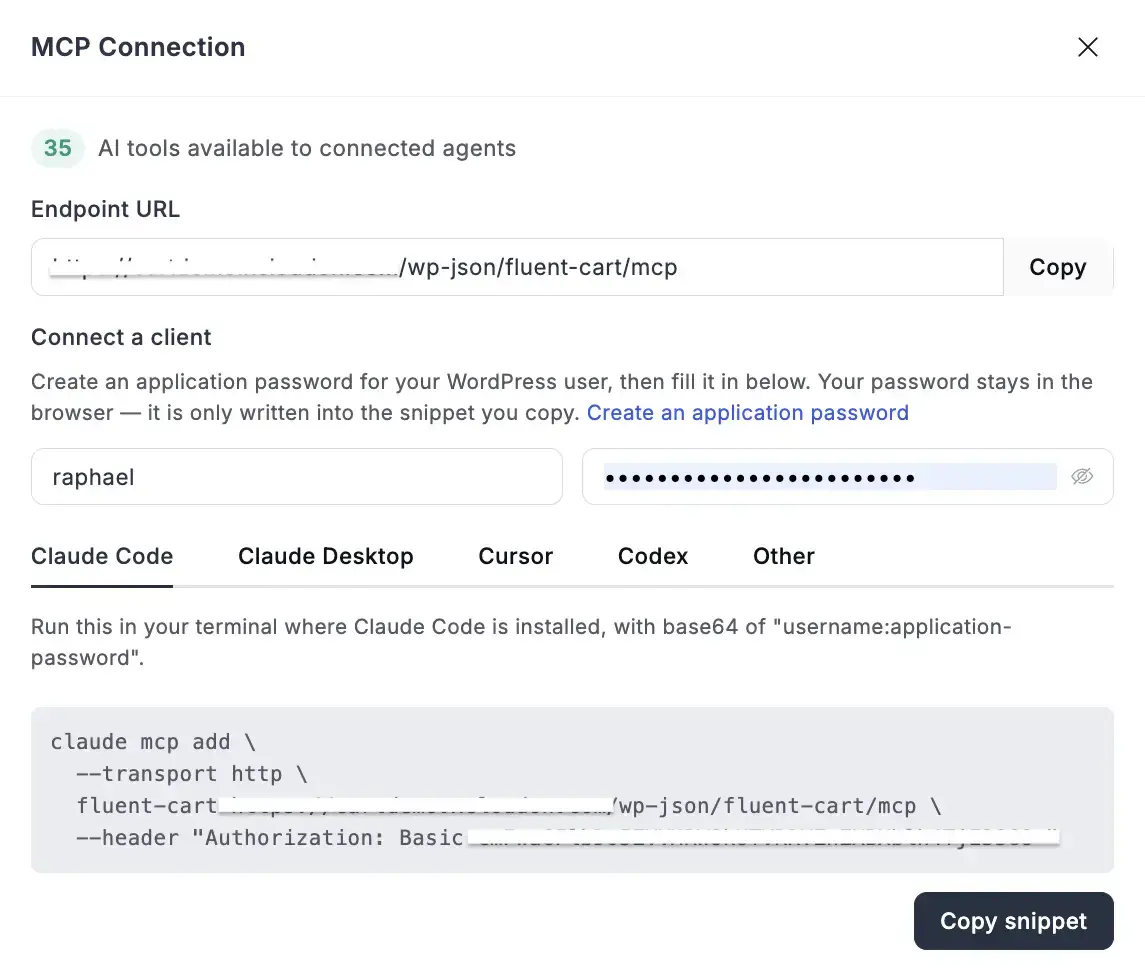
FluentCart’s MCP connection lets an AI assistant answer questions from live store data. In Q3, those answers went deeper. 1.5.3 added product profit after cost and discount, renewal forecasts, and ledger access. 1.5.4 added precise search across orders, customers, products, and subscriptions, with strict guardrails on any action that moves money.
The problem:
An assistant that could fetch but not advise
FluentCart could already talk to AI assistants before Q3. What it could tell you was mostly a list: orders, customers, revenue. The questions owners ask sit one layer deeper. Which product carries the store? What gets charged next week? Is this month’s refund count a blip?
We Built Profit, Forecasts, and The Ledger (1.5.3)
1.5.3 taught the connection three things. First, it reports what a product earns once cost and discounts come out. The assistant also lists which subscription payments come due, and when. And it reads the payment and refund ledger directly, so a question about a specific charge gets a specific answer.
Reporting grew up alongside it. Reports now handle real date ranges down to the hour. Live figures exclude test-mode orders. Long answers page cleanly, and per-product figures carry discount and margin detail. In 1.5.4, search got much sharper across orders, customers, products, and subscriptions, with rich filtering behind it.
The design choice: answers are free, actions are not
Giving an assistant a view of your store is one thing. Giving it a refund button is another. FluentCart treats them differently.
An assistant connects as a real WordPress user with a real FluentCart role, through an application password you can revoke. It sees what that person would see, no more. Where money moves, a second gate applies. A refund or cancellation needs a preview first, pinned to the order’s current state.
If the order changes in between, the preview goes stale and the action is refused. A retried refund returns the first result instead of sending a second. The feature ships switched off, in free core, under Settings → Features & Addons as “MCP for AI Agents.”
How I’ve Been Using it
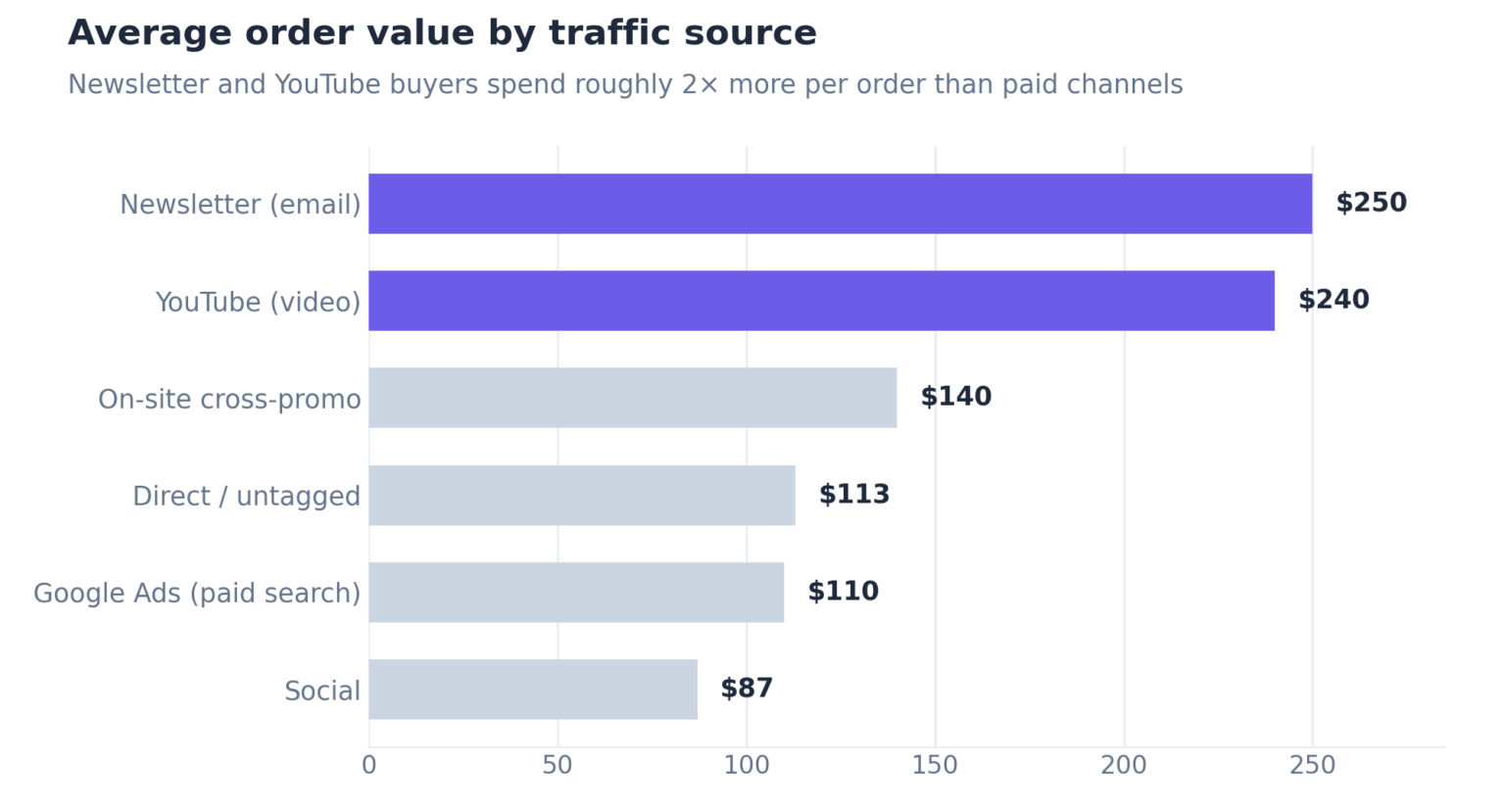
The MCP is hands down the FluentCart feature I use almost everyday. It is the first thing I open each morning, before email and Discord. I’ve already written up the exact questions I ask the store every morning, from 30-day sales comparisons to revenue by traffic source and renewals at risk.
One of those answers even changed my ad budget. A breakdown by traffic source showed our newsletter and YouTube buyers were worth more per order than paid channels. So went back to writing better emails instead of raising ad spend.
Major Page Builder Support
We added native elements for three page builders in Q3 2026. Elementor got a full widget library in 1.5.2, Bricks got a dedicated add-on with 15 blocks in 1.5.4, and Divi 5 got 18 modules and 8 layouts in 1.6.1. The block editor gained a Cart block in 1.6.4.
The problem:
A pretty page and a working checkout are two different things
Store owners who design in a page builder used to stitch FluentCart in with shortcodes, custom CSS, and theme templates. We were never proud of that experience.
The page looked one way in the editor and another way live. Every builder needed its own workaround.
The design choice behind all three: Each builder integration renders FluentCart’s own storefront output, not a rebuilt copy of it. Pricing rules, variations, subscriptions, coupons, and taxes behave the same inside Elementor, Bricks, or Divi as anywhere else. Styling flows through each builder’s own controls, so there is no separate stylesheet to maintain.
Elementor (1.5.2, free from 1.6.0)
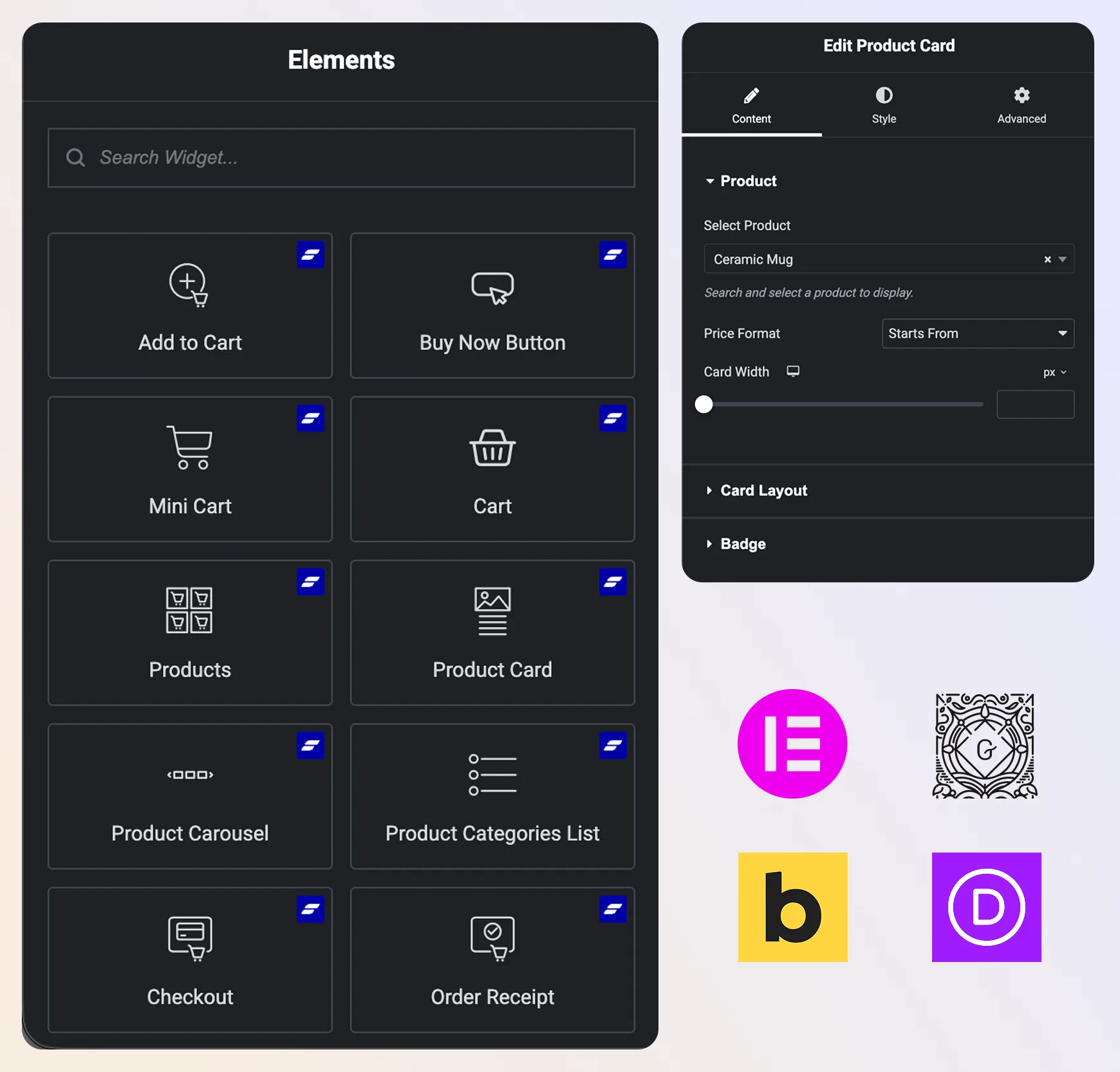
1.5.2 turned the Elementor add-on into a full widget library. It covers checkout, cart, mini cart, Buy Now, shop with product tables, carousels, category lists, search, and a store logo. A Theme Builder set handles single product pages, including a Product Info widget whose sections you can drag into any order.
In 1.6.0, Elementor blocks became available as an add-on for free FluentCart stores. Page-builder users no longer need Pro to place FluentCart elements.
Bricks (1.5.4, 1.6.0, 1.6.4)
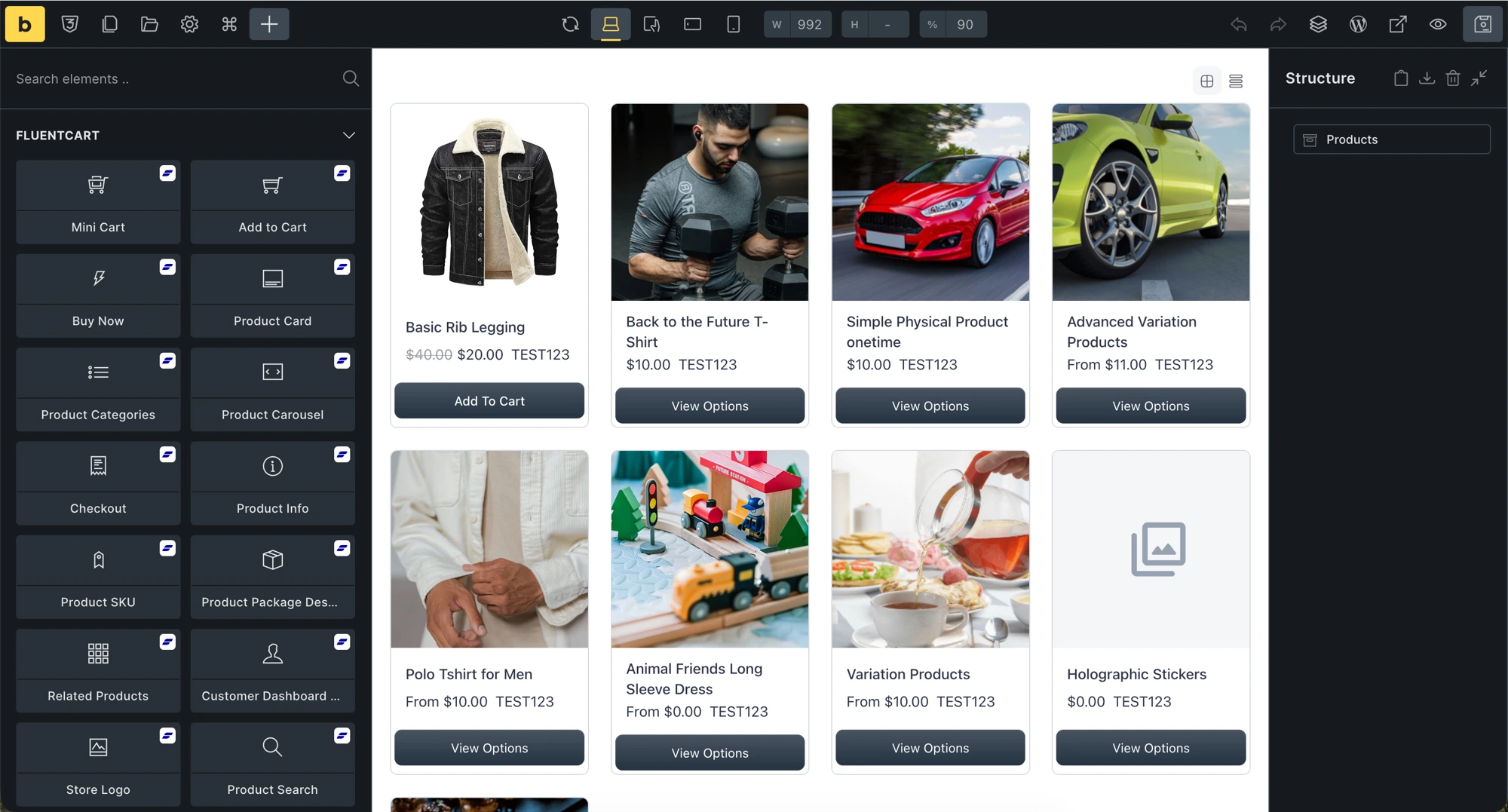
The FluentCart Bricks Blocks add-on arrived in 1.5.4 with product grids, cards, add to cart and buy now buttons, checkout, mini cart, search, related products, and the customer dashboard. A new step in the Getting Started checklist walks new stores through setup.
Bricks kept improving through the quarter. 1.6.0 added controls for empty categories and tags. 1.6.4 added Sale and Sold Out badges on Products Collection, with text, discount percentage, shape, and position controls. Default filters now let a collection open with a preset search and category.
Divi 5 (1.6.1)
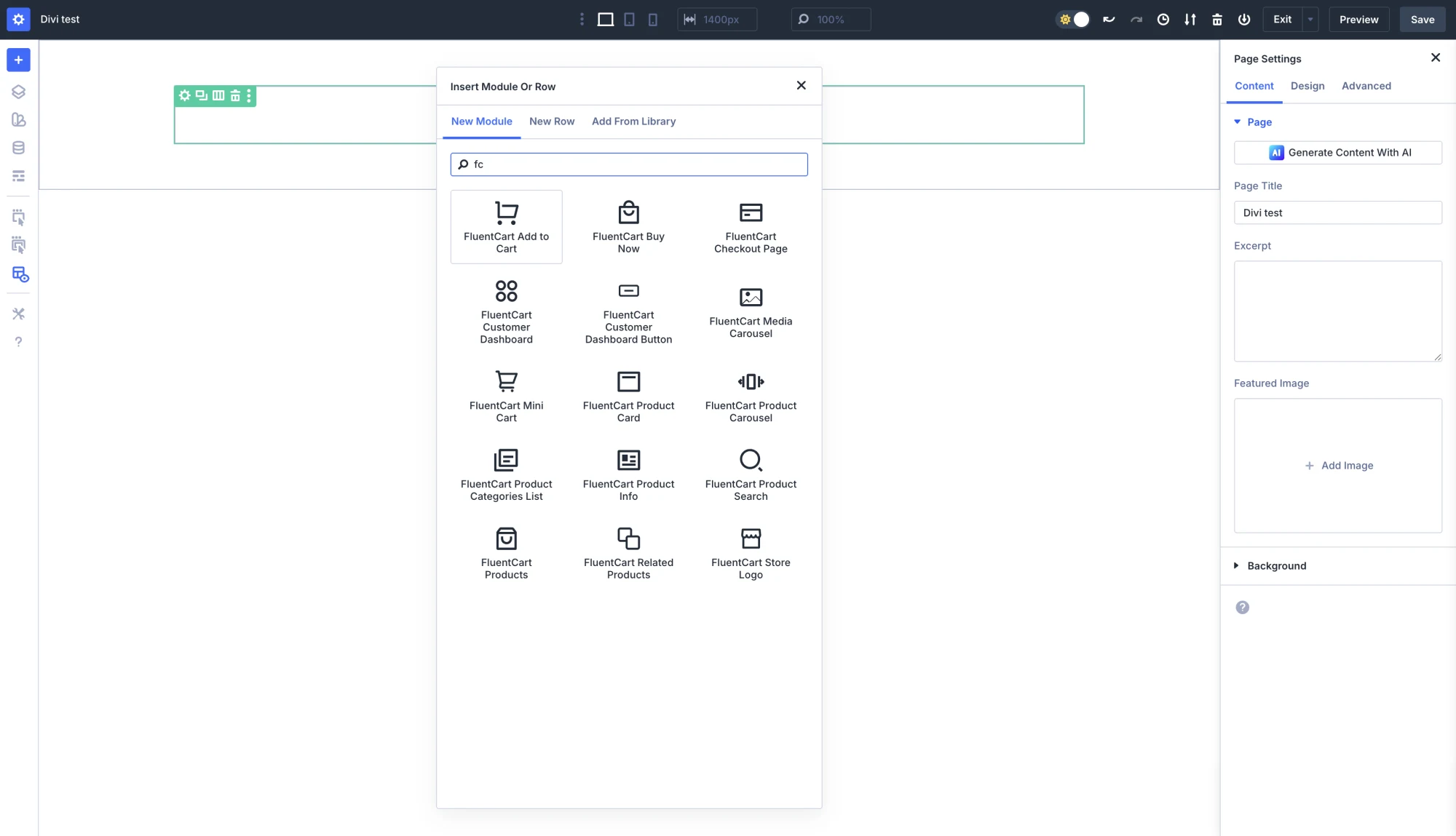
Divi users had two options before 1.6.1: accept default templates or rebuild with shortcodes. FluentCart Divi Blocks puts 18 native modules in the Divi 5 Visual Builder, in their own folder. Type “fc” in the module picker to find them.
The product modules preview for real on the canvas, with actual products, prices, variations, and badges. No grey placeholder boxes. Eight ready-made layouts land in the Divi Library: Shop, Single Product, Cart, Checkout, Thank You, Product Category, Customer Dashboard, and Campaign Landing.
The design choice: one Product Category layout covers every category and brand archive. The Archive Header and catalog modules scope themselves to whatever the shopper is browsing. That avoids a separate layout for each term.
Mak foudner of SiteKrafter published a video from the Divi beta the week before launch, which gave Divi users an early look.
The Block Editor and Buy Now
1.6.4 added a Cart block with Cart Items, Cart Total, and Checkout Button child blocks. The cart page can now be laid out like any other block page, matching what the Checkout block already offered.
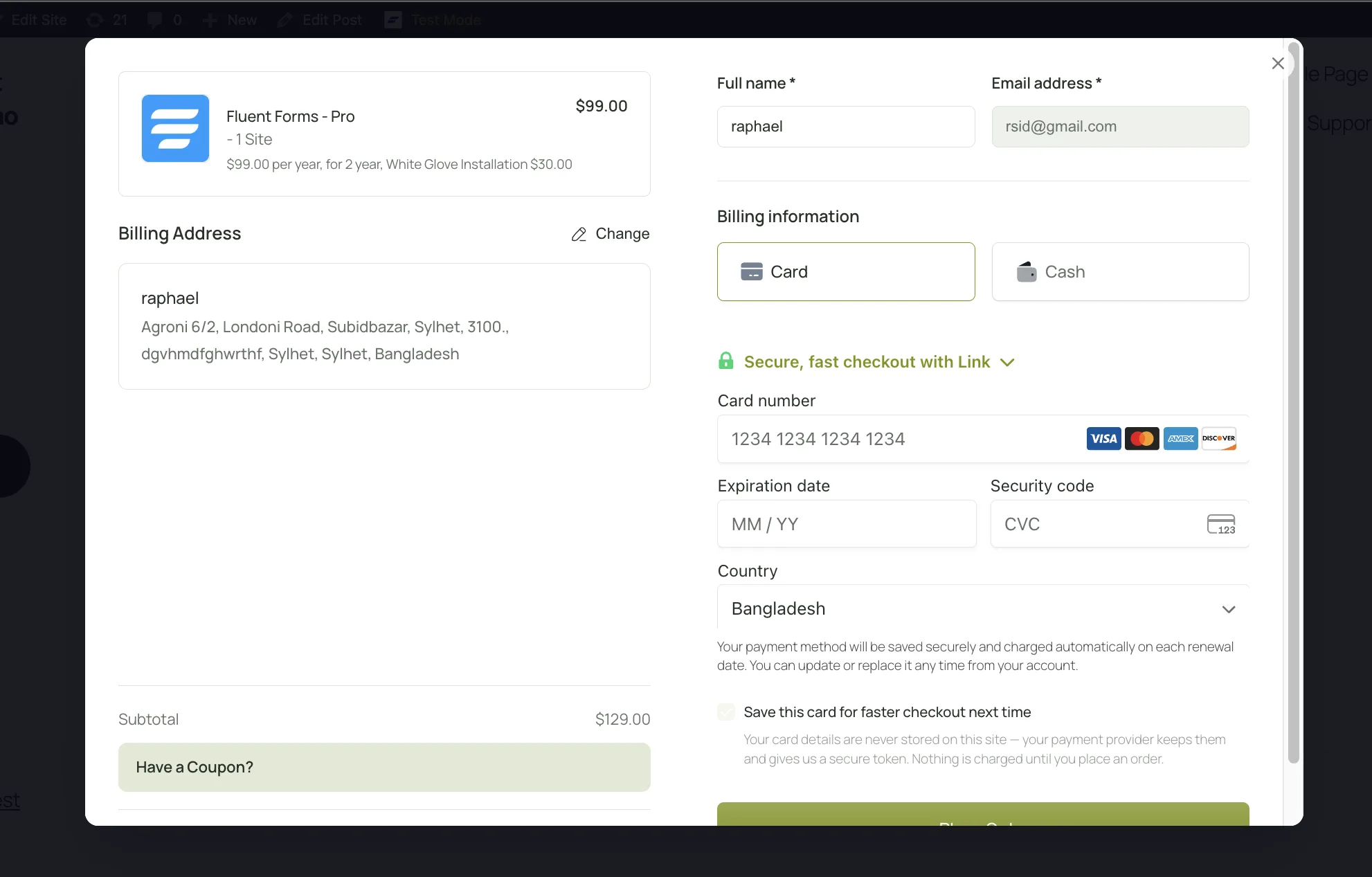
The Buy Now element with modal checkout also got attention this quarter. We built it for a simple reason: a buyer of one digital product shouldn’t need a shop page, a cart page, and a checkout page. Checkout opens in a popup on the page they were reading. It is in the free version, and Divi’s Buy Now module includes the same modal option.
Paul C from WPTuts recorded a walkthrough of Buy Now with instant modal checkout, building it once in Bricks and once in Gutenberg for his own document pack.
More Regional Gateways and Currencies
FluentCart payments in Q3 reached more regions and settled more accurately. 1.5.2 added SSLCommerz and automatic Paddle reconciliation. Later releases fixed zero-decimal currencies, itemized Stripe hosted checkout, recorded provider settlement times, and made coupons behave the same on the storefront and in admin orders.
SSLCommerz for Bangladesh and SEA (1.5.2)
Card processors aren’t universal. In much of South Asia, customers complete checkout with SSLCommerz. A store that can’t offer it loses sales at the last step. 1.5.2 added SSLCommerz as a first-class gateway, installable in one click from Payment Settings.
Paddle orders Improvements (1.5.2, 1.6.4)
Paddle works as a Merchant of Record, so it owns tax and currency at the moment of sale. When Paddle added tax, removed VAT for a B2B reverse charge, or charged in another currency, an order could sit unpaid. That held up fulfillment and license delivery.
1.5.2 reconciles the order against what Paddle took, marks it paid, and keeps the exact captured amount for later refunds. In 1.6.4, Pro stores got clearer reverse-charge records, VAT numbers on receipts, and checkouts pinned to the order’s currency. Developers who prefer Paddle’s automatic localization can restore it with a filter.
Tax and Shipping Math Got an Overhaul (1.5.2, 1.5.3)
Some customers want every tax rate itemized. Others want one number. 1.5.3 added a Tax Display Style setting with a Simplified option: one tax line, details a click away, and a label you choose, such as VAT, MwSt, or GST. Nothing changes unless you switch.
Under the hood, 1.5.3 tightened shipping math. Shipping tax follows the method the customer selected. Per-item shipping shares sum exactly to the charge, with no rounding drift. Earlier, 1.5.2 added itemized tax with per-rate VAT summaries on PDF receipts. The EU reverse charge declaration now prints automatically instead of relying on a checkout text box.
Zero-decimal currencies and settlement times
Currencies like JPY, HUF, and TWD have no decimal places, and that broke assumptions in several gateways. 1.6.4 fixed PayPal checkout, renewals, and refunds in those currencies. Stripe resyncs stopped inflating totals a hundredfold. Mollie and Authorize.Net stopped overcharging on JPY.
1.6.2 added the payment provider’s own settlement time to transactions for Stripe, PayPal, Mollie, Paddle, and Authorize.Net. In other words, your admin finally lines up with your bank statement.
Stripe-hosted Checkout Shows what Buyers Pay For (1.6.4)
Buyers on Stripe’s hosted page used to see one line for the whole charge. 1.6.4 lists each product, plus shipping and tax. Setup fees and add-ons appear under their own names. A new button label setting offers Buy, Book, Donate, or Subscribe, so a donation page reads like one.
In 1.6.6, wallet payments such as Apple Pay open directly from the Place Order click, and a quick double click no longer starts a second order.
Coupons that Behave The Same Everywhere (1.6.1)
A coupon should mean the same thing in the storefront and on an admin order. In several places, the two had drifted apart. 1.6.1 settled them. The first coupon a customer applies now stays, so a large non-stackable coupon doesn’t vanish when someone tries a second code.
Maximum discount caps now apply at checkout. Email limits, per-customer limits, and spend rules now hold on admin orders too. Invalid coupon settings get rejected on save instead of failing later.
Product Pages that Earn Trust: Video, Color, and Reviews
The last month of Q3 focused on what your shoppers see. 1.6.4 added product video through FluentPlayer. 1.6.5 and 1.6.6 let the storefront use your theme’s colors or your own. 1.7.0 brought product reviews and star ratings into FluentCart, tied to real orders.
Product Videos with FluentPlayer (1.6.4)
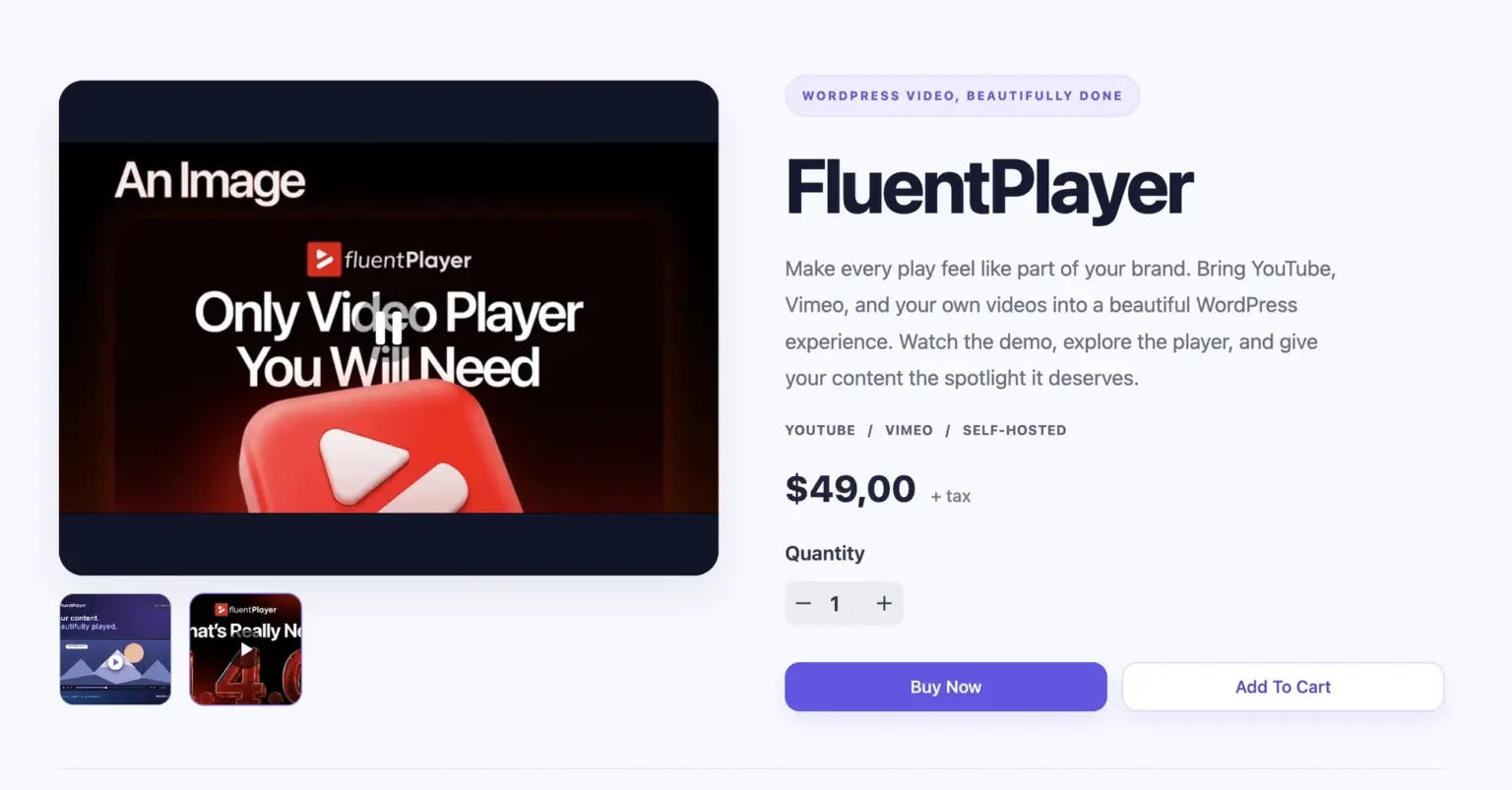
For many products, a short video sells better than any copy. I want to frame the feature around FluentCart’s goal: conversion-focused at the core and open to everyone. With the FluentPlayer plugin active (the free version is enough), the gallery dialog gains a Video tab.
Paste a YouTube, Vimeo, or direct video URL, or pull from your FluentPlayer library. The video plays inline where the main image sits, in whatever order you dragged it.
Put it first, and shoppers see the demo when the page loads. FluentPlayer is a sister product from the same team, which made the integration possible without a separate embed.
A Storefront in Your Own Colors (1.6.5, 1.6.6)
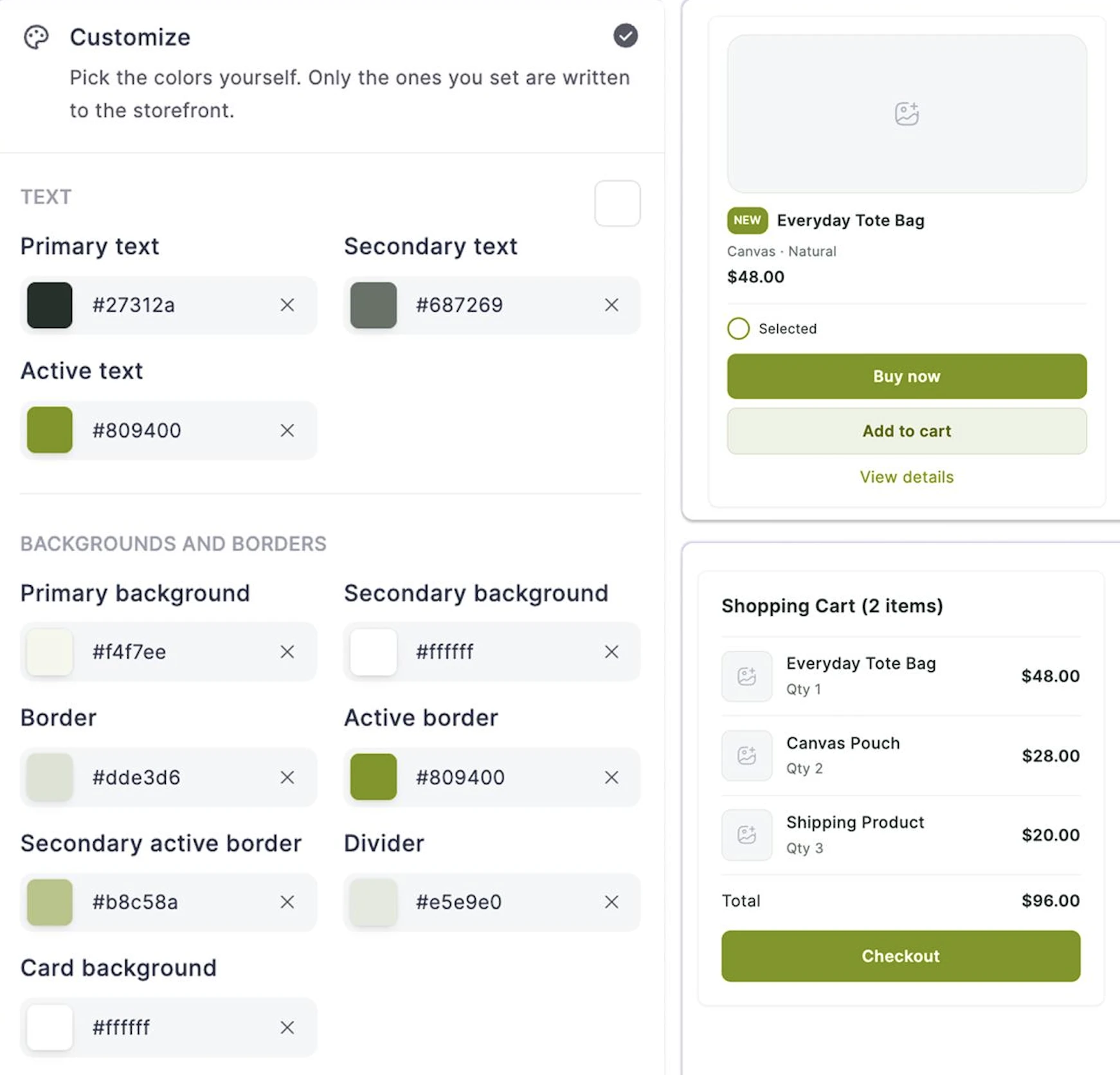
Every FluentCart storefront shipped in the same palette. Changing it meant custom CSS. This one came straight from store owners who told us about it. 1.6.5 added an Appearance tab under Store Settings with three choices: FluentCart’s colors, inherit from your theme, or customize your own.
The palette reaches product cards, the shop, the cart drawer, checkout, the customer dashboard, and even Stripe’s embedded card fields.
The design choice: only the colors you set get written to the page. Anything blank keeps FluentCart’s default, so a half-finished palette never produces an invisible button. Button text color is picked for readability, not assumed white.
Store owners tried it the same day and sent feedback. One day later, 1.6.6 shipped as a follow-up. Now, theme inheritance covers all block themes plus, Blocksy, Kadence, Divi, GeneratePress, and Bricks. Shop filters, the price slider, toast notifications, and Stripe’s payment tabs now use storefront colors too.
Reviews Module (1.7.0)
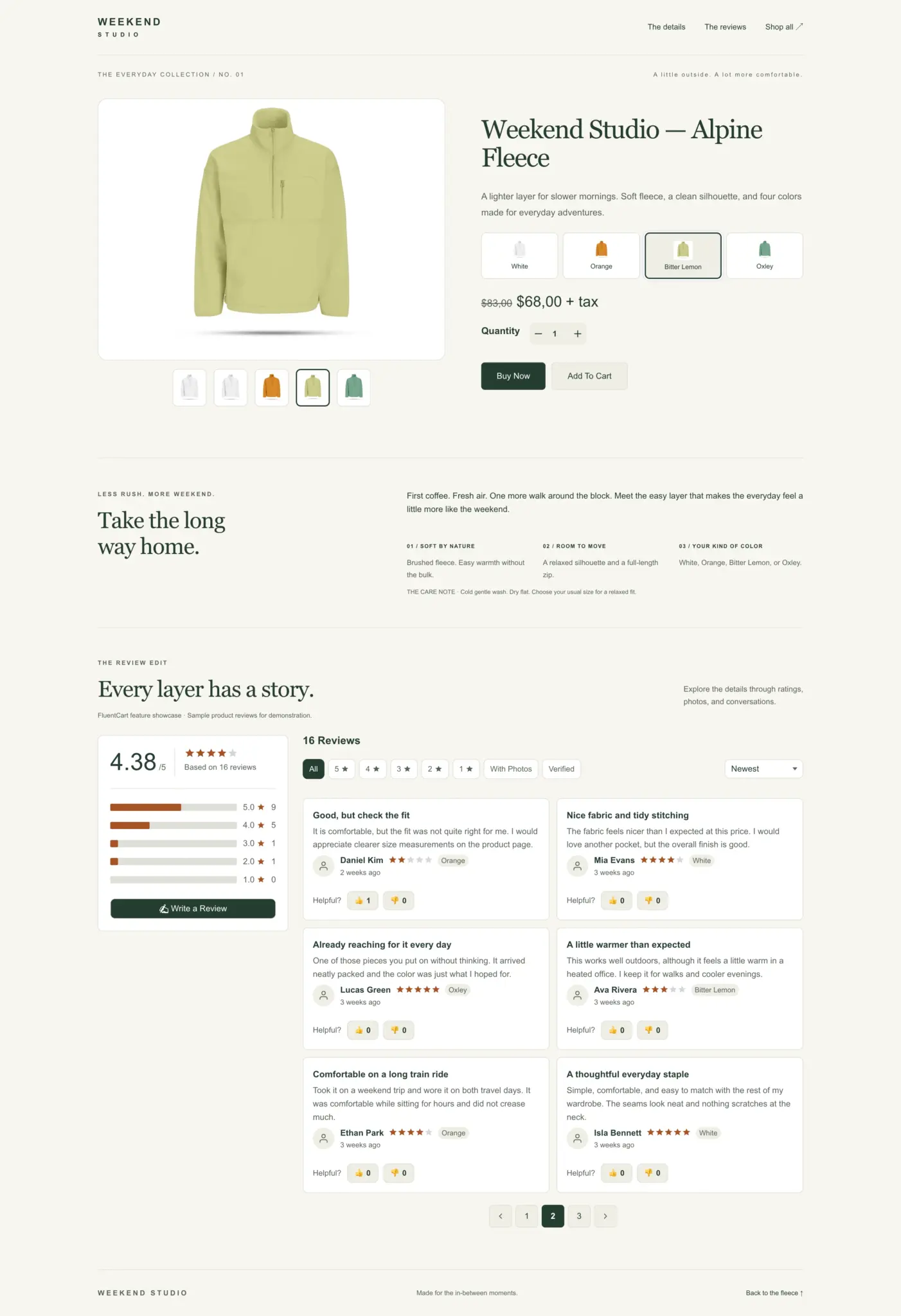
On most WordPress stores, reviews need one plugin for ratings, another for photos, and then time spent fixing the styling.
My view was simple on this. Reviews are a basic part of any store, so FluentCart should ship them. He called 1.7.0 one of the biggest FluentCart releases so far.
The design choice: every review links to the customer and the order. A confirmed buyer’s review carries a Verified Purchase badge. A review of a variation stays tied to that variation, not the whole product. Store owners choose who may review, whether reviews wait for moderation, and whether ratings are required.
Most customers never return to a product page after buying, so 1.7.0 asks for reviews where customers already are. The customer dashboard gets My Reviews, with a to-review list. A Review Your Order link lists every item in an order, each reviewable in one click.
Six blocks control placement: Product Reviews, Review List, Review Summary, Review Form, Write a Review Button, and Product Rating. Product pages output JSON-LD schema with aggregate ratings, so search engines can show stars in results. The reviews section follows your storefront palette without extra CSS.
FluentCart Pro adds photo reviews, helpful votes with a Most Helpful sort, threaded replies between the store and reviewer, and layouts such as Card Grid, Carousel, and Testimonials. This was somethig that I cared about and the team delivered without fail. Thank the development team for this one.
Attribution, Accounts, and Dates that Follow Your Store
Q3 also tightened three quieter areas. Marketing attribution now follows shoppers across your sites and respects consent. Customer accounts gained email verification with guest order recovery. Every date FluentCart renders now follows the store’s own WordPress date, time, and timezone settings.
Attribution You Can Trust (1.5.4, 1.6.2, 1.6.4)
In 1.5.4, UTM data started following shoppers between your connected sites. 1.6.2 captured ad click identifiers from Google, Microsoft, and Facebook separately from UTM fields. A paid click still gets credit when the buyer returns a week later through a newsletter. Attribution is last-touch, and every order carries its source.
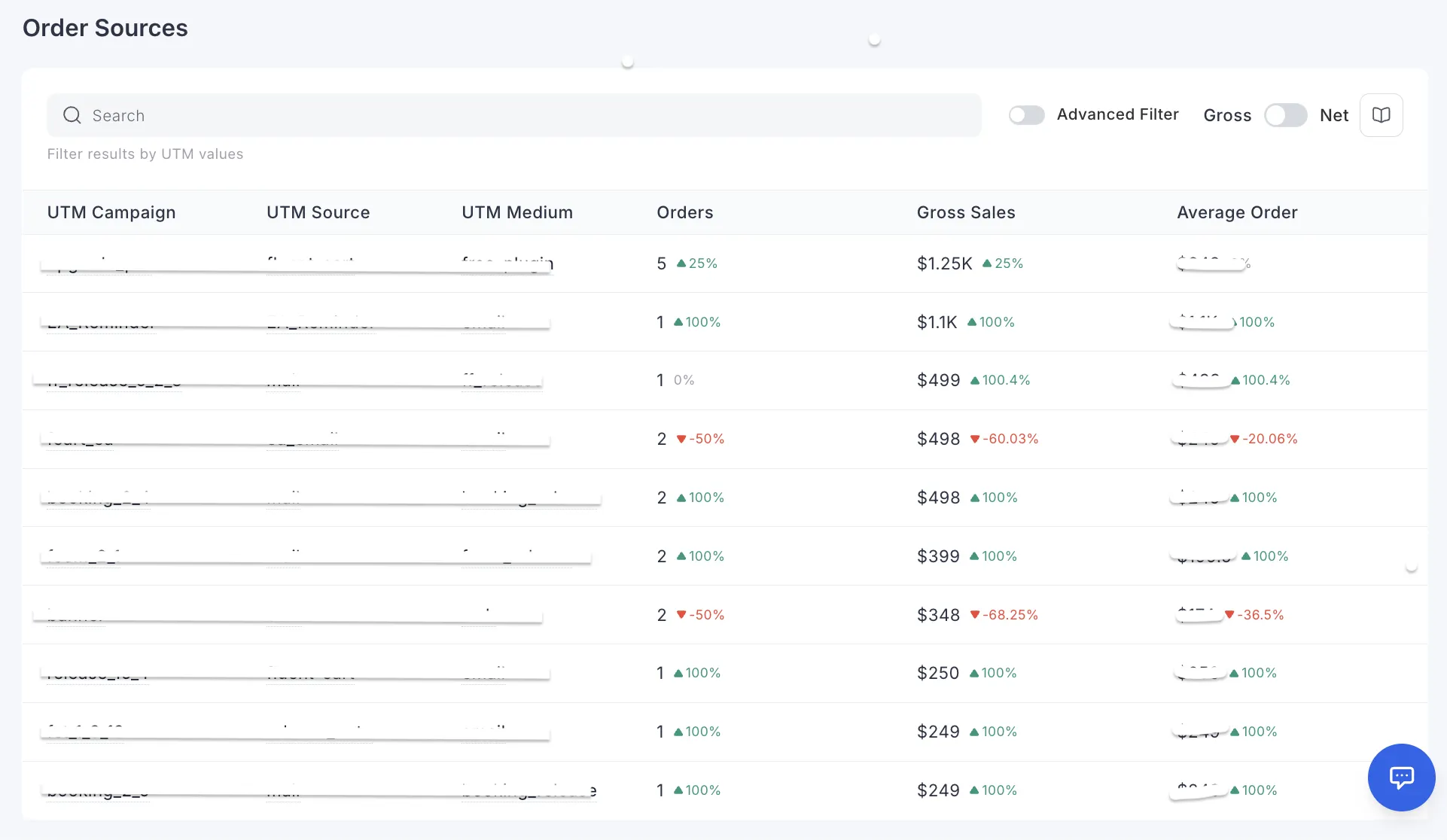
The Order Sources report now accepts the same advanced filters as the Orders table. “Which channel sold this product in Germany last month” became a filter instead of an export. In 1.6.4, attribution data is stored on a visitor’s device only after a consent tool approves it, which helps stores under GDPR and Germany’s TDDDG.
Verified Accounts and Store-wide Dates (1.6.5)
1.6.5 added email verification before the customer dashboard shows purchase history. Once confirmed, guest purchases made with that email merge into the account. A new Compliance setting decides whether customers log in automatically after account creation. The default is now logged out.
Dates got the same treatment. A German store sending “Aug 16, 2026 03:30 PM” in a renewal email looks like someone else’s software. Every user-facing date now uses the store’s WordPress date format, time format, and timezone, in emails, invoices, dashboards, and the FluentCRM integration.
Security and Data Hardening
Every Q3 release included security audits and routine hardening across core and Pro. Some fixes stand out because they close gaps a busy store would never spot on its own. They cover exposed data, download links, permissions, and payment notification checks.
Performance work landed alongside it. The Inventory screen in 1.6.2 makes a handful of database calls where it used to make hundreds. In 1.6.4, shop listings dropped hundreds of repeated lookups per page.
Upgrade notes: Defaults that Changed in Q3
A few Q3 changes alter default behavior, so check these before or after you update. Most new features ship switched off. The ones below either change existing output or come switched on, and they are listed here so nothing on your store surprises you.
Add-ons Released or Updated in Q3
Several Q3 features ship as separate add-ons, so each can move faster than core. All install from Settings → Features & Addons → Plugin Addons in one click, except where noted below.
Where FluentCart Stands after Q3
You now know what changed in FluentCart during Q3 2026 and why. Subscriptions run from your store. A WooCommerce store can move in with its history. Your store answers questions about profit and cash flow. Elementor, Bricks, and Divi 5 users build without workarounds. Reviews, video, and color live inside the product.
The pattern behind these changes is consistent. Most new behavior ships off by default. Choices that touch money ask for confirmation. Existing customers keep working the way they did. That is the standard the Cart team held all quarter.
Your next step: update FluentCart and FluentCart Pro from your WordPress dashboard, then open the one feature that solves your biggest problem today. If you sell subscriptions, start under Settings → Subscription Settings. If you’re weighing a move, test the migrator on a staging copy. To compare plans and see what Pro adds, visit FluentCart pricing.
More features to come! Looking forward to cook more in Q4.

I’m Jewel, founder of FluentCart and CEO at WPManageNinja, the team behind Fluent Forms, Fluent CRM, Fluent Support, FluentLogs and a handful of other WordPress plugins. I have been writing WordPress code since 2009 and still think of myself as a developer first and an entrepreneur second. Most of what I write on this blog comes from arguments we have had inside the team about how to build software people can actually depend on.

Subscribe now
Related Articles and Topics
-

How to Sell Online Courses With WordPress: The 2026 Setup
The LMS plugin you have leaned on for years just changed hands again, the cart you bolted on…
-

Is Etsy Bad for Business?
Once upon a time, Etsy stood proudly as an artisan’s portal. Crafted, curated, and welcoming. Today, however, it’s…



Add your first comment to this post