

What Is a Digital Download? (Plus How to Sell Your Own)
A digital download is a file you buy or get online and save to your device, such as an ebook, a design template, a music track or a piece of software.
What the buyer receives is more than a file. Every digital download also comes with a license that sets what the buyer may do with it, and an access method that controls how the file reaches them. Sellers who understand all three set up cleaner stores and answer far fewer “my link stopped working” emails.
This guide covers what a digital download is made of, what the buyer legally owns, which formats each product type needs, and how delivery works behind the scenes. After the basics, you will set up digital downloads on your own WordPress store with FluentCart, step by step.
Let’s start reading.
TL;DR
- A digital download is a file the buyer saves and keeps on their own device, unlike streaming, where the content stays on someone else’s server.
- Every digital download has three parts: the file, the license that sets how buyers can use it, and the access method that delivers it.
- Buyers own their copy of the file, not the content. A US court ruled against reselling music files, and the EU’s top court did the same for ebooks.
- Match the format to the product: PDF and EPUB for ebooks, Letter and A4 for printables, and SVG, DXF and PNG for cut files.
- Deliver files through signed, time-limited links instead of public media library URLs, which anyone with the address can download.
- FluentCart lets you sell digital downloads on WordPress with its free version, including several files per product and separate files for each variation.
- Buyers get their download links by email, and logged-in customers can download again from their account. Place a test order before launch to check both.
What Exactly Is a Digital Download?
A digital download is a product the buyer saves to their own device and can open offline, for as long as they keep the file. People who search “what is digital download” usually picture only the file, but the product has three working parts.
The Three Parts of Every Digital Download
Most buyer questions map to one of these parts. “Can I use this font in a client logo?” is a license question.
“My download link expired” is an access question.
Setting each part up clearly before launch cuts down support tickets.
What the Buyer Owns
The buyer owns their copy of the file and a license to use the content inside it. The content itself stays with the creator, and courts treat reselling a digital file differently from reselling a printed book.
That last point gives the clearest legal line between a digital download and other digital purchases. A file the buyer can keep offline is treated differently from content that lives inside a store’s app.
Digital Download vs. Cloud Library, Streaming and Digital Code
| Model | Where the content lives | Works offline | Example |
|---|---|---|---|
| Digital download | The buyer’s device | Yes, for as long as the buyer keeps the file | PDF ebook, MP3 album, plugin ZIP |
| Cloud library | Inside the seller’s app or reader | Only inside that app | Kindle book, a film bought in the Apple TV app |
| Streaming | The service’s servers | Only through in-app downloads, where the service allows them | A film on a streaming service |
| Digital code | The platform account where it is redeemed | Depends on the platform | A Steam key or console game code |
*Table Powered by NinjaTables
The difference matters when a platform changes its terms or closes. A buyer with a digital download still has the file. A buyer with cloud library access depends on the platform keeping that access open.
Common Types of Digital Downloads
Almost any product that can live as a file can be sold as a digital download. The format you deliver decides whether buyers can open the file on the first try, which is why each product type has its own conventions.
Digital Download Formats by Product Type
| Product type | Formats to deliver | The detail that matters |
|---|---|---|
| Ebooks and guides | PDF, EPUB | PDF keeps a fixed layout for workbooks and print. EPUB reflows to fit e-reader screens. For long reads, offer both. |
| Printables | PDF in US Letter and A4 | US buyers print on Letter (8.5 × 11 in). UK and EU buyers print on A4 (210 × 297 mm). Printing one size on the other paper shrinks or crops the design. |
| Templates | DOCX, XLSX, PPTX, or a PDF with a template link | Canva and Notion templates live on those platforms. Sellers deliver a PDF that holds the link to copy the template. |
| Audio | WAV, MP3 | A 3-minute track is about 32 MB as a CD-quality WAV and about 7 MB as a 320 kbps MP3. Sample packs can reach several gigabytes. |
| Fonts | OTF, TTF, WOFF2 | Desktop use and website use often need separate licenses. Ship the license terms inside the ZIP. |
| Craft and design files | SVG, DXF, PNG | Cutting machine software differs in which formats it opens. Include SVG, DXF and PNG versions of every design. |
| Photo presets | XMP, DNG | Lightroom presets install from XMP files. Deliver them unzipped, plus DNG versions for older mobile workflows. |
| Video | MP4 (H.264) | An hour of 1080p video at a 5 Mbps bitrate is about 2.25 GB. |
| Software, plugins and themes | ZIP, DMG, EXE | Depending on the software, buyers may also need a license key and an update channel. |
*Table Powered by NinjaTables
How to Package Digital Download Files
Two practical rules come out of this table. First, bundle multi-file products into one clearly named ZIP with a short README that explains each file. Second, check file sizes before you pick storage. WordPress caps uploads at your host’s PHP limit, which you can see as “Maximum upload file size” on the Media → Add New Media File screen. Audio packs, video and large software builds usually belong in cloud storage instead.
How Do Digital Downloads Work?
Digital downloads work by delivering a file through a link the store can verify before serving it. For paid digital downloads, stores typically release the file after verifying payment. Free downloads can be delivered after a $0 checkout without collecting payment details.
Here is what happens between the checkout button and the saved file on a paid order.
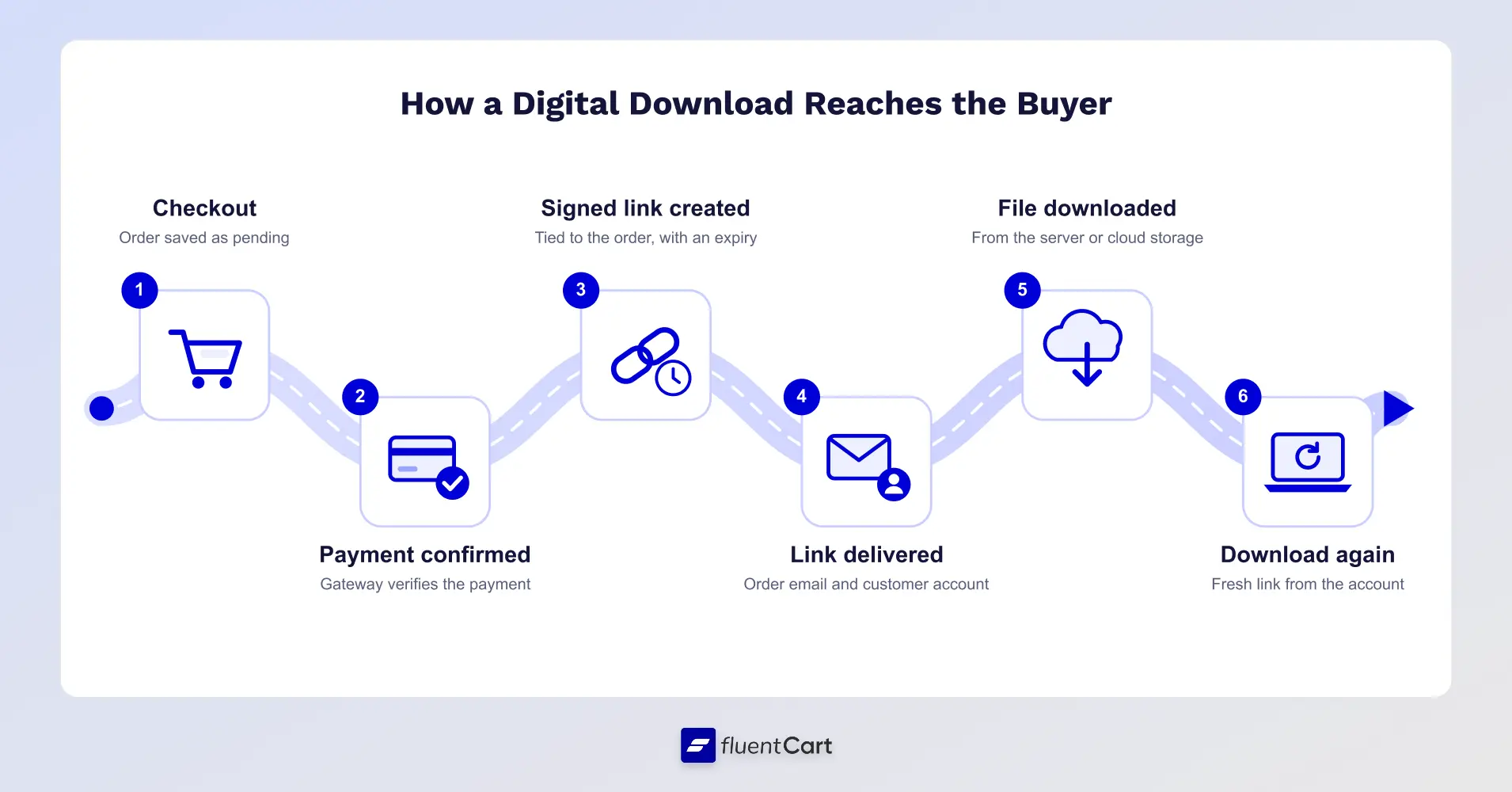
- Checkout: the buyer submits the order, and the store records it as pending.
- Payment confirmation: the payment gateway reports a successful payment. The store marks the order paid after verifying it, often through an automatic notification called a webhook.
- Link generation: the store creates a signed download link. The link carries a token tied to the order and an expiry time, and the store can check both before it sends the file.
- Delivery: the link goes out in the order email and appears in the buyer’s account, if the store has one.
- File transfer: the store sends the file from its own server, or hands the buyer a temporary link to cloud storage. On Amazon S3, these temporary links last 7 days at most.
- Re-download: when an old link expires, the buyer gets a fresh one from their account instead of emailing the seller.
Step 2 explains why card and PayPal orders deliver in seconds while bank transfers and cash orders don’t. For paid orders, the store releases the file once it has confirmation that the money arrived.
Why a Plain File Link Is Not Enough
Files uploaded through the WordPress media library sit in the /wp-content/uploads/ folder with a public address. Anyone who has that address can download the file, buyers can share it in forums, and search engines can index PDFs stored there.
Signed, expiring links close that gap for the link itself. They cannot stop a buyer from copying a file after downloading it, which is why clear license terms matter as much as the delivery setup.
A store that sells digital downloads has to handle all of this on its own, for every order. That is where your store setup comes in.
How to Set Up Digital Downloads for Your Business
To sell digital downloads from your own website, you need two things: a website you control and an e-commerce plugin that delivers files automatically. WordPress and FluentCart cover both.
In this walkthrough, we’ll set up a sample product: a PDF ebook with a companion workbook, sold in two editions.
Start With WordPress
WordPress is a free, open-source platform that runs on your own hosting. Your store, your files and your customer data stay with you. Unlike a marketplace, no platform takes a cut of every sale, and you decide how your store looks and works.
Add FluentCart to Sell Digital Downloads
FluentCart is an eCommerce plugin for WordPress that sells digital, physical and subscription products from one store. Here’s why the pairing works well for digital downloads:
- Digital downloads in the free version. File delivery, multiple files per product and subscriptions are available without upgrading.
- Automatic delivery. Buyers receive download links by email and can return to their account to download again.
- Flexible file setup. Attach several files to one product and give each variation its own set of files.
- Room to grow. Sell physical products from the same store, and add software licensing with FluentCart Pro.
You can follow every step in this guide with the free version of FluentCart.
Launch Your First Digital Download in Minutes
Create a digital product, attach your files and connect Stripe or PayPal. FluentCart handles delivery after every payment, free.
Step 1: Install FluentCart and Set Up Your Store
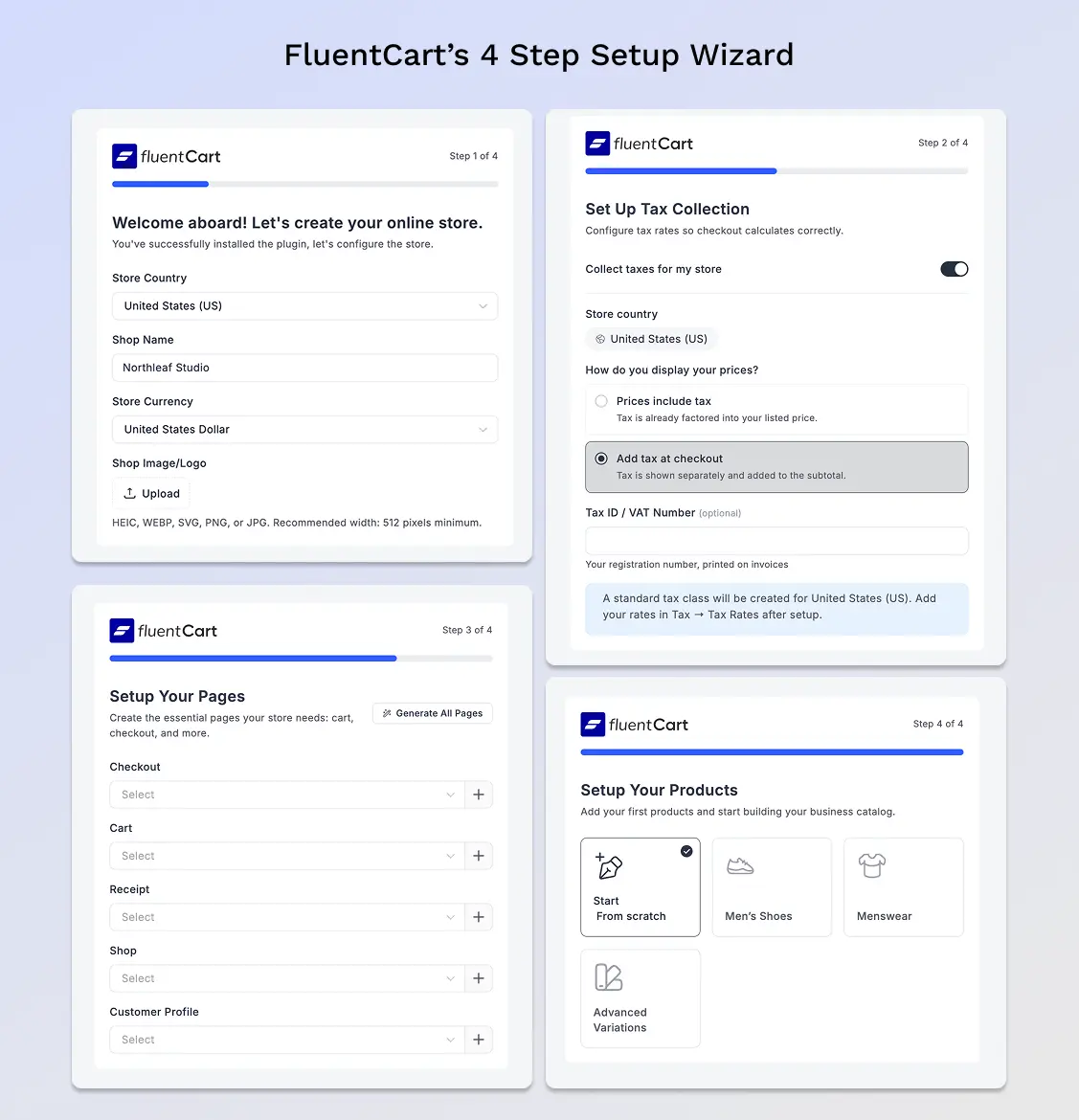
In your WordPress dashboard, go to Plugins → Add New Plugin, search for FluentCart, then install and activate it. FluentCart then opens its onboarding wizard on first activation.
Overall, the wizard has four stages:
- Store information: first, your country, shop name, currency and logo.
- Tax: whether to collect taxes, whether prices include tax or tax is added at checkout, and an optional Tax ID or VAT number. The wizard then creates a standard tax class, and you add your rates later under Tax → Tax Rates.
- Pages: for Checkout, Cart, Receipt, Shop and Customer Profile, select an existing page or click + to create a new one. You can also click Generate All Pages to create all five at once.
- Products: finally, initial product setup, with sample product options.
Generate the Account page during this stage. Customers need an account and must log in to use this page. Guest buyers can download directly through their emailed links.
Step 2: Connect a Payment Method
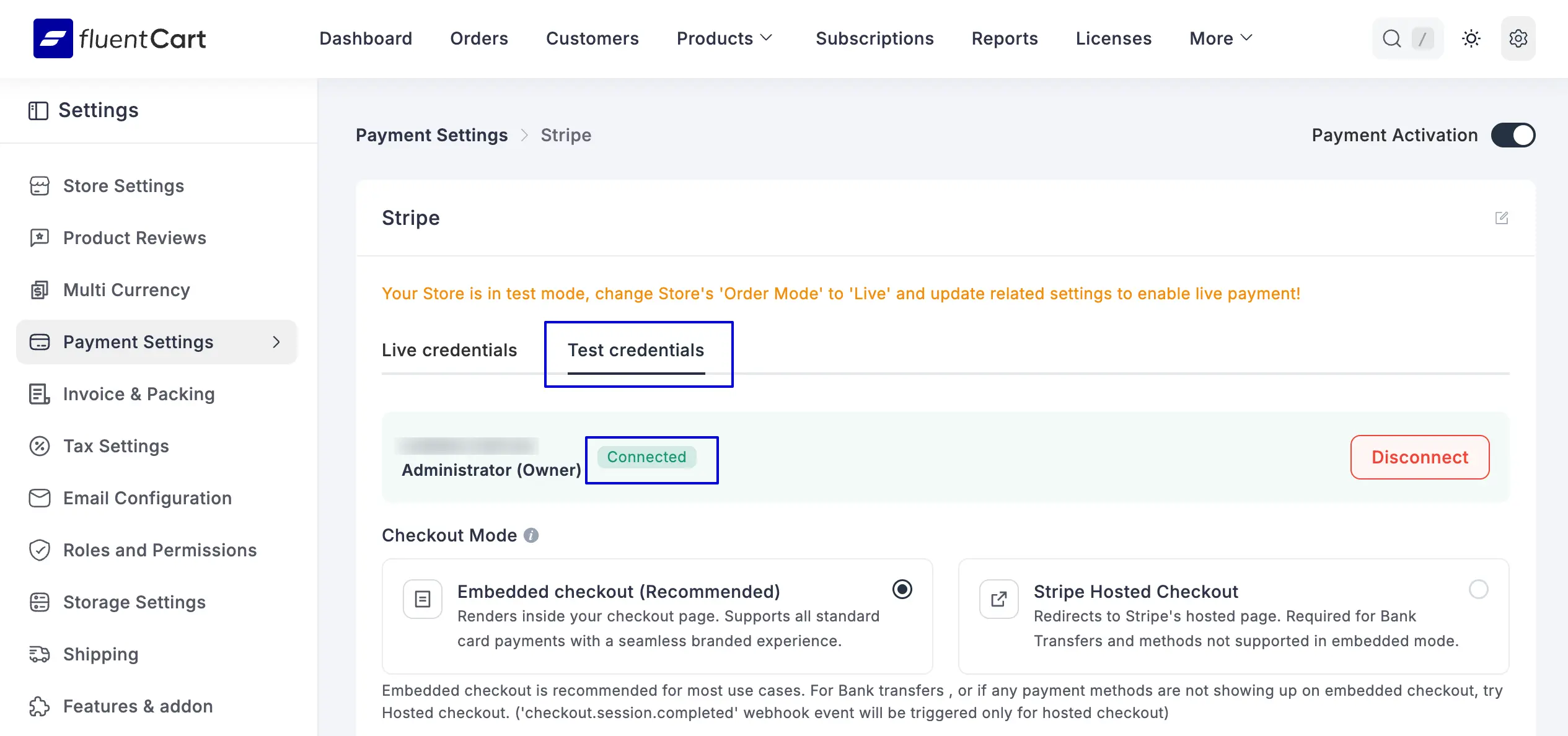
After that, connect the gateway that collects your payments.. The free version of FluentCart includes Stripe, PayPal and offline payments, while FluentCart Pro adds Paddle, Mollie and Authorize.Net.
For a digital store, choose an online gateway such as Stripe or PayPal. Offline payments need manual confirmation before the order counts as paid, and buyers wait for their files until then.
While you set things up, switch on Stripe test mode or PayPal Sandbox. You will then use it to place a test order in Step 8 without a real charge.
Just a heads up: switching platforms takes a little more planning than setting up a store from scratch. If your digital downloads already sell somewhere else, your payment setup is only one piece of the move. Orders, customers and tax settings also have to come across intact. Our free Store Migration Checklist gives you checks to work through before go-live, from gateway settings to open refunds and your order cutoff time.
Get the free printable migration checklist.
Nothing missed, nothing left to chance.
Print 3 copies and check them off by hand.
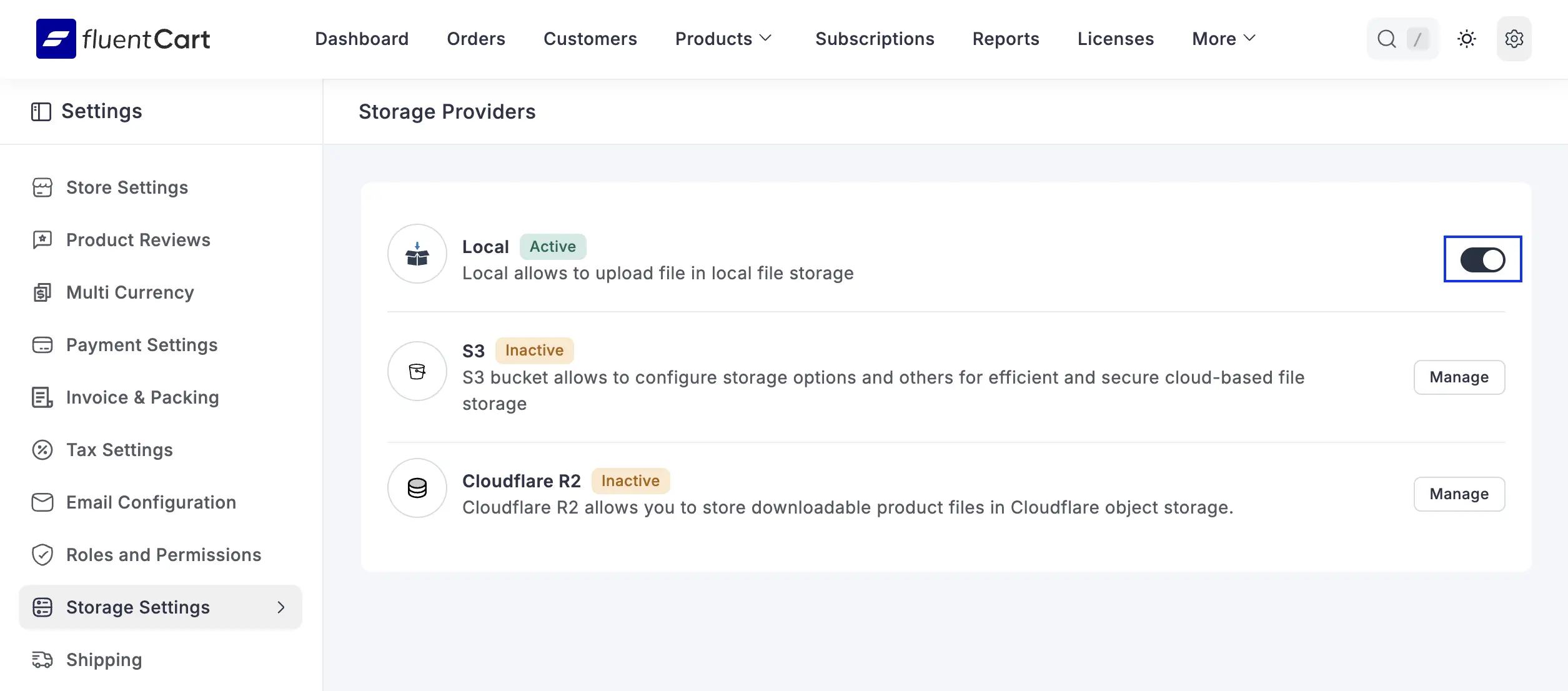
Step 3: Choose Where Your Files Are Stored
FluentCart gives you two storage options in the free version:
- Local storage: files stay on your hosting server. This works well for PDFs, templates and other small files.
- Amazon S3: files live in cloud storage. This suits large files such as video or software packages and takes load off your server.
FluentCart Pro also supports Cloudflare R2. Cloud storage providers bill their own storage fees, separate from FluentCart.
For our ebook, local storage is enough.
Step 4: Create a Digital Download Product
First, go to FluentCart → Products → Add Product and select Digital Product.
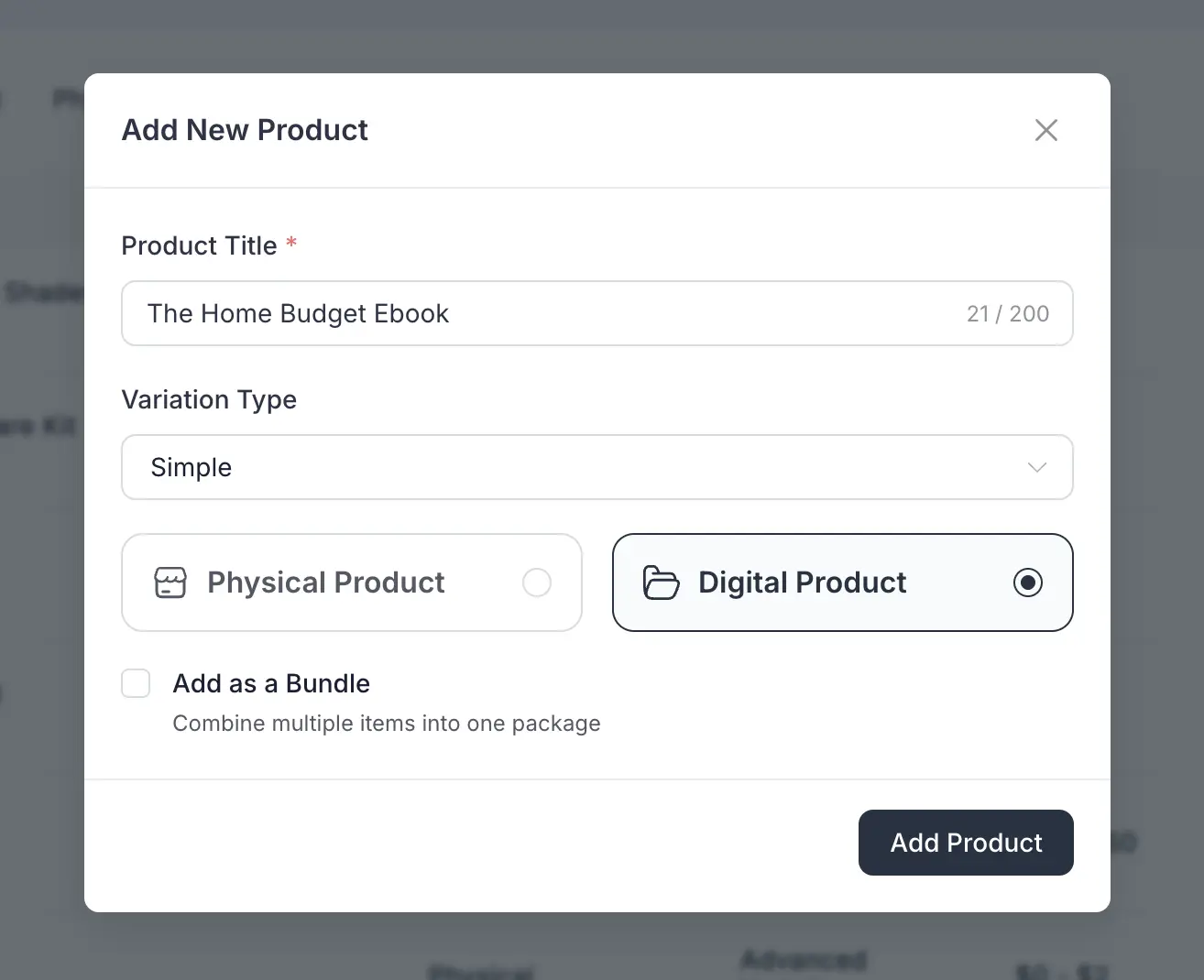
Next, add a title, a description and product images, the same way you would for any other product.
Then configure the pricing and variations. You can charge in three ways:
- One-time payment: the buyer pays once and keeps the files.
- Subscription: the buyer pays on a recurring schedule. This is available in the free version with a gateway that supports recurring payments.
- Installments: the buyer splits the price into several payments. This is available in FluentCart Pro.
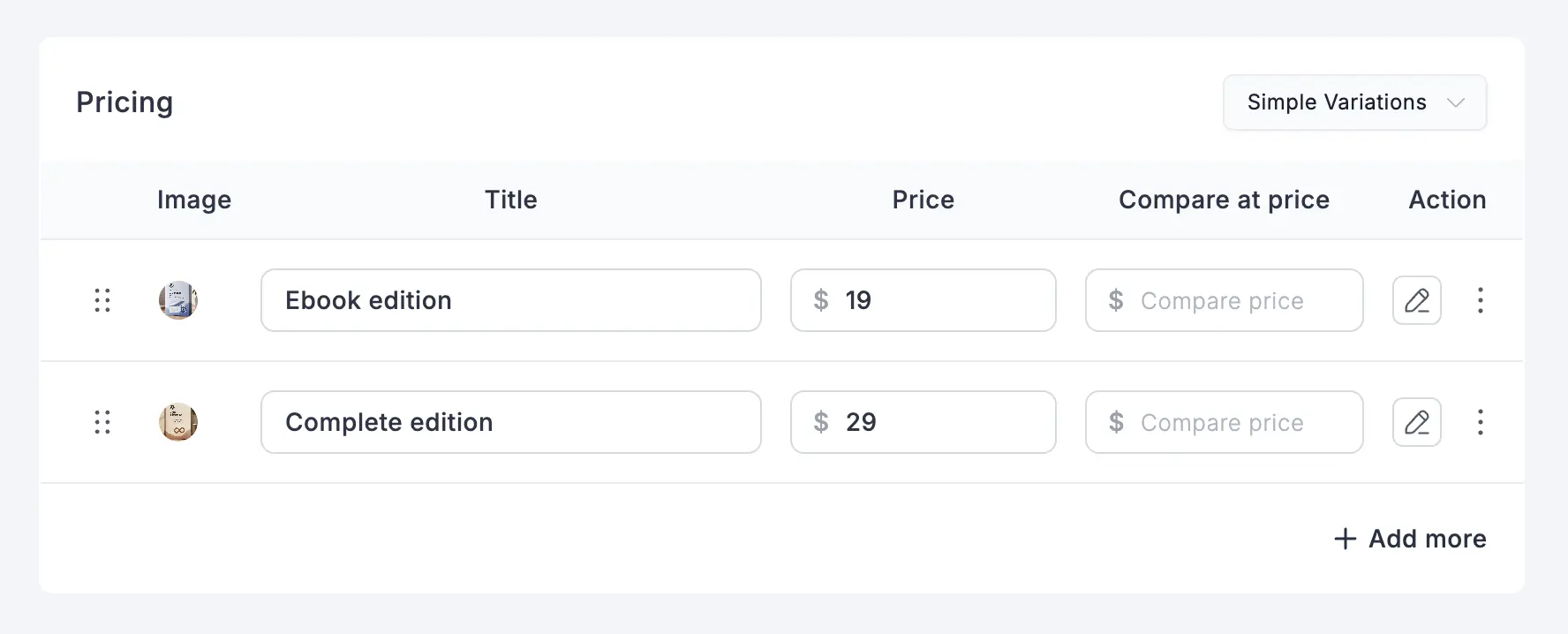
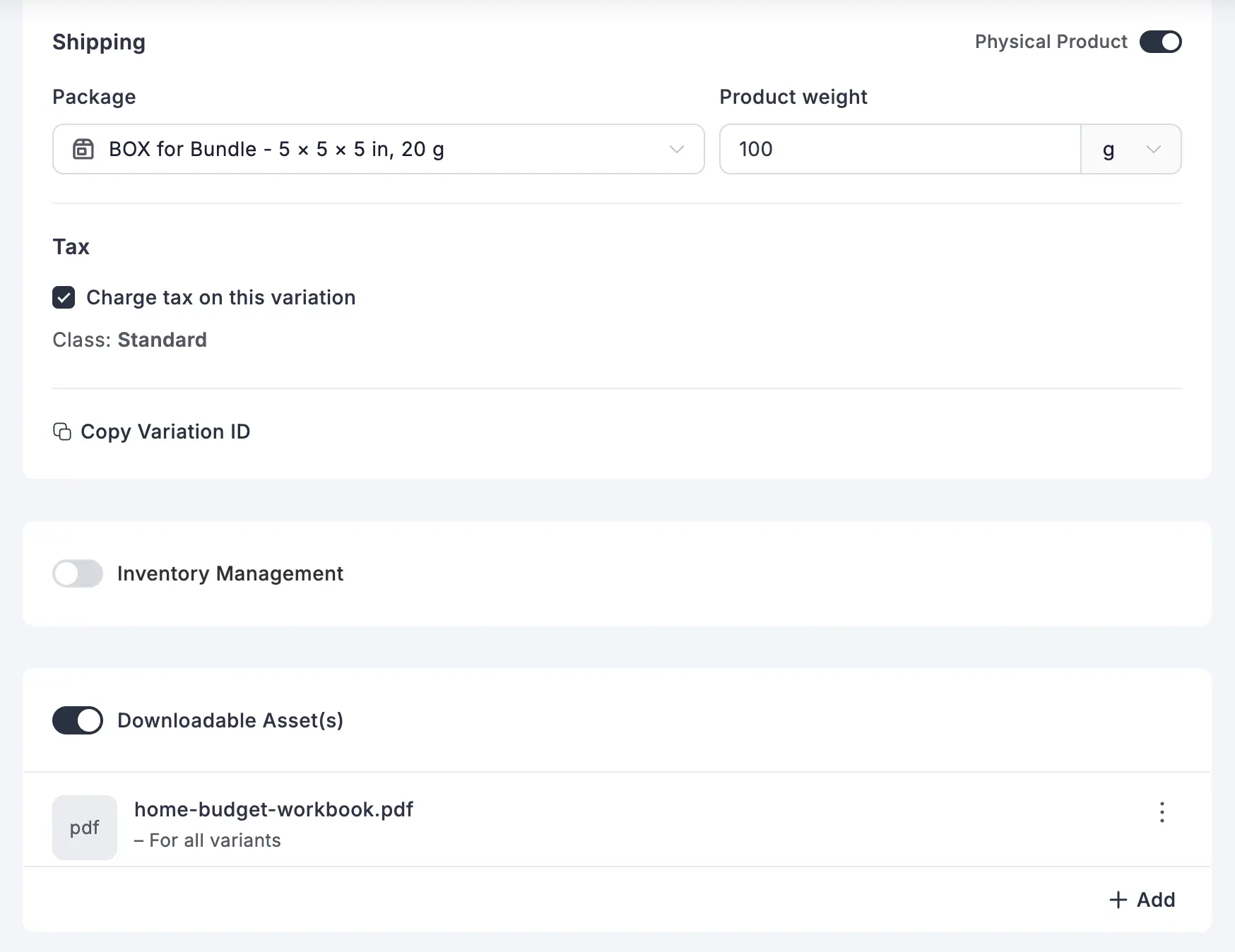
For our ebook, open Pricing and add two variations: an Ebook edition and a Complete edition that includes the workbook.
Want to offer a free lead magnet instead? Set the price to $0. Buyers complete a $0 checkout with their email address, without entering payment details. FluentCart records them as customers. Adding them to a marketing list needs separate consent and an email marketing integration.
Step 5: Add Your Digital Download Files
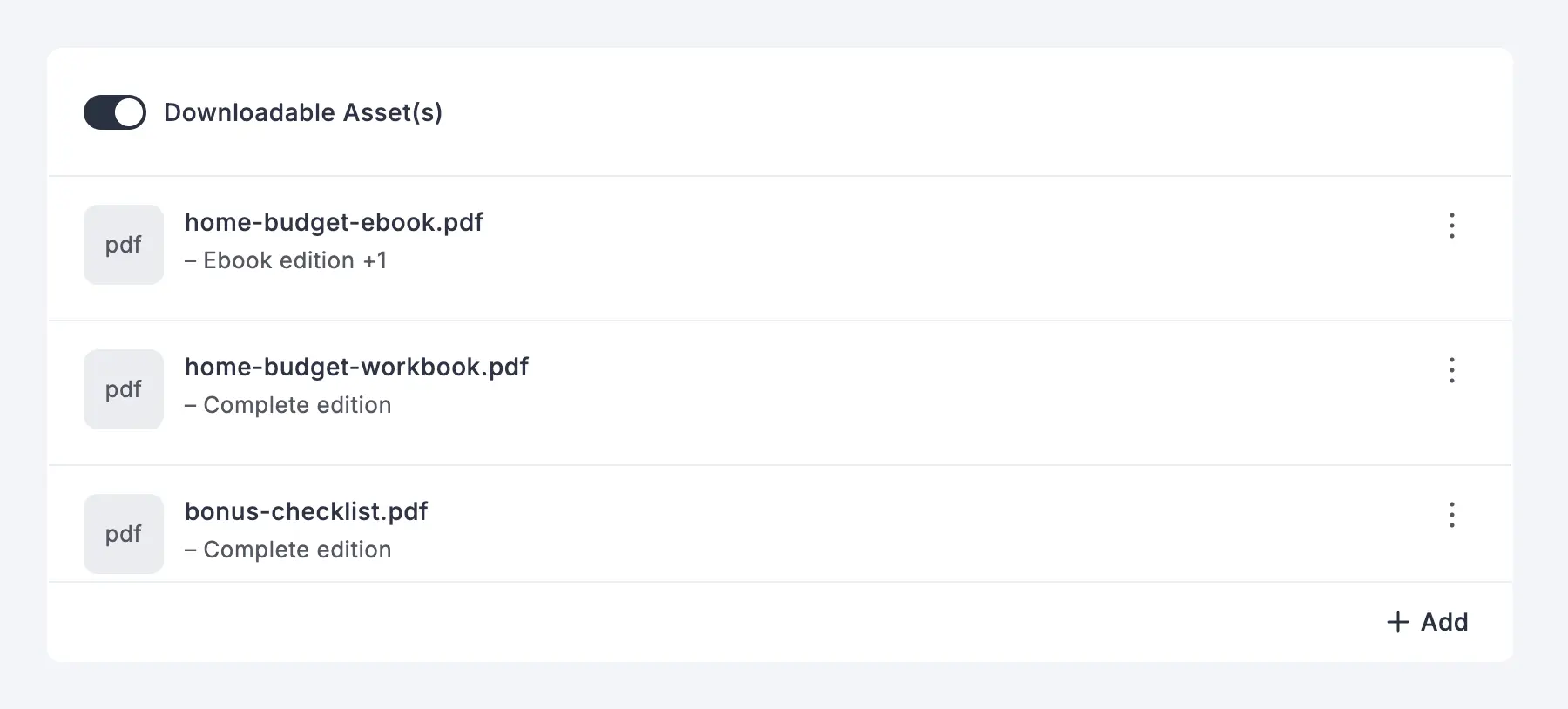
In the product editor, enable Downloadable Asset(s), then click Add to attach your files. Upload a file from your computer or select one already in your FluentCart storage.
You can attach more than one file to the same product. For our example, add three files:
- The ebook PDF
- The companion workbook PDF
- A bonus checklist
You don’t need a separate product for each file. All three assets belong to one product, and each buyer receives the files assigned to their purchased variation.
The file types you can upload depend on your WordPress upload permissions and your storage setup. Check that your format is allowed before launch.
Step 6: Match Files to Variations
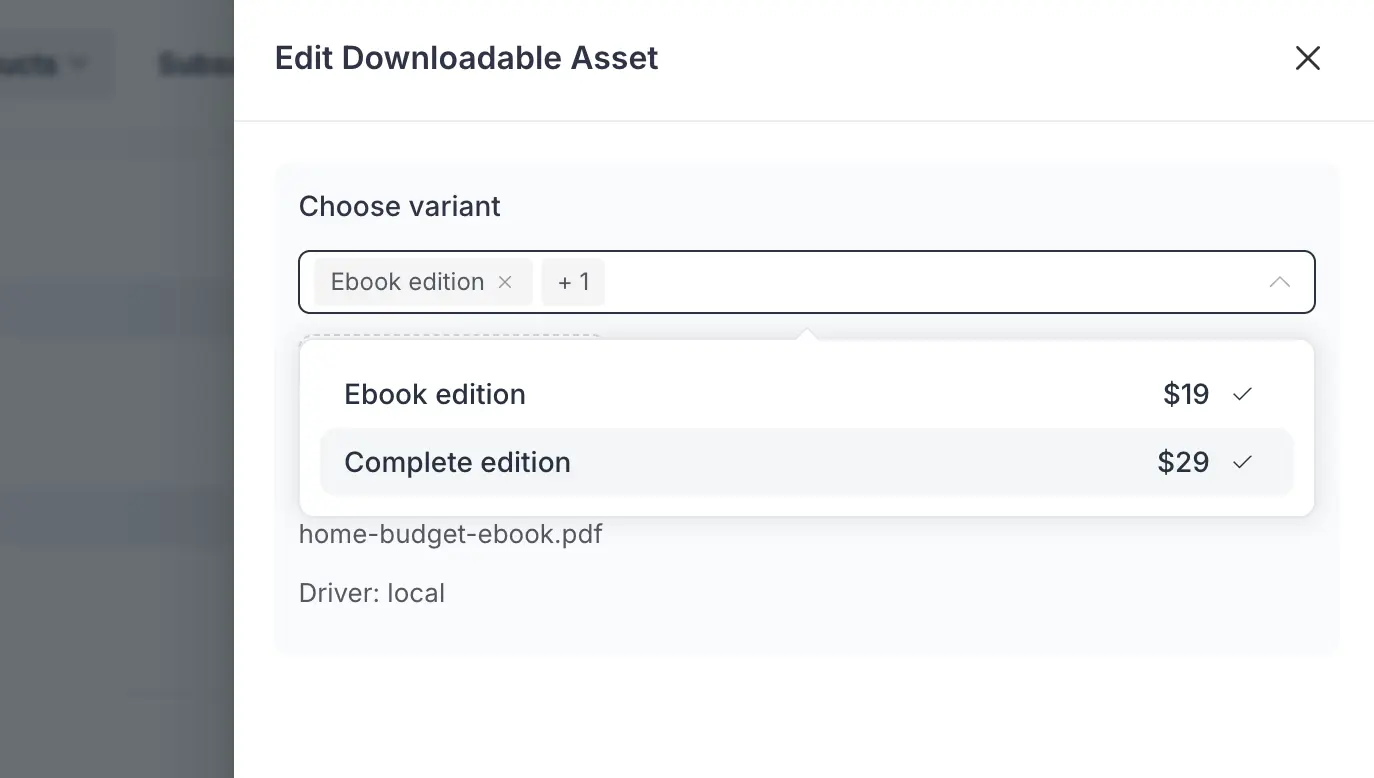
If your product has variations, decide which files each one delivers. Leave the variation selection empty and the file goes to every variation. Select specific variations and only buyers of those variations receive it.
For our ebook:
- Ebook edition: the ebook PDF.
- Complete edition: the ebook PDF, the workbook and the bonus checklist.
One file can belong to several variations. You upload the ebook PDF once and assign it to both editions.
Step 7: Add License Keys for Software (Optional)
Skip this step if you sell PDFs, templates or other regular files. License keys are an option for software, plugins and themes. If you want FluentCart to issue and manage software license keys, you need FluentCart Pro.
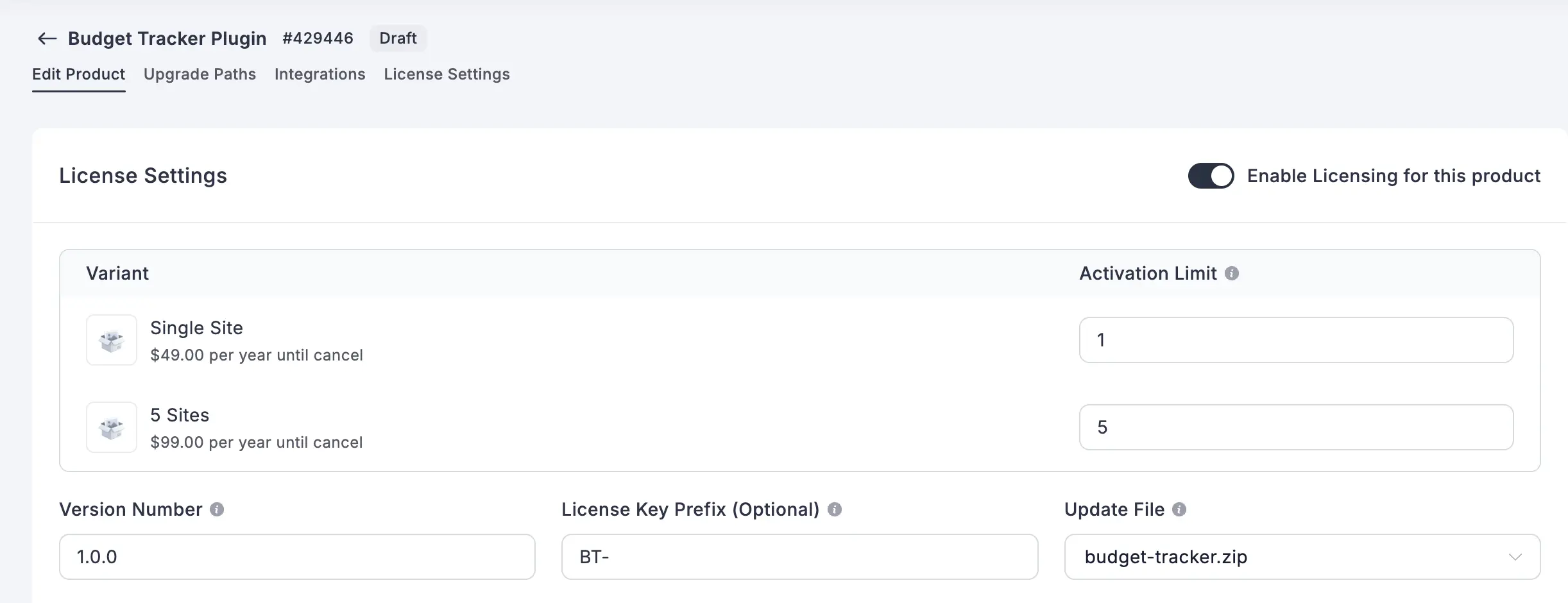
With licensing turned on, each buyer receives a unique license key. You control these settings:
- Activation limit: how many sites or devices one license can activate, set per variation. Use 0 or leave it empty for unlimited.
- Validity: follows the subscription interval. An annual subscription gives a one-year license.
- Version number and key prefix: product-wide details for your software.
- Update File: selects one of your attached files as the package for automatic updates.
For automatic updates to work, your software also needs FluentCart’s licensing and updater integration in its code.
Step 8: Publish and Place a Test Order
Publish the product, then buy it yourself with Stripe test mode or PayPal Sandbox switched on. Check these five things:
- Your payment goes through and the order shows as paid.
- The order confirmation email includes the download links.
- Guests can download the file from the emailed link without logging in.
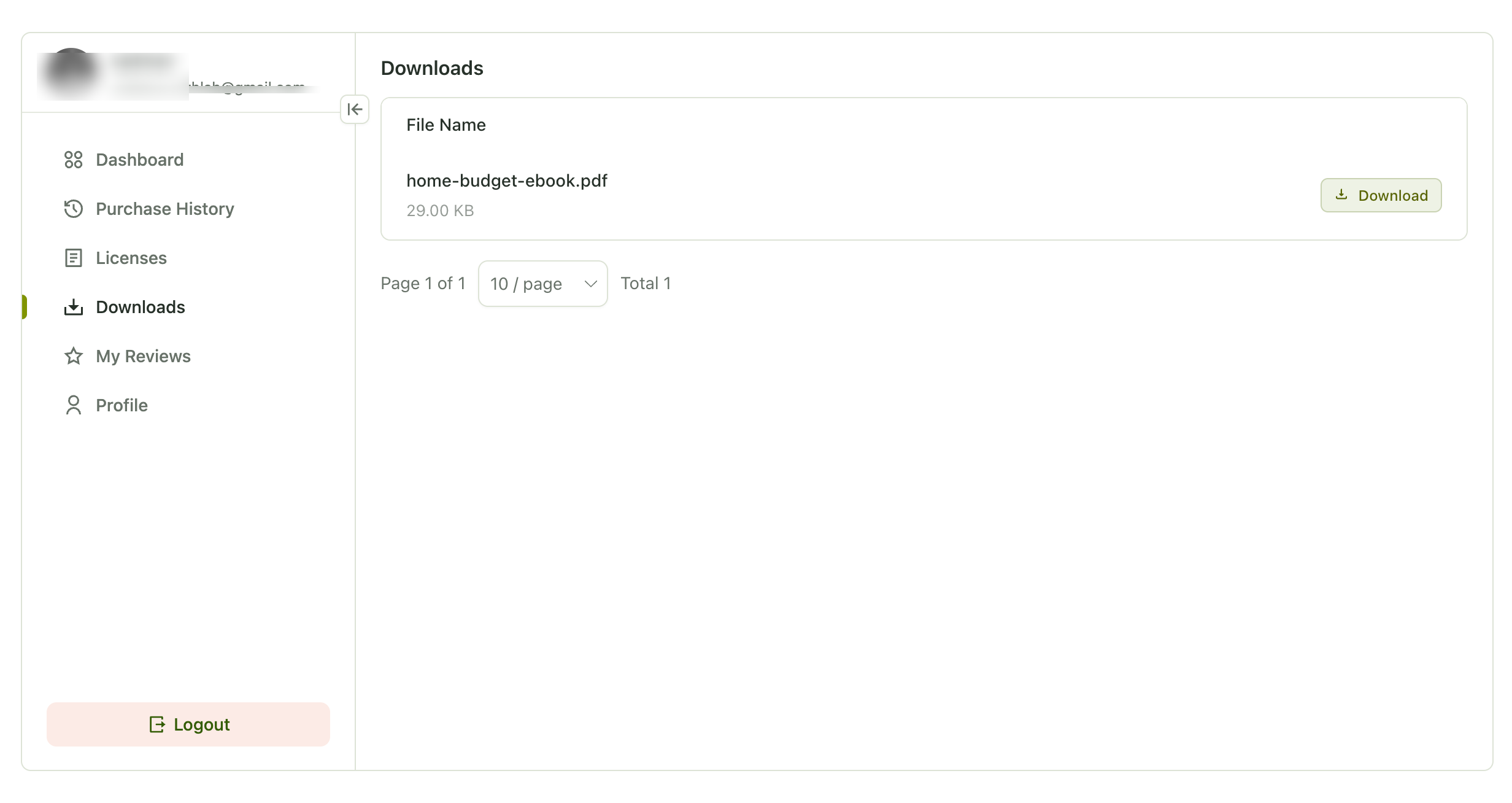
- A logged-in test customer sees the files under Downloads on the Account page.
- Each variation delivers the right files.
Fix anything that looks off, then switch your payment gateway to live mode.
What Your Customers Get After Purchase
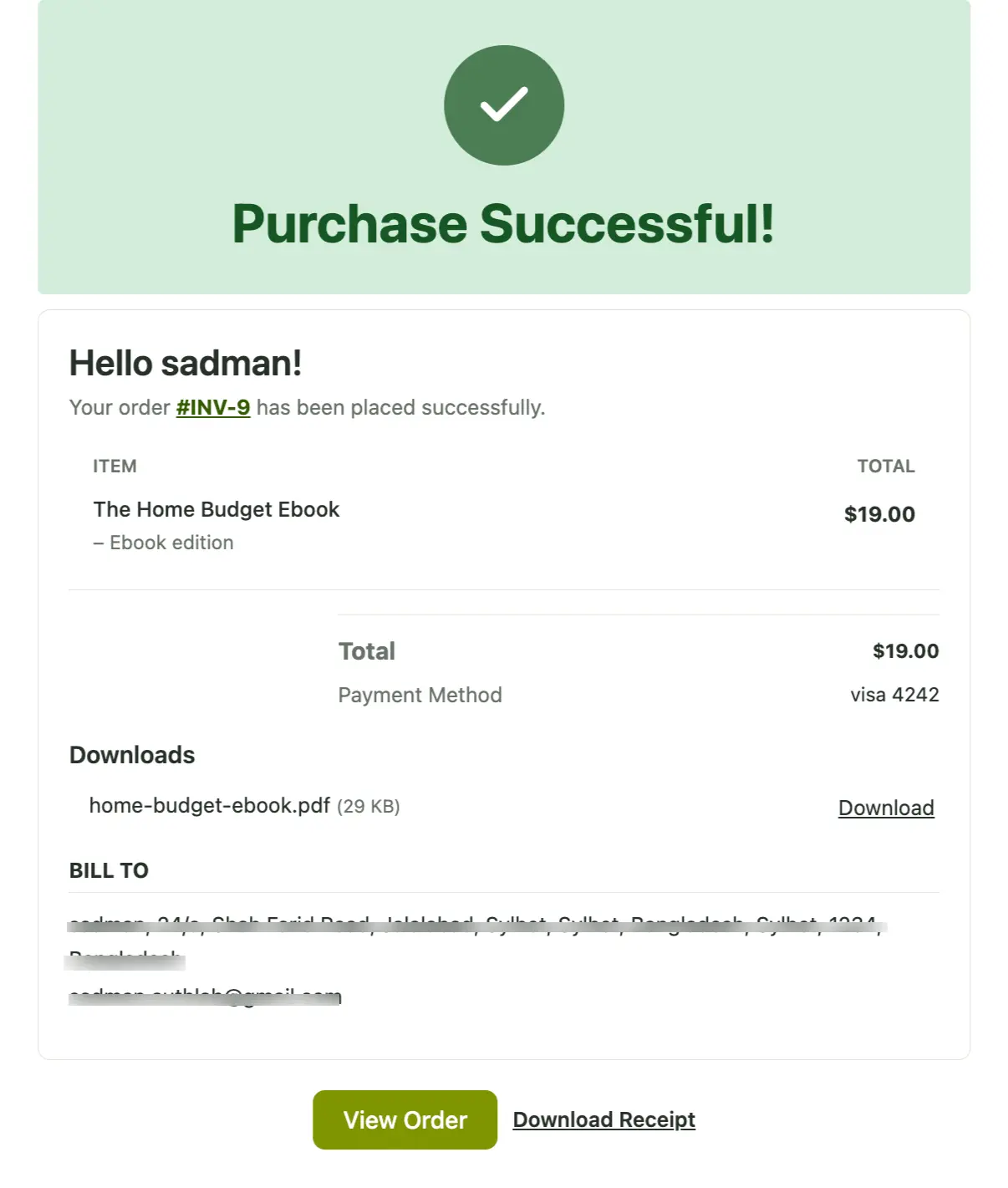
Once the payment is confirmed, FluentCart handles delivery on its own. Here’s what your buyers receive:
- Download links in the order email. Buyers can download right away, and guests don’t need an account.
- A Downloads section in their account. Logged-in customers see each file, its size and a download button.
- Secure links. FluentCart generates signed, time-limited download links. For order-linked downloads, it checks that the purchase still qualifies for access, including subscription validity where applicable. Logged-in customers can get a fresh link through their account.
- Files that stay current. Eligible existing buyers can access replacement or newly added files, subject to variation assignments and access eligibility.
You can edit the order email under FluentCart → Settings → Email Notifications. Keep the {{order.downloads}} smartcode in the template, because it adds the download section to the email.
If you issue a full refund, that order loses access to protected downloads. Files the buyer already downloaded stay with them.
Got a question about your own setup that this guide didn’t cover? In the FluentCart community, you can talk directly to store owners who already sell ebooks, templates and plugins with FluentCart.
Ask store owners who run FluentCart every day. Join the FluentCart Community.
Selling a Digital File With a Physical Product
A digital file also works as a bonus on a physical product. A printed workbook can come with a companion PDF, and a piece of hardware can ship with its setup guide.
To set this up, keep the product type as physical, enable downloadable assets in the product editor and attach the file. Assign it to specific variations if you need to. The buyer receives the file as soon as the payment is confirmed, while the physical item follows its normal shipping process.
Wrapping Up
So, now you know what a digital download is, how it reaches your buyer and what it takes to sell one from your own store. The good news is that none of it gets complicated once the basics are in place.
Start with one product. Deliver it in the formats your buyers already use, write your license terms in plain words, and keep every file behind secure download links. That small setup saves you a lot of “my file won’t open” and “my link stopped working” emails later.
When you’re ready to sell digital downloads on WordPress, check out FluentCart. It keeps the whole process in one place, from adding your product and attaching the files to connecting Stripe or PayPal. Once a payment goes through, FluentCart delivers the order by email and through the customer account.
Before you go live, place a test order and look at everything from your buyer’s side. Once that first sale runs smoothly, every new digital download you add follows the same path.
Deciding which file formats to offer or how to word your license terms? In the FluentCart community, you can ask store owners who already sell digital downloads how they handled it on their own stores.
Ask store owners who run FluentCart every day. Join the FluentCart Community.
FAQs

Hi, this is Sajid, a Marketing Strategist who creates content and visuals designed for maximum audience engagement. I also love exploring different tech tools, always curious to see what’s out there.

Subscribe now
Related Articles and Topics
-
WooCommerce vs FluentCart: Which Fits Your Store
WooCommerce or FluentCart? See what each does from the start, what it costs as your store grows, and…
-
Best Black Friday and Cyber Monday Deals for WordPress (2026)
Black Friday and Cyber Monday deals for WordPress in one list: 2026 discounts on plugins, themes, and hosting,…
-
Custom Checkout Page: How to Build One That Converts
Build a custom checkout page that cuts drop-offs: icluding chekcout types, checkout steps, best practices and best platforms…




Add your first comment to this post