
What Are Webhooks? Everything You Need to Know
Every online store depends on dozens of tools passing information back and forth. Orders need to reach shipping software. Payments need to reach accounting.
Without a proper connection between these systems, someone ends up checking dashboards by hand, and mistakes creep in. Webhooks solve this by letting apps notify each other the instant something happens.
In this blog, we will cover what webhooks are, how they work, how to keep them secure, and where they show up in real ecommerce workflows.
TL;DR
- Definition: A webhook is an automated message one app sends to another when a specific event occurs.
- Mechanism: It works through a callback URL that receives data over HTTP, usually as JSON.
- Difference: A webhook does not require the receiving app to ask for data first, unlike a typical API call.
- Security: A trustworthy webhook setup verifies a signature and handles retries, not just a URL.
- Use case: Stores use webhooks for payment confirmations, order updates, and inventory syncing.
What Is a Webhook?
A webhook is an automated way for one application to send data to another the moment a specific event takes place. Instead of an app repeatedly checking whether something new has happened, the sending system pushes the information out on its own.
This happens through a callback URL, a web address the receiving app provides in advance. When the triggering event occurs, such as a completed payment or a new order, the sending app fires an HTTP POST request to that URL.
The payload, formatted mostly in JSON, carries the relevant details, and it only goes out when something actually happens.
How Webhooks Work
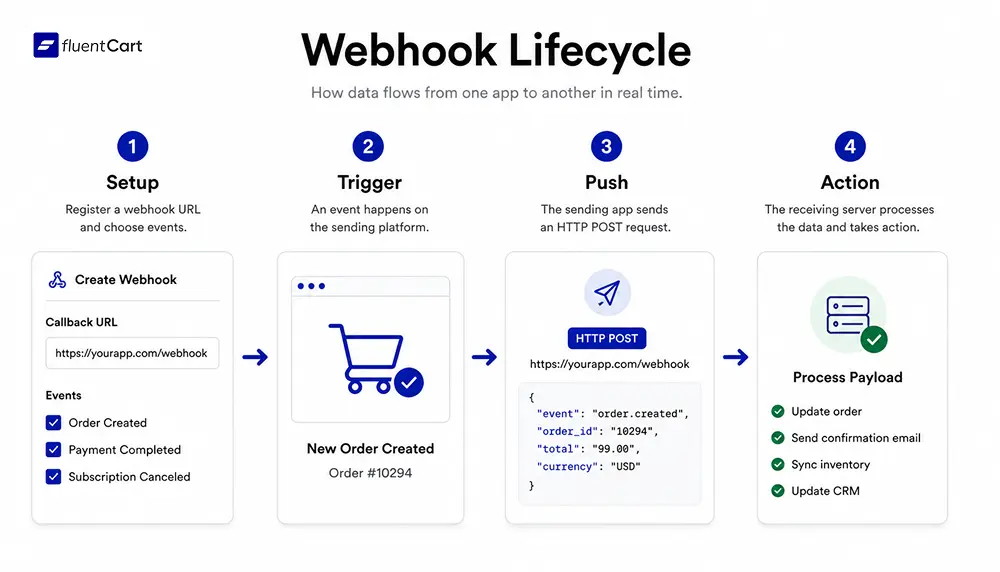
Webhooks follow a simple sequence between two systems, one sending and one receiving.
- Setup: The receiving app gives the sending app a callback URL and picks which events matter.
- Trigger: An event happens on the sending platform, such as a completed purchase.
- Push: The sending app sends an HTTP POST to the URL on its own.
- Action: The receiving server processes the payload and updates an order or sends a receipt.
This event-driven approach, per Red Hat, skips constant polling. A store waits for the webhook instead of checking a gateway every few seconds.
Webhook vs API
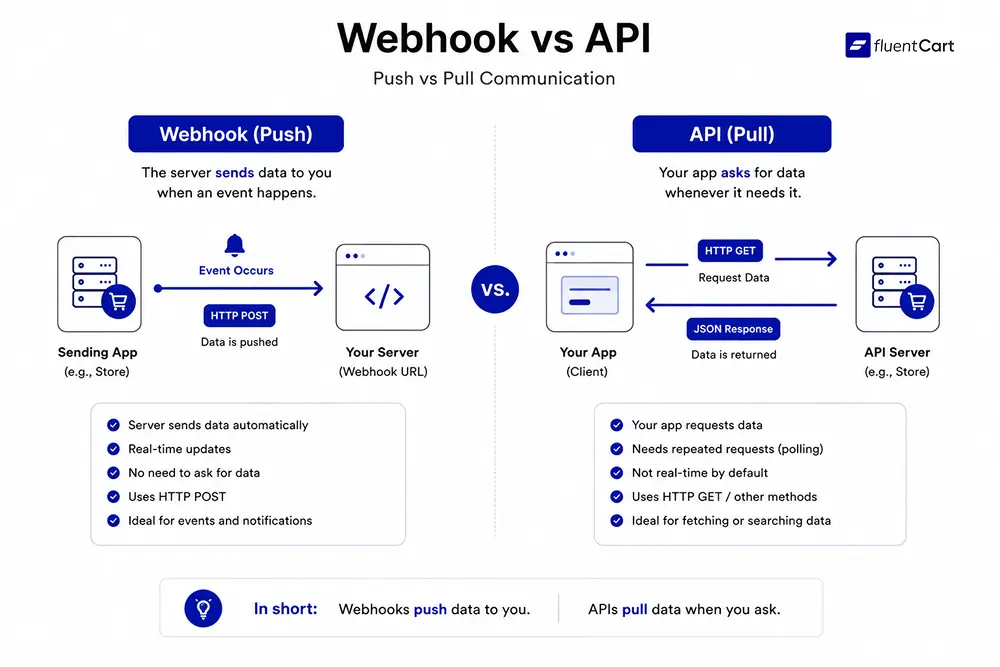
People often use webhook and API interchangeably, but they solve different problems.
- Direction: An API call is two-way. Your app asks and waits. A webhook is one-way and pushes data unprompted.
- Trigger: APIs respond to requests you send. Webhooks respond to events on someone else’s server.
- Scale: ProgrammableWeb lists thousands of public two-way APIs, while a store often needs only a few webhooks for its core events.
- Overlap: A webhook is still a type of API, just event-triggered. One Reddit thread frames it as an API you set up yourself, called once your event fires.
Common Webhook Examples
Different platforms name their events differently, but the pattern stays the same.
| Provider | Sample Event | What Triggers It |
| Stripe | payment_intent.succeeded | A payment clears |
| GitHub | push | Code lands on a branch |
| PayPal | PAYMENT.CAPTURE.COMPLETED | A payment is captured |
| Slack | incoming webhook | A message needs to post to a channel |
A Reddit explainer covers a common case beyond this table. A customer pays, then closes the browser before the confirmation page loads. A payment webhook still notifies the store’s server in the background, independent of the browser.
Webhook Security and Signatures
Anyone can guess a webhook URL if it sits unprotected, so verification matters before a payload gets trusted.
- Signing: Providers such as Stripe attach a signature header to each webhook. Verifying it against an endpoint secret, per the Stripe docs, confirms the request actually came from Stripe.
- Secrets: Most platforms issue a webhook secret when an endpoint is created. That secret belongs on the server, never in client side code.
- HTTPS: A callback URL should run over HTTPS, since payloads often carry customer names, order details, or payment references.
- Raw payloads: Frameworks that parse a request body before verification can break signature checks, so the raw payload needs to reach that step first.
FluentCart follows a similar pattern on the receiving end. Its Paddle integration asks store owners to enter a webhook secret so incoming payment notifications get verified before FluentCart acts on them.
Webhook Retries and Delivery
Not every webhook arrives on the first try. Servers go down, networks fail, and endpoints sometimes error out mid process.
- Retry logic: Most providers retry a failed delivery a set number of times, often with growing delays between attempts.
- Response codes: A receiving endpoint should return a success status quickly. Anything else gets treated as a failed delivery and tried again.
- Duplicate events: Retries mean the same event can arrive twice. Storing an event ID and checking for duplicates avoids double charges or repeat emails.
- Timeouts: Heavy processing inside a webhook handler risks a timeout. Queuing the work and responding fast is the safer pattern.
Anyone integrating a payment gateway webhook should read that provider’s own retry documentation, since retry windows and duplicate handling vary by service.
Webhooks in FluentCart
For WordPress stores, webhooks matter just as much as they do on larger platforms. FluentCart, an ecommerce plugin built for WordPress, offers webhook integration through FluentCart Pro. Store owners can send order, payment, and subscription events to outside tools with no custom code.
A store can trigger a webhook whenever an order is created, a payment succeeds, or a subscription is canceled, then route that payload to accounting software or a CRM. Developers can also work with FluentCart’s documented REST endpoints to build custom payment gateways or automation, paired with the plugin’s own integrations screen.
Benefits and Tradeoffs
- Efficiency: Webhooks skip constant polling, so servers spend fewer cycles asking for updates that have not happened.
- Speed: Data pushes out the moment an event fires, so downstream systems update almost instantly.
- Simplicity: Setup is usually pasting a URL and picking an event, lighter than building a two way API integration.
- Reliability tradeoff: If a receiving server is down when a webhook fires, the message can get lost unless the sending app retries.
Store owners exploring developer tools should confirm signature verification and retry handling are part of any webhook they plan to rely on for anything critical.
Wrapping Up
Webhooks give applications a fast, lightweight way to talk to each other without constant checking. Once a callback URL is set, an event is chosen, and the signature gets verified, updates arrive on their own and can be trusted. Webhooks keep connected systems in sync with far less manual work.
FAQs
What is the difference between a webhook and a pull API? There is not much real difference beyond direction. A pull API is called by the client to fetch data, while a webhook is the server initiating that same kind of call.
Are webhooks frontend or backend? Webhooks are a backend concept. One server sends data to another server’s endpoint, with no browser or user interface involved.
What is a webhook URL? A webhook URL is the callback address a receiving app provides so another service knows where to send event data, similar to a private mailbox address.
Are webhooks the same as WebSockets? No. A WebSocket keeps a connection open so both sides can send data at any time. A webhook fires a single request only when its chosen event happens, with no open connection in between.

Deputy Marketing Lead, published literary author, and musician. I thrive on marketing for tech companies while composing music, collecting books of lasting depth, exploring cinema with a discerning eye, and studying the arts and history.

Subscribe now
Related Articles and Topics
-
Credit Card Payment Plugins Compared: Which Should You Choose?
Compare 10 credit card payment plugins for 2026. See the hidden 1.9% to 3% fees on free plans,…
-
Best Membership Website Hosting in 2026
Membership website hosting isn’t a separate kind of hosting. It’s regular managed cloud or VPS hosting that happens…
-

Best Membership WordPress Plugin: 8 Options Compared for 2026
Compare the best membership WordPress plugin options for 2026 by use case.




Add your first comment to this post