
FluentCart 2.3.0 – Shipping, start to finish
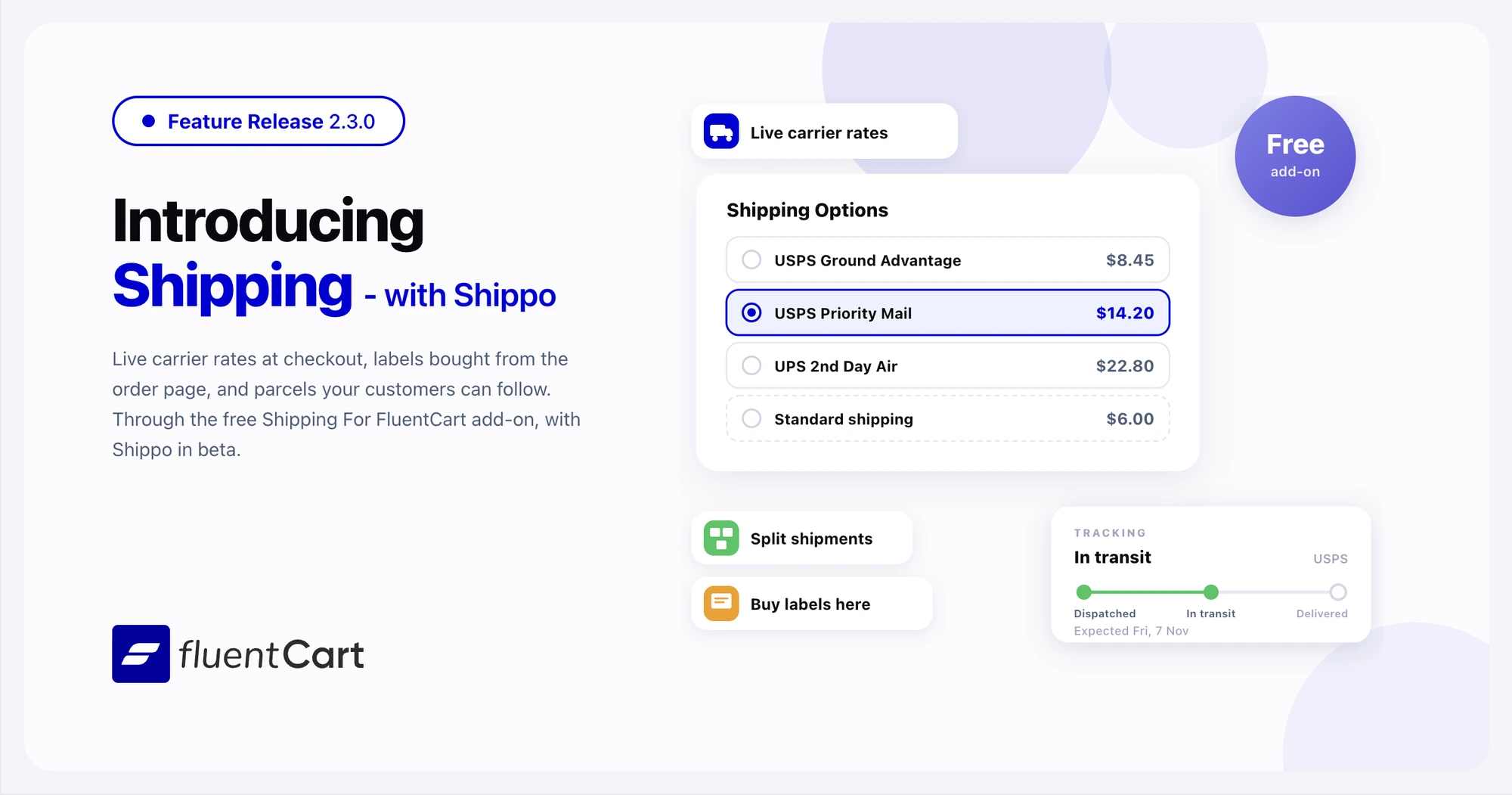
Until now, FluentCart charged shipping from the flat rates you set in shipping zones. A flat rate is your estimate of what the carrier will charge. A heavy parcel to a far address can cost more than you collected. After the sale, you bought the label on a carrier site and copied the tracking number back by hand. Customers then wrote in to ask where their order was. FluentCart 2.3.0 connects your store to Shippo and adds shipments to every order, so you quote, buy labels, and track parcels inside FluentCart.

This is a feature-led release, and shipping leads it. The new Shipping For FluentCart add-on is free and brings Shippo live rates, labels, and tracking, with Shippo marked beta in this first release. FluentCart itself adds shipments you can split, a Carriers page, a shipment email, and tracking in the customer portal. Reports get a rebuild, with an Overview page and four new reports. Refunds change too. You refund by item quantity, and FluentCart records a refund only after the payment gateway accepts it.
Shoppers pick from real carrier rates at checkout
A shopper who sends a hoodie across the country expects to choose between a cheap service and a fast one. A single flat rate offers neither, and it can undercharge you on the parcels that cost the most to send.
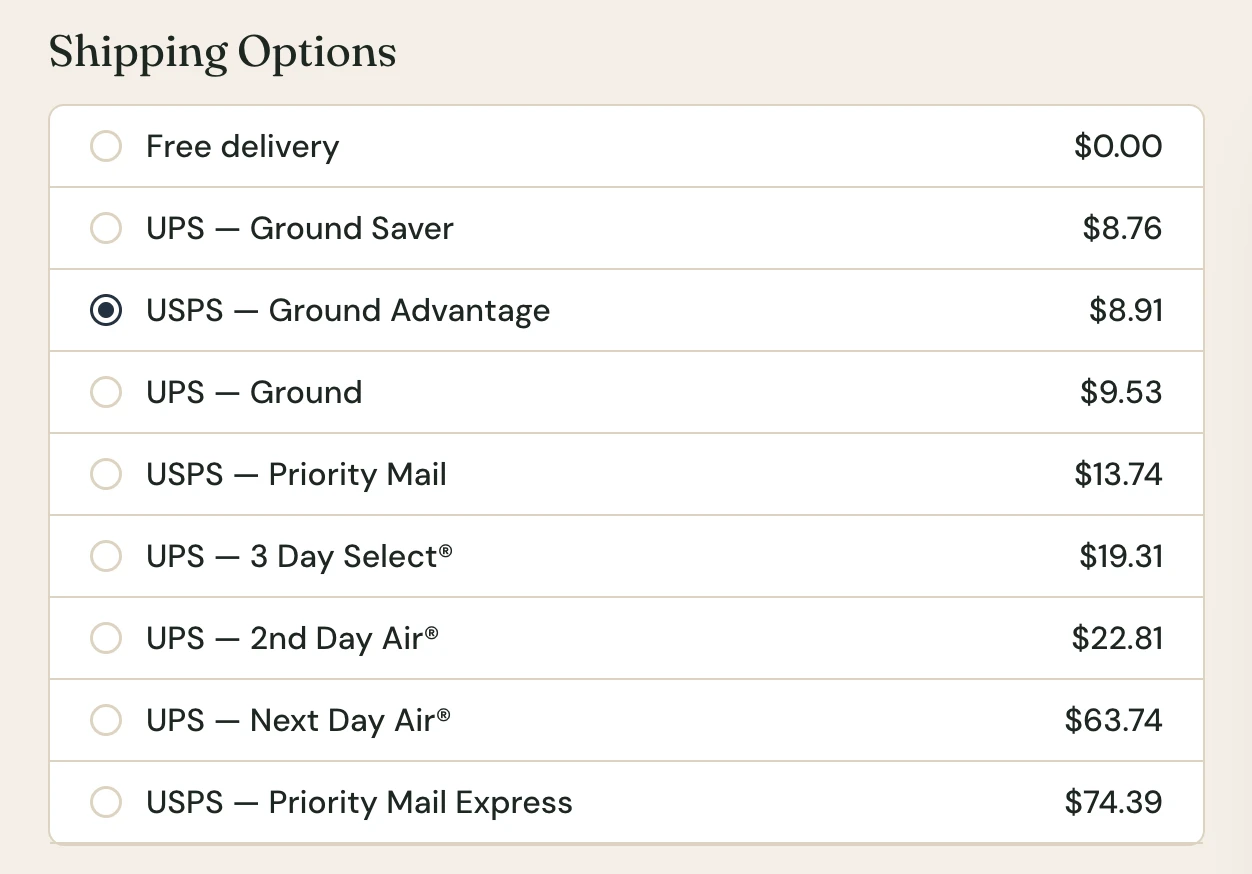
With Shipping For FluentCart, Shippo quotes the carriers you connect in your Shippo account, such as USPS and UPS. FluentCart labels Shippo as Beta in this first release. Once the shopper enters an address, the rates appear under Shipping Options next to your zone shipping methods. Shippo prices each rate in the shopper’s checkout currency, so a Multi Currency store shows the rate in the currency the shopper pays.
FluentCart builds the parcels from each product’s weight and the boxes you set up under Packages. A new Max weight setting on a package tells FluentCart how much a box holds. A heavier cart goes out as several boxes, and Shippo prices all of them.
One limit worth knowing before you turn rates on. Give every physical product a weight. FluentCart quotes a cart with no weight as a default parcel, which may not match the real one.
Your zone shipping methods keep working. They now open from the Manual / Other carrier under Settings → Shipping → Carriers, and the old Shipping Zones page points there.
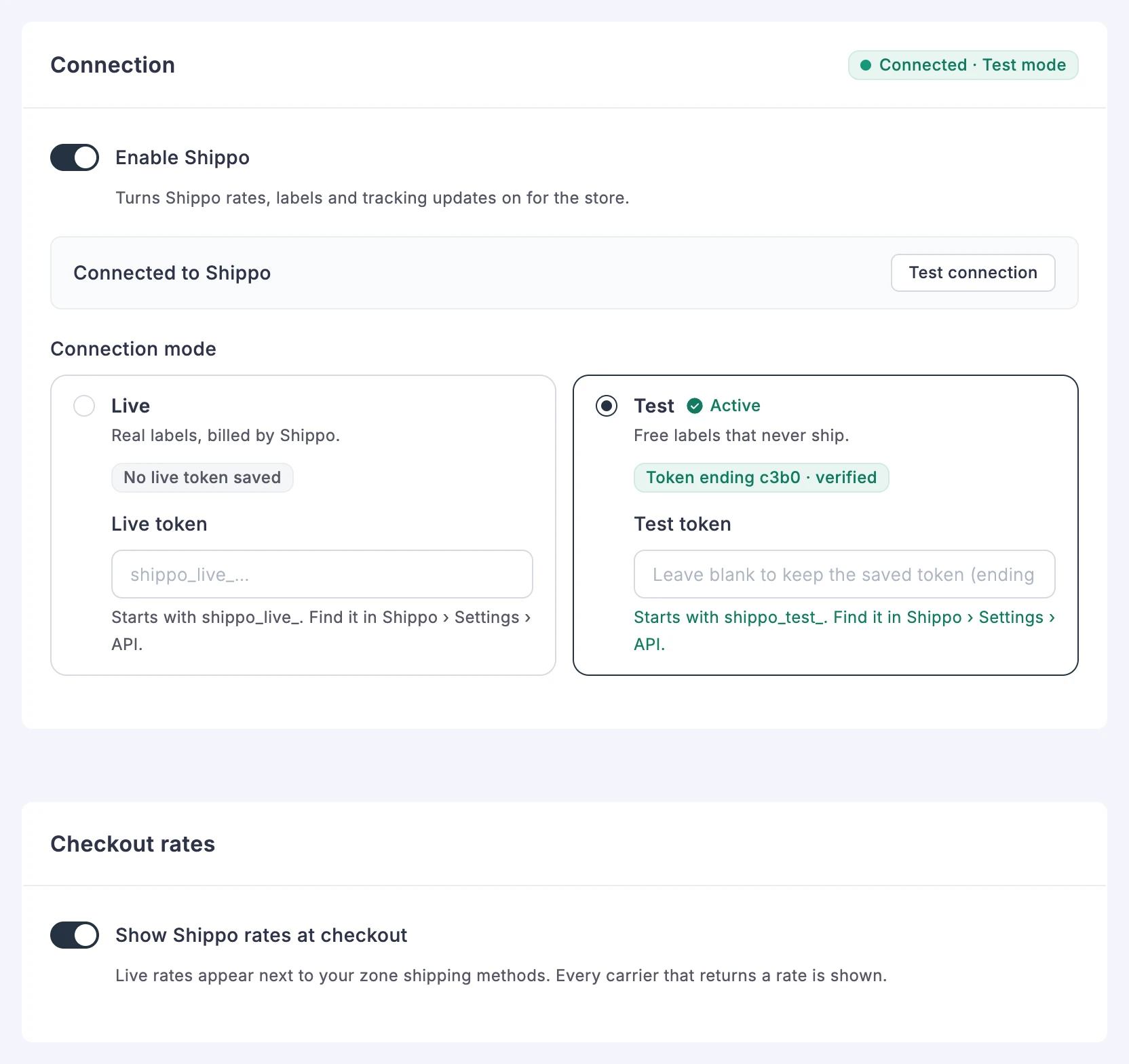
The Shippo settings page shows each part in its own card. Test connection checks your token, and the Ships from address comes from your Store Settings.
Ship an order in parts and buy Shippo labels from the order page
An order does not always leave in one box. One item is on backorder, or two items ship from different shelves. Until now, FluentCart had one shipping status for the whole order.
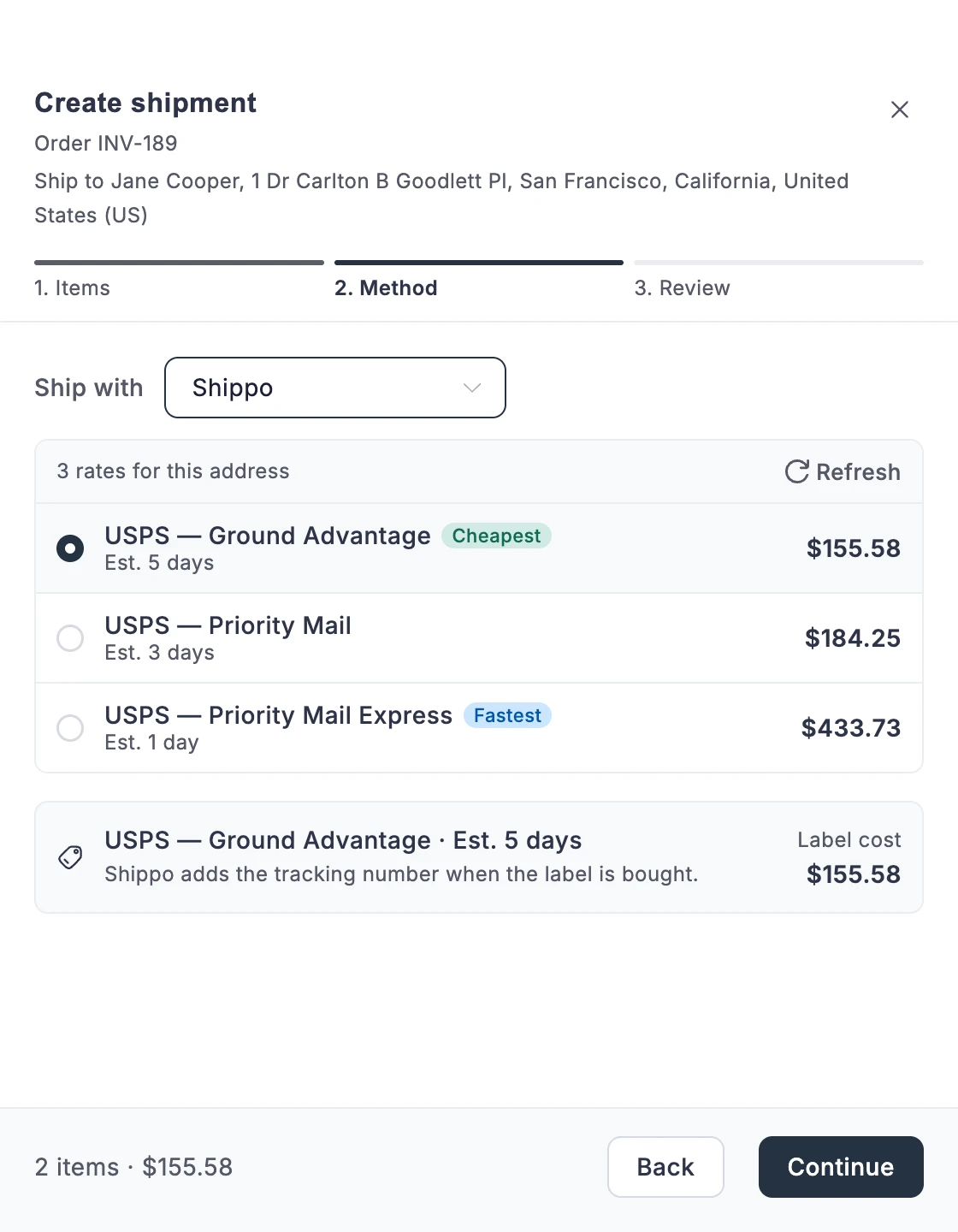
The order page now has a Create shipment button. It opens a drawer with three steps: Items, Method, and Review. In Items, you pick how many of each item go in this box. In Method, you pick Manual / Other or Shippo. With Shippo, the drawer lists the rates for the order’s address, marks the cheapest and the fastest, and shows the label cost. Buy the label, and Shippo returns the tracking number. Each time you click Download label, FluentCart fetches the label from Shippo.
Each shipment then gets a row in a Shipments table on the order, with its status, service, tracking number, and cost. The order shows Partially Shipped until every item has gone out. When Shippo splits a heavy shipment into several parcels, the row lists each parcel with its own tracking number and label. An international label carries a customs declaration built from the items in the shipment.
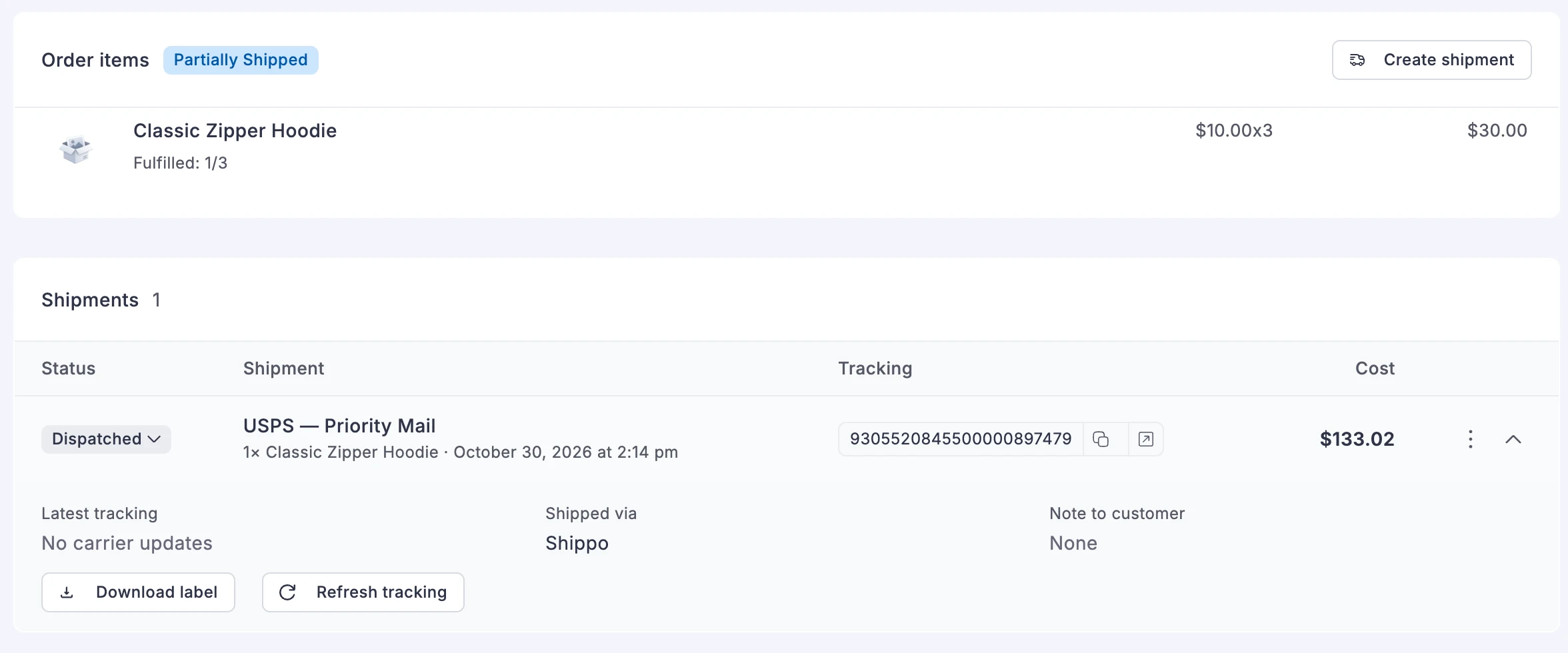
Two checks keep you from paying for a label twice or for a label you no longer need. If Shippo does not confirm a purchase in time, FluentCart locks Buy label and asks you to check your Shippo dashboard before you try again. If you delete a shipment that has not been delivered, FluentCart asks Shippo to void its label.
Stores that use their own courier pick Manual / Other and type the tracking number. Each zone shipping method now has a Tracking URL Pattern, such as the courier’s tracking page with {tracking_number} in the address. FluentCart fills in the tracking link from that pattern.
For developers. Any plugin can add a carrier through the fluent_cart/shipping/carrier_providers filter, and fluent_cart/order_shipment_* actions run when a shipment is created, changes status, or is deleted. Shipping For FluentCart uses the same carrier system.
Customers get an email and a tracking link for each shipment
A customer who receives one box out of two wants to know what is in it and when the rest arrives. Tick Notify Customer when you create a shipment, and FluentCart sends a shipment email. The email lists that shipment’s items, the carrier and service, and a link to the tracking page. A customer with two boxes gets two shipment emails and no extra “order shipped” email on top.
With Shippo, each shipment’s status changes as the carrier scans the parcel. To turn this on, click Register webhook in Shippo under Tracking updates on the Shippo settings page. The shipment moves from dispatched to in transit to delivered, and the order turns Delivered when the last shipment arrives. To pull the latest status yourself, click Refresh tracking on the shipment.
The customer portal shows the same tracking. The order page in the portal has a card for each shipment, with its status, carrier, tracking link, and items. With Shippo, the card also shows the expected delivery date, and Out for delivery when the carrier reports it. Purchase History shows the delivery state of each order.
To write your own shipment email, use {{shipment.tracking_link}} and the other shipment smartcodes, or {{order.shipments}} for every shipment of an order. With FluentCart Pro, the email block editor also offers a Shipment Update starter template.
Reports show what changed and what needs your attention
Until now, FluentCart reports showed your totals, but not which coupon cost you the most or which gateway declined the most cards.
The new Overview page shows net sales, orders, average order value, new customers, repeat purchase rate, and refund rate, each against the previous period. Stores with subscriptions also see MRR, paying subscriptions, and churn rate. A Needs Attention list names failing subscriptions, a dispute rate over the card networks’ 0.75% threshold, failed installment payments, and a sharp rise in refunds. Each item links to its report.
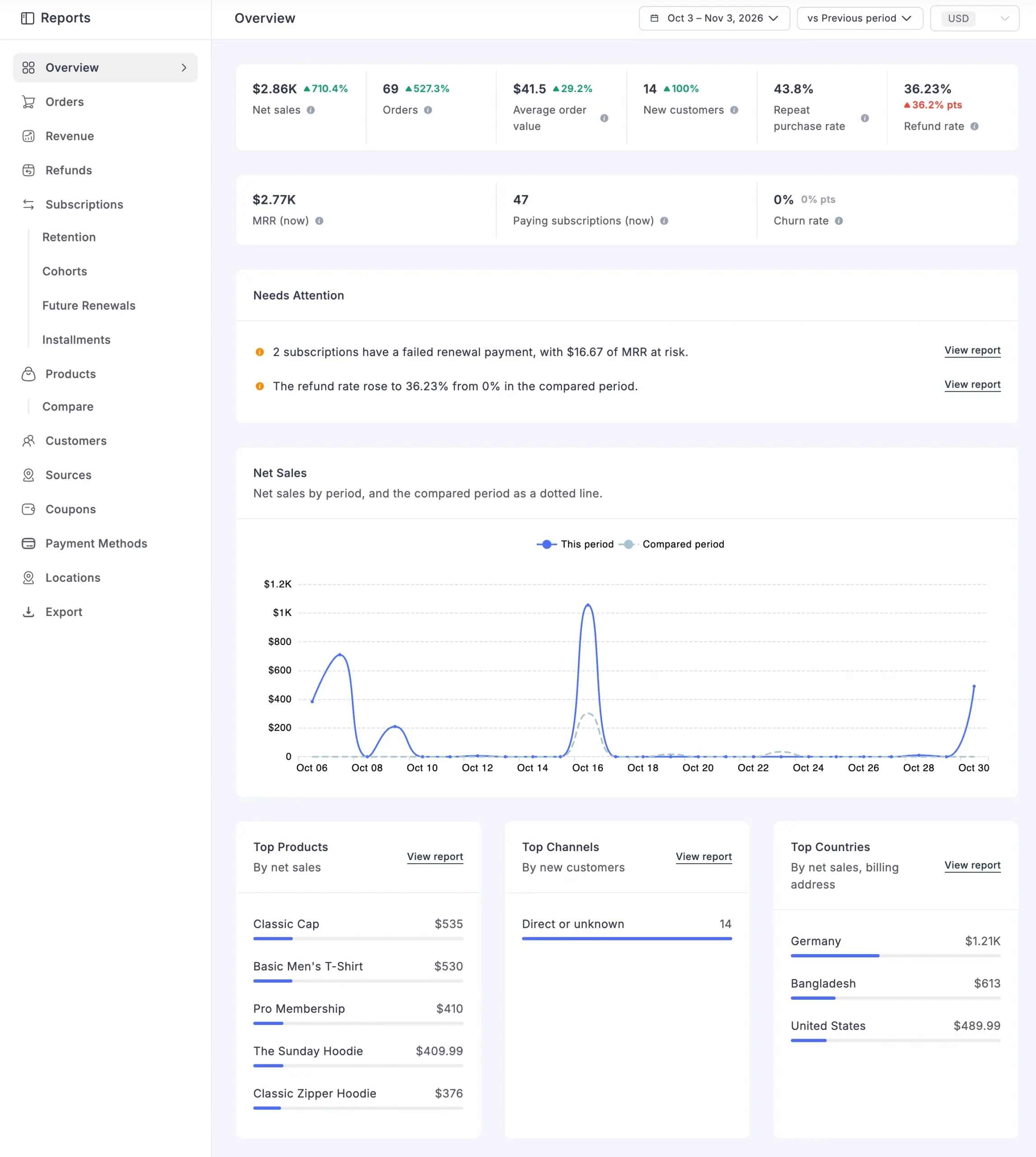
Four reports are new. Coupons lists each coupon with its uses, discount given, net sales, and refunds. Payment Methods shows sales, payment success, declined charges, and failed orders for each gateway. Locations shows sales by country on a world map. Installments shows what installment plans have collected, what is due in the next 30 days, and what is overdue.
FluentCart rebuilt the other report pages, so their figures agree. Products now has one table with each product’s variants under it. Customers shows new, returning, and renewing customers over time. Sources groups orders by any UTM field. Every report now counts days in your WordPress timezone, and stores without Pro can pick any date range.
FluentCart Pro adds deeper sections to these reports. Customers adds customer value, repeat purchase behavior, and RFM segments you can export. The subscription reports add an MRR breakdown, trial conversion, a retention curve, and an installment forecast. Payment Methods adds disputes and card brands, and Locations drills down to states and cities. Sources adds your own channel rules and groups by product, time, or referrer.
The MCP report tools now return the same figures as the admin reports, so an AI assistant and the Reports page agree.
Refunds follow the items a customer sends back
A customer returns one hoodie out of three. Before 2.3.0, you typed an amount by hand and worked out the tax yourself. The order kept showing three hoodies.
The refund window now lists each item with a quantity. Pick 1 of 3, and FluentCart works out the amount, including that item’s share of tax and discounts. You can lower the amount when you keep part of the price. Shipping has its own line, and you can refund all of it or part of it, in one refund or across several.
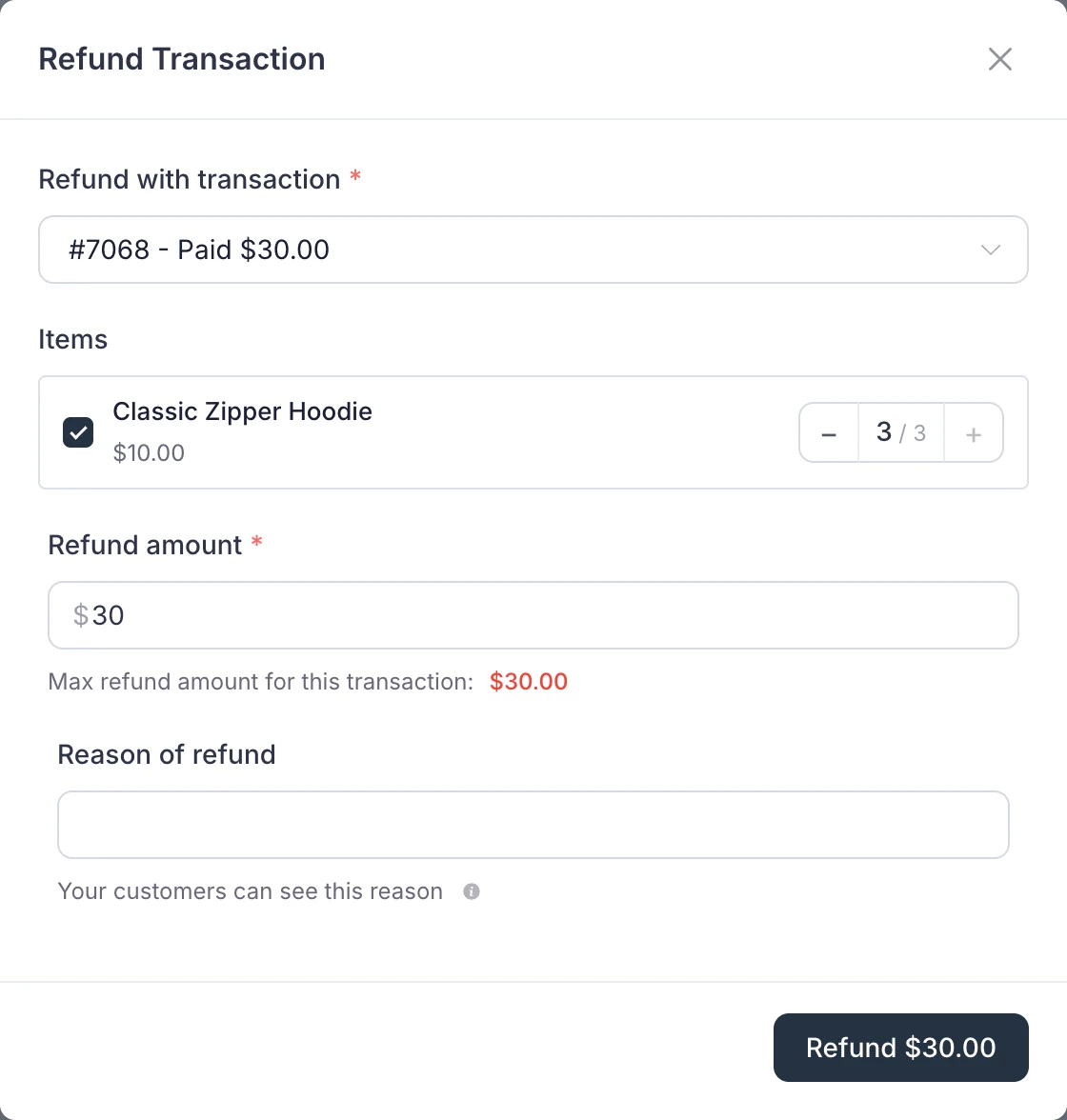
After the refund, the order shows the original quantity struck through next to what the customer kept. If some of the refunded units had shipped, the window asks how many, so the shipped count stays right.
FluentCart now sends the refund to Stripe, PayPal, or your other gateway first. It records the refund only after the gateway accepts it. If the gateway refuses or does not answer, the order stays as it was, and you see the gateway’s reason. You can then cancel, or choose Record locally only if you already returned the money another way. Record locally only moves no money.
Improvements
Email layout. The default email templates now show a card on a grey page and a larger total. The order summary has Item, Qty, and Total columns. Payment shows as a badge, and long prices and order numbers wrap on phones.
Order and receipt numbers. Emails, receipts, receipt PDFs, and the customer dashboard now show Order # and Receipt # as two numbers. Order # is the order’s unique reference. Receipt # is the invoice number, and it appears once the order is paid. Receipt PDF files take their name from the same number.
Admin menus. The FluentCart menu in the WordPress sidebar now groups its items with dividers. Pages the FluentCart top bar already links to, such as Taxes and Logs, leave the sidebar. In the top bar, Products lists every product grouping, such as Categories and Brands, and More groups its items into Marketing and Store.
Customer email checks. When a customer changes their account email without confirming the new inbox, the customer and order screens show Email unverified. On the customer profile, staff can click Mark verified, which also links the guest orders placed with that email.
Features & Addons. The page has a Save button in its header. Each active add-on with settings, such as Shipping For FluentCart, shows a gear that opens them.
Installment plans. Installment orders now read Installment 3/6 on the order list. Installment plans have their own icon on the subscription list, so you can tell them from recurring plans.
Order bump. With FluentCart Pro, each order bump at checkout shows as a card, with the product image, the price, and a Yes, add this to my order toggle.
Pro tools. The customer export in FluentCart Pro adds Purchased items, with each item’s order status and payment status. On Create Order, the currency picker moves into the Products header and asks before it re-prices items.
Fixes & Stability
Refunds and stock. A partial refund that refunds a product in full now removes the CRM tags, community spaces, and course access that product granted. Stock stays right when a shopper raises a quantity on a second payment attempt. It also stays right when you cancel and refund the same order, and when a refund completes a partly delivered order. Refunded units that had shipped no longer count as shipped. Unticking an order bump no longer removes the units the shopper added.
Checkout. Turnstile no longer refuses an order when the shopper waits more than five minutes, and it loads on every checkout. A checkout without Turnstile keys no longer stops. Shipping methods load when the State field is turned off, and payment options are no longer cut off. Stripe payments no longer fail when a password manager types the card number into a name field. The processing overlay clears after every successful order. Country search accepts brackets, such as “United States (US)”, and popup checkout totals update after a VAT number check. A PayPal error without a message no longer causes background errors, and the PayPal hint follows the checkout text color. Account page links, such as order links in emails, work after the account page moves under a parent page.
Shipping and tax. A shipping class now charges once per class, and a percentage class charges once, on the highest unit price. Weight-based rates count a box’s weight once per box, not once per unit. Percentage shipping fees use the postage after discounts. In tax-inclusive stores, shipping and fees now include their tax, as your product prices do.
Amounts and emails. Currencies keep their decimals on order screens and the customer dashboard, and half cents round the same way on PHP 8.4. Failed-renewal emails include the renewal amount and no longer promise a retry.
Admin and integrations. FluentCRM receives the state name instead of its code, and the Fluent Support widget shows dates in the site timezone. Saving a shipping class keeps Apply to quantity, and a product saves after its shipping class is deleted. Block editor product pickers open above the editor in Safari and keep keyboard focus inside the dialog. The product carousel shows a message instead of loading forever, and a simple product’s thumbnail falls back to its gallery image. The Add Review picker lets you pick a product as well as its variations. Coupon notes save as expected, and the activity log no longer reports a failure as a success. More text in subscription wording, the activity log, admin badges, and checkout errors can now be translated.
Payments in FluentCart Pro. Refunds that you make in the Authorize.Net, Mollie, and Paddle dashboards now reach FluentCart, and Paddle item refunds match the amounts FluentCart recorded. Cards used for subscription renewals appear in saved cards. Remove works on a saved Stripe card when Stripe cannot detach it, and a payment no longer fails after a shopper changes the save-card choice. Mollie now emails the customer when a renewal payment fails. The order summary email block shows the payment method again. Dynamic Pricing no longer adds a shipping fee to a cart with nothing to ship.
Security and maintenance. This release includes ongoing security audits and routine hardening across FluentCart core and FluentCart Pro, including the new shipping and refund screens.
Getting 2.3.0
Update FluentCart and FluentCart Pro from your dashboard. Shipping For FluentCart is free and needs FluentCart 2.3.0 or later.
To install Shipping For FluentCart:
- Go to FluentCart → Settings → Features & addon.
- Under Plugin Addons, find Shipping For FluentCart and click Install & Activate.
To connect Shippo:
- Go to Settings → Shipping → Carriers, and click Manage next to Shippo (Beta).
- Turn on Enable Shippo.
- Under Connection mode, pick Test, paste your Shippo test token, and click Test connection.
- Turn on Show Shippo rates at checkout and Buy labels from the order page.
- Under Sender, fill in Phone with its country code. USPS requires it.
- Click Save settings.
- Under Tracking updates, click Register webhook in Shippo.
When your test labels look right, pick Live, paste your live token, and save. Then click Register webhook in Shippo again for Live mode.
To ship part of an order, open the order and click Create shipment.
Full Changelog
Shipping For FluentCart 1.0.0
- Adds Shippo live rates at checkout, priced in the shopper’s checkout currency.
- Adds Shippo labels from the Create shipment drawer, including multi-parcel labels and international labels with customs.
- Adds Shippo tracking updates, turned on with one Register webhook in Shippo button, plus a Refresh tracking button.
- Adds the expected delivery date and an Out for delivery status from Shippo to the customer portal.
- Adds a Shippo label void when you delete a shipment that has not been delivered.
- Adds Live and Test modes, a Test connection button, and a Preferred Carrier setting.
Features
- Adds split shipments on the order page, created step by step in a Create shipment drawer.
- Adds a Carriers page under Settings → Shipping, and moves Shipping Zones to the Manual / Other carrier.
- Adds a Tracking URL Pattern to each zone shipping method for manual shipments.
- Adds a shipment email and
{{shipment.*}}smartcodes with each shipment’s items and tracking link. - Adds a Shipment Update starter template for the shipment email. Pro only.
- Adds shipment tracking to the customer portal order page, and a delivery status in Purchase History.
- Adds a Max weight setting to shipping packages, so carriers can quote a heavy cart as several boxes.
- Adds an Overview report with key figures, a net sales trend, top lists, and a Needs Attention list.
- Adds Coupons, Payment Methods, Locations, and Installments reports.
- Adds customer value, repeat purchase, and RFM segment sections to the Customers report. Pro only.
- Adds MRR breakdown, trial conversion, a retention curve, and an installment forecast to the subscription reports. Pro only.
- Adds dispute and card brand figures, coupon quality, most refunded products, and state and city drill-down. Pro only.
- Adds custom channel rules and product, time, and referrer groupings to the Sources report. Pro only.
- Adds a card layout for the order bump at checkout. Pro only.
- Adds an Email unverified tag and a Mark verified action for customers.
- Adds Purchased items to the customer export. Pro only.
- Adds
fluent_cart/shipping/*,fluent_cart/order_shipment_*, andfluent_cart/admin_menu/*hooks for developers.
Improvements
- Improves every report page with rebuilt cards, charts, and tables that use the same figures.
- Improves reports, which now count days in your WordPress timezone and let free stores pick any date range.
- Improves MCP report tools, which now return the same figures as the admin reports.
- Improves refunds with item quantities, partial shipping refunds, and an amount you can lower.
- Improves refunds, which FluentCart records only after the gateway accepts them, with a Record locally only option.
- Improves installment orders, which now read “Installment 3/6” and stand apart on the order and subscription lists.
- Improves the default email layout with a card design and a clearer order summary.
- Improves emails, receipts, PDFs, and the customer dashboard, which show Order # and Receipt # separately.
- Improves the admin sidebar and top bar menus, which now group their items.
- Improves Features & Addons with a header Save button and a settings gear for each active add-on.
- Improves the Create Order currency picker, which moves into the Products header. Pro only.
Fixes
- Fixes partial refunds keeping the CRM tags, community spaces, and course access of the refunded product.
- Fixes stock and shipped counts after checkout retries, cancels, refunds, and partial deliveries.
- Fixes unticking an order bump removing the units the shopper added.
- Fixes shipping class charges, which now apply once per class, and percentage classes charged on every line.
- Fixes weight-based rates counting a box’s weight for every unit, and percentage fees ignoring discounts.
- Fixes shipping and fee tax in tax-inclusive stores.
- Fixes Turnstile refusing orders after five minutes, missing from some checkouts, and blocking checkout without keys.
- Fixes Stripe payments failing when a password manager typed the card number into a name field.
- Fixes checkout shipping methods when the State field is off, a stuck processing overlay, and clipped payment options.
- Fixes country search with brackets and popup totals after a VAT check at checkout.
- Fixes PayPal background errors and the PayPal hint ignoring the checkout text color.
- Fixes account page links opening the blog after the account page moved under a parent page.
- Fixes lost decimals for some currencies, and half cents rounding differently on PHP 8.4.
- Fixes failed-renewal emails leaving out the renewal amount and promising a retry.
- Fixes state names sent to FluentCRM and Fluent Support widget dates in the site timezone.
- Fixes shipping class saves turning Apply to quantity off, and products failing to save after a class was deleted.
- Fixes simple product thumbnails, which now fall back to the gallery image.
- Fixes block editor product pickers in Safari, keyboard focus in the picker, and a product carousel that never loaded.
- Fixes the Add Review product picker, coupon notes, and failures logged as successes in the activity log.
- Fixes text that could not be translated in subscription wording, the activity log, admin badges, and checkout errors.
- Fixes refunds from the Authorize.Net, Mollie, and Paddle dashboards, and Paddle item refunds one cent off. Pro only.
- Fixes Mollie renewal failures, which now notify the customer. Pro only.
- Fixes saved cards from renewals, Remove on Stripe cards, and payments after a shopper changed the save-card choice. Pro only.
- Fixes the blank Payment Method line in the order summary email block. Pro only.
- Fixes Dynamic Pricing shipping fees on carts that have nothing to ship. Pro only.
In case you missed
2.2.0, Oct 16, 2026
- Improves right-to-left layouts on the checkout, cart, shop, product pages, customer portal, and receipts.
- Improves notification emails and the store digest email, which now lay out right to left on right-to-left stores.
- Adds Slovak, Czech, and German labels for the store’s business IDs, such as IČO and USt-IdNr., when your store country matches.
- Improves orders in another currency, where the create and edit order screens now price products, coupons, and totals in that currency. Pro only.
2.1.0, Oct 15, 2026
- Adds a Compare report under Products, with a totals table and a chart for two or more products. Pro only.
- Adds Customers, Discounts, and Top Sold Variants cards and a Units Sold by Period table to the Products report.
- Adds a Renewals by Variant table to the Future Renewals report.
- Adds a Field Labels setting with Docked, Floating, and Placeholder only styles for checkout fields, with Docked as the new default.
2.0.0, Oct 14, 2026
- Adds Multi Currency as a beta, so shoppers see prices, the cart, and checkout in their own currency. Pro only.
- Adds Price adjustment, Rounding, and Charm pricing settings for each currency, with charm endings of .99 and .95. Pro only.
- Adds a stored exchange rate on every order, which the order’s renewals and refunds reuse. Pro only.
- Adds a currency switcher with flags as a block, a shortcode, and a site menu item. Pro only.

I’m Jewel, founder of FluentCart and CEO at WPManageNinja, the team behind Fluent Forms, Fluent CRM, Fluent Support, FluentLogs and a handful of other WordPress plugins. I have been writing WordPress code since 2009 and still think of myself as a developer first and an entrepreneur second. Most of what I write on this blog comes from arguments we have had inside the team about how to build software people can actually depend on.

Subscribe now
Related Articles and Topics
-
FluentCart 2.2.0 – RTL stores and complete receipts
FluentCart 2.2.0 lays out the storefront for right-to-left languages, and receipts and order emails now show the registration,…
-
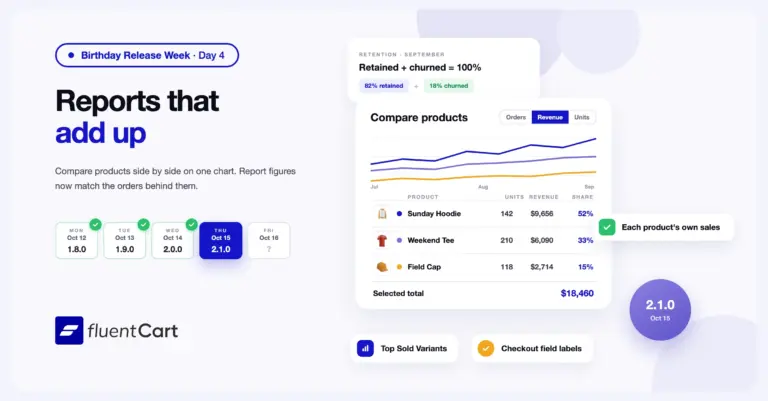
FluentCart 2.1.0 – Reports that add up
FluentCart 2.1.0 adds a Compare report that puts two or more products on one chart and one table,…
-
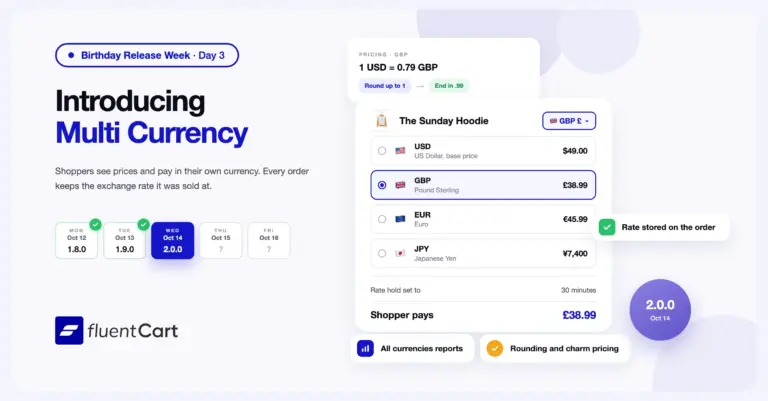
FluentCart 2.0: Multi Currency for our first birthday
FluentCart 2.0.0 adds Multi Currency. Shoppers see prices, check out, and get their emails in their own currency,…



Add your first comment to this post