
What Is a Website Title? Definition, Examples & SEO Best Practices
Most people launching a website spend hours on design, product copy, and checkout flow. Then they spend two minutes on page titles. That is backwards. Your website title is often the first thing a potential visitor reads before deciding whether to click your page or skip it. It shapes how search engines categorize your content and whether your page earns the click it deserves.
In this blog, we will cover what a website title is, where it appears, why it matters for SEO, how it differs from related terms, and how to write one that works.
TL;DR
- A website title is an HTML element that identifies a web page for browsers, search engines, and social platforms
- It appears in browser tabs, Google search results as the bold blue headline, and social media link previews
- It is a confirmed Google ranking signal with a direct effect on click-through rates
- The ideal length is 50 to 60 characters to avoid truncation in search results
- Every page needs its own unique title that reflects that page’s specific content
- Common mistakes include duplicate titles, vague phrasing, keyword stuffing, and all-caps formatting
What Is a Website Title?
A website title is an HTML element that defines the name of a specific web page. It lives in the <head> section of a page’s code, written between <title> and </title> tags, and communicates the page’s topic to both users and search engines.
In HTML, it looks like this:
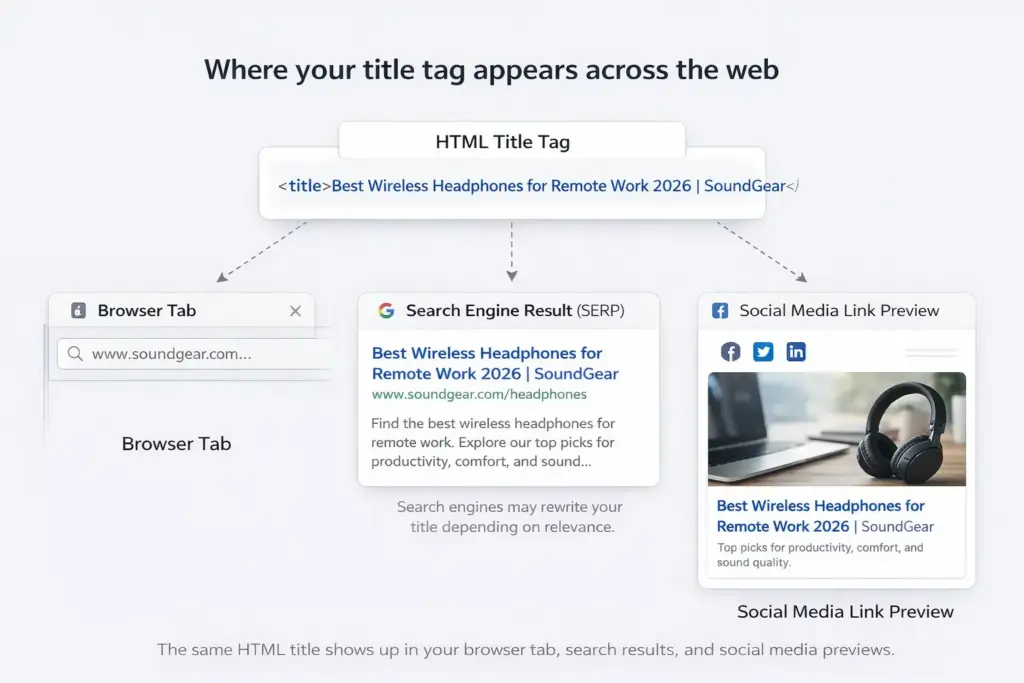
<title>Best Wireless Headphones for Remote Work 2026 | SoundGear</title>
The title does not appear visibly on the page itself. It surfaces in the browser tab, in the clickable headline on search engine results pages (SERPs), and in the link preview when someone shares your URL on social media.
What Does a Website Title Mean, Exactly?
The term gets used loosely, so it helps to be precise. In SEO terms, the website title refers to the HTML title tag for a specific page. It can also be called a title tag, page title, SEO title, or meta title. All of these refer to the same element.
In a broader sense, some people use “website title” to mean the overall name of a site or brand. In WordPress, this is called the site title, set globally under Settings > General. It is a different field from individual page title tags, though both matter for SEO.
One is a global brand label. The other is a page-level SEO element. Conflating them is where most people go wrong.
Where Does a Website Title Appear?
A website title appears in four places:
- In browser tabs: Your title is the only identifier for your page when a visitor has multiple tabs open. A tab that reads “Home” tells them nothing useful.
- In search results: The website title appears as the bold clickable headline above the URL in every organic search result. It is the first thing a searcher reads before deciding to visit your page.
- In social media previews: When someone shares your URL on LinkedIn, Facebook, X, or WhatsApp, the platform pulls your title tag to generate the link card headline.
- In browser bookmarks: When a user saves your page, the browser uses the title as the default bookmark label.
What Is a Website Title vs. Article Title vs. Title Tag?
These three terms trip up a lot of people. Here is how they differ:
- Website title (title tag): The HTML element inside <head>. Invisible on the page itself. Read by search engines and browsers. Optimized for people who have not landed on your page yet.
- Article title (H1 tag): The main visible heading at the top of the page. Read by visitors after they arrive. Optimized for on-page readers.
- Site title: The global name for the entire website, typically matching the brand or domain name. Set once and applies site-wide.
The title tag and H1 do not need to be identical. The title tag is concise and keyword-forward for the SERP. The H1 can be slightly longer and more engaging for the reader already on the page.
Website Title vs Article Title vs Site Title
| Aspect | Website Title (Title Tag) | Article Title (H1) | Site Title |
| Definition | HTML <title> element inside the <head> | Main heading using <h1> tag | Overall name of the website/brand |
| Location | In the page’s HTML <head> section | At the top of the webpage content | Set globally (CMS settings / theme config) |
| Where It Appears | Browser tab, Google search results (SERP), social previews | Visible on the page itself as the main heading | Header, homepage, browser tab (sometimes), branding areas |
| Visibility | Not visible on the page | Fully visible to visitors | Visible across the site |
| Audience | Search engine users (before clicking) | Readers already on the page | All users (branding context) |
| Primary Purpose | Improve SEO and click-through rate | Engage and inform readers | Establish brand identity |
| Length Guideline | ~50–60 characters (to avoid truncation in SERP) | Flexible (can be longer and more descriptive) | Short (usually brand name or tagline) |
| Optimization Focus | Keywords + clarity + intent | Readability + engagement | Memorability + branding |
| Example | Best Wireless Headphones for Remote Work 2026 | SoundGear | The Best Wireless Headphones for Remote Work (2026 Guide) | SoundGear |
Why Is a Website Title Important for SEO?
The website title is one of the most accessible on-page SEO elements you control. Here is why it matters:
- It signals relevance to search engines: The title tag is among the first elements a crawler reads. Including your target keyword tells the crawler your page is directly relevant to that search term. Backlinko found that nearly 100% of page-one results include their keyword in the title or H1.
- It influences click-through rate: The top results capture the majority of clicks on the Google search results page (SERP). According to Backlinko’s analysis of “4 million search results, the number one result gets 27.6% of all clicks”. And, “The top three results collectively receive around 54.4% of clicks, showing how heavily attention is concentrated at the top”. Moving from position two to position one can result in a significant CTR boost. Your title is what earns or loses those clicks.
- It affects whether Google rewrites your title: Google may replace your title in the SERP if it judges your original as inaccurate, too long, stuffed with keywords, or duplicated across pages. A clean, accurate title keeps you in control of your SERP appearance.
Once In a Lifetime Offer
What Is a Website Title Example?
Here are before-and-after examples across common page types:
By Page Type
Product page:
- Weak: Product Page | Online Store
- Stronger: Organic Cotton Bath Towels, Soft and Absorbent | NaturaBath
Blog post:
- Weak: Tips for Better Sleep
- Stronger: 12 Science-Backed Sleep Tips That Actually Work | WellnessHub
Category page:
- Weak: Shoes | YourStore
- Stronger: Women’s Running Shoes, Lightweight and Supportive | YourStore
Homepage:
- Weak: Welcome to Our Website
- Stronger: NaturaBath | Organic Home Essentials for Everyday Living
Effective titles include the keyword, communicate a specific benefit, and give the reader a reason to click, all within 60 characters.
Weak vs. Strong Website Titles (by Page Type)
| Page Type | Weak Title | Strong Title | Character Count (Strong) |
| Product Page | Product Page | Online Store | Organic Cotton Bath Towels, Soft and Absorbent | NaturaBath | ~68 (may truncate slightly) |
| Blog Post | Tips for Better Sleep | 12 Science-Backed Sleep Tips That Actually Work | WellnessHub | ~72 (slightly long but compelling) |
| Category Page | Shoes | YourStore | Women’s Running Shoes, Lightweight and Supportive | YourStore | ~73 (may truncate) |
| Homepage | Welcome to Our Website | NaturaBath | Organic Home Essentials for Everyday Living | ~66 (borderline optimal) |
How to Write a Good Website Title (Step by Step)
1. Identify the Primary Keyword
Start with the exact phrase your audience types when searching for that specific page. Place the keyword as close to the start of the title as possible. Front-loading ensures it appears even when the title is truncated on smaller screens.
2. Match the Search Intent
Your language should reflect why the user is searching:
- Informational: Use “What Is,” “Guide to,” or “How to”
- Commercial: Use “Best,” “Top,” or “Compared”
- Transactional: Use “Buy,” “Shop,” or “Order”
A title that mismatches the intent will underperform even with the right keyword.
3. Add a Value Signal
Give the user a reason to click your result over the others. Common signals include:
- Specificity: “for Beginners,” “2026 Edition,” “Step-by-Step”
- Practical benefit: “Free Template,” “With Examples”
4. Add Your Brand Name
Place the brand name at the end, separated by a pipe (|). For your homepage, leading with the brand name is appropriate.
5. Check the Length
Keep the title between 50 and 60 characters. Use a SERP preview tool before publishing to confirm it is not truncated on desktop or mobile.
Website Title Best Practices
What to Do
- Write a unique title for every page: Duplicate titles create indexing confusion. Search engines cannot determine which page is most relevant, so both tend to rank lower.
- Front-load the keyword: The first few words carry the most weight for both users and crawlers.
- Match the title to the page content: Every word in your title should reflect something the visitor will actually find on the page.
What to Avoid
- Keyword stuffing: One well-placed keyword used naturally outperforms three awkward repetitions every time.
- All caps formatting: Harder to read and registers as unprofessional. Use sentence case or title case.
- Vague or misleading phrasing: A title is a promise. If the page does not deliver what the title suggests, users bounce, and that sends negative signals to search engines.
- Empty title tags: Without a title, search engines generate one automatically from your page content. You lose all control over your SERP appearance.
Website Title When Citing: MLA and APA
Many people searching this topic are students figuring out how to cite sources. The citation meaning differs from the SEO meaning.
MLA Format (9th Edition)
- Webpage title: Written in quotation marks
- Website title (site name): Written in italics
Format: Author Last Name, First Name. “Title of Webpage.” Name of Website, Date, URL.
APA Format (7th Edition)
- Webpage title: Plain text, sentence case
- Website name: Written in italics
Format: Author Last Name, Initials. (Year, Month Day). Title of webpage. Name of Website. URL
In both formats, “website title” in citation context means the name of the site or publication, not the HTML title tag.
How to Find Your Current Website Title
- Browser tab: Open the page and read the tab label at the top of the browser.
- Google search: Search your brand name or URL and read the bold headline in the result.
- Page source: Right-click the page, select “View Page Source,” and search for <title> in the code.
For large sites, a crawling tool like Screaming Frog or your SEO plugin’s audit feature will pull all titles in bulk so you can review for duplicates or missing entries efficiently.
Wrapping Up
A website title is small but consequential. It tells search engines what your page is about, tells users whether to click, and represents your brand every time a link is shared. Getting it right takes ten minutes per page and pays back in traffic for as long as that page ranks.
Keep it specific, keep it under 60 characters, make it unique per page, and match it honestly to what the visitor will find. That is the whole job.
If you are building or growing an online store and want to understand more abouthow to increase website traffic through on-page fundamentals, that guide covers the broader picture alongside title optimization.
Once In a Lifetime Offer
Frequently Asked Questions
What is the difference between a website title and a meta description?
The website title is the bold blue clickable headline in a search result. The meta description is the shorter grey text beneath it. The title is a confirmed ranking signal. The meta description is not, but it does influence whether someone clicks.
What happens if I do not set a website title?
Search engines generate one automatically from your H1 or visible page text. You lose control over how your page appears in search results and shared links.
Does the website title need to match the H1 exactly?
No. They should be consistent in topic and keyword, but not word-for-word identical. The title tag is for the SERP. The H1 is for the reader on the page.
How often should I update my website titles?
Review key pages every six to twelve months. If CTR drops in Google Search Console, the title is the first thing to test and revise.
What is a good character length for a website title?
Aim for 50 to 60 characters. Below 30 often lacks context. Above 65 risks truncation on mobile screens.

Deputy Marketing Lead, published literary author, and musician. I thrive on marketing for tech companies while composing music, collecting books of lasting depth, exploring cinema with a discerning eye, and studying the arts and history.

Subscribe now
Related Articles and Topics
-
What Is a GUI? Graphical User Interface Explained Simply
Think about the last time you clicked a button, tapped an icon, or dragged a file into a…
-

Pure Play eCommerce: What It Is and How It Works in 2026
Pure play ecommerce means selling online only. Learn how it works, the real pros and cons, and whether…
-

Is Dropshipping Worth It in 2026? Profitability, Trends & Real Challenges
Is dropshipping worth it in 2026? A practical look at profitability, market trends, challenges, and which sellers tend…



Leave a Reply