
What Is Order Management? (And Why It Gets Messy Fast) [Guide]

Order management is the process of order capturing, tracking, and fulfilling customer orders. The order management process begins when an order is placed and ends when the customer receives their package.
Simple enough, right?
Here’s the thing, though, most store owners don’t think about order management until something breaks. An order gets shipped to the wrong address. You oversell a product you don’t actually have in stock. A customer emails you three times asking “where’s my order?” and you’re digging through spreadsheets, emails, and your fulfillment partner’s portal all at once trying to piece together an answer.
That’s not a you problem. That’s an order management problem. And it can practically harm your business, and eventually lose customers’ trust. No trust, no business.
TL;DR
Order management vs. order fulfillment
First, if you’re getting confused between order management and fulfillment, then you are not the only person. People tend to use these interchangeably. But they’re not the same thing.
Order fulfillment is the physical side, picking the item off the shelf, packing it, shipping it out. It’s just the execution. If you want to go deeper on what that actually involves end-to-end, this guide to eCommerce fulfillment covers it well.
Order management is the whole system around that execution, capturing the order, making sure inventory is right, routing it correctly, communicating with the customer, handling what happens after delivery. It’s the total coordination layer that makes fulfillment work well.
You can have great fulfillment and still have terrible order management if nothing is connected or visible. So, both matter. Now…
Why order management matters
Let’s be real, when you’re running a growing eCommerce store, order management is basically the engine under the hood.
Here’s what’s actually happening every time a customer places an order: your inventory changes, a fulfillment process kicks off, shipping needs to be arranged, the customer expects updates, and if anything goes sideways, you need to catch it fast. That’s a lot of moving parts happening simultaneously, for every single order.
And when you’re at 10 to 20 orders a week? You can probably manage that manually. But at 200 orders a week? Good luck!
Most businesses don’t realize this until they’re already in the thick of it, orders piling up, stock numbers that don’t match reality, and customers getting frustrated. Proper order management is what keeps that whole machine running without your constant maintenance.
The order management process, step by step
So what does order management actually look like in practice? Here’s the typical flow:
1. Order Placement and Capture
A customer places an order, through your website, a marketplace, wherever. The system captures their details: what they ordered, how many, where it’s going, how they’re paying.
2. Order Validation
Before anything moves, the system checks: Is the payment legit? Is this item actually in stock? Is the shipping address complete? Does the shipping area cover the delivery zone? This is the step that prevents a whole category of headaches down the line.
3. Inventory Allocation
Stock gets reserved for that specific order. Sounds simple, but this is where businesses selling on multiple channels get into trouble fast, you need real-time inventory visibility, or you end up promising the same unit to two different customers.
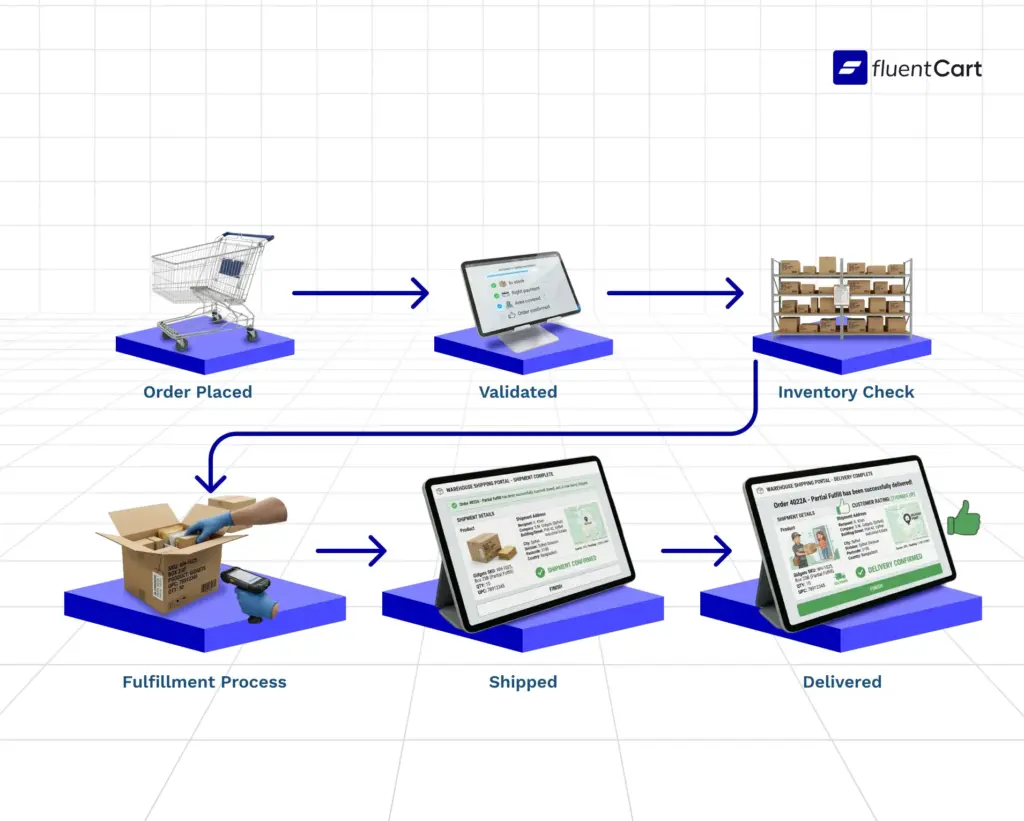
4. Order Fulfillment
The order goes to picking and packing. Someone (or something, if you’re using a warehouse management system) locates the item, packages it, prints the label, and gets it ready to ship.
5. Shipping and Delivery
The order goes out. The customer gets tracking information. The order management process follows that package all the way to delivery.
6. Post-Delivery: Returns and Customer Service
The order didn’t magically end at delivery. Returns happen. Questions come in. A solid order management process handles these without you personally having to chase down information from three different places.
Where order management breaks down
This is where things get brutal. Most of the pain in order management comes from the same few problems, and they almost all get worse as you scale your business.
Inventory that doesn’t match reality You think you have 50 units. You actually have 32. Orders go out, then you send an awkward cancellation email. This usually happens when you’re updating stock manually, or when you’re selling across multiple channels with no central system syncing everything together. And if that unsold stock just sits there aging out, you’re also looking at a dead stock problem on top of everything else. FluentCart has this handled in one place, product feed in omnichannel, and your online store is connected to the same inventory.
No visibility into order status Your customer asks where their order is. You have to check your eCommerce platform, then your shipping carrier, then maybe your fulfillment partner’s separate dashboard. By the time you have an answer, 10 minutes have passed and now the customer is angry. Angry customers mean bad business.
Manual data entry errors Wrong address. Wrong SKU. Wrong quantity. Every manual step is another place for a human to make a mistake. And when order volume grows, you’ve got no time to fix it manually, hence, these mistakes multiply.
Returns turning into chaos Returns are already annoying. But without a proper process, they become a time sink, manually tracking what came back, whether it’s restockable, whether the refund was processed. You’d need to hire a dedicated person for this, and there will still be human error if the orders keep growing. Having a clear return policy is actually the first step to making returns less chaotic for everyone.
Disconnected systems Your store is on something. Your inventory lives somewhere else. Your fulfillment partner has their own portal. None of these talk to each other. So you become the connection layer, manually moving data between them. That’s just business suicide if you want to scale.
Signs you’ve outgrown your current order management setup
You don’t always know when things have gotten too messy until you’re already in crisis mode. Here are some earlier warning signs:
Your team is spending hours each week manually updating order statuses or inventory counts. Stockouts are hurting you. You’re getting way too many “where’s my order?” emails. Returns feel chaotic and untrackable. Research has actually quantified the hidden cost of stockouts, over half of eCommerce products experienced at least one stockout period in a given year, with an average of 35 days of lost sales per occurrence.
The second you’ve started selling on another channel, things start to get even more complicated, fast.
What is an order management system?
An order management system (OMS) is software that handles the operational side of all this automatically. But let me break down what that actually means in practice, because “automates your orders” is one of those phrases that sounds great but means nothing if you do not understand the mechanism behind it.
Real-time inventory tracking Every order placed, every return received, every restock, your inventory numbers update automatically. No spreadsheet. No manual count. If you’re selling on multiple channels, they all pull from the same live inventory pool.
Order tracking from your end and the customer’s end You can see exactly where every order is at any point. So you can answer quickly and build trust.
Automated order routing Orders get sent to the right fulfillment location automatically. If you have inventory in multiple warehouses, the system picks the closest one to the customer, which cuts shipping costs and delivery time.
Returns management Returns get tracked, inventory gets updated when items come back, and refunds get triggered. All in one place, not spread across three different tools.
Reporting and forecasting You can see which products are selling fast, which ones are slow, where your customers are geographically concentrated, and what seasonal trends look like. That’s data you actually make decisions with.
Managing orders on WordPress?
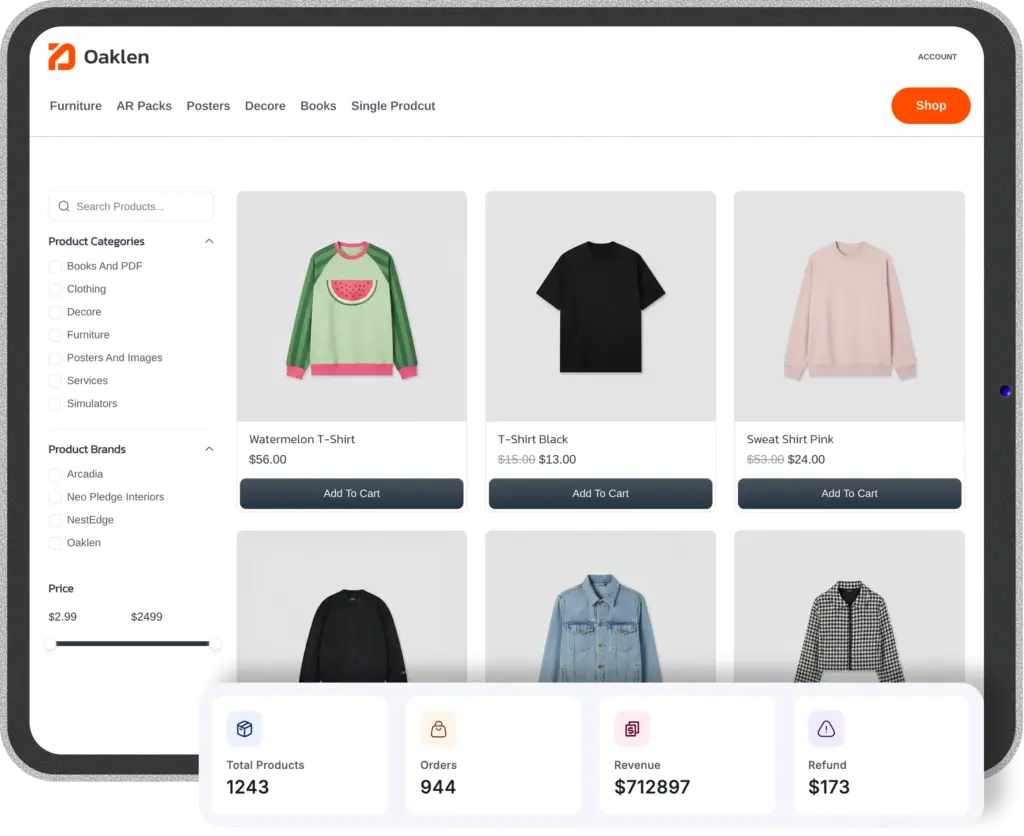
If you’re running your store on WordPress, FluentCart is worth looking at. It’s built specifically for WordPress-based eCommerce and handles order management natively, so you’re not duct-taping together a bunch of plugins to get visibility into your orders.
It keeps everything in one place: inventory, order tracking, customer data. Nothing fancy to set up, and it actually works out of the box. If you’re on WordPress and order management is getting messy, it’s the one-stop solution for you.
How to improve order management
Alright, let’s get practical now. Here’s where most growing businesses should start:
Consolidate your data Stop managing orders in multiple places. Get everything into one system, your orders, your inventory, your customer info. Whether that’s an OMS, an ERP, or a well-integrated eCommerce platform, the goal is a single source of truth.
Something we tend to start with is the spreadsheet, thinking it’s easy and we can transfer it to a proper system later. Never do that. Because that “later” task starts to become more and more complex over time.
Automate the repetitive stuff Order confirmations, shipping notifications, inventory updates, none of this should require a human touch every single time. Automate what you can so your team’s attention goes to the exceptions, not the routine.
From time to time, owners tend to not trust the automation and keep a manual log alongside it. That can actually harm your business, because very soon you’ll lose track of it. And the manual updates start to become a burden.
Get serious about inventory accuracy This usually means doing regular cycle counts, setting up low-stock alerts, and making sure your sales channels are synced. Overselling is fixable, but it’s way more painful than preventing it.
Update the inventory directly in the system instead of logging it in a notebook or spreadsheet first. It will save your time and reduce human error because there’s one less step.
Build a real returns process A messy returns process costs you money and customers. Set up clear workflows: what gets restocked, what doesn’t, when refunds get issued, how returns are tracked against inventory.
Use your data Your order history is valuable. What’s selling? Where are your customers? What times of year do you need to stock up? If you’re not tracking the right eCommerce KPIs and using them to make decisions, you’re leaving money on the table.
You can even start a seasonal newsletter based on that data to boost sales, and you can retarget for upselling and cross-selling using email marketing. Email marketing has a really high conversion rate when it comes to cross-sell and upsell.
Omnichannel order management
If you’re selling in more than one place, your own store, Amazon, a physical location, social commerce, this gets more complex fast.
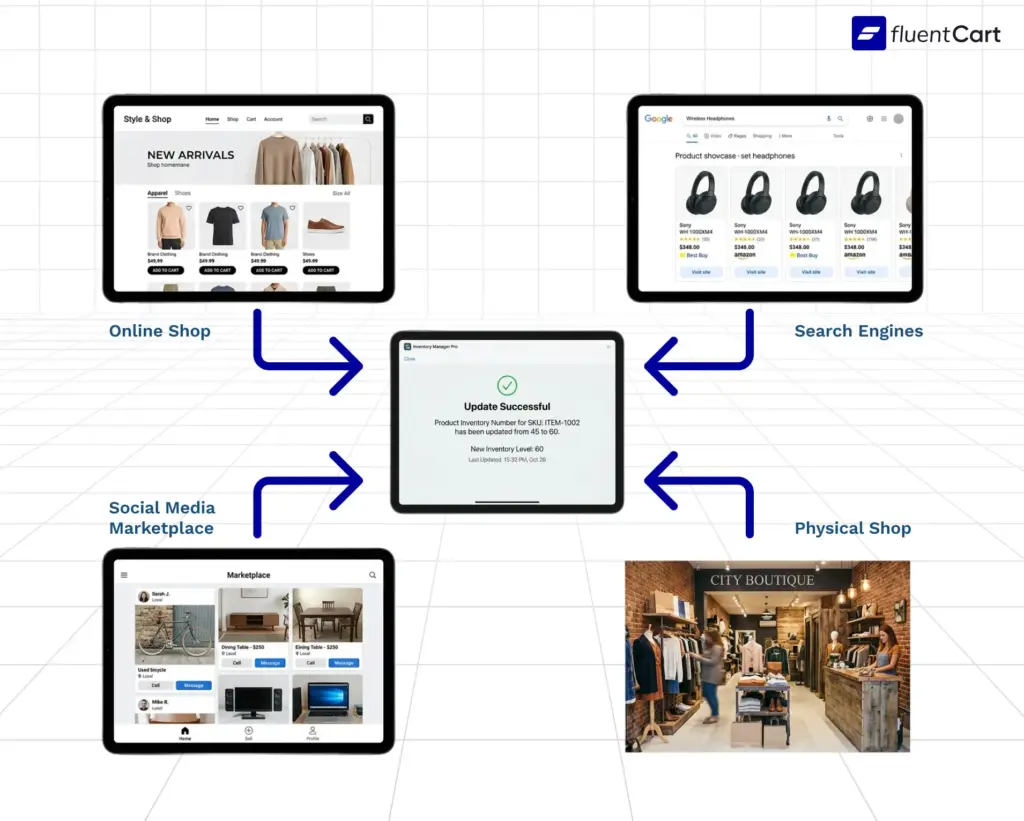
The problem with selling everywhere is that your inventory lives in one place, but orders come from everywhere. Without a centralized order management setup, you’re constantly playing catch-up: manually updating stock levels, reconciling orders from different platforms, and hoping nothing falls through the cracks.
Omnichannel order management means all of those channels feed into one system. Orders from anywhere, inventory tracked in one single place to manage it all. That’s the industry best practice.
Wrapping up
Order management isn’t glamorous. It’s not the part of a business that people post about on LinkedIn to flex. But it’s the part that either quietly keeps everything running smoothly, or quietly causes your growth to hit a ceiling and hurt the business.
The sooner you get it right, the sooner you’ll be the one gaining. Because your customers will get their orders on time, your team won’t drown in manual work, and you’ll have actual data to make decisions with. Get it wrong, and you’re perpetually putting out fires.
Things starting to feel messy? Well, mate, that’s the signal. Not a crisis yet, but a good time to get ahead of it and get your order management in line.

Hi, this is Abir, a Deputy Marketing Lead, passionate product designer, and WordPress core contributor. Creating interesting content and products that ensure a 360-degree customer experience is my daily job.

Subscribe now
Related Articles and Topics
-
What Is Petty Cash? Examples, Uses, and Smarter Alternatives
Learn what petty cash is, how the imprest system works, how to record and reconcile it, and whether…
-

SKU: Definition, Examples, and How to Use It for Your Store
Learn what SKU means, how stock keeping units work, and how to create SKU codes for your ecommerce…
-

What Is FIFO? How It Works in Retail & eCommerce
Learn what is FIFO (First In, First Out), how it works, and also why it matters for your…



Leave a Reply