
Custom eCommerce Development: A Beginner’s Guide
Custom eCommerce Development is building the eCommerce website from stretch that’s specifically designed for your business niche. Now this is right for your business. Let’s find out. So you want…

Published: February 25, 2026
Updated: April 7, 2026
Custom eCommerce Development is building the eCommerce website from stretch that’s specifically designed for your business niche. Now this is right for your business. Let’s find out.
So you want to sell online. And you’ve probably already hit that moment.
The moment of confusion. No, you can’t do that. No, that integration isn’t supported. No, that feature requires a $299/month plan. This “NO” word started to become annoying. And now you might be thinking of a custom eCommerce development.
If you are hitting that moment of confusion hard, then this guide is for you.
You need to keep in mind that “go fully custom” comes with responsibilities. But in a very good way. Let’s go through these responsibilities one by one. And else you have as an option. Besides SaaS options, there’s a whole spectrum between those two. Knowing where your business sits on that spectrum saves you a lot of money and a lot of headaches.
This content has a lot of layers if information for you. So, here is the follow guide for you. On that note, let’s walk through all of it.
TL;DR
What Is Custom eCommerce Development?
Custom eCommerce Development means creating an online store from the ground up with your own code, your own design system, and a backend built specifically around how your business actually works.
Think of it like housing.
Renting a furnished apartment is fast. Everything’s already there. You can move in the same week. But here is the catch. You can not redesign the layout. You have to figure out a workaround to make yourself comfortable.
Buying and building your own house is different. You design every room. Every door. Every detail. But it takes a longer time to move in. Costs more upfront. But it’s entirely yours.
Custom eCommerce development is exactly like that. You hand pick every detail and every feature you want and build the full store mechanism from scratch. No templates borrowed from someone else. No platform rules you didn’t write. Just what you need.
So basically, you are responsible for building the:
- Frontend, everything your customers see, click, and interact with
- Backend, the engine handling orders, inventory, pricing logic, and data
- Integrations, connections to your CRM, ERP, payment providers, and other tools
It also comes with a few more responsibilities, which we will get to later. Now let’s talk about where it fits, because it seems like a lot of responsibilities. But it does have a good reason to dive into custom eCommerce development.
8 Key Features of a Custom eCommerce System
A serious eCommerce includes a few things you need to have strong control over as the business scales. Let’s go through those one by one.
1. Personalized Design
Your brand, your layout, your customer experience, tailored to your niche and your customers’ expectations. Not borrowed from a template and not recognizable as “that popular SaaS theme.” If you want inspiration for what excellent design actually looks like in practice, browsing the best eCommerce websites is a great way to calibrate your eye before you start building.
2. Advanced Product Management
Complex variants, configurable products, detailed filtering, and product pages built around how your customers want to interact while shopping.
3. Flexible Payment Integration
Whatever gateways your customers prefer. Stripe, PayPal, custom regional options, buy-now-pay-later. Anything without being restricted by platform approvals.
4. Custom Checkout Logic
There isn’t just one way to design a checkout. You’ve got on-page, single-page, multi-step, B2B quote-based, recurring billing, and each one serves a different business model.
Your checkout shouldn’t follow a template. It should follow your buyer. Are they impulse shoppers who want speed? Or careful, research-heavy buyers who need reassurance?
Your checkout UX should match how your customers think and decide, not what a theme happens to offer. A big part of that is understanding and fixing the reasons customers leave before completing a purchase, which is covered in depth in this guide on how to reduce cart abandonment.
5. Analytics & Reporting
Track what actually matters to your operation. Not just traffic, conversions, revenue per customer, inventory movement, and fulfillment performance. Data is your friend here. Knowing which eCommerce KPIs to measure and how to read them is what separates stores that improve from stores that guess.
6. Security You Control
SSL, encryption, regular backups, and patch management. More responsibility than other options, yes, but also more control over how customer data is handled.
7. Third-Party Integrations
Your CRM, ERP, accounting software, and warehouse system all need to be connected with your online store without workaround compromises. Sometimes it’s not possible to use other options without custom eCommerce development.
8. Scalability on Your Terms
When traffic spikes, you handle it your way. You can add infrastructure where you need it, optimize where you need to, without waiting on a platform to make those decisions and give you an update for that.
So basically the custom eCommerce development comes with lot’s of hard and top level control. You can scale your business in your own terms and in your own logic. When you are running a growing business and tailor evry aspects of customer experience, you can ensure the sustainability of your business.
Custom eCommerce development isn’t just about features; it’s about building a shopping experience tailored to your customers, setting your business up for long-term sustainability.
Cost Breakdown (Real Numbers)
Obviously, when a system has that level of control, it’s never supposed be cheap. And yes, there’s an upfront and ongoing investment. But when you do it right, the system doesn’t drain resources; it brings more in the house over time.
Now let’s see the cost table. These numbers can vary significantly from one country to another. These figures are simply rough estimates based on the international market. For a broader look at what it actually costs to get a business off the ground, this breakdown of the cost of starting a business puts the eCommerce investment in context.
| What You’re Paying For | Estimated Range |
|---|---|
| Domain | $10–$20/year |
| Hosting | $20–$250/month (enterprise is higher) |
| UI/UX Design | $3,000–$20,000 |
| Custom Development | $15,000–$100,000+ |
| Third-Party Integrations | $1,000–$10,000+ |
| SSL Certificate and security | $8–$1,000/year |
| Annual Maintenance | $3,000–$50,000+/year |
Let me be clear, costs can shift dramatically depending on location.
The Real Spectrum: Custom vs. WordPress vs. SaaS
Now you might be thinking, for starting a business, as an initial cost, this is a bit high, but you also need to start the business. So let’s explore your other options. And good news, there are a few solid ones.
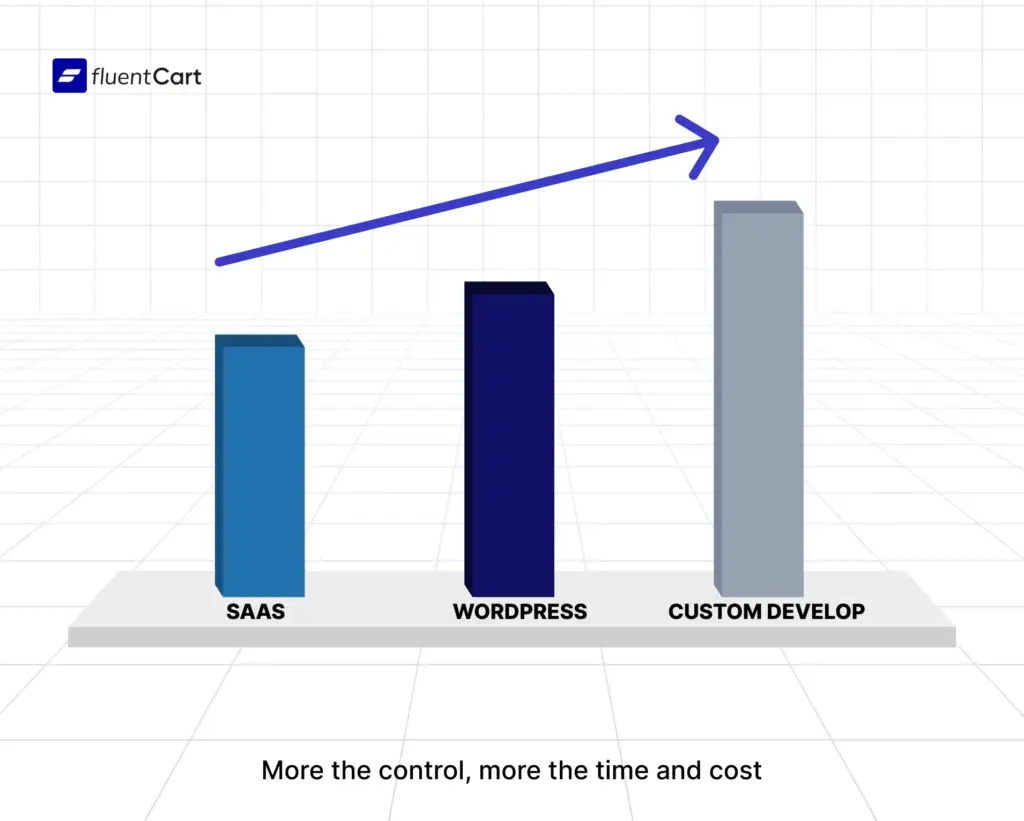
So in the market, there are three solid options, and they each suit a different stage and type of business. Let’s break it down.
Option 1: Pure SaaS (Shopify, BigCommerce, etc.)
These platforms get you live fast. The infrastructure is handled. Security, hosting, updates, all managed for you. You pay a monthly fee and focus on your products.
They’re genuinely excellent for straightforward stores. Clean catalog, standard checkout, common payment methods, SaaS handles this beautifully.
The ceiling shows up when you need something the platform didn’t build for. Complex B2B pricing. Deep ERP sync. Checkout flows that don’t match their template. At that point, you’re fighting the platform instead of using it. It’s worth reading a detailed Shopify review or a BigCommerce review to understand exactly where those ceilings are before committing.
And to be honest, you have to start paying a lot besides the base price just to scale your business. And maintaining all can be a handful.
Option 2: WordPress + Ecommerce Plugins
Now here is your solid choice. And it’s probably where most businesses actually belong. Because WordPress powers over 40% of the internet. That’s not an accident. It’s a mature, deeply flexible ecosystem with a huge plugin library that covers almost anything an eCommerce store needs.
And then there’s the community. WordPress isn’t alone; it’s backed by a huge, super-active crowd that’s ready to jump in. Whether you’re a small business or a big-money enterprise, there are people and agencies who operate at any level.
WooCommerce alone runs millions of stores globally. FluentCart is a newer, more modern tool built for WordPress that takes things further with cleaner code, better performance, faster checkout, and advanced features out of the box. You just skip the overhead of building everything from scratch. If you want a concrete look at what it can do, the FluentCart eCommerce plugin overview is a good starting point.
The WordPress middle ground gives you:
- Real customization without building from zero
- An enormous ecosystem of plugins, integrations, and developers
- Full control and ownership over your hosting, data, and codebase
- The ability to extend things precisely where you need to
It’s not a “lite” version of custom development. For many businesses, it delivers everything a custom build would, in less time, at a fraction of the cost, and with more reliability with the power of community. And if you want to see exactly how to get a store up and running on WordPress, this step-by-step guide on how to make a website to sell products walks through the whole process.
Option 3: Custom eCommerce development
As we are discussing, when no existing solution, SaaS or WordPress-based, can meet your needs, you build from scratch. And happens more than you think.
This is the right call for businesses with truly unique requirements. Complex product logic. Proprietary systems that need deep integration. Regulatory requirements around data. A scale that demands infrastructure decisions, no platform can make for you.
Let’s go through a simple comparison:
| SaaS | WordPress Ecosystem | Fully Custom | |
|---|---|---|---|
| Launch speed | Fast (days–weeks) | Medium (weeks–months) | Slow (months) |
| Upfront cost | Low | Medium | High |
| Monthly cost | Ongoing fees | Hosting + plugins | Hosting + maintenance |
| Design freedom | Template-bound | High flexibility | Total freedom |
| Scalability | Platform-limited | Strong | You control everything |
| Integrations | Plugin marketplace | Massive ecosystem | Build anything |
| Maintenance | Platform handles | Shared responsibility | You handle it |
The point isn’t that one column wins. The point is matching your business to the right column.
When Does Each Option Make Sense?
There are scopes for each of the technology. There is none that fit for all, so you have chose carefully.
Go SaaS when:
- You’re launching fast and validating a product
- Your catalog and checkout needs are basic to standard
- You want someone else to handle hosting, security, updates and your data.
- Budget is tight and time to market matters more than customization
Chose WordPress ecosystem when:
- You want real control without a full custom build
- You need strong integrations with marketing, CRM, or business tools
- You want a developer ecosystem that’s easy to hire from
- You need flexibility now, with room to grow later
- You want to own your platform, not rent it
Go Custom eCommerce development when:
- Existing platforms, including WordPress solutions, genuinely can’t do what you need
- You have proprietary systems that require deep, bespoke integration
- Your business logic is unique enough that templates are more hindrance than help
- You’re building for serious enterprise scale with specific infrastructure needs
- You have the budget, timeline, and technical team to support it
The honest truth: most businesses that think they need a fully custom solution actually need a well-built WordPress solution. And most businesses that think SaaS is limiting them just haven’t explored what a good plugin stack can do.
But of course, some businesses are super niche, think
- specialized agro systems,
- custom clothing, or
- personalized recipe food services.
These are just a few examples that a standard eCommerce setup can not cut it straight out of the box. And if you’ve been on a closed platform like Etsy and started feeling the friction of someone else’s rules, this look at why Etsy is bad for business captures exactly the kind of ceiling that pushes sellers toward owning their own store.
Pros & Cons
Custom development (including sophisticated WordPress builds):
The good:
- Complete design and functional freedom
- No licensing fees once built
- Scales how you need it to
- Integrates with anything
- You own the platform entirely
- Long-term cost efficiency at scale
The hard parts:
- Higher upfront investment
- Takes longer to launch than other options
- Maintenance and security are your responsibility
- Requires technical talent, either in-house or an ongoing agency relationship
- More complexity means more potential failure points
Neither column should scare you away or lure you in on its own. Context is everything.
7 Steps of The Development Process
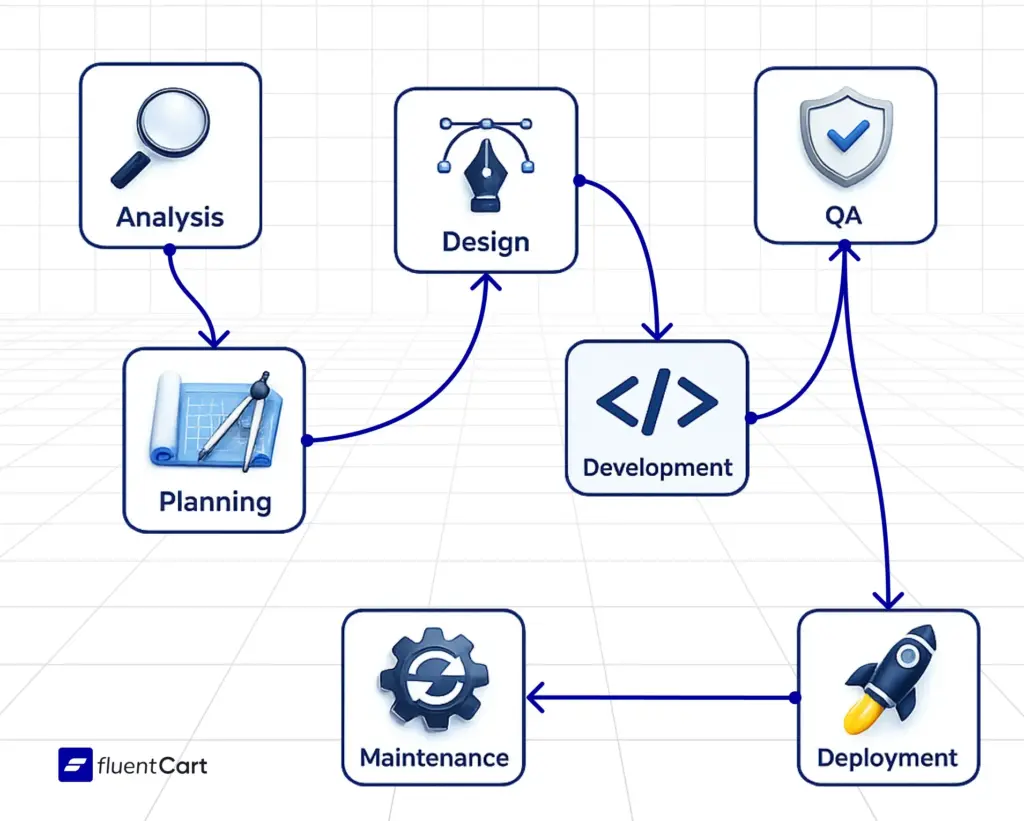
Here’s the lowdown on building a custom eCommerce system, explained from analysis to development to maintenance, in 7 simple steps.
Step 1: Business Analysis
Before anyone touches code, you need to understand what you’re actually building.
Usually, you don’t start running a business and then figure it out; you know where you’re going first.
Key questions at this stage:
- Who are your customers and how do they actually shop?
- What does your business need to do that a standard platform can’t?
- What tools do you already use that the store needs to connect with?
- What does success look like in year one, year three, year five?
The output is a project brief with clear scope, features, budget range, and timeline. This document saves you money later.
Step 2: Planning & Architecture
The technical team takes the brief and designs the actual structure.
Which tech stack? How the database is organized. How do different systems talk to each other? Where the performance bottlenecks will be and how to prevent them.
This is also where you make the call on the platform. Fully custom? WordPress with a modern plugin stack? The architecture decisions here shape everything downstream.
Step 3: UI/UX Design
Now the store starts to look like something.
Wireframes first, rough sketches of each page, no colors, no imagery. Just layout and logic. Where does the eye go? Where does the click happen? Does the path from landing to purchase make sense? It take a solid research. Understanding user experience basics at this stage, before the design locks in, will save you from building a store that looks good but doesn’t actually work for customers.
Then mockups, full designs with brand colors, typography, imagery. Then, interactive prototypes, clickable previews that feel almost real, are tested with actual users before a line of code is written.
The goal of every design decision: make it easier for the customer to buy. Not prettier for the designer. Easier for the customer.
Technically Optimized Design
A beautiful store that loads in five seconds is an empty store. Performance isn’t a developer problem to solve after design. It’s a design requirement from day one.
What that means in practice:
- Images compressed without visible quality loss
- Clean CSS that doesn’t make the browser work harder than it needs to
- Lazy loading so the browser only fetches images as the user scrolls to them
- Minimal third-party scripts on the critical path (every analytics pixel, chat widget, and tracking tag slows your first load)
- Core Web Vitals were designed and not patched in after launch
Google uses page experience as a ranking signal. And a page that loads in under 2 seconds converts meaningfully better than one that takes 4. That’s not a theory, it’s measurable.
Conversion-Focused Layout
Good design and conversion-focused design aren’t the same thing. A conversion-focused layout has one job: guide the customer from “I’m looking” to “I’m buying.” Every element either supports that or gets removed.
What that actually means:
Visual hierarchy: The product, the price, and the “Add to Cart” button are what the eye hits first. Everything else is secondary. If your brand story is competing with the buy button, you’re losing sales.
Friction removal: Every extra click, unnecessary form field, or confusing label costs conversions. Identify them and cut them.
Trust signals placed where hesitation happens: Not tucked in the footer. On the product page, near the price, near the cart. That’s where doubt lives, show it there.
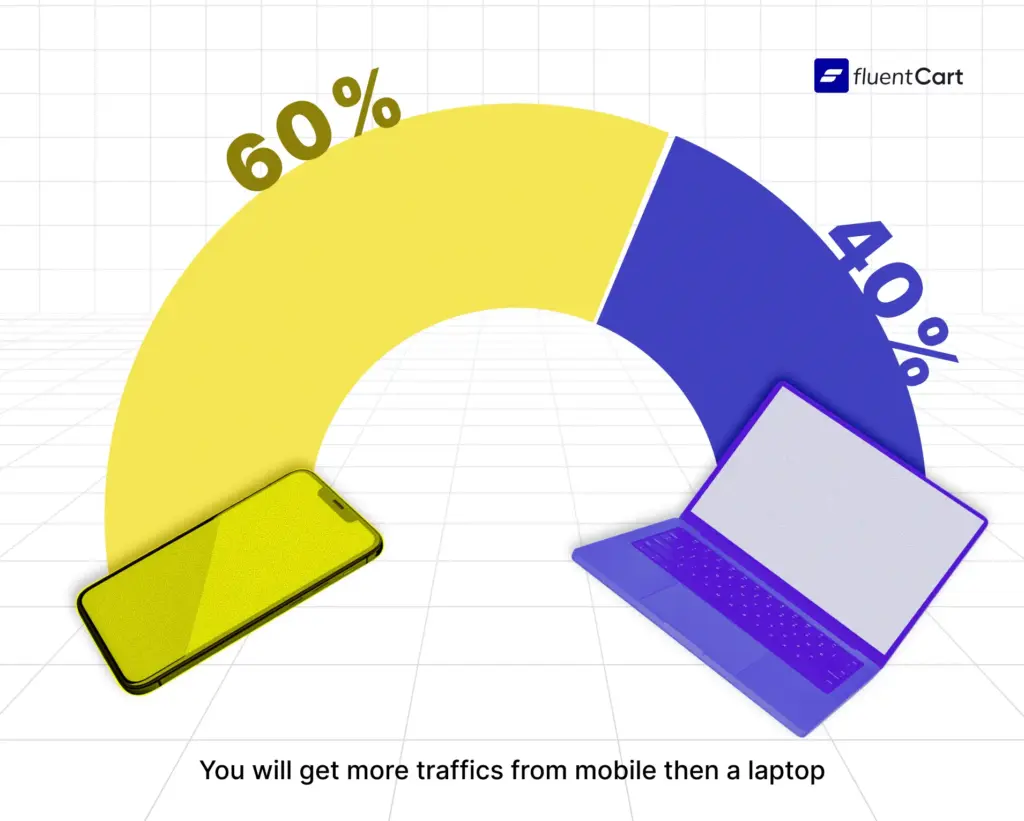
Mobile-first thinking: Design for the phone first, then scale up to desktop. More than half of your traffic is mobile. Designing desktop-first and “making it work on mobile” is considered backwards nowadays.
Single Product Page Layout
This page has one job: get the customer to hit the buy button. There’s a full breakdown of what separates high-converting from low-converting pages in this guide on eCommerce product page design, which is worth reading alongside this section.
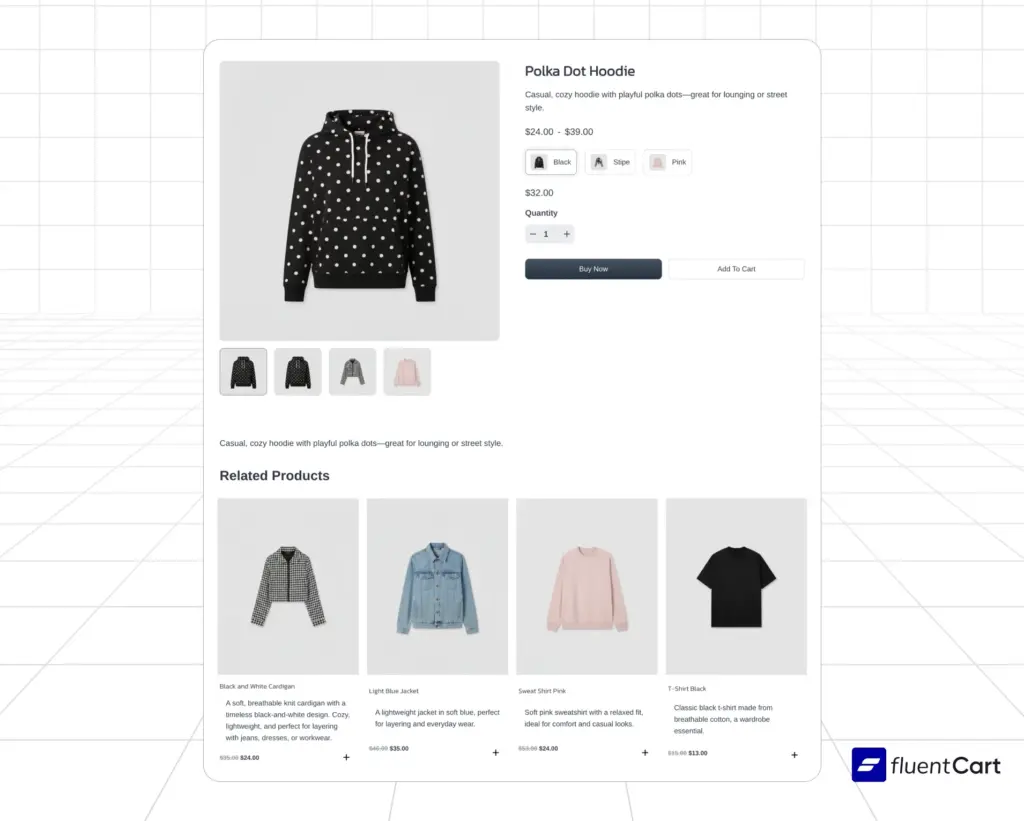
Above the fold (what they see without scrolling):
- Product title, clear, specific, no marketing fluff
- Primary product image, high quality, real representation of the item
- Price, large, visible, no hunting
- Key variant selectors (size, color, etc.), clean and intuitive
- Add to Cart button, high contrast, impossible to miss
- 1–2 line value proposition, why this, why now
Below the fold (after they’ve engaged):
- Full product description, benefit-led, not just specs. Knowing how to write a product description that leads with benefits rather than specs is one of the higher-leverage skills in eCommerce.
- Additional images, multiple angles, lifestyle shots, scale reference. This is where investing in eCommerce product photography pays off; customers can’t touch the product, so your images have to do the selling.
- Social proof, star rating with review count near the top, full reviews further down
- Technical specs or details, for those who need them
- Shipping, returns, trust badges, visible but not cluttering the main experience
- Related products, at the bottom, are not competing with the main CTA
What kills conversions on product pages: auto-playing video that slows load time, popups that fire before the customer has read anything, CTAs that blend into the background, and product descriptions that read like they were written for a warehouse system.
Shop Page Product Card Layout
The shop or category page is the browsing experience. The product card is a tiny ad for each item; it needs to communicate value instantly and invite the click.
What a strong product card contains:
- Product image, clean, consistent cropping and background across all cards. On hover, show a second image (front + lifestyle, or front + back)
- Product name, short and scannable, not truncated awkwardly
- Price, always present, always visible. Sale prices show both original (struck through) and sale price (highlighted)
- Star rating is a quick trust signal. Even a simple visual rating adds credibility
- Quick add to cart, optional, but reduces the number of clicks to purchase
- Status badge, “New,” “Sale,” or “Low Stock” when genuinely relevant, not as decoration
What hurts the grid experience:
- Cards of inconsistent height are breaking the grid alignment
- Missing ratings on some cards, making the layout look unfinished
- Too much information is crammed into a small space
- Images that don’t load fast, especially on mobile
Consistency and symmetry are the things most shop pages get wrong. If some cards have ratings and some don’t, it looks half-built. Decide on the card format, apply it across the full catalog, and stick to it.
Choosing the Right Tools for Better Conversion
The tools you integrate directly affect whether customers complete purchases.
A few that matter most:
- Speed infrastructure: A CDN (Content Delivery Network) serves your store from servers physically closer to each customer. Lots of hosting service does this well nowadays, you just have to make sure it’s there and up and running. Faster delivery = faster load = higher conversions.
- Search: If your catalog has more than 50 products, invest in real search. Algolia or Elasticsearch turns “I can’t find it” into “I found exactly what I wanted.” Customers who search convert at significantly higher rates than those who browse.
- Checkout optimization: Every additional step in checkout is a dropout point. Tools like Stripe Link or PayPal Express pre-fill payment details for returning customers. Fewer fields = more completions.
- Support: A well-timed prompt support (Fluent Support), including live chat, can catch a customer on the fence and turn a hesitation into a sale. The keyword is well-timed, not firing at every visitor on every page.
- Heat mapping: Tools like Hotjar or Microsoft Clarity show you where customers click, where they stop scrolling, and where they leave. These aren’t nice-to-haves. They’re the feedback loop that tells you what to fix. Running a structured eCommerce CRO audit takes this further by giving you a systematic way to identify and prioritize exactly what needs improving.
- Personalization: Showing customers products related to what they’ve viewed or bought increases average order value. You don’t need complex AI for this; a solid recommendation engine built into your platform or plugin stack handles it well. Understanding what upselling actually is and where it fits in the customer journey helps you implement this in a way that adds value rather than feeling pushy.
The tools don’t convert on their own. The right tools, correctly implemented, remove the friction that prevents conversions.
Step 4: Development
Now the building actually happens. And this process also has a few critical steps that require tablet onboarding.
Frontend: HTML structures the page. CSS styles it. JavaScript or PHP adds interactivity, sliders, dynamic filters, cart updates without page reloads. Frameworks like React or Vue.js help build fast, smooth interfaces at scale.
Backend: This is the logic layer. PHP, Node.js, or Python handling requests, processing orders, talking to the database, and running business rules. The database, usually MySQL or PostgreSQL for structured data, stores everything from product details to order history.
In a WordPress build, much of this is handled by the platform and your plugin stack, with custom code filling in the gaps. In a full custom build, it’s written from scratch.
Step 5: Quality Assurance
Before anything goes live, you test everything. Every page. Every device. Each and Every browser. Every edge case.
The checkout, especially. Test failed payments. Event test with real card numbers in staging. Test the confirmation email. Test the order flow end-to-end.
QA isn’t glamorous. But shipping a broken checkout is a catastrophe. This step earns its place.
Step 6: Deployment
Moving from the development environment to live servers. Setting up the domain, SSL certificate, email systems, redirects, and all the technical configuration that makes things work in production.
Then: launch. With a plan. Email list, social announcement, maybe a launch promotion. Don’t build something for months and then quietly press publish. A site on the web doesn’t let anyone know that you are open for business. Just like a real store, you need to let them know. Knowing how to increase website traffic from day one means you’re not waiting for the algorithm to find you, you’re actively driving people in the door.
Step 7: Ongoing Maintenance & Optimization
The store is live. That’s day one, not the finish line. Security patches, performance monitoring, conversion optimization, and new features as the business evolves. This is ongoing work. Budget for it. Either an in-house or with an agency relationship is mandatory for a custom eCommcer development. If the operational side of running a store starts to feel like too much to manage alone, eCommerce outsourcing is worth understanding, knowing what to delegate and what to keep in-house is its own skill.
The best ecommerce stores in the world are constantly being improved. The ones that launch and go quiet fall behind. Good eCommerce management is what keeps things moving in the right direction long after launch day.
7 Common Mistakes to Avoid
These are the things that actually sink ecommerce projects. Not hypothetically but repeatedly, across every type of build.
1. Building before understanding
The most expensive mistake is writing code before knowing what you need. Requirements change. But starting without a proper brief costs far more than the time it takes to write one.
2. Underestimating scope
Budget 20–30% extra on both time and money. Not because developers are bad at estimating, but because requirements reveal complexity as you go. This is normal. Plan for it.
3. Designing desktop-first
More than half of eCommerce traffic is mobile.
If your design decisions are made on a 27-inch monitor and “checked” on mobile afterwards, you’re building for the minority.
4. Treating performance as an afterthought
Page speed is a conversion factor, not a technical detail. Every second of load time costs revenue. Build fast from the start.
5. Skipping user testing
Designers and developers are too close to the project to see its flaws. Get five real people to try to find a product and check out. Watch them. You’ll learn more in an hour than months of internal review.
6. Letting scope creep go undocumented
“Can we just add one more thing?” is the phrase that delays launches by months. Every addition gets documented. For Every addition gets a revised estimate. Every addition is a decision, not an assumption.
7. No post-launch plan
The site is live. Now what? If you don’t have a plan for traffic, optimization, and ongoing development, the launch was just the starting gun on a race you haven’t prepared for.
Is It Right for Your Business?
The WordPress ecosystem sits meaningfully below full custom. A well-built WordPress ecommerce setup, with quality plugins and a good developer, often lands between $5,000 and $25,000 total, with lower ongoing costs than a fully bespoke system.
A full custom build for a complex operation might run $50,000–$150,000 before you launch, with significant ongoing maintenance investment.
SaaS looks cheap at $39–$299/month. But those fees compound. Premium apps add up. And if you’re doing serious volume, transaction fees are a real cost. Over five years, a well-built WordPress or custom solution often beats SaaS on total cost, for the right business.
But there’s no shame in starting simple. The best ecommerce operators often start on a managed platform, grow into a more flexible solution, and only go fully custom when the business genuinely demands it.
The mistake isn’t starting on SaaS. The mistake is staying there when it’s holding you back, or jumping to a full custom build when a better platform would solve everything faster and cheaper.
5 Final Decision Framework
Now you have full picture and mental model in front of you. Before making any call for custom eCommerce development or any other option, answer these honestly.
1. What problem am I actually solving?
If you can describe the specific thing your current setup can’t do, you have a real reason to change. If the answer is vague (“I just want more control”), you might not need as much as you think.
2. What’s my realistic budget?
Under $1k SaaS with a good theme and plugin stack. $1k–$5k, WordPress-based solution with custom design and integrations. $10k–$50k o maybe 100k plus, full custom becomes genuinely viable.
3. How long can I wait?
Need to be live in a month? SaaS. Can you invest properly in a build? WordPress or custom becomes an option.
4. Do I have technical support?
Custom stores need ongoing care. If you don’t have that in-house or budgeted externally, a managed platform is safer. If you have a developer relationship you trust, more ownership becomes practical.
5. What does my business look like in five years?
This question matters most. A store that’s right for year one might be wrong for year four. The best choice now is the one that gets you running and leaves room to grow, without rebuilding from scratch when you outgrow it.
In conclusion
Most businesses that think they need a fully custom build actually need a well-built WordPress solution, modern, flexible, properly integrated, and designed for growth. Like WordPress and FluentCart.
Most businesses that think SaaS is fine haven’t explored what a capable WordPress-based ecommerce setup can actually do.
And businesses that genuinely need fully custom eCommerce development know the requirements make it obvious.
Start where you are. Build for where you’re going. And choose the tool that grows with you, not one you’ll fight at every stage. So, are you going with the custom eCommerce development or considering other options? Either way, build smart.
Once In a Lifetime Offer
Related Articles and Topics
-
Bundle Marketing: An eCommerce Guide for Store Owners
Bundle marketing guide: types, pricing math, examples, and a FluentCart setup.
-
Digital Product Ideas for Passive Income: The Complete Roundup
Real digital product ideas, real numbers, and the honest truth about what passive income actually costs and what…
-

Subscriptions on WordPress: The Complete Guide for Sellers
Set up subscriptions on WordPress and own every renewal, not just rent it.
-
Digital Goods VAT OSS Guidance: The EU Rules Explained
This digital goods VAT OSS guidance EU walkthrough covers thresholds, rates, and reverse charge in plain English.
-
Best Dropshipping Niche: What’s Your Best Bet
We’ve listed 5 best dropshipping niche picks. But understanding a niche matters more than picking one. Here’s the…
-
Best Free eCommerce Business Course Options
Five hand-picked eCommerce courses that are genuinely free, plus one faster way to learn that most people skip.
-
The Best Business in the World You Need To Know
A list of the best business in the world. Five of the 14 giants below started exactly like…
-
eCommerce Data Ownership: Why Your Customer Records Decide Who Survives 2026
Your store does not own its customers. Right now, today, in June 2026. And the platforms hosting your…
-
Best Products to Sell on World Cup 2026 + Build Your Store Fast
Discover the best products to sell on World Cup 2026, from fan apparel to drinkware, and how to…




Leave a Reply