
Types of eCommerce Tools Every Online Business Actually Needs

Running an online store used to mean duct-taping five different subscriptions together and hoping the data would sync. Today, the eCommerce tools landscape is broader and sharper than ever, but most guides still only scratch the surface, listing the obvious names without helping you understand why each category exists. That gap is where stores quietly bleed money.
The real problem isn’t finding tools. It’s knowing which type of tool solves which problem, and building a stack that actually talks to itself.
TL;DR
- eCommerce tools fall into 10 distinct categories, each solving a specific operational problem
- Your eCommerce platform is the foundation, everything else integrates around it
- Marketing and email tools like FluentCRM and Buffer drive repeatable customer acquisition
- Analytics tools (Google Analytics, Microsoft Clarity) tell you what’s working before you waste budget
- SEO tools like Ahrefs and Yoast SEO determine whether anyone finds your store organically
- Design tools like Canva and CapCut let small teams produce professional-quality creative
- Project management keeps operations from falling apart as teams grow
- Payments, shipping, and support tools complete the post-purchase experience
- The best stacks aren’t the biggest, they’re the most integrated
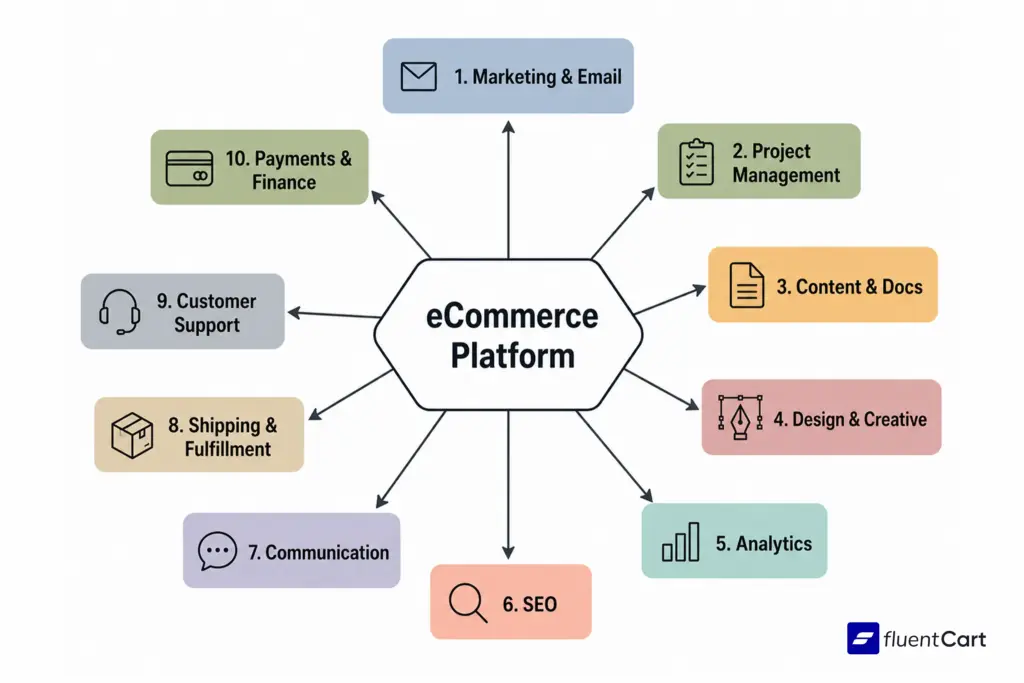
What Are eCommerce Tools, Really?
eCommerce tools are any platforms, apps, or plugins that help you build, run, or scale an online store. Full stop.
That’s the definition. What matters more is how they fit together. A solo seller running a handmade goods shop on WordPress needs a completely different stack than a team of 15 managing a digital product business. Neither is wrong. Both will fail if they pick tools without understanding the category each one covers.
Here’s what’s actually happening in most failed tool setups: business owners stack tools by brand recognition rather than function. They end up with three analytics platforms and no CRM, or a beautiful design workflow and zero email automation. The categories in this guide are meant to prevent exactly that.
The 10 Types of eCommerce Tools for Online Businesses
1. eCommerce Platform
This is the engine. Everything else plugs into it.
An eCommerce platform handles your storefront, product catalog, checkout flow, and order management. It’s not just a website builder, it’s the operational infrastructure of your entire business. If you’re weighing whether to go with a hosted solution, a WordPress plugin, or something fully custom, this guide to custom eCommerce development breaks down the tradeoffs clearly before you commit.
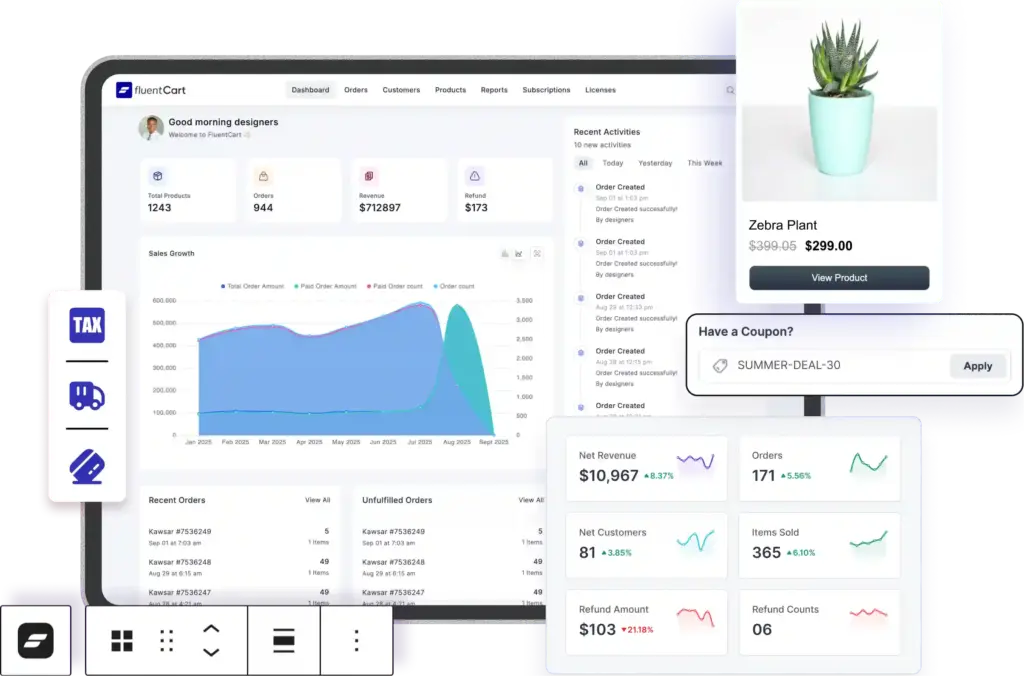
FluentCart
It is a WordPress-native eCommerce plugin that covers this entire layer for teams already on WordPress. It handles physical and digital products, subscriptions, and payment integrations without forcing you to leave the ecosystem you already know. If you’re running on WordPress, something like FluentCart just handles this for you, cleanly, without the bloat.
Other platforms worth knowing:
- Shopify, hosted SaaS, ideal for brands that want speed to market
- WooCommerce, open-source WordPress plugin, highly customizable
- BigCommerce, strong for mid-market and international sellers
The platform choice shapes what’s even possible in every other category. Switching later is expensive and painful, which is exactly why getting it right early is worth the research time.
2. Marketing and Email Tools
Traffic without a follow-up strategy is just noise.
Marketing tools cover the full customer acquisition and retention loop: email automation, form capture, and social media scheduling. They work best when they’re connected to your platform, so purchase data, cart abandonment events, and customer segments flow automatically into your campaigns.
FluentCRM
It handles email marketing and CRM directly inside WordPress. You can trigger automation sequences based on purchase behavior, tag customers by product type, and run campaigns without leaving your dashboard. For teams already using FluentCart for their store, the integration is native, no webhooks needed.
FluentForms
It sits at the top of the funnel. It captures leads, builds opt-in forms, and feeds data into your CRM or email platform. Simple, but critical.
Buffer
It handles social media scheduling. For small eCommerce businesses without a dedicated social team, Buffer’s free plan is enough to stay consistent across channels without building a daily posting habit from scratch.
Most businesses don’t figure this out until they’ve spent months posting manually and wondering why follower growth isn’t converting to sales. The answer is almost always automation and follow-up sequences, not more posts.
3. Project and Task Management Tools
Operations fall apart in spreadsheets. That’s where this category earns its place.
As soon as an eCommerce business has more than two people, or even one person wearing five hats, the need for structured task management becomes obvious. Product launches, content calendars, supplier follow-ups, customer escalations: they all need a home.
FluentBoards
It is a Kanban-based project management tool built for WordPress teams. If you’re already in the WordPress ecosystem, keeping your task management inside the same environment reduces context switching.
Notion
It works well for documentation-heavy teams. It’s less of a pure task manager and more of a flexible workspace where SOPs, meeting notes, and project tracking can coexist.
Monday.com
It is the enterprise-ready option. Better for teams with complex workflows, multiple departments, or cross-functional projects that need approval stages and timeline views.
The tool matters less than the habit. What kills eCommerce operations isn’t bad software, it’s tasks living in someone’s head or a chat thread that nobody can find two weeks later.
4. Content and Documentation Tools
Your store needs content. Your team needs shared documentation. These are different problems with different tools.
WordPress
It remains the most capable CMS for eCommerce stores that need a content strategy. A blog isn’t optional if organic traffic is part of the plan. Product guides, comparison pages, SEO-driven category content, WordPress handles all of it, and it integrates directly with your store. For context on how starting a content presence works in practice, this guide on how to start a blog covers the fundamentals.
Google Docs
It is the default for collaborative writing and internal documentation. It’s not glamorous, but it’s where most eCommerce teams draft product descriptions, write SOPs, and maintain style guides. The real value is version history and simultaneous editing, especially when multiple people are touching the same content. If you’re using AI to speed up that first-draft process, these 150+ business prompts for online store owners save a lot of blank-page time.
5. Design and Creative Tools
Nobody expects a two-person eCommerce team to look like a funded startup. But customers do judge visual quality immediately.
This is the category where good eCommerce tools for small businesses shine hardest. You don’t need an in-house designer if you have the right workflow.
Canva
It handles static design: product banners, social graphics, email headers, ad creatives. The template library is large enough that most businesses can produce professional-looking assets without design training. Its AI background removal and brand kit features are particularly useful for product photography clean-up.
Figma
It steps in when you need actual UI work, custom landing pages, store design mockups, or design assets that need pixel-level precision. It’s more technical than Canva, but essential if you work with developers.
Adobe Express
It sits between the two. More polished output than Canva for some use cases, with direct integration into Adobe’s broader asset ecosystem.
CapCut
It is the practical choice for short-form video. Product unboxings, how-to clips, and social-first video content can all be edited quickly without a desktop editing suite.
DaVinci Resolve
It is the professional-grade option for longer-form video, brand story content, tutorial series, or any video that needs color grading and multi-track audio.
Here’s what’s actually happening in most product-led businesses: the brands that look expensive on a $2,000 marketing budget aren’t using expensive tools. They’re using Canva, a ring light, and a consistent template system.
6. Analytics Tools
You can’t improve what you can’t measure. That sounds obvious. Most eCommerce teams measure the wrong things anyway.
Analytics tools break into two distinct layers: traffic analytics and behavior analytics. Both matter.
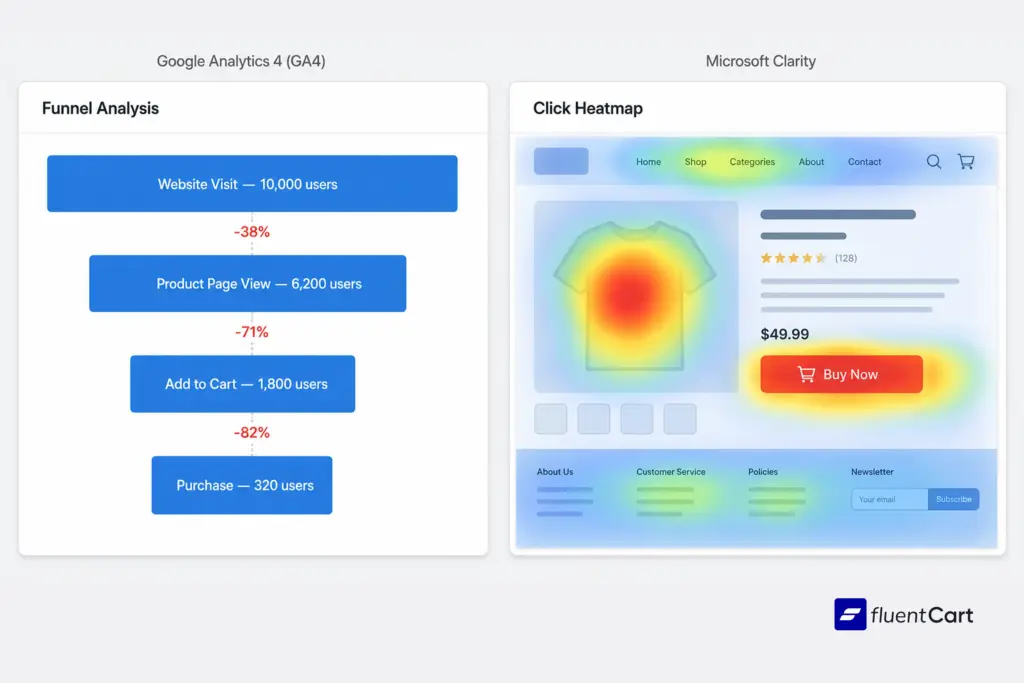
Google Analytics (GA4)
It covers traffic: where visitors come from, which pages they land on, conversion paths, revenue attribution. It’s free and it’s the standard. The eCommerce KPIs guide on FluentCart goes deeper on which metrics actually matter for online stores.
Google Search Console
It shows you the organic search side of the picture: which queries bring people to your site, click-through rates, indexing issues. This is the tool that tells you whether your SEO is working before GA4 shows revenue movement.
Microsoft Clarity
It records sessions and generates heatmaps. It’s free and it answers a different question than GA4: not how many people but what do they actually do. Rage clicks on a button that doesn’t work, scroll depth on product pages, dead zones in your navigation, Clarity surfaces all of this visually.
Real users echo this. In a tools discussion on r/ecommercemarketing, one commenter put it plainly: “You must have Google Search Console as well to analyze your page’s performance… you can also use MS Clarity to analyse heatmap data, its alternative option of Hotjar.” (r/ecommercemarketing) Both free. Both already in your browser. No excuse not to have them running.
Bing Webmaster Tools
It is the overlooked one. Bing’s market share is small but not negligible, and for eCommerce businesses with older customer demographics, it can be meaningful. The data is also useful for indexing validation that mirrors what you’d see in Search Console.
This disconnect between traffic and revenue is one of the most common frustrations in eCommerce. A seller on r/shopify posted exactly this scenario, good traffic, products being viewed, items added to cart, conversions close to zero. One response cut straight to it: “without knowing where your conversions are breaking down, any advice will just be guessing”, and went on to recommend mapping GA4 funnel drop-off across four stages: visit to product page, product page to add-to-cart, add-to-cart to checkout, checkout to purchase. (r/shopify)
That’s precisely what Google Analytics, Microsoft Clarity, and Search Console are for when used together, not to confirm traffic is arriving, but to show exactly where it stops converting.
7. SEO Tools
Organic search is still the highest-ROI acquisition channel for most eCommerce businesses that get it right. The keyword is right.
SEO tools help you identify what people are searching for, audit your site’s health, and track ranking progress over time. Without them, you’re writing content and optimizing pages based on intuition, which is expensive and slow.
Ahrefs
It is the industry standard for keyword research, competitor analysis, and backlink auditing. For eCommerce stores trying to understand why a competitor ranks above them on product category pages, Ahrefs’ site explorer is where the answer lives.
Google Trends
It is free and underused. Validates product ideas before you invest in inventory, see the product research guide for practical examples. It also shows seasonal patterns that inform when to run campaigns.
Yoast SEO
It handles on-page optimization directly inside WordPress. It flags missing meta descriptions, thin content, internal linking gaps, and readability issues in real time as you write. For teams that don’t have a dedicated SEO person, Yoast functions as a basic quality check on every page you publish.
The gap most existing articles miss here: SEO tools aren’t just for ranking, they’re for understanding your customers’ language. The words your customers use in search queries are often different from the words your product team uses internally. Ahrefs and Google Trends bridge that gap.
8. Communication Tools
Internal communication tools are easy to overlook in a tool stack breakdown. They’re also where most operational friction lives.
A team that communicates across three different channels, with decisions scattered between email threads and chat messages, will always move slower than one with a clear communication layer.
Slack
It is the default for most small-to-medium eCommerce teams. Channels by project or function, integrations with most SaaS tools, and a searchable message history that keeps decisions findable.
Discord
It is increasingly used by eCommerce businesses that have a community component, think brand communities, affiliate groups, or customer loyalty channels. It’s better than Slack for community moderation and free for unlimited history.
WhatsApp Business
It is the practical choice for teams in markets where WhatsApp is the default communication layer. It’s also used heavily for supplier communication in international sourcing contexts.
9. Shipping and Fulfillment Tools
Order fulfillment is where customer experience either holds up or breaks down completely.
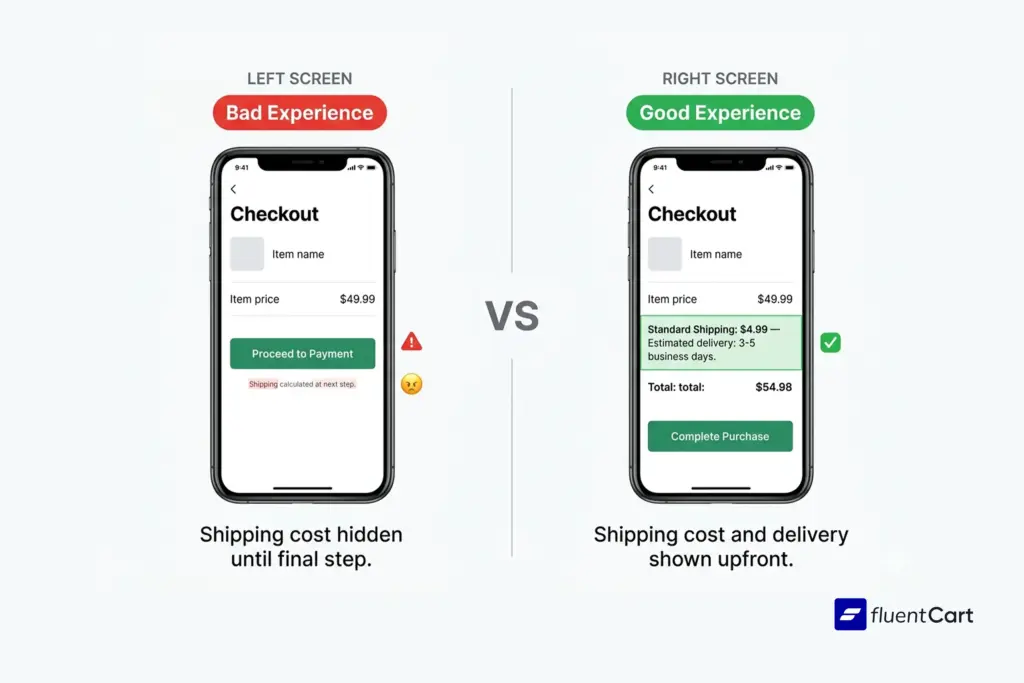
The tools in this category automate the logistics layer: label generation, carrier selection, tracking updates, and return processing.
ShipStation
It is the most commonly used option for small-to-mid-size eCommerce stores. It connects to most major carriers, supports multi-channel selling, and automates label printing based on order rules. The setup time is low and the cost scales with volume.
What most guides don’t cover: shipping tools don’t just save time, they directly affect cart conversion. Over 70% of online shoppers abandoned their carts in 2025 due to unexpected shipping costs or delivery timeline uncertainty. Shipping tools that surface accurate rates at checkout, before the customer commits, reduce that abandonment meaningfully.
10. Customer Support Tools
Happy customers come back. Frustrated customers leave reviews.
Customer support tools centralize inquiries, automate routing, and give support agents the context they need to resolve issues without back-and-forth.
FluentSupport
It is a WordPress-native helpdesk plugin. For eCommerce stores already on WordPress, it keeps ticketing inside the same dashboard as everything else, no external subscription needed for teams with manageable support volume.
Chatwoot
It is an open-source customer support platform that handles live chat, email, and social inbox in one place. It’s free to self-host, which makes it attractive for cost-conscious eCommerce operators who want multi-channel support without the Zendesk price tag.
This is where things break for a lot of growing stores: support gets handled through a shared email inbox until it doesn’t work anymore. By the time it breaks, there are already unhappy customers and missed tickets. The tool switch should happen before volume forces it.
11. Payment and Finance Tools
Getting paid cleanly is non-negotiable. The tools in this category process transactions, handle subscriptions, manage disputes, and route payouts.
Stripe
It is the developer-friendly default. Highly customizable, supports 135+ currencies, and integrates cleanly with most eCommerce platforms and WordPress plugins. If you’re building a custom checkout or subscription flow, Stripe’s API is where most developers start.
PayPal
It adds buyer trust at checkout. In markets where PayPal recognition increases conversion, having it as an option is worth the processing fee. Its Buy Now Pay Later integration is increasingly relevant for higher average order value stores.
Paddle
It is the specialized option for digital products and SaaS-adjacent eCommerce. It acts as the merchant of record, handling VAT compliance and tax remittance across jurisdictions, which is the part of selling digital products internationally that most stores underestimate until their first tax season. For context on why payment infrastructure matters more than most realize, the eCommerce accounting guide is worth reading alongside this category.
If you are using FlunetCart, then all of the payment gateways will connect with it, and your customer can pay without a hassle.
How to Build a Stack That Actually Works
The most common mistake in assembling eCommerce tools isn’t picking the wrong tool; it’s picking tools that don’t integrate with each other.
Data silos are the operational enemy. If your email platform can’t see purchase data from your store, your automation sequences are guessing. If your analytics platform doesn’t connect to your CRM, your attribution is incomplete. The businesses that get this right treat integration as a first-class requirement, not an afterthought.
Start with the platform. Build outward from there.
For small businesses specifically, the eCommerce tools for small business principle is simple: fewer tools, deeper integration. A WordPress store with FluentCart, FluentCRM, Yoast SEO, and Google Analytics covers the core of what most stores need, and all four are in the same ecosystem.
The Right eCommerce Tools Won’t Run Themselves
The eCommerce AI tools conversation is growing, and rightfully so. Tools are embedding AI into everything from product description generation to abandoned cart prediction to customer support routing. That trajectory is real and it’s moving fast.
But the fundamentals haven’t changed: the best eCommerce tools are the ones your team actually uses consistently, that talk to each other, and that give you clear data to act on. A stack built on those principles will outperform any collection of premium subscriptions that nobody checks.
Pick your platform. Connect your layers. Measure what matters. The right eCommerce tools make that possible, the rest is execution.

Hi, this is Abir, a Deputy Marketing Lead, passionate product designer, and WordPress core contributor. Creating interesting content and products that ensure a 360-degree customer experience is my daily job.

Subscribe now
Related Articles and Topics
-

Membership Affiliate Programs: The Cost-effective, Integrated Setup
Run membership affiliate programs on WordPress with one integrated stack.
-

Best Membership WordPress Plugin: 8 Options Compared for 2026
Compare the best membership WordPress plugin options for 2026 by use case.
-

Best WooCommerce Plugins: For Physical and Digital Sellers
Skip the 30-plugin lists. 12 WooCommerce add-ons sorted by store type, with an honest note on what’s free,…




Add your first comment to this post