
What Is a Payment Gateway? A Guide for WordPress Store Owners

A payment gateway is the piece of tech that takes your customer’s card details, checks them against their bank, and tells your store whether to say “thank you” or “declined.” Here’s the scarier part. Get the security side of this wrong, and it’s not just a lost sale anymore. Your store can lose the right to accept cards at all, not for a day, but for good.
Choosing the wrong one on WordPress eCommerce is how stores lose sales they never even see happen, because the checkout quietly fails somewhere between “place order” and “payment confirmed.”
You’ve probably felt the smaller version of this already. A customer emails asking why their card got rejected, and you have no idea if the problem was the gateway, the bank, or your plugin. It gets messier the moment a customer pays from a country you didn’t plan for, but that part comes later. First, the basics.
TL;DR
- A payment gateway encrypts and authorizes card data between your store and the customer’s bank.
- It’s different from a payment processor, a merchant account, and a merchant of record, even though people mix these terms up constantly.
- Stripe, PayPal, and Square cover most WordPress stores; each fits a different kind of business.
- Stripe charges roughly 2.9% + 30¢ domestically, plus 1.5% on international cards and 1% on currency conversion.
- A merchant of record, like Paddle, takes on your global tax compliance directly, which matters a lot once you sell across borders.
- Nearly 1 in 5 shoppers who abandon a cart for a reason other than browsing say it’s because they didn’t trust the site with their card details.
- PCI DSS v4.0.1 compliance became fully mandatory in March 2025, and it’s the technical reason that trust gap exists.
What Is a Payment Gateway, Exactly?
Think of it as a digital card reader. In a physical shop, the card reader talks to the bank in a few seconds and hands back a yes or no. A payment gateway does the same job online, just without the plastic terminal on the counter.
Here’s the thing: the gateway itself never touches your money. It only carries the data. It encrypts the card details, sends them to the right bank, and brings back an answer. Your bank account only comes into the picture later, during settlement, which is where a lot of the confusion around this topic starts.
Payment Gateway vs. Payment Processor vs. Merchant Account
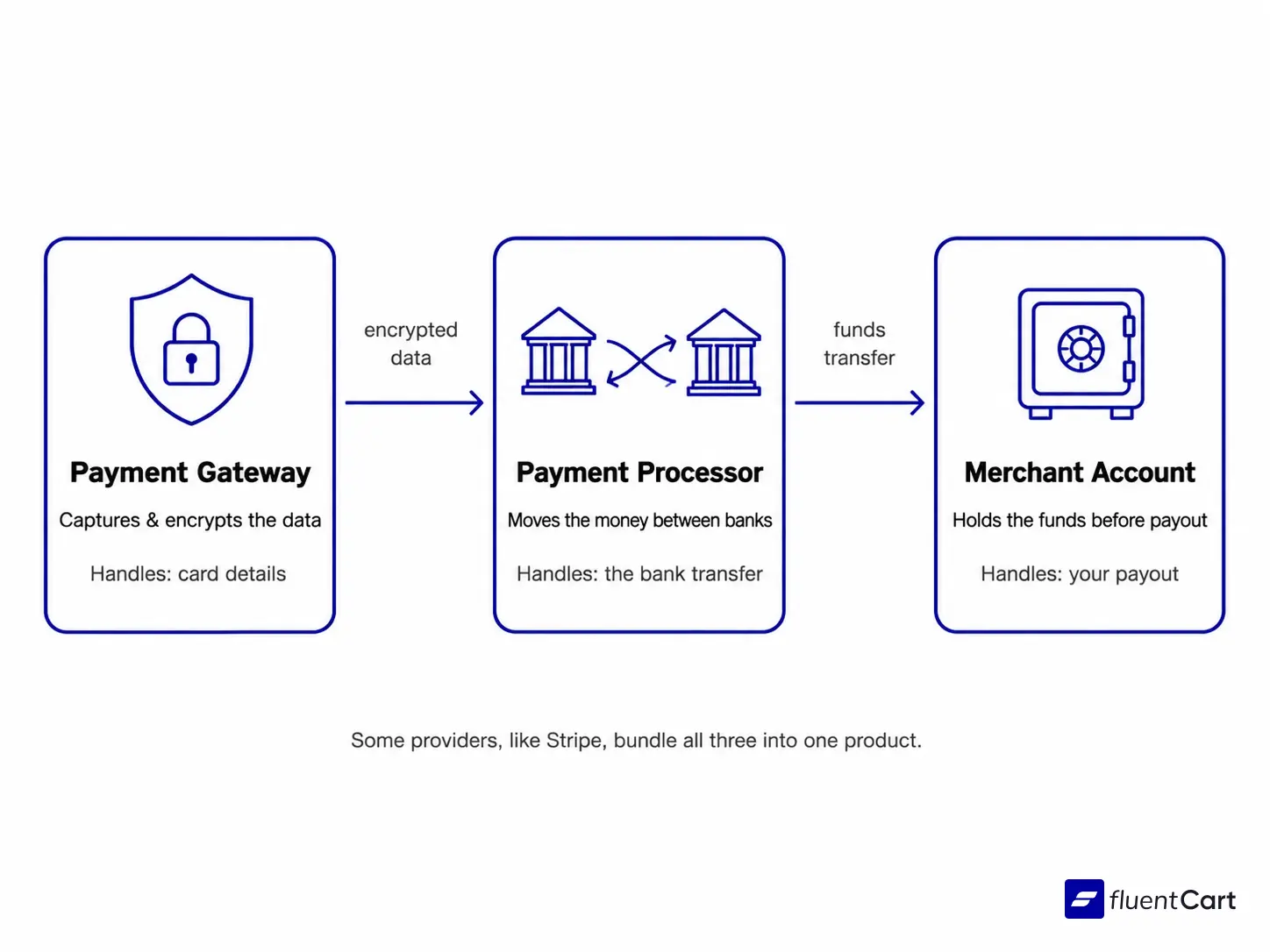
This is where most people get tangled up, and the industry doesn’t help by using these three terms loosely. Clearing this up now matters, because every section below depends on the distinction.
A payment gateway captures and encrypts the transaction data at checkout. A payment processor moves the funds between banks, acting on the gateway’s approval. A merchant account is the holding account, set up through an acquiring bank, where the money sits before it lands in your regular business bank account.
Some providers, Stripe among them, bundle all three into one product. That’s part of why they’re popular on WordPress. You sign up once, and you don’t have to think about the plumbing underneath.
One more term trips people up here, mostly because it sounds so close to “merchant account.” A merchant of record is a different concept entirely, and it matters enough to cover on its own further down.
How a Payment Gateway Actually Moves Your Money
Let’s say a customer on your WordPress store buys a $40 hoodie. Here’s what happens in the two or three seconds after they hit “pay.”
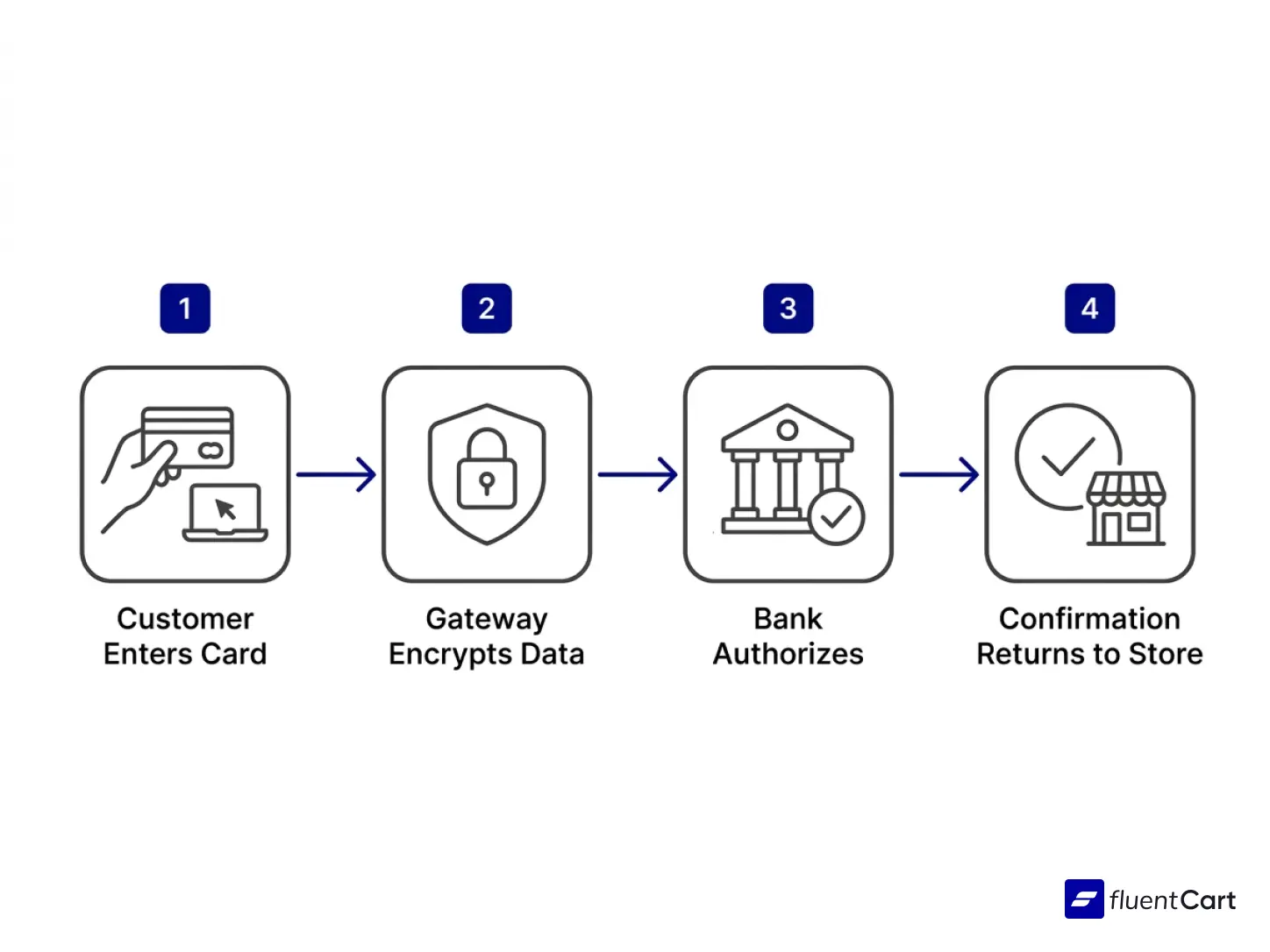
- Capture. The gateway grabs the card number, expiry, and CVV from the checkout form.
- Encrypt. That data gets locked so nobody watching the connection can read it.
- Route. The encrypted data travels to your payment processor, which sends it to the card network (Visa, Mastercard, whichever applies) and on to the customer’s issuing bank.
- Authorize. The bank checks the balance, checks for fraud signals, and sends back an approval or a decline.
- Confirm. The gateway passes that answer back to your store. The customer sees a thank-you page. Or they don’t.
None of this touches your bank account yet. Settlement, the step where the money actually lands in your account, happens separately, usually a day or two later. A successful payment on screen and money in your bank are two different moments in time.
Types of Payment Gateways You Can Add to a WordPress Store
Not every gateway works the same way, and the type you pick shapes both your checkout design and your compliance load.
Hosted Gateways
These send the customer to a payment page hosted somewhere else, then bring them back once payment clears. Less development work for you, and a lighter PCI DSS burden. The tradeoff is that redirect, which is also a trust moment where some shoppers get nervous and leave.
Non-Hosted (On-Site) Gateways
These keep the customer on your checkout page the whole time. Conversion tends to be better here, since nobody feels like they’ve left your site. You do carry more PCI DSS responsibility with this option.
API-Based Gateways
These sit in between the two. The payment form lives on your site, styled however you want, but the sensitive fields get tokenized before they ever reach your server. Stripe Elements works this way, and it’s become the default for a reason: full branding control, without the full compliance weight.
Building a gateway completely from scratch is technically possible, but rarely worth it. Past cost estimates for even a minimal, credit-card-only build have landed close to a quarter of a million dollars, before factoring in international support or the ongoing compliance work. Renting one of the three types above is almost always the cheaper path.
The Best Payment Gateways for WordPress Stores
For most WordPress store owners, the shortlist of realistic options looks similar no matter what you’re selling.
Stripe
The developer favorite, and increasingly the default pick for stores that want on-site checkout without a redirect. Pricing sits at 2.9% + 30¢ per transaction in the US, and it connects to WordPress through official plugins or a direct API integration. Apple Pay and Google Pay come built in.
PayPal
Wins on recognition. A “Pay with PayPal” button still calms down shoppers who don’t fully trust a smaller site with their card number. Fees land close to Stripe’s, at 2.9% + $0.30, though PayPal’s cross-border fees can run higher.
Square
Makes sense if you also sell in person. As of early 2026, Square’s free plan charges 2.6% + 15¢ for in-person card payments and 3.3% + 30¢ online, which puts its online rate above Stripe and PayPal on the free tier. A paid Square plan brings the online rate back down closer to 2.9%.
None of these three is universally “the best.” Match the gateway to your situation instead:
- Mostly domestic, one-time purchases: Stripe or PayPal, whichever your customers already recognize.
- Selling in person and online: Square, for the shared dashboard, keeping in mind the online rate is now the highest of the three on the free plan.
- Running recurring billing or subscriptions: check retry logic and dunning support first; not every gateway handles subscriptions on WordPress the same way.
- Selling internationally from day one: the section below is more useful than any single pick above.
Choosing the Best Payment Gateway for International Transactions
This is where the generic “top 5 gateways” lists fall apart. International is not one problem. It’s a different problem in every region, and sometimes a different problem entirely once tax gets involved.
Stripe for Broad Global Reach
Stripe covers 135+ currencies and cards from 46 countries, and its international pricing is at least transparent about the markup: 2.9% + 30¢ domestically, plus 1.5% on cards issued outside the US, plus 1% if a currency conversion happens. Stack all three, and a genuinely international sale can cost you close to 5.4% before you’ve paid for anything else.
That’s fine if most of your customers are domestic and international sales stay occasional. It stops being fine once you’re actively building a market somewhere Stripe’s US-centric routing doesn’t serve well.
Airwallex for Multi-Currency Operations
Airwallex takes a different approach. Instead of a flat surcharge on every foreign card, it lets a store hold and settle funds in the currency it was actually paid in, across 120+ countries, with FX markups that typically land between 0.5% and 1%. For a store that sells into many markets regularly, not just occasionally, that lower conversion cost adds up over a year.
Regional Gateways for Local Trust
Local banking rails tend to lift card approval rates far more than any global gateway manages from the outside, which is why serious international stores often run more than one gateway at once.
- Razorpay serves customers paying from India.
- Paystack covers Nigeria and much of West Africa.
- Flutterwave reaches a wider set of African markets and overlaps with Paystack in some countries. If your customers split across both regions, it’s worth testing each and keeping whichever one clears more payments in practice.
- Mercado Pago is the dominant option across Latin America.
- SSLCommerz handles Bangladesh.
- Authorize.net is widely trusted by US and enterprise buyers who expect a more traditional gateway name.
Merchant of Record: When Someone Else Handles the Tax
A merchant of record works differently from every gateway above, and it’s worth understanding on its own, because it solves a problem none of the others touch.
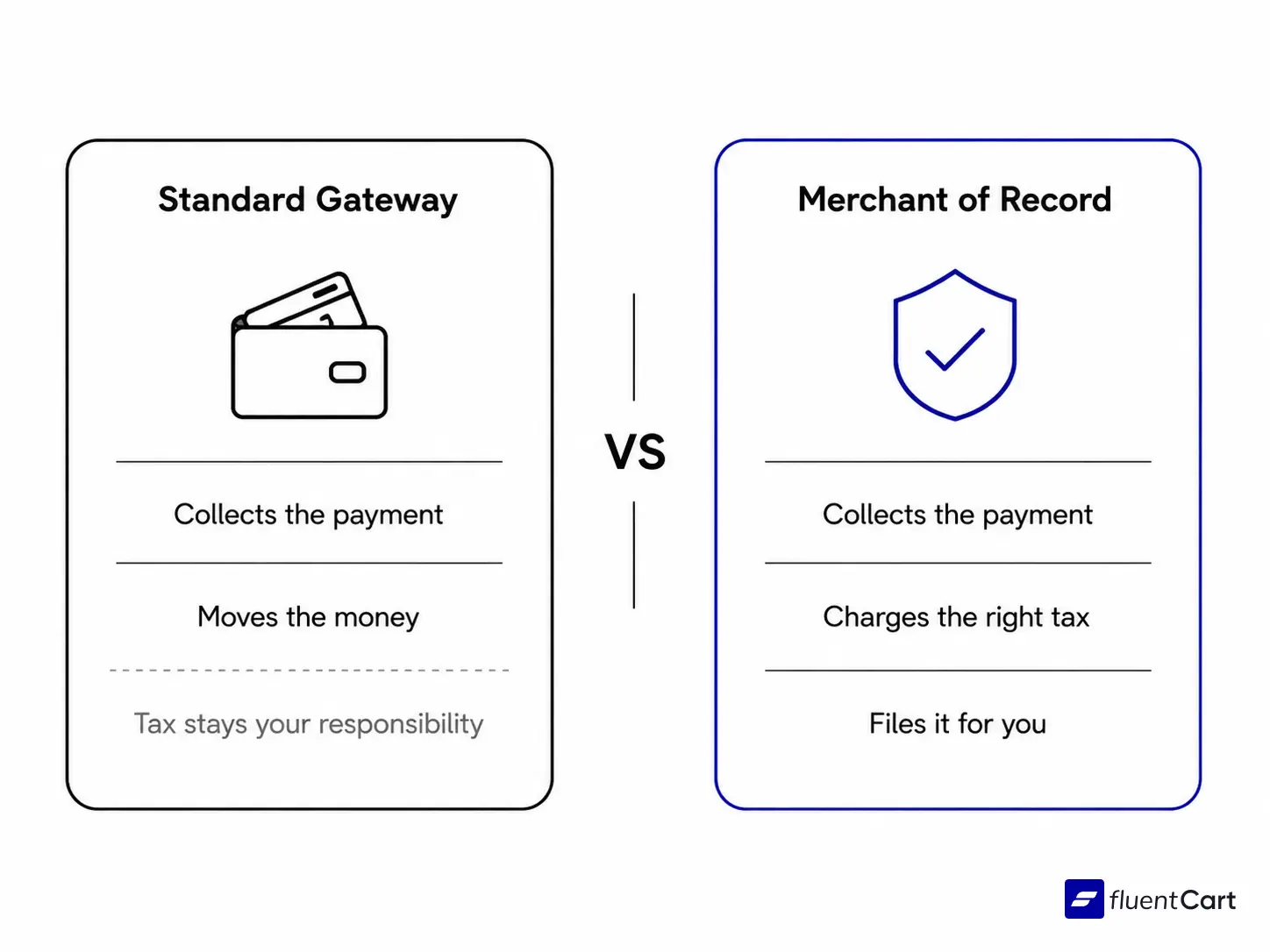
A regular gateway or processor moves your customer’s payment. It does not become legally responsible for that sale. Your store stays on the hook for calculating, collecting, and filing sales tax or VAT in every country and state where you have customers, which gets complicated fast once you’re selling somewhere close to twenty different tax jurisdictions.
A merchant of record, Paddle is one well-known example, legally becomes the seller on paper. It collects the payment, charges the right tax for the buyer’s location, and files that tax on your behalf. You get paid a net amount after tax and fees, and the tax paperwork simply isn’t yours to deal with anymore.
That tradeoff costs more per transaction than a standard gateway. For a store already managing EU VAT by hand, or planning to sell in a dozen countries without hiring a tax specialist, it can be the difference between launching this quarter and stalling for months on compliance work alone.
If you’re running a WordPress store and this whole regional and tax picture applies to you, FluentCart supports most of the gateways above without needing a separate plugin for each one.
Security and Trust: Why They’re the Same Problem
Every payment gateway you evaluate should be PCI DSS compliant. That part is non-negotiable, and it’s also the quiet cause behind a checkout statistic that catches a lot of store owners off guard.
PCI DSS Compliance Isn’t Optional Anymore
PCI DSS v4.0.1 is the current standard, and since March 31, 2025, every requirement in it is mandatory, including the ones that used to be listed as future best practices. If your store handles cardholder data in any way, even briefly, this standard applies to you.
For most WordPress stores using a hosted or API-based gateway, the heavy compliance work sits with the gateway provider, not with you. Your part is smaller than it sounds. Confirm your hosting includes free SSL, which most providers do by default.
Check with your gateway that card numbers get stored on their servers, not in your own WordPress database. Ask your gateway provider directly if you’re not sure either box is checked, since getting this wrong can mean real fines, and in serious cases losing the ability to process cards at all.
What Cart Abandonment Data Actually Shows
Nearly 70% of online carts get abandoned before checkout finishes, according to Baymard Institute’s analysis of 50 separate studies. Extra costs at checkout rank as the top reason. But among shoppers who left for a reason other than “just browsing,” 19% said they didn’t trust the site with their credit card information.
Nearly 1 in 5. That’s the same underlying issue as the compliance section above, just seen from the customer’s side of the screen instead of yours. PCI DSS is the technical answer to that distrust. A recognizable gateway logo, a visible security badge, and a checkout that doesn’t redirect somewhere unfamiliar are the visible answer.
A WordPress store running a proper cart abandonment strategy treats the payment step as part of that trust chain, not a technical detail bolted on at the end. Running an ecommerce CRO audit now and then usually shows exactly where that trust breaks down on your own site.
How to Add a Payment Gateway to Your WordPress Store
If you’re setting up a WordPress store to sell products for the first time, the actual setup takes less time than people expect.
- Pick your gateway based on where your customers bank, not where you’re based.
- Create the merchant account with that provider, which usually means business details, a bank account, and identity verification.
- Install the plugin, official where possible, and activate it.
- Enter your API keys into the plugin’s payment settings.
- Run a test transaction in sandbox mode before going live.
- Switch to live mode and confirm a small real transaction clears.
Most of this takes under an hour. The step that takes longer, for stores with EU customers, is getting tax handling right at the same time, since VAT and payment setup on WordPress tend to get configured together anyway.
If you are looking for expert’s say about which one is right for you, then join the FluentCart community where you will find real store owner.
Real store owners. Real problems. Real answers. Join the FluentCart Community.
Frequently Asked Questions
Is PayPal a payment gateway or a payment processor?
Both, in practice. PayPal’s merchant accounts work like a processor, moving money between banks, while its gateway product, PayFlow, handles the data-capture side. Most stores never notice the split, since PayPal bundles the two together the same way Stripe does.
What’s the difference between a payment gateway and a payment processor?
A gateway captures and encrypts the customer’s card data at checkout. A processor takes that data and actually moves the money between the customer’s bank and yours. Providers like Stripe and PayPal handle both jobs in one product, which is why the terms get used interchangeably even though they describe different steps.
What are the best payment gateways for a WordPress store?
Stripe and PayPal cover most general-purpose stores, Square makes sense alongside in-person sales, and Airwallex is worth a look once international volume grows. Beyond that, the right pick depends on where your customers actually bank, not on a single universal answer.
Can I build my own payment gateway for free?
Not realistically. Past cost estimates for even a minimal, credit-card-only build have landed close to a quarter of a million dollars, and that figure doesn’t include ongoing PCI DSS compliance or international support. Renting an existing gateway is almost always cheaper than building one.
Do I need a payment gateway for every online store?
Yes, for any store accepting card payments. Without one, a WordPress store can only take manual payment methods like bank transfer or cash on delivery, both of which add friction that most shoppers won’t tolerate.
Getting This Choice Right
Go back to that customer email from the start of this guide, the one asking why their card got declined. Most of the time, the answer traces back to one of the things covered here: the wrong gateway type for your audience, a missing regional option, or a trust signal your checkout never had. None of that is hard to fix once you know where to look.
A payment gateway is a small piece of software carrying a large amount of trust. Get it wrong, and customers feel it at the exact moment they were ready to buy. Get it right, and it disappears into the background, which is exactly the job a payment gateway is supposed to do.

Hi, this is Abir, a Deputy Marketing Lead, passionate product designer, and WordPress core contributor. Creating interesting content and products that ensure a 360-degree customer experience is my daily job.

Subscribe now
Related Articles and Topics
-

eCommerce Laws in 2026: The 8 Rules Regulators Are Fining Stores Over
The 8 ecommerce laws regulators fined stores over in 2025 and 2026.
-

GiveWP Alternatives: What Actually Replaces It
GiveWP’s future is shaky. Here’s what real GiveWP alternatives do better in donation-taking operations, and where they still…
-

What Is Retail Margin? Formula, Benchmarks & Tips
Retail margin shows how much profit survives each sale. Learn the formula, industry benchmarks, and ways to raise…




Add your first comment to this post