

Why Abandoned Cart Happens and How to Win the Sale Back
A shopper picked a size, typed their email, saw the total, and closed the tab. Most store owners write that off. We don’t, because that person told you three things before they left: what they wanted, how much they were willing to spend, and where to reach them.
This guide covers what an abandoned cart is, why shoppers leave, how to stop the avoidable exits, and how to win the rest back with email. If you want a deeper list of checkout fixes, our guide on ways to reduce cart abandonment goes further. Here, the focus is the follow-up.
TL;DR
What is An Abandoned Cart?
An abandoned cart is an online shopping cart a customer filled with products but left without paying. The shopper showed clear intent by choosing items, and sometimes by starting checkout, then stopped. It’s one of the most common leaks in any online store, and one of the easiest to measure.
Baymard Institute tracks this across dozens of studies and puts the average documented cart abandonment rate at about 70%.
Picture 10 people at your register. 7 of them put the basket down and walk out.
That number sounds grim. It isn’t the whole story, though. Some of those seven were never going to buy on that very day. The rest hit something in your store that stopped them, and that part you can fix.
Cart Abandonment vs Checkout Abandonment
These two get mixed up, and the difference changes what you can do next.
Cart abandonment
The shopper added items but never started checkout. You usually don’t have their email.
Checkout abandonment
The shopper started checkout and entered details, then left before paying.
Email recovery lives almost entirely in the second group. If nobody typed an email address, there’s no one to write to.
How to Calculate Abandonment Rate of Your Store
Divide completed orders by carts created, subtract that from 1, and multiply by 100.
If your store saw 1,000 carts and 300 orders last month, the math is (1 − 300 ÷ 1,000) × 100 = 70%. Track it monthly. A single number tells you little. The trend after you change something tells you a lot.
Why Shoppers Abandon Carts
Shoppers abandon carts mostly because something at checkout surprised, slowed, or worried them. Baymard’s survey of US online shoppers found that about 43% of people who leave were only browsing. Among the rest, the reasons are specific, and most of them point at the checkout itself.
Here are the most common reasons for an abandoned cart:
Read that list again and count how many items a store owner controls. Nearly all of them. That’s the good news hiding inside the 70%.
What You Can Do: Prevent First, then Recover
You fight an abandoned cart in two places. Prevention removes the friction that pushes people out of checkout. Recovery follows up with the people who still leave. Do them in that order. Emails can’t save a checkout that keeps scaring buyers off.
Prevent: Fix the Checkout Before Writing an Email
Start with the reasons on the list above and work down.
Here’s the thing about prevention: it pays twice. Every fix lowers abandonment and lifts conversion for buyers who never would have left anyway.
Recover: Follow-up While the Intent is Still Warm
Some shoppers will still leave. A child needs dinner, a meeting starts, the card is in the other room. For them, the cart isn’t a rejection. It’s a pause.
Recovery means catching that pause. You capture the email at checkout, wait a short while, and send a reminder with the cart and a link back to it. If that doesn’t work, you send a second and third message with a different angle each time. Then you stop.
Abandoned Cart Email Best Practices
The best abandoned cart emails are short, personal, and built around one button that takes the shopper straight back to their saved cart. They come in a short series, each with a different job, and they stop the moment the person buys. These abandoned cart email best practices come from what we’ve seen work for store owners.
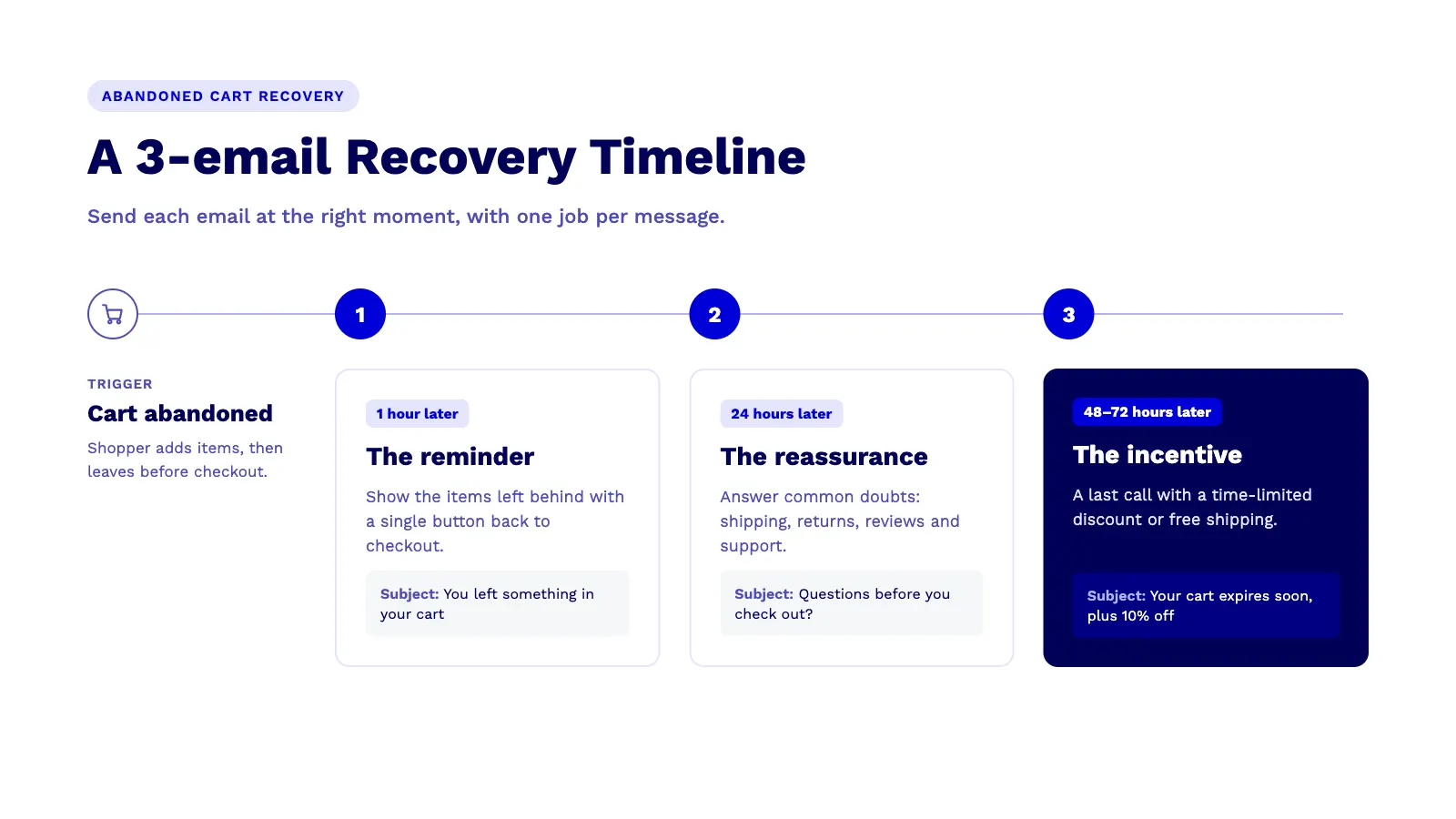
Send 3 emails, Each with Only One Job
Three is the number most recovery flows settle on, and it’s a good ceiling. Give each email one purpose:
Never send the same email three times. A repeat reads like a machine. A new angle reads like a person who noticed.
Write Subject Lines that Name the Cart
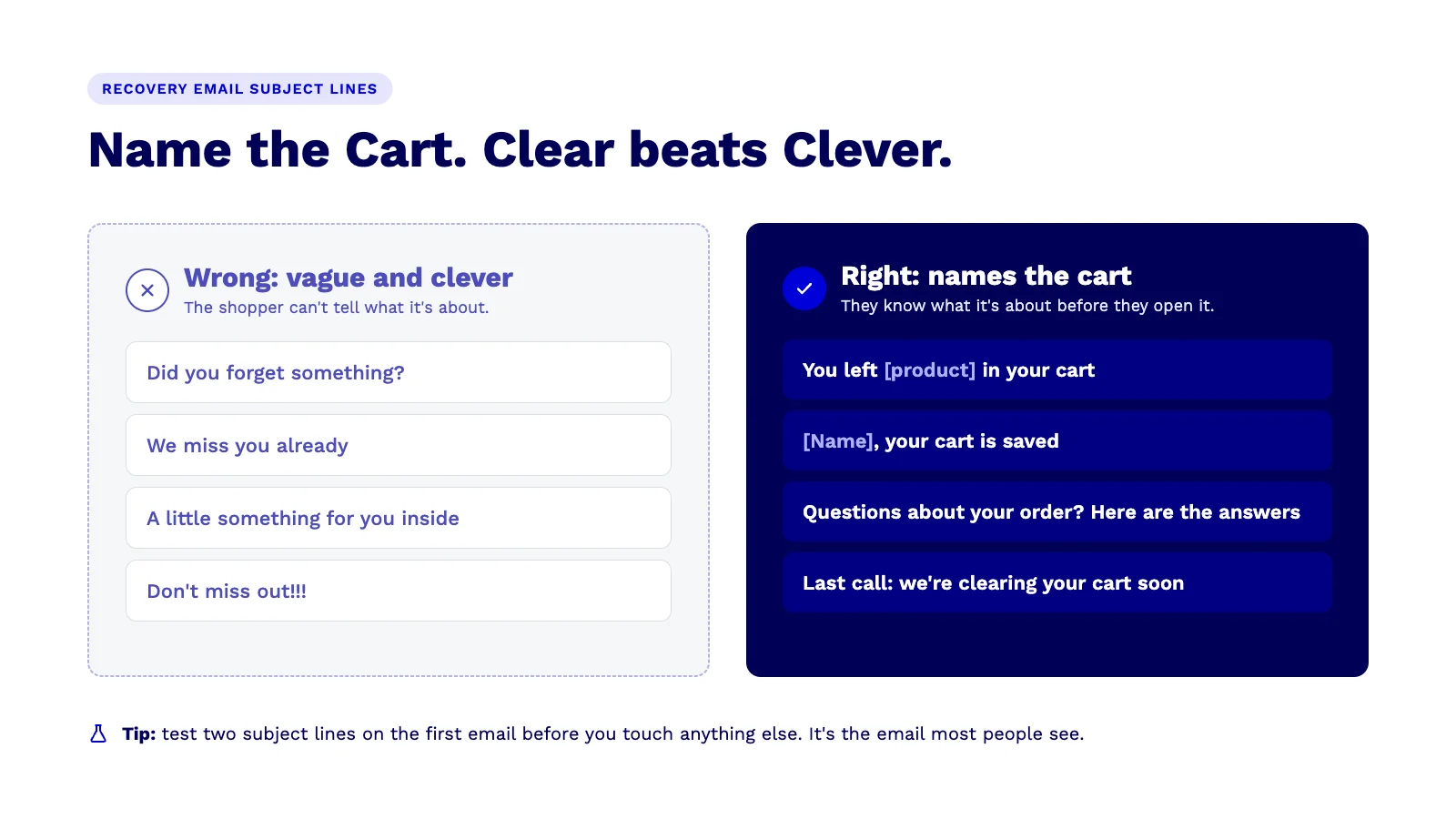
Clear beats clever. The shopper should know what the email is about before they open it.
Test two subject lines on the first email before you touch anything else. It’s the email most people see.
Show the Cart, not a Generic Banner
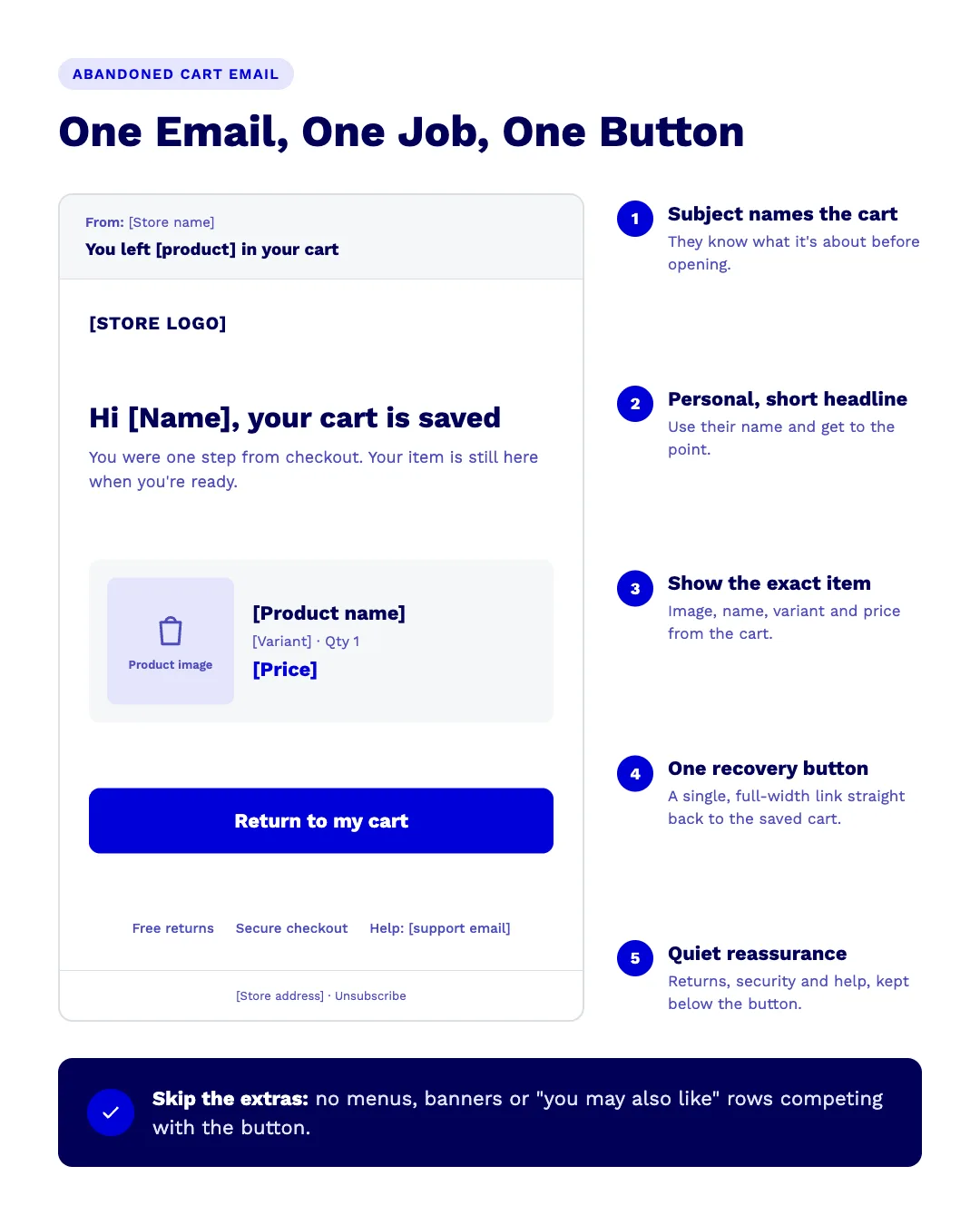
Include the product image, name, options like size or color, and price. People forget what they picked. A cart table brings back the moment they decided they wanted it, without making them search your store again.
Use One Button that Restores the Cart
One call to action. Make it obvious, and use plain words like “Complete my order” or “Return to my cart.” The link should restore the exact cart, including items and any coupon, even if they open it on a different device. A link to your home page throws away most of the work.
Save the Discount for The Last Email
A discount in email one teaches buyers to abandon on purpose. Keep the first two emails about the cart and the doubts. If you offer an incentive, put it in the final message and keep it modest: free shipping or a small percentage. You can set this up with WordPress coupon codes that apply on a single click.
Stop the Moment They Buy
Nothing burns trust faster than “you forgot something” landing an hour after the order confirmation. Your automation must check for a completed order before every send and exit the sequence when it finds one.
Know When To Let Go
After the third email, stop. More messages turn a warm lead into an unsubscribe. Add a clear opt-out to each email so people feel in control. The shopper who ignored three polite notes isn’t lost forever. They’re a newsletter subscriber now, and that’s a fine outcome.
Want these written for you? Get the free abandoned cart recovery email pack with three ready-to-send emails, a subject line bank, and a FluentCRM setup sheet.
How to Recover Abandoned Carts on WordPress Stores
For WordPress you’ll need a self-hosted checkout like FluentCart. The store handles checkout and the cart. Email Marketing tools like FluentCRM watch store checkouts, save a recovery snapshot when a shopper enters their email, and runs your recovery emails after a period of inactivity.
When the shopper buys, it marks the cart recovered and stops the sequence on its own.
The FluentCart abandoned cart tracking and basic trigger ship in FluentCRM’s free core. Advanced trigger conditions, like cart total or product filters, need FluentCRM Pro. The FluentCRM integration for FluentCart brings the whole eCommerce marketing stack inside your WordPress dashboard. Hard to go wrong with a native eCommerce+marketing stack that integrates seemlessly.
Set it up in Four Steps
Turning on tracking alone sends nothing. You need a published automation, and that trips up more people than any other step.
What Happens Behind the Scenes
When a shopper enters an email at checkout and leaves, FluentCRM saves the cart as a draft. After the cut-off passes with no activity, it checks whether this person bought recently, picks the matching automation, and starts the emails.
The recovery link restores the cart, items, and coupons, even in a different browser. If the original cart is gone, it rebuilds it from the saved snapshot. Once the order is paid, the cart is marked recovered, the remaining emails are canceled, and the cart shows up in FluentCRM → Reports → Abandoned Carts.
Two honest limits. A shopper who never typed an email can’t be tracked this way. And the 30-minute cut-off is an inactivity threshold, not an exact send time, since it runs on a five-minute scheduled task.
Abandoned Cart FAQs
How long should I wait before sending the first abandoned cart email?
One to three hours works for most stores. It’s soon enough that the shopper still remembers the cart and late enough that it doesn’t feel like you’re watching them. Higher-priced items can wait longer, since people take more time to decide.
Should every abandoned cart email include a discount?
No. Lead with the cart and the answers to common doubts. Save a modest incentive for the last email, so you don’t train regular buyers to abandon on purpose.
Does clicking the recovery link count as a recovered cart?
Not in FluentCRM. A cart counts as recovered only when an order is placed and paid. A shopper who comes back on their own in the same browser and buys also counts.
Do I need FluentCRM Pro for abandoned cart emails?
No. Tracking and the basic trigger work in the free core. Pro adds conditions like cart value, products, categories, and tags, so you can send different sequences to different carts.
Wrapping Up
Remember the shopper who closed the tab? They left you a product, a price, and an email address. With a cleaner checkout, three emails that each do one job, and a sequence that stops the moment they buy, most of that cart is still in play.
Start with your checkout. Then set up the recovery flow in FluentCRM and watch the abandoned carts report for a month. If you’re still choosing a store setup, compare FluentCart plans and see which fits your shop.

Rasel leads the marketing function at FluentCart, driving both high-level strategy and ground-level execution across the product’s growth engine. He plays a central role in defining how FluentCart is positioned, how it enters the market, and how it evolves based on user behavior and feedback. His responsibilities span go-to-market planning, funnel architecture, conversion strategy, and narrative development. He works across teams to ensure that product decisions, marketing efforts, and customer experience stay tightly aligned.

Subscribe now
Related Articles and Topics
-
Custom Checkout Page: How to Build One That Converts
Build a custom checkout page that cuts drop-offs: icluding chekcout types, checkout steps, best practices and best platforms…
-
Black Friday Marketing Strategies That Protect Profit
A 20% sale can mean selling double the units to earn the same profit. Here’s how to plan…
-
6 Easy-to-sell Black Friday Ideas for Small Businesses
Black Friday ideas for small stores: six niches and the offers that sell them.




Add your first comment to this post