
FluentCart 1.3.28 – the storefront grows up in Elementor
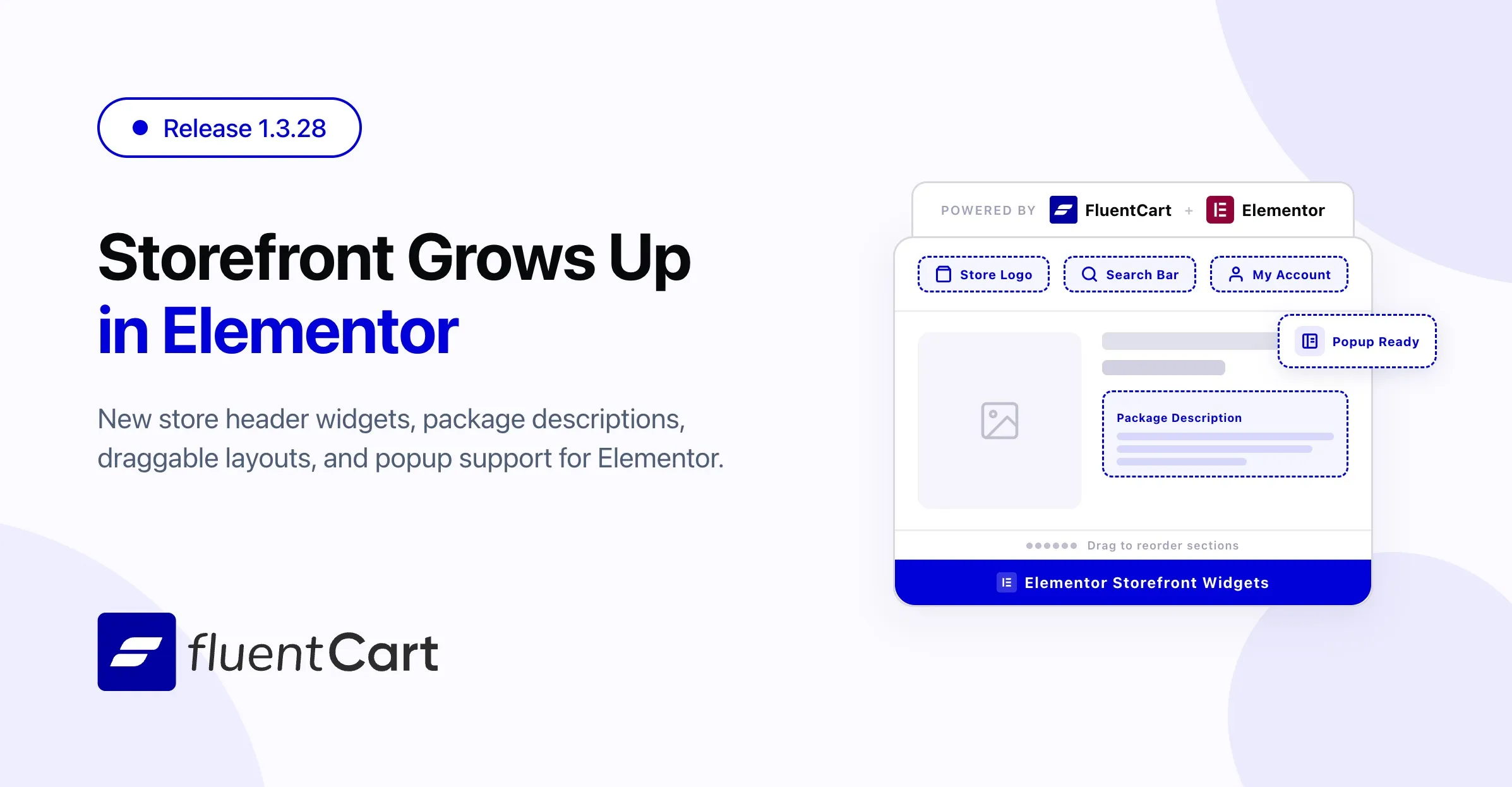
FluentCart 1.3.28 leads with reach. The Elementor Blocks add-on, shipping alongside this release as 1.0.1, expands well beyond the Single Product surface and into the rest of the storefront store header essentials, a customer dashboard entry point, a dedicated description block for packaged products, and a long list of polish fixes that make the existing widgets behave the way Elementor users expect. Around it, the core release quiets down course-driven subscription renewals, sharpens the Pricing Table and Single Product surfaces inside Full Site Editor themes, and gives Bricks Builder users a Sort By toggle and cleaner element grouping.
It is a feature-led release for Elementor users and a maintenance-led release in the core. The theme: more of the storefront is now buildable in the page builder of your choice, course renewals are calm and correct, and a long list of paper-cut fixes lands across checkout, storefront, and admin.
Three new storefront widgets for Elementor
Stores building their layout entirely inside Elementor used to drop back to shortcodes or theme code for a handful of cross-site pieces. This release closes that gap with three new widgets:
- Search Bar widget for placing the FluentCart product search anywhere in the layout, with full styling controls
- Store Logo widget for placing the store mark in header rows and footer columns without theme overrides
- Customer Dashboard Button widget for surfacing a “My Account” entry point in the header, with style controls that match the rest of the storefront
Each widget ships with the same depth of style controls Elementor users expect, so they fit cleanly into existing designs instead of looking like a bolt-on. For agency stores and design-led merchants, the Elementor add-on now covers the whole header-to-checkout journey, not just the product page.
Product Package Description widget
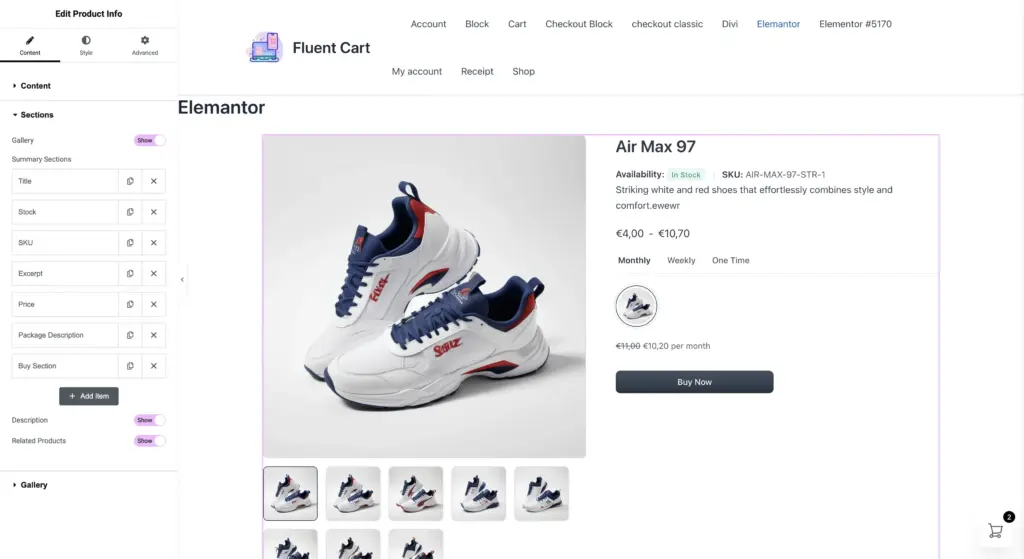
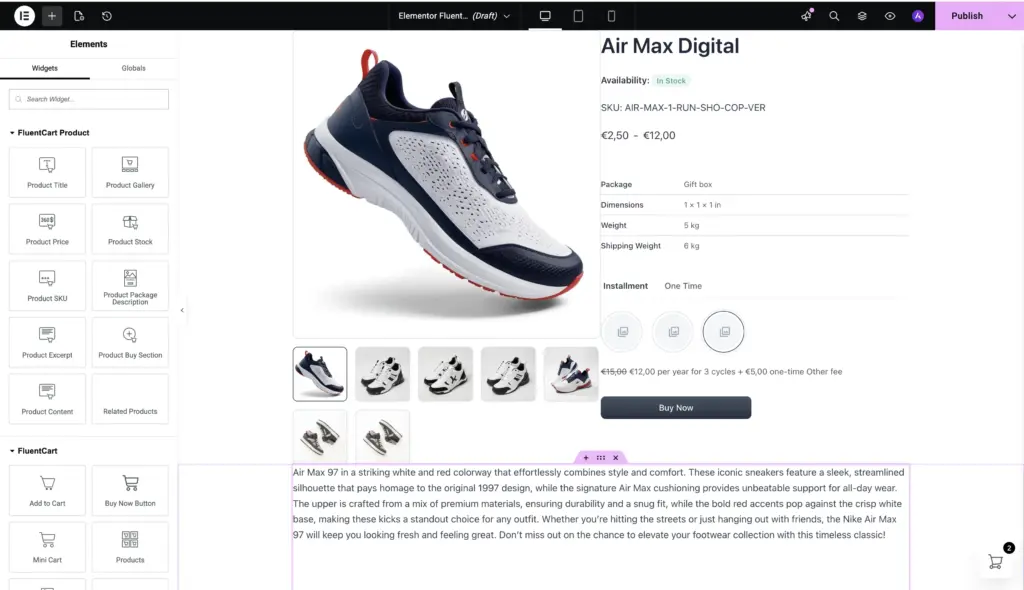
For stores selling packaged products such as software bundles, course collections, or service tiers, the package description is often the most decision-shaping piece of copy on the product page. 1.0.1 of the Elementor add-on adds a dedicated Product Package Description widget that surfaces that copy as a first-class block, and also folds it into the composite Product Info widget so it can be reordered alongside the other product summary sections.
Draggable Product Info summary
The composite Product Info widget now lets store owners drag and reorder the summary sections inside it — title, price, excerpt, package description, and the rest — to match the merchandising priority of each product line. Different product categories often deserve different emphasis; the widget now bends to that without needing separate templates.
Elementor Popup compatibility for Single Product
Stores using Elementor Popups to surface a quick product view from a catalog grid used to find that variation pickers, gallery, and quantity controls inside the popup were inert. The add-on now bridges the Elementor popup show event to FluentCart’s single-product re-initialize hook, so the full product UI works correctly the first time the popup opens and every time after.
LearnDash subscription renewals, completed
For stores selling courses through subscriptions, renewal time used to be noisier than it should be. A renewal could re-trigger the enrollment path, integrations could fire again, and the audit log could fill with events that did not reflect a meaningful change. 1.3.28 finishes that thread of work.
When a subscription renews, FluentCart now extends course access silently:
- Course expiration dates are extended in place
- Any leftover block from a previous lapse is cleared automatically
- No enrollment integrations re-run, and no duplicate notifications go out
- The order log records a single, clear “renewed silently” entry
Student progress is preserved cleanly across the entire renewal lifecycle, and the customer never sees a flicker of “newly enrolled” status on something they have been studying for months.
The same release extends LearnDash group access to follow the subscription expiry behavior already in place for individual courses. When a subscription lapses, the customer’s group membership is preserved, but access is blocked. When they re-subscribe, their place in the group comes back without re-enrollment. FluentCart’s expiration logic now runs ahead of other LearnDash extensions as well, so nothing layered on top can accidentally override it.
For membership-style course bundles and time-limited learning programs, this is the difference between a renewal that feels invisible and one that feels like starting over.
Bricks Builder gets a Sort By toggle
For Bricks Builder users, the Products Collection element now includes a Sort By control. Designers can show or hide the sort dropdown on a per-listing basis, so listings that should expose customer-controlled ordering can, and curated landing pages that should hold a specific order do not have to fight the front-end UI.
All FluentCart elements in the Bricks Builder are now grouped under a single “FluentCart” category as well, so finding the right product element takes one stop instead of three.
Mollie payment methods, by store currency
Stores using Mollie sometimes saw payment methods listed in the admin that did not actually work for the store’s currency. 1.3.28 fetches the activated payment method list using the store’s currency, so what shows up in settings reflects what customers can actually use at checkout. Zero-decimal currencies like JPY and KRW are handled correctly end to end.
Improvements
Elementor widget categorization and checkout layout. FluentCart product widgets are now grouped under a dedicated “FluentCart Product” category in the Elementor panel for easier discovery, and the 1-column checkout layout renders correctly in Elementor templates.
Coupon error clarity. When a coupon fails to apply at checkout, the message now names the specific reason: expired, usage limit reached, or minimum cart value not met, instead of a generic “could not apply” line. Customers know what to fix, and store owners get fewer confused emails.
Bricks element grouping. All FluentCart elements in the Bricks Builder are now grouped under a single “FluentCart” category. No more hunting across two or three categories to find a product element.
Mobile admin spacing. Horizontal padding on the admin menu has been refined for mobile screens, so the menu and the FluentCart mobile app surface read more comfortably on small displays.
Fixes & Stability
Elementor variation sync. When a customer changes the active variation on a Single Product page built with the standalone Elementor widgets — Title, Price, SKU, Stock, Buy Section, Gallery — each widget now refreshes to match. The Buy button correctly reflects the variation’s purchase state, and the stock badge clears cleanly when the new variation has no stock data to show. The stock label now renders as plain text instead of leaking raw markup.
Elementor empty wrappers and document scoping. Elementor product widgets such as Excerpt, SKU, Stock, and Price no longer render empty wrapper blocks when the underlying field has no content, so layouts stay tidy on products that only fill some fields. Product-template widgets are now hidden in the Elementor panel when editing documents that are not Single Product templates, so they don’t appear as options where they wouldn’t render. The Product Info widget renders correctly inside the Elementor editor, and the Select2 control inside it now fires change events reliably.
Storefront and shortcodes. The Pricing Table shortcode and block render correctly in Full Site Editor templates again, including the tabbed layout that organizes plans into pricing tiers. The Single Product shortcode now renders fully, with variation pickers, thumbnail switching, and quantity controls working the same as they do on the standalone product page. Product descriptions display correctly when they contain shortcodes or blocks that depend on the current product context, closing a long-standing gap where third-party additions inside the description would render with the wrong data.
Block editor compatibility. The Customer Dashboard, Product Card, Product Search, and Pricing Table blocks now render correctly inside Full Site Editor templates and template parts, not just on regular pages.
Admin polish. Pressing Enter inside the product title field in the editor no longer submits the form by accident. The Search Bar widget now honors the “Same Tab” setting instead of always opening results in a new tab.
Receipts. Admins can always view a receipt in the admin, even on records that would normally show the not-found page to a customer. Investigating a problem order no longer means working around the safety screen meant for the storefront.
Bricks polish. The Bricks Builder Product Title element renders consistently across layouts.
Security and maintenance. This release includes ongoing security audits and routine hardening across FluentCart core, FluentCart Pro, and the Elementor Blocks add-on.
Closing
1.3.28 is the release where FluentCart’s storefront becomes properly buildable in Elementor — header, search, customer dashboard, packaged-product description, and the existing Single Product surface, all behaving the way Elementor users expect. Around that headline, LearnDash subscription renewals are calm and correct, the Pricing Table and Single Product surfaces work cleanly inside Full Site Editor themes, Bricks Builder picks up a useful new control, and Mollie shows the right payment methods for the right currency. Each change is small on its own; together they continue FluentCart’s direction toward a self-hosted commerce platform that gets sharper, more reliable, and more thoughtful with every release.
Full Change-log
Adds
- Search Bar widget for Elementor.
- Store Logo widget for Elementor.
- Customer Dashboard Button widget for Elementor.
- Product Package Description widget for Elementor, standalone or inside Product Info.
- Draggable, reorderable summary sections inside the Elementor Product Info widget.
- Elementor Popup support for Single Product: variations, gallery, and quantity now work in popups.
- Sort By toggle for the Bricks Products Collection element.
- fluent_cart/show_admin_top_bar shortcode for hiding top menubar.
Improvements
- LearnDash course management: missing pieces completed.
- Mollie payment list now respects the store’s currency.
- Coupon failures show the specific reason at checkout.
- FluentCart Elementor widgets grouped under one “FluentCart Product” category.
- 1-column checkout layout renders correctly in Elementor templates.
- All Bricks elements grouped under one “FluentCart” category.
- Cleaner admin menu spacing on mobile.
- Decimal trimming logic to only remove trailing zeros when decimal point exists, preventing incorrect formatting of integer tax rates.
- Global search is now with slash (/) instead of (cmd + k).
Fixes
- Elementor Single Product widgets (Title, Price, SKU, Stock, Buy Section, Gallery) now sync to the active variation.
- Buy button reflects the active variation’s purchase state.
- Stock badge clears when a variation has no stock data.
- Stock label renders as text, not raw markup.
- Empty Elementor product widgets (Excerpt, SKU, Stock, Price) no longer leave empty wrappers.
- Product-template widgets hidden in Elementor outside Single Product documents.
- Product Info widget renders correctly in the Elementor editor; Select2 change events fire reliably.
- Pricing Table shortcode and block render correctly, including group_by tabs.
- Single Product shortcode renders fully: variations, thumbnails, and quantity all work.
- Product descriptions render correctly when third-party shortcodes or blocks need product context.
- Customer Dashboard, Product Card, Product Search, and Pricing Table blocks render in FSE templates and parts.
- Admins can always view a receipt, even on a record that would normally show the not-found page.
- Search Bar widget honors the “Same Tab” setting.
- Enter key in the product title field no longer submits the form.
- Bricks Product Title element renders consistently across layouts.
- French overseas territory VAT mapping issue.
In case you missed
1.3.27 (May 08, 2026)
- Licensing Sites page with top-level list, detail view, and advanced filters
- Variation details shown in licensing site view
- Bricks Builder List/Grid view switcher for product listings
- Bricks Builder customizable display names for category filters
- Bricks Builder partial-match toggle for product search
- Bricks Builder live filter toggle for instant result updates
- Bricks Builder Allow Out Of Stock control for product listings
- Subscription reactivation now triggers integrations and customer emails
- License re-activation on subscription reactivation
- Copy Variation ID action in simple product pricing panel
- Add-More button for faster variant creation
- Tax notes support in PDF receipts (Pro)
- Table filter animations with smoother search bar and fewer background requests
- Bricks Builder rendering rebuilt for speed on product-heavy pages
- Bricks Builder pagination rebuilt for larger catalogs
- Auto-expand pricing section on validation errors for faster editing
- Subscription interval labels and upgrade-path payment summary now translatable
- Offline-payment subscriptions with 100% recurring coupon not activating
- Subscription reactivation after refund failing end to end
- PayPal subscription syncing out of step with gateway
- Authorize.net subscriptions blocked on fully-discounted setups
- LearnDash course expiration not clearing on subscription completion (lifetime access)
- PDF receipts missing dynamic fields in item table
- Long file names pushing download button off-screen on receipt page
- Cart allowing multiple subscriptions in one order
- Cart allowing subscription mixed with one-time product
- Order bump free-shipping checkbox not syncing on product change
- Deleted store pages triggering background errors
- Admin menu highlight bleeding into adjacent menu items
- Bricks Builder dynamic content field and category filter inconsistencies
- Licensing Site Detail amount formatting and customer profile rendering (Pro)
- Ongoing security audits and routine hardening
1.3.26 (May 05, 2026)
- Adds Square Payment gateway
- Adds Private products support in discounts, coupons, and order bumps
- Adds Subscription setup fee to receipts and emails
- Fixes Order/invoice dates showing previous day in profiles
- Fixes Coupon expiration timezone mismatch
- Fixes Duplicate success toast on product update
- Fixes Email preview created_at DateTime issue
- Fixes Safari chevron icon visibility issue
- Fixes Menu button and dropdown styling issues
- Fixes LearnDash course expiry resolution for users
- Improves button feedback with visual indicators only
- Fixes Skip subscription field validation when subscription is disabled
- Fixes Auto-expand Additional display prices section when subscription is enabled
1.3.25 (Apr 30, 2026)
- Fixes Sites with www and non-www counted as separate activations
- Fixes Subscription orders with coupon discounts getting stuck after checkout
- Fixes Duplicate renewal records created during payment processing
- Fixes Page freeze when clicking empty mini cart
- Fixes Max-width constraints and responsive padding on product pages
- Fixes Incorrect coupon expiration time in admin dashboard
- Fixes Shipping overcharge with multiple shipping classes in cart
- Fixes Free shipping adding class surcharges with multiple shipping classes
- Fixes Paddle subscriptions not cancelling immediately after refund
- Fixes Customer lifetime stats not updating after refund
- Fixes Double encryption when saving Stripe settings
- Fixes Raw transaction and subscription status keys shown in customer portal
- Improves Product variation management

I’m Jewel, founder of FluentCart and CEO at WPManageNinja, the team behind Fluent Forms, Fluent CRM, Fluent Support, FluentLogs and a handful of other WordPress plugins. I have been writing WordPress code since 2009 and still think of myself as a developer first and an entrepreneur second. Most of what I write on this blog comes from arguments we have had inside the team about how to build software people can actually depend on.

Subscribe now
Related Articles and Topics
-

Why FluentCart Sponsors WordPress Community Events
FluentCart is a Platinum Sponsor of WordCamp Sylhet 2026. Here’s why we show up.
-
Elementor Blocks for FluentCart 1.1.0 – reviews, placed in Elementor
Elementor Blocks for FluentCart 1.1.0 adds six product review widgets, eleven review layouts, ratings on shop cards, and…
-
FluentCart 1.7.0 – reviews, built in
A product page carries two voices: the store’s, and the customers who already bought. Until now a FluentCart…



Add your first comment to this post