
FluentCart eCommerce MCP Is Here: Now You Can Talk to Your Store

FluentCart launched last year with one promise: a WordPress eCommerce store without the clutter. A modern codebase built from the ground up, and a user experience that actually respects your time, from the first product you add to the checkout your customers see. At every stage since, it has backed that up. But “modern” is a moving target.
Right now, modern means AI. So FluentCart is taking the next step: built-in eCommerce MCP. You can now talk to your store. And once you can talk to your store, the possibilities stop being a feature list and start being whatever you can ask for.
If you’ve ever ended a long day clicking through five admin screens just to answer “how did we do this month compared to last month,” this is built for you.
TL;DR
What Is MCP?
MCP, or Model Context Protocol, is an open standard that lets AI assistants securely connect to external tools and data. Think of it as a universal adapter: any MCP-compatible AI client can talk to any MCP server, no custom integration needed.
Anthropic open-sourced the protocol in late 2024, and the industry moved fast. WooCommerce shipped MCP in developer preview, and Shopify built MCP endpoints into its platform. That’s the protocol layer of AI in commerce settling in real time.
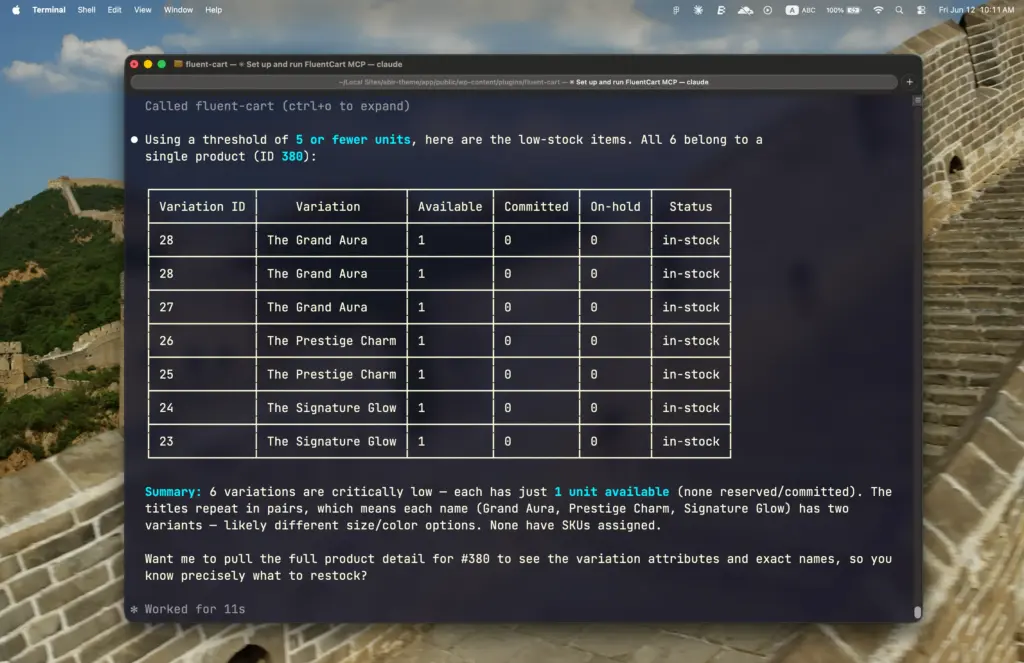
For your store, it means one thing. FluentCart exposes its data and actions as tools that an AI like Claude can call on your behalf, with your permissions. You ask in plain English. The AI does the clicking.
We’ll get to the setup soon. First, what exactly can eCommerce MCP do in FluentCart?
Everything Your AI Can Do With eCommerce MCP
FluentCart’s MCP server ships 30 tools for now, organized by domain. Here’s the full map.
Context & Reference
- get-store-context, the AI calls this first each session. It learns who you are, your permissions, your store’s currency and timezone, headline stats, and every valid status value, so it never guesses
- list-reference-data, on-demand lookups for coupons, labels, gateways, tax classes, shipping zones, and product categories
Orders
- list-orders, find and filter orders by status, payment, shipping, customer, product, coupon, country, totals, dates, and more
- get-order, full detail for one order: money breakdown, line items, customer, plus transactions, refunds, and addresses on request
- get-order-activity, the audit timeline: who did what and when, from status changes to emails sent
- change-order-status, move an order through its lifecycle or update shipping status
- add-order-note, drop an internal staff note on the order.
- refund-order, refund through the payment gateway, with a mandatory preview-and-confirm flow that prevents double refunds
Customers
- list-customers, filter your customer base by lifetime value, purchase count, location, and purchase dates
- get-customer, one customer’s full profile and metrics, with order and subscription history on request
- upsert-customer, create or update customer records; only the fields you pass change
Products & Inventory
- list-products, filter your catalog by status, fulfillment type, stock status, category, and price range
- get-product, full product detail including variations, SKUs, pricing, stock, and subscription terms
- get-inventory, the restock radar: which stock-managed variations are out or running low, with available vs committed vs on-hold counts
Subscriptions
- list-subscriptions, filter by status, billing interval, upcoming renewal dates, or cancellation dates to measure churn
- get-subscription, one subscription’s full lifecycle: billing schedule, trial, parent order, gateway ids
- change-subscription-status, cancel through the gateway, with the same dry-run safety pattern as refunds
Coupons & Labels
- list-coupons, browse coupons with usage counts and validity windows
- manage-coupon, create, update, or deactivate discount codes conversationally
- apply-labels, add or remove labels on any order, customer, or subscription
Reports & Analytics
Every report tool accepts ready-made ranges (today, last 7 days, this month, MTD, QTD, YTD, last quarter, and more) or exact dates.
- get-sales-report, revenue overview with prior-period comparison: gross, net, refunds, AOV, order count, and percent change
- get-sales-trend, revenue and orders over time, bucketed by day, week, or month
- get-top-products, best sellers ranked by revenue or units
- get-refund-report, refund counts, refund rate, and average refunded amount
- query-orders, flexible analytics: pick your metrics, group by your dimensions
- query-products, product-sales analytics grouped by product or variation
- query-customers, customer analytics grouped by country, status, or purchase month
- query-sources, UTM attribution: which source, medium, or campaign actually drove revenue
Licenses (FluentCart Pro)
- list-licenses, filter software licenses by status, customer, product, or expiry window to catch lapsing licenses early
- get-license, one license in full: activations, limits, expiration, and linked records
That’s the whole surface. Every order question, every customer lookup, every report you used to build by hand. Now one prompt away.
Setting It Up Is the Easy Part
MCP sounds like developer territory. Protocols, servers, endpoints. Here’s the honest truth: connecting your FluentCart store takes about ten minutes, and you never leave WordPress to do it.
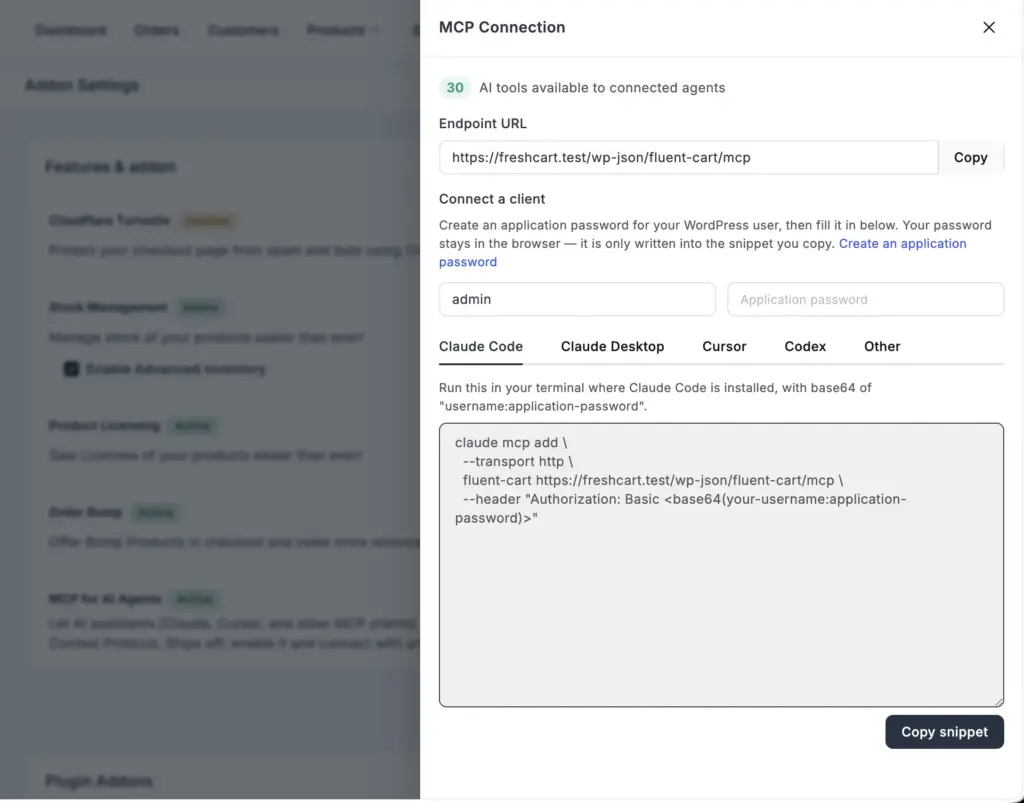
- One toggle. MCP lives right in FluentCart → Settings → Features & Addon. Flip on “MCP for AI Agents” and the server is live
- The adapter comes bundled. FluentHub ships with everything the connection needs, so there’s nothing extra to hunt down or configure
- One password. Create a WordPress application password from your profile. It’s separate from your login, and you can revoke it anytime to cut off access instantly
- One connection. Point your AI client (Claude Desktop, Claude Code, or Cursor) at your store’s MCP endpoint, paste the credentials, done
- One test. Ask “show me all my orders.” If data comes back, you’re talking to your store
No code or third-party SaaS in the middle. And No custom API work. The only real requirement is WordPress 6.9 or later, since MCP runs on the WordPress Abilities API in core. For the full walkthrough with screenshots and troubleshooting, the FluentCart documentation has a step-by-step guide.
What a Day With FluentCart eCommerce MCP Looks Like
Real prompts, real workflows:
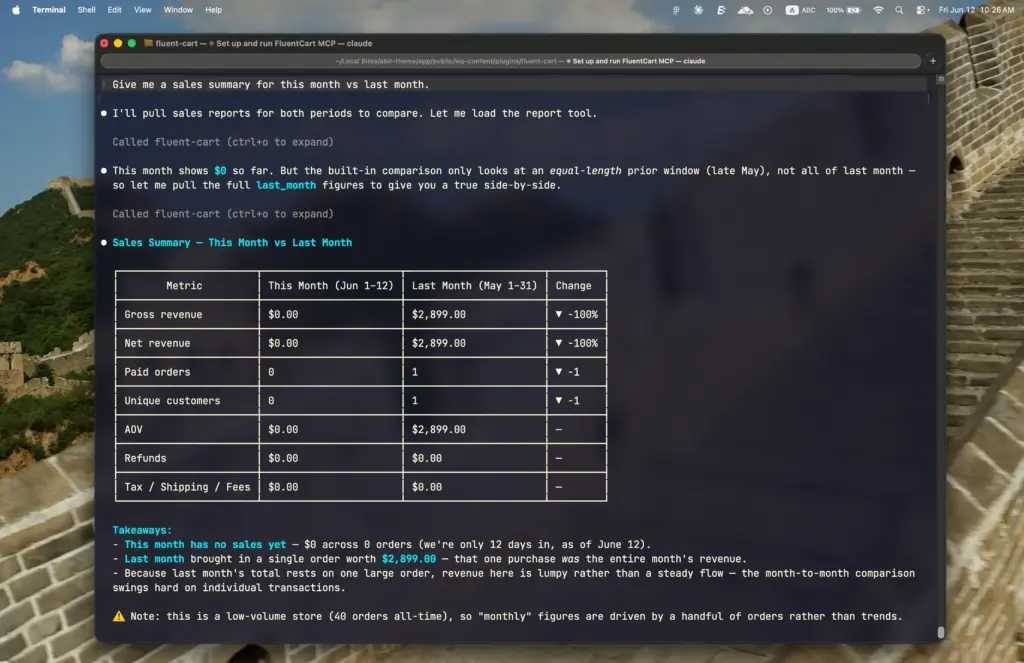
Morning check-in. “Give me a sales summary for this month vs last month.” You get gross, net, refunds, order count, AOV, and the percentage change, without opening a single report screen.
Support triage. “Find the order for [email protected] and add a note saying the refund was approved.” The note lands in the order’s internal activity log, invisible to the customer, visible to your whole team.
Restock decisions. “Which products are out of stock or running low?” If you’ve ever been burned by unsold inventory piling up, you know dead stock is the silent margin killer. Now the question takes five seconds to answer.
Flash promotions. “Create a 15% coupon called SPRINGSALE that expires end of month.” Done. Pair it with a campaign and you’ve got a promo live before your coffee cools. Coupons like this are also one of the proven levers to reduce cart abandonment when timed right.
Attribution questions. “Which UTM source drove the most revenue last quarter?” This one used to require exporting data and building a pivot table. Now it’s a sentence.
Clean books. Pull refund rates and net revenue by period conversationally, then hand cleaner numbers to whoever handles your eCommerce accounting.
Notice the pattern. None of these are exotic AI use cases. They’re the boring, repetitive tasks that eat your week. That’s the point.
For Operators, Not Customers
One thing worth being clear about. eCommerce MCP is a private, admin-side capability for you and your team. It is not a customer-facing chatbot bolted onto your storefront. Your customers keep shopping through your normal store pages. Nothing changes on the front end. The change happens in how you run the back end.
Why does that distinction matter? Because most of the “AI in eCommerce” conversation has focused on the customer side: recommendations, support bots, and AI-generated descriptions. Useful stuff. But the operational side, the daily grind of order management, reporting, and inventory checks, is where store owners actually lose their hours. That’s the side MCP attacks first.
The Safety Layer
This is where things break in most AI automation setups. An AI with write access and no guardrails is a liability, and anyone who tells you otherwise hasn’t refunded the wrong order yet.
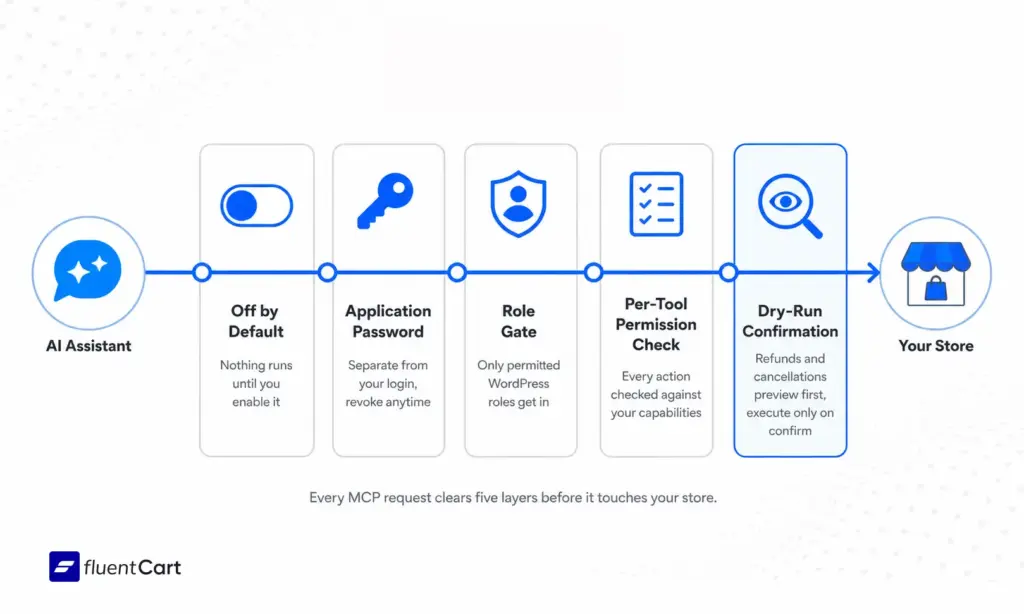
FluentCart handles destructive actions with a dry-run pattern. Ask the AI to refund an order, and it first previews the refundable amount and generates a confirmation token. The actual refund only executes when you confirm, and an idempotency key prevents the same refund from firing twice. Live financial actions also require explicit operator opt-in. Subscription cancellations follow the same pattern.
Layer that on top of WordPress authentication, application passwords, a role-based gate on the endpoint, and per-tool permission checks, and you get an AI assistant that’s useful without being dangerous. The AI inherits the permissions of the WordPress account it connects through. If your account can’t issue refunds, neither can the AI. Revoke the application password, and access dies instantly.
It also ships OFF by default. The server isn’t even instantiated until you flip the toggle, so there’s zero performance cost for stores that don’t use it.
Where This Fits in Your Stack
If you’ve been assembling your store from a pile of eCommerce tools, MCP changes the math a little. A lot of the “I need a reporting dashboard” and “I need an ops assistant” gaps get covered by one connection between your store and an AI client you probably already use.
It also changes who can answer questions. A team member who’s never learned your admin interface can ask the AI for a sales trend and get it. The interface barrier drops. The data was always there. Now it’s reachable by anyone you’ve given an account, at exactly the permission level you’ve given them.
Most businesses don’t figure this out until they’re drowning in tabs: the bottleneck was never the data. It was the clicks between you and the data.
Is This Agentic Commerce?
Sort of. Well, at least this is the first step of it.
The industry term “agentic commerce” usually describes AI agents shopping on behalf of consumers. WooCommerce’s own roadmap frames MCP for store management as the foundation, with consumer-facing agentic checkout as the longer-term goal. FluentCart’s implementation focuses squarely on the operator side today: your store, your team, your AI assistant.
That’s the right order of operations. Before AI agents buy from your store, you should be comfortable with an AI agent helping you run it.
The Bottom Line
The protocol layer for AI in commerce has settled, and it’s MCP. Shopify built endpoints for it. WooCommerce shipped native support for it. Anthropic’s open standard went from announcement to industry default in just over a year.
FluentCart shipping built-in eCommerce MCP means WordPress store owners get this without waiting, without middleware, and without giving a third party the keys to their store data. Ten minutes of setup, and your store becomes something you can talk to.
For a store owner in 2026, that’s not a novelty. It’s a working advantage.

Hi, this is Abir, a Deputy Marketing Lead, passionate product designer, and WordPress core contributor. Creating interesting content and products that ensure a 360-degree customer experience is my daily job.

Subscribe now
Related Articles and Topics
-
Wholesale Pricing: A FluentCart Guide for WordPress Store Owners
Learn how to set up wholesale pricing. Using FluentCart for this, you get five practical methods, from simple…
-
How to Build an Online Community With FluentCart
Learn how to build an online community with FluentCart and FluentCommunity, from planning access levels to testing the…
-
FluentCart Ecommerce Plugin: Smartest WordPress Store
Before you build your online store, see why FluentCart eCommerce plugin solves the problems that quietly kill new…




Leave a Reply