
User Experience Basics: The Fundamentals for eCommerce Businesses

When it’s your service business or niche product business, your customer satisfaction depends on customer experience(CX). But when it’s eCommerce, your platform’s user experience(UX) is the most important thing because you are getting barely a minute to convert your visitor into a customer.
Let’s be more concise. Baymard Institute research found that if a site takes more than 3 seconds to load, 40% of visitors leave. And 32% of customers leave a brand after one bad experience.
So, it’s not enough to have great products. You also have to be careful about user experience.
After working in the eCommerce niche, we often have to see cases where they have an amazing product, but their disaster of a website, messy checkout process, and non-working search process made their bounce rate go through the roof.
So, here today, let’s talk about the user experience basics and fundamentals for eCommerce businesses. It’s an in-depth blog.
We won’t promise to reduce your bounce rate to 0%, but for sure, it would be a great help for the 32% of visitors who used to stay less than 3 seconds on your website.
Let’s start.
User Experience Definition
User experience (UX) is the overall interaction a user has with a product or service. It demands seamless, user-focused design and close collaboration across teams like design, development, and marketing.
If you want the most “official” definition, ISO 9241-210 describes UX as a person’s perceptions and responses from using a product, system, or service. That includes emotions, beliefs, comfort, and satisfaction.
So UX is not only about design. It’s about the full experience people feel while using your website.
Our field is known for its confusing terms. Words or acronyms that sound similar and are related, but their core meanings differ. While subtle, these differences are important. The most common of these is the name of our field, user experience, UX, versus user interface, UI.
People often mix up these with customer experience (CX) and brand experience (BX), too. They are all connected, but each one has its own purpose.
- UI (User Interface): UI is the surface level. The colors, buttons, text styles, and layout. Basically, everything you see. It makes the product look inviting and easy to interact with.
- UX (User Experience): UX is what happens underneath the visuals. It’s the structure, the flow, the way everything is arranged to make the experience feel effortless.
- CX (Customer Experience): CX takes things beyond the website. It covers the whole relationship someone has with your brand. From the moment they first discover you, to the purchase, to support afterward.
- BX (Brand Experience): BX is the emotional side. It’s what people think and feel about your brand because of every interaction they’ve had. The visuals, the communication style, the consistency across your touchpoints.
All four matter, but UX is where the experience truly starts. Let’s dig into the basics.
Importance of User Experience (UX) for your Business
A strong User Experience is a must. It directly impacts how people interact with your brand. When users find your website easy to navigate, they’re more likely to trust your business, explore your products, and take action.
But when the experience feels confusing or frustrating, they leave quickly and often don’t come back.
It Boosts Sales
When your site’s easy to use, people actually complete their purchases instead of rage-quitting halfway through checkout. Remove the annoying stuff, and you can literally double or triple your sales.
Some sites see conversion rates jump 200-400% just from fixing their UX. That’s not marketing fluff, that’s real money.
Google Rewards Sites With Good UX
Suppose people land on your site and immediately bounce, Google notices and tanks your rankings. But when visitors stick around and actually browse? Google pushes you higher in search results. Good UX helps new customers find you in the first place.
A big part of “good UX” is simple: your site should be predictable and easy to understand. That’s why Google-friendly UX often follows principles like:
- Clear hierarchy (users instantly understand what’s important)
- Feedback (the site responds when users click or act)
- Consistency (buttons, layouts, and patterns behave the same everywhere)
Hierarchy, feedback, and consistency are not just design theory. They reduce confusion, build confidence, and help users move faster.
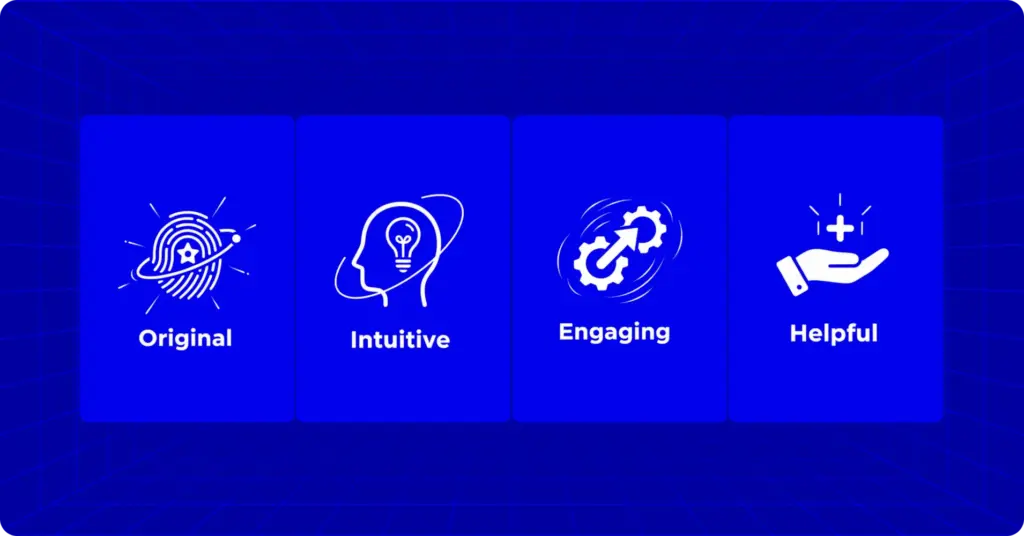
Google looks for four things when evaluating user experience. Nail all four, and you’ll rank higher and build real authority.
- Original: Google hates copycats. Your content and products need to be genuinely yours. But originality alone isn’t enough. It needs to connect with people. When users find your authentic content valuable and stick around to explore, Google notices and rewards you.
- Intuitive: Your site should make sense immediately. Navigation feels natural. Buttons are obvious. Finding products and completing purchases happens without confusion. If people have to think hard about how to use your site, you’ve already lost.
- Engaging: Good UX isn’t just functional. It’s enjoyable. Smooth interactions, timely feedback, and helpful error messages create positive moments. It’s the difference between users tolerating your site and actually enjoying it.
- Helpful: Your site should do what people actually need. Easy product discovery. Quick answers to questions. Simple order tracking. Focus on genuine usefulness, not flashy features nobody asked for.
Get all four right, and your UX works. Miss even one, and you’re leaving opportunities on the table.
People Judge You in Seconds
75% of people decide if your business is legit based on your website alone. A clunky site screams “sketchy.” A smooth one builds instant trust. You’ve got one shot at that first impression. Don’t waste it.
It’s Cheaper to Keep Customers Than Find New Ones
Getting someone to buy from you again costs almost nothing compared to finding new customers. When people have a great experience, they come back without you having to convince them. That’s where the real money is. Turn one-time buyers into regulars.
Core Components of User Experience
Great UX isn’t one thing, but it’s a bunch of pieces working together. All the pieces are connected and without one another is incomplete. You can call it a complete package. You complete the package, and users are happy. Let’s break down what matters.
Usability
This is the basics. Can someone figure out your site without wanting to throw their laptop? A usable site means:
- First-timers get it immediately
- Regular users can zip through tasks fast
- People remember how it works when they come back
- Mistakes are rare, and when they happen, easy to fix
- The whole thing just feels… good
This is where Nielsen Norman Group usability heuristics become super useful. They’re basically common-sense rules like: give users feedback, prevent errors, keep things consistent, and don’t make people guess.
If your site violates those rules, users feel it instantly.
Information Architecture
This is basically how you organize your content and information. Good organization means clear navigation menus, logical page structure, and labels that actually make sense.
If someone has to hunt for your contact page or can’t figure out where to click, your architecture needs work.
Interaction Design
Every time someone clicks, hovers, or types something, your site should respond in a way that makes sense. Buttons should react when you click them.
Forms should tell you if you messed up. Everything should work the same way across your whole site without surprises or guessing games.
Visual Design
Design matters. A clean, professional design makes people trust you instantly. The colors, fonts, and overall vibe should match your brand. Highlight important stuff like your “Buy Now” button. Pretty isn’t everything, but ugly will kill your credibility fast.
Accessibility
This means making sure people with disabilities can actually use your site too. We’re talking screen reader compatibility, keyboard navigation, and readable color contrast. And here’s the bonus: when you make your site accessible, you usually make it better for everyone. Win-win.
The User Experience Basics: 4D’s (Discover, Define, Development, Deliver)
Making a great user experience for your visitor is a tough process. It won’t happen by accident. It’s the result of a structured process that moves from understanding problems to delivering solutions. Here’s the framework that actually works.
The Two-Phase Approach: Think of UX design as two connected journeys:
- Figure out the problem
- Build the right solution.
Avoiding the first part will make you waste months building something nobody needs.
Phase 1: Figure Out the Problem
This is where most people screw up. They skip straight to designing without understanding what they’re solving. The very first step is to discover the problem and define how to solve it.
Step 1: Discovery
It’s a simple job. Dive into the real world and learn everything about your users and their problems.
- Talk to actual customers, not just your assumptions
- Run surveys and interviews
- Check your analytics to see where people are struggling
- Research competitor
What You Get: A lot of insights about real user needs, frustrations, and behaviors. This is your foundation for everything else.
Step 2: Define
Now you sort through all that research to identify the core issue you’re solving.
- Create user personas
- Map out user journeys to spot exactly where things go wrong
- Write a crystal-clear problem statement
- Build a sitemap showing how your pages connect
What You Get: A focused problem statement and a clear brief that says “here’s exactly what we’re solving and for whom.” This becomes your north star for the entire project.
Phase 2: Build the Solution
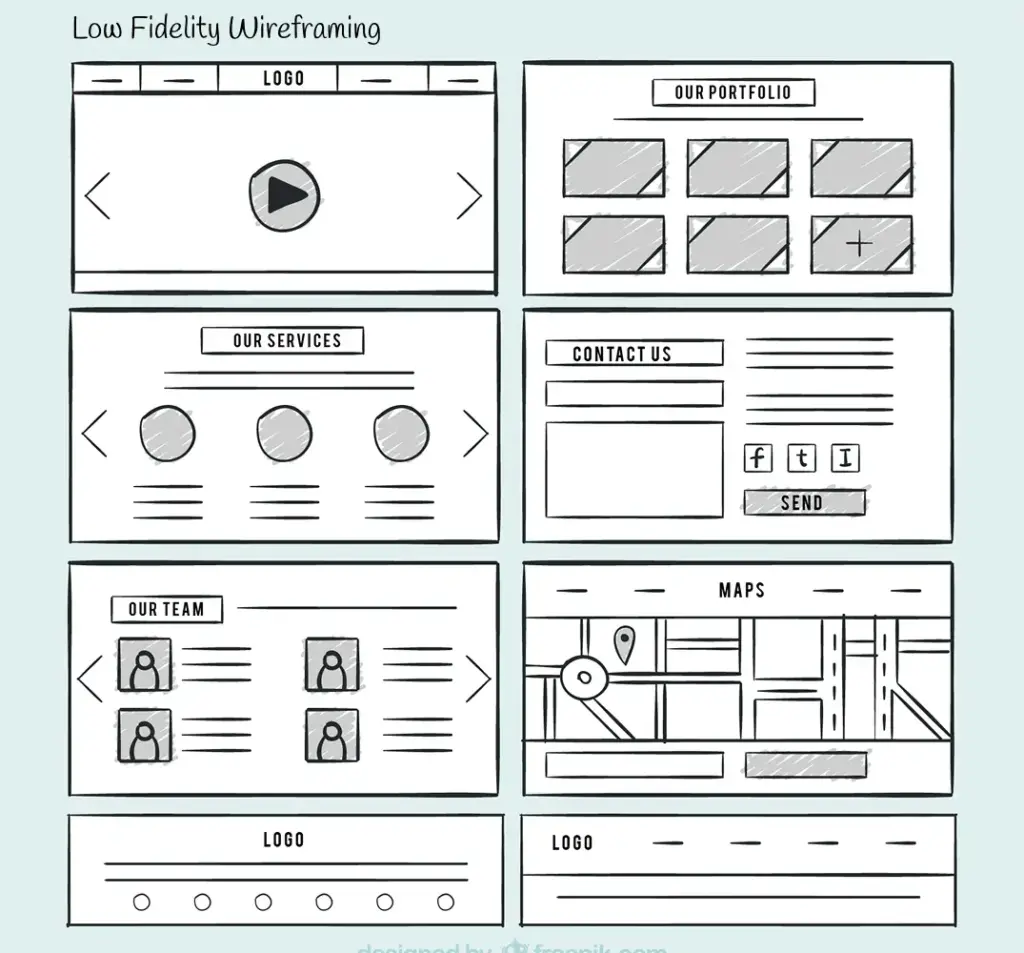
Now that you know what you’re solving, it’s time to actually solve it. The solution is starts with low fidelity wireframing and ends with launching the product.
Step 3: Develop
This is the messy, creative part where you try different approaches.
- Sketch low-fidelity wireframes with no fancy design
- Brainstorm multiple solutions
- Build quick prototypes you can actually click through
- Test these rough versions with real users
- Remove the ideas that don’t work, refine the ones that do
What You Get: One solid solution that you’ve already tested and know works. Not a guess, an actual validated direction.
Step 4: Deliver
When you are done with the three D’s(Discovery, define, development), its time for the forth one now, it’s time to polish everything and launch.
- Create high-fidelity designs with real colors, fonts, and images
- Build the actual website or app
- Run usability tests to catch any final issues
- Watch real users interact with it
- Fix problems, then test again
- Launch when it’s actually ready
What You Get: A live product that solves the problem you identified and works the way users expect.
UX is a Never-Ending Process
Launching isn’t the finish line. After launch, you keep watching how people use your site, gather feedback, spot new problems, and improve. UX is a loop, not a line.
The best websites aren’t built once. They evolve based on real user behavior and changing needs. Set up analytics, collect feedback, run periodic usability tests, and keep refining. That’s how good UX stays good.
User Experience for eCommerce Businesses
In eCommerce, UX is your sales team. Every smooth interaction moves customers closer to buying. Every friction point sends them to your competitors.
Make Product Pages Irresistible
Show high-quality images from multiple angles with zoom. Write product descriptions that connect features to real benefits. How will this product actually improve their life?
Display honest reviews prominently. A few four-star ratings with real feedback build more trust than perfect five-star ratings that feel fake.
Fix Your Checkout Before It Kills Sales
Cart abandonment hovers around 70% because checkouts are unnecessarily complicated. Always offer guest checkout. Minimize steps ruthlessly. Show shipping costs upfront, not as a surprise at the end. Every extra click is another chance to lose the sale.
Mobile Isn’t Optional
Over half of your traffic comes from mobile. Make buttons thumb-sized. Use smart keyboard types for forms. Load fast on any connection. Mobile optimization means redesigning for how people actually use their phones, not just shrinking your desktop site.
Build Trust Instantly
Display security badges and SSL certificates. Make returns easy and obvious. Show real contact information. These signals tell customers you’re legitimate before they even consider buying.
Keep Testing, Keep Improving
The final thing is, A/B test everything. All the buttons, layouts, and checkout flows. You can use heat maps to see where people struggle. Collect feedback from support emails and analytics. What works today might not work tomorrow. Great UX is never finished.
The best eCommerce experiences feel effortless. When customers find what they need, trust what they see, and buy without friction. That’s when your given user experience (UX) is working.
Building User Experiences That Actually Work
Good UX isn’t some secret formula. It’s simply understanding your customers, noticing where they get stuck, and improving things bit by bit.
Maintain clear hierarchy, feedback, consistency, and fast navigation. Also, think bigger than design screens. Frameworks like Jesse James Garrett’s Five Elements remind us that UX is not just visuals. It starts way earlier with intent, structure, and flow.
Start small. Pick one issue and fix it properly. Maybe your checkout takes too long. Maybe the mobile version feels cramped.
Remember the fundamentals: easy navigation, logical organization, mobile optimization, and trust at every step. These aren’t trends. They’re the foundation of every successful eCommerce site.
And don’t assume you already know what’s working. Test everything. Watch how real people use your site. Pay attention to where they hesitate or drop off. Their behavior will tell you more than any guess ever could.
UX never ends because customers keep evolving. Their expectations change, technology advances, and competitors improve. The sites that win keep listening, testing, and refining.
Often, your website is the only way someone can interact with your brand. Make it count. Every friction point you remove, every delight you create, every obstacle you eliminate turns visitors into customers and customers into loyal fans.
Start with one improvement. Fix it. Then keep going. That’s how great experiences are built. Step by step.
Once In a Lifetime Offer

WordPress, automation, eCommerce and growth marketing specialist, a Core Contributor and Media Corps member blending storytelling with technology to craft purposeful strategies in SEO, email marketing, and beyond.

Subscribe now
Related Articles and Topics
-

What Is Petty Cash? Examples, Uses, and Smarter Alternatives
Learn what petty cash is, how the imprest system works, how to record and reconcile it, and whether…
-
What Is Order Management? (And Why It Gets Messy Fast) [Guide]
Order management is the process of order capturing, tracking, and fulfilling customer orders. The order management process begins…
-

SKU: Definition, Examples, and How to Use It for Your Store
Learn what SKU means, how stock keeping units work, and how to create SKU codes for your ecommerce…




Leave a Reply