
How to Sell Online Courses With WordPress: The 2026 Setup

The LMS plugin you have leaned on for years just changed hands again, the cart you bolted on top was built for shipping t-shirts, and the community that keeps students engaged lives on a SaaS platform that bills you in dollars and stress. Three vendors, three dashboards, three places the connection can quietly fall apart on a Saturday night.
If you want to sell online courses with WordPress without that mess, the answer is fewer moving parts, not more. This guide shows you how to run a paid-course business on WordPress in 2026. You’ll learn how to choose your course stack, price your content, package your offer, add a buyer-friendly paywall directly to the course page, and turn one-time buyers into recurring members. We recommend FluentCart and FluentCommunity throughout because the same team designed both plugins to handle this workflow without forcing you to connect them through a third-party bridge. We recommend FluentCart and FluentCommunity throughout because the same team designed them to handle this workflow without a third-party bridge. Choose two plugins built to work together instead of three or four that only pretend to.
TL;DR
- Most WordPress course setups break in the gap between an LMS, a cart, and a community tool. The cost is a tax you pay every month in support time and lost trust.
- A modern WordPress course stack only needs two things doing one job each: a commerce engine that knows about subscriptions, refunds, and licensing, and a course host that lives on the same server and shares the same customer record.
- FluentCart runs the checkout, the subscription, the refund, and the receipt. FluentCommunity hosts the course, the lessons, the spaces, and the member profile.
- A paid order grants access in the same second. A refund pulls access back in the same second. No webhook in the middle, no third-party automation fee.
- You own the data, the members, and the storefront. Pricing is one-time per site, not a percentage of every sale.
Why sell online courses with WordPress in the first place?
WordPress runs more of the public internet than the next ten platforms combined, and that scale is not the only reason to host a course business on it. The bigger reason is ownership. On a hosted course platform, your students, your content, your payment history, and your member relationships sit on someone else’s server, behind someone else’s terms of service, with someone else’s fee schedule. On WordPress, all of that sits inside an install you control.
That ownership matters most on the bad day. The day the hosted platform raises its prices by 30 percent. Or, deprecate the feature your business depends on. And even the day they get acquired and the new owner pivots away from your use case. None of those days end your business when the install, the database, the customer list, and the access logic all live on hardware you pay for. On a SaaS course tool, every one of them is an existential event.
The cost case follows the same logic. A WordPress course business pays once for the plugins, once for the hosting, and zero percent of revenue to a platform. The same buyer on Kajabi or Teachable carries a monthly platform fee that grows with the membership, plus payment processor fees on top. Over a three-year horizon, the difference is rarely close. The savings show up as margin, marketing budget, or hours you do not have to chase to pay the platform bill.
What you give up on WordPress is the all-in-one polish of a hosted tool. The fix for that is choosing two plugins that were built to work together, instead of three or four that pretend to.
What it takes to sell courses with WordPress in 2026
A working course business needs four jobs done well: a checkout that does not lose buyers on the payment screen, a way to grant and revoke course access automatically, a place for students to live (the lessons, the discussion, the membership tier), and a customer record that ties all of that together for refunds, renewals, and support. Get any one of those wrong and the business gets harder to run as it grows.
A great course with a broken checkout is a permanent discount waiting to happen. An effective checkout that hands students off to a clumsy login flow loses trust on day one. A great LMS with no real subscription engine forces you to chase renewals by hand and apologize to people whose cards quietly failed. The four jobs are not optional, they are the work. The only choice you actually make is whether one team owns all four, or whether you stitch three vendors together and hope the bridges hold.
This is why the comparison that matters is not “WordPress versus Kajabi” anymore. The comparison is “two plugins from one team versus three plugins from three teams”. On the latter, the third-party bridge is usually the weakest link, and it is also the one that fails first when any of the other plugins ships a major update.
Pick a stack that does not need a third-party bridge
The cleanest WordPress course stack in 2026 is a commerce engine that handles the money side, paired with a community plugin that handles the course and the member side, both built and maintained by the same team. That is what FluentCart and FluentCommunity were designed to be. FluentCart owns the storefront, the cart, the checkout, the subscription, the refund logic, and the customer profile. FluentCommunity owns the course content, the lessons, the spaces where members talk, and the access rules per piece of content.
Why FluentCart?
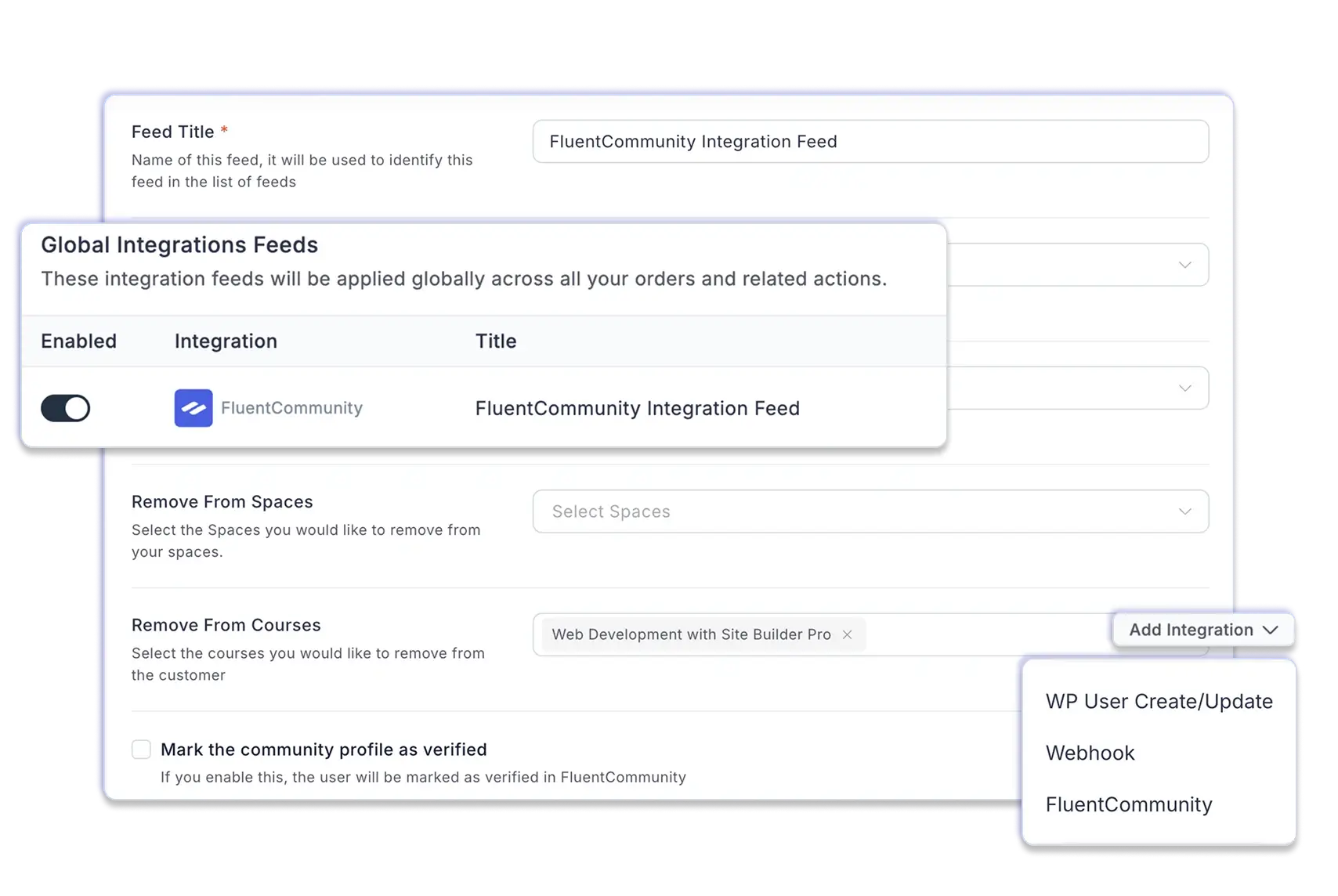
The reason this pairing works is that the checkout was not bolted onto an LMS as a side feature, and the LMS was not bolted onto a generic shop as a side feature. FluentCart was built as a full commerce engine from the start. It loads its checkout in roughly 0.8 seconds, takes 0 percent of your transaction revenue, and supports physical goods, downloadable files, licensed software like premium WordPress plugins, subscriptions, and hybrid products from one dashboard. None of those are course-specific, which is the point: the engine that runs your course catalog can also run your workbook PDFs, your branded merch, and your software licenses on one receipt. For sellers who want to see how the same engine works for software, the workflow for selling premium plugins on WordPress uses the exact same building blocks.
Why FluentCommunity?
FluentCommunity sits on the other side. It hosts your lessons, your member spaces, your discussion areas, your member profiles, and your private content, and it does the actual access enforcement at the page level. Together, the pair removes the third-party bridge problem because the bridge does not exist. The two products talk directly, on the same install, through the same database, with the same team owning the contract between them.
The contrast worth keeping in mind is what happens when this is not true. The popular legacy WordPress LMS, paired with a generic ecommerce plugin, depends on a third connector to move purchase data into course enrollments. That connector is owned by a fourth party. When the LMS ships an update, the connector might break. When the cart updates, the connector might break. As the connector’s maintainer moves on, support quietly stops. None of that happens on a stack where the two products are built by the same team for the same job.
Plan the course so it earns its price
The technology only matters if the course is worth what you charge for it, and the courses that earn their price all do one thing well: they sell a transformation, not a content library. Work backwards from the outcome the student will achieve. What problem do they solve? Can they credibly claim competence about themselves after they finish? That answer is the course. The hours of video are how you deliver it.
Course Catalogs
Most effective course catalogs follow a tiered shape. A short, cheap entry product (a single workbook, a one-hour mini-course, a starter cohort) brings buyers into the relationship at a price they decide on without thinking. A flagship course (a multi-week program, a signature method, a paid certification) carries the real margin and the real outcome. A recurring membership (monthly access to a member space, office hours, or a cohort program) builds the steady revenue that lets you stop launching every month.
Pricing
Pricing for each tier should reflect the outcome, not the runtime. A $997 flagship course that helps a student land one paid client has paid for itself the day they sign the contract. A $29 monthly membership where a student gets feedback on real work for a year has earned its keep ten times over. Length-based pricing (“12 hours of video for $97”) teaches buyers to compare your offer to a YouTube playlist, which is a fight you do not want.
Distribution
Drip the content rather than dumping it. Releasing a module a week keeps the student in the course longer, gives the community something to discuss in real time, and reduces the refund pressure that comes when a buyer realizes on day three that they will not actually finish thirty hours of video. The shape of the offer is the part most LMS plugins cannot help you with. It is the part you have to get right yourself.
Build the paywall directly on the course page
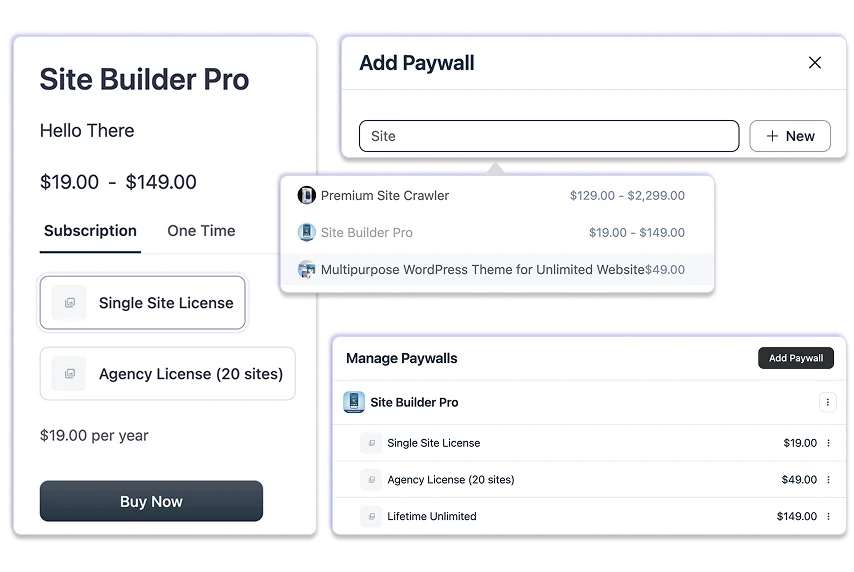
The cleanest course-selling flow on WordPress keeps the buyer on the course page through the entire purchase. With FluentCart and FluentCommunity, the course itself carries a paywall that shows the buyer what they are buying, the available pricing plans, and a checkout form embedded directly in the same page. There is no redirect to a separate cart, no transition to a hosted checkout on a SaaS domain, no second login after the payment goes through.
FluentCommunity Paywall
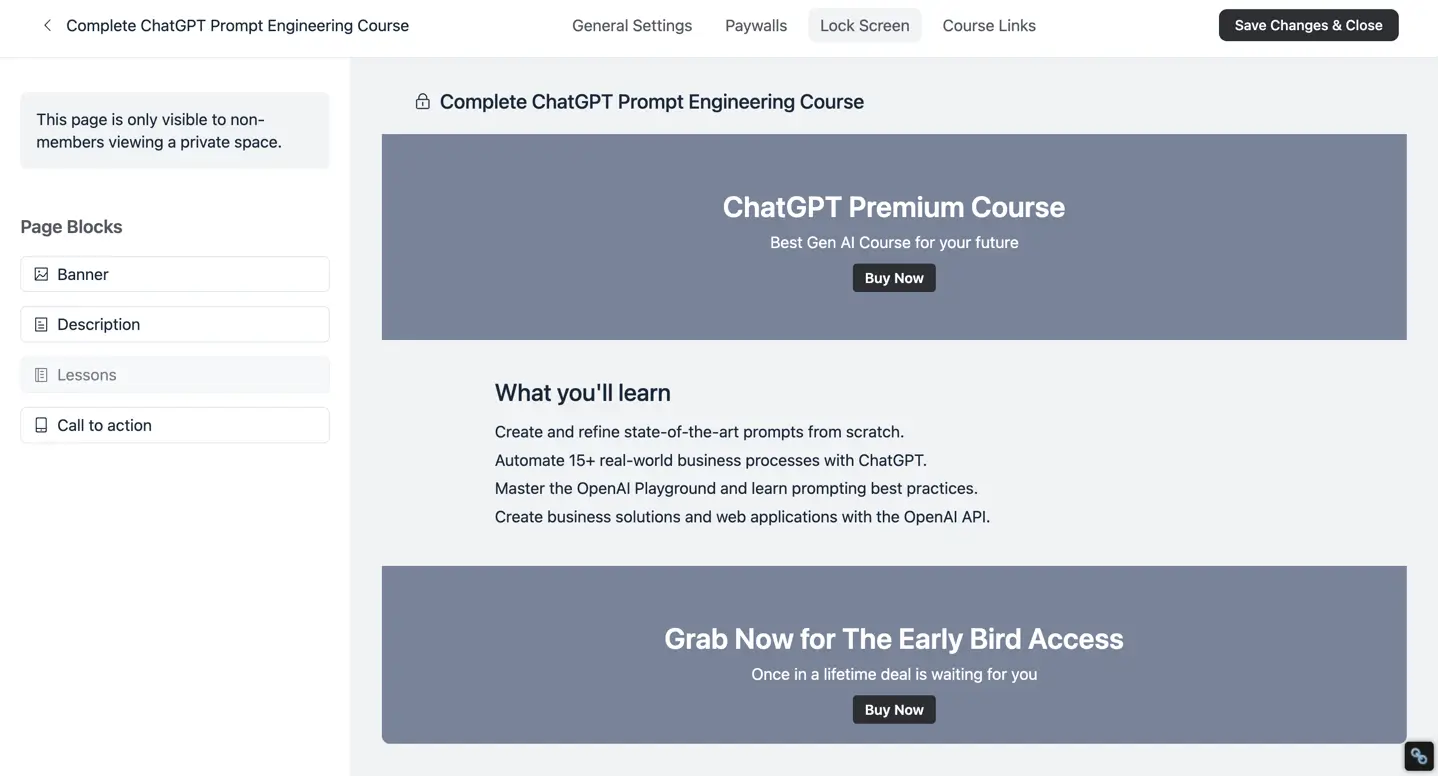
The lock screen on top of that course is built with a drag-and-drop builder, not hand-coded HTML. You can lay out a banner, a curriculum preview, a pricing comparison, social proof, and a clear call to action, all themed to match the rest of your community. Spaces can be set to private (visible to non-members so people know the door exists and can buy in) or fully secret (invisible to non-members, useful for VIP cohorts and alumni groups). Both work with the same access rules from the commerce side.
Subscriptions on FluentCart
Behind the lock screen is a real subscription engine. You can offer the course as a one-time payment, a monthly plan, a quarterly plan, an annual plan, or an installment plan paid over a fixed number of months, and each pricing variation can carry its own access rule. A lifetime tier can unlock every future cohort. An annual plan can include a bonus space the monthly plan does not. Failed payments are retried automatically, refunds revoke access in the same second they are processed, and the whole flow is driven by a feed-based access automation that lives inside the WordPress dashboard.
The useful side effect of building the paywall on the course page is that the page becomes the source of truth for both the sales pitch and the access. You are not maintaining a separate landing page that has to mirror the curriculum, then linking out to a separate cart that has to mirror the pricing. One page, one source, one place to update when the offer changes.
Turn one-off sales into recurring membership revenue
Added membership for students
A one-off course sale is a real business. A recurring membership is a better one. A $199 course with a six percent refund rate creates a different revenue profile than a $29 monthly membership that runs for an average of 14 months.
The membership generates roughly twice the lifetime revenue per buyer, with less marketing spend per dollar earned. WordPress access plumbing has always created the hard part, and FluentCart and FluentCommunity were built to handle it.
The link between the membership product and the membership benefit is set once, then runs on autopilot. A new member is added to the right spaces and the right courses on the first paid invoice. The next renewal keeps their access alive without you touching anything. A canceled subscription pulls them out at the end of the billing period. A failed card without a successful retry pulls them out at the right time too. You can also remove members from older spaces when they upgrade. So you keep the community map clean as you add more tiers.
Separate spaces for students forum
The spaces themselves are what make the membership stick. A course that ends when the last video plays is a course the student stops thinking about. A course that lives inside an active space, where members ask questions, share work, and see what other cohorts are doing, has a different retention profile and a different price ceiling. Members can be marked as verified once they pay, which gives you a built-in trust signal without manual tagging. If you have ever run a community on Circle, Skool, Discord, or BuddyBoss, the experience is familiar, just without the platform fees, the per-member pricing, or the data sitting on a server you do not control.
When the membership grows past a few hundred active members, the rest of the stack starts to matter too. The same customer record reaches into the email, CRM, and helpdesk tools you already use without copying data between dashboards, which is what lets you send a renewal nudge from the email tool that already knows whether the renewal succeeded.
Once In a Lifetime Offer
A 6-step setup for selling your first course on WordPress
Once the stack is picked, the build itself is short. The setup below is what most creators run on the first weekend with FluentCart and FluentCommunity: ground the install, get the two plugins in, design the offer, build the course inside the community, lock the page behind a paywall, then connect the access automation. Six steps, no third-party bridge, no SaaS fees.
1. Install WordPress on hosting that can handle video
A working course site needs hosting that does not buckle when ten members hit a lesson at the same time. Managed WordPress hosting with at least 2GB of RAM is the floor. Pick a theme that does not interfere with checkout pages or block layouts, then get the domain pointed, SSL turned on, and a backup schedule running before you go any further.
2. Install the two plugins that do the four jobs
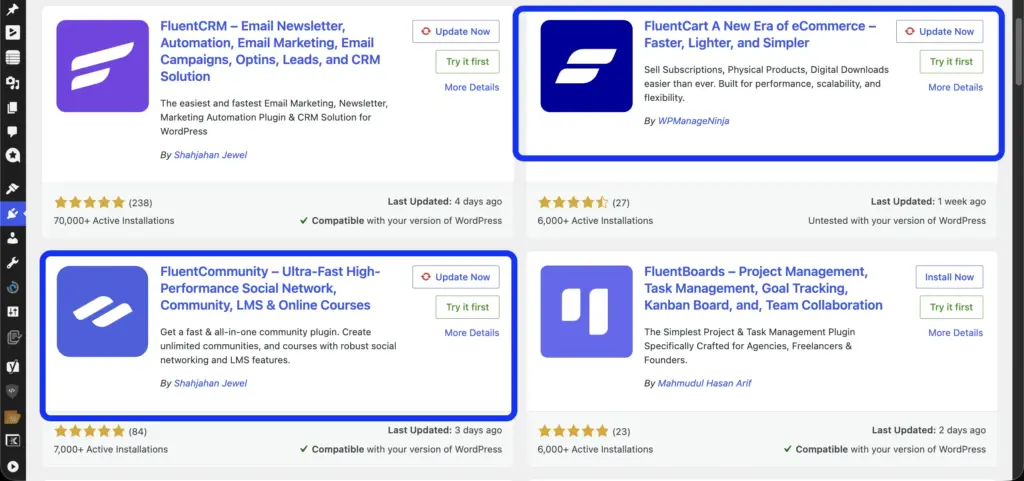
Install FluentCart for the commerce side and FluentCommunity for the course and member side. Both install from the WordPress admin like any other plugin, both ship with onboarding flows that walk you through the first-run setup, and neither needs a third-party bridge to connect to the other. That is the entire stack you need to add on top of WordPress itself.
3. Plan the course around the transformation, not the runtime
Decide what the student will be able to do at the end that they could not do at the start. Map the curriculum backwards from that outcome. Price the course on the value of the outcome, not the hours of video. Drip the modules weekly so students stay in the course long enough to actually finish and refer.
4. Build the course and the member space inside FluentCommunity
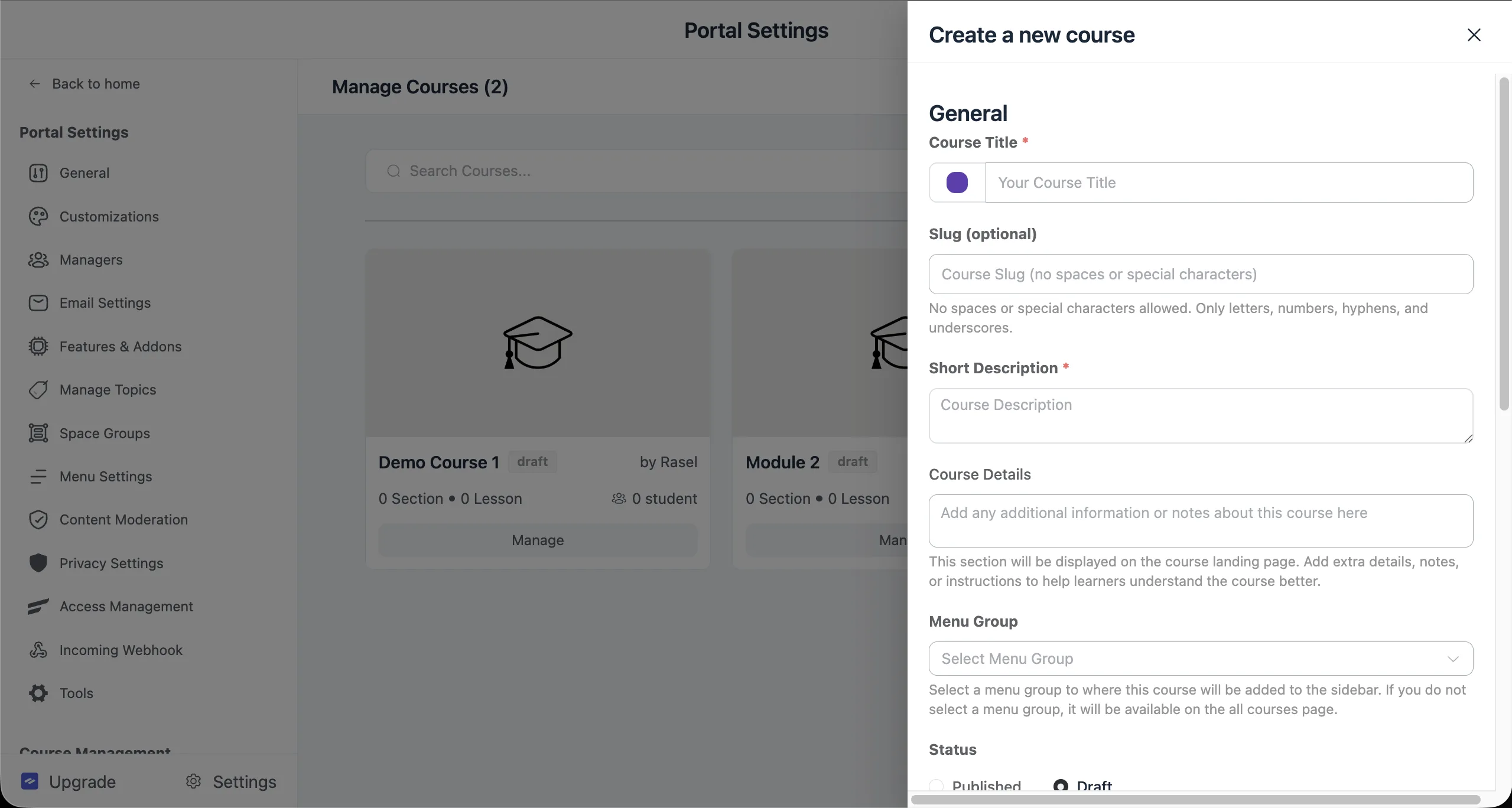
Create the course inside FluentCommunity, add the lessons, and set the course to private so non-members cannot see the content. Create a space tied to the course where students can ask questions and share work. Decide whether the space is private (visible to non-members, so they know the door exists) or secret (invisible until enrolled).
5. Set the paywall, pricing, and lock screen on the course page
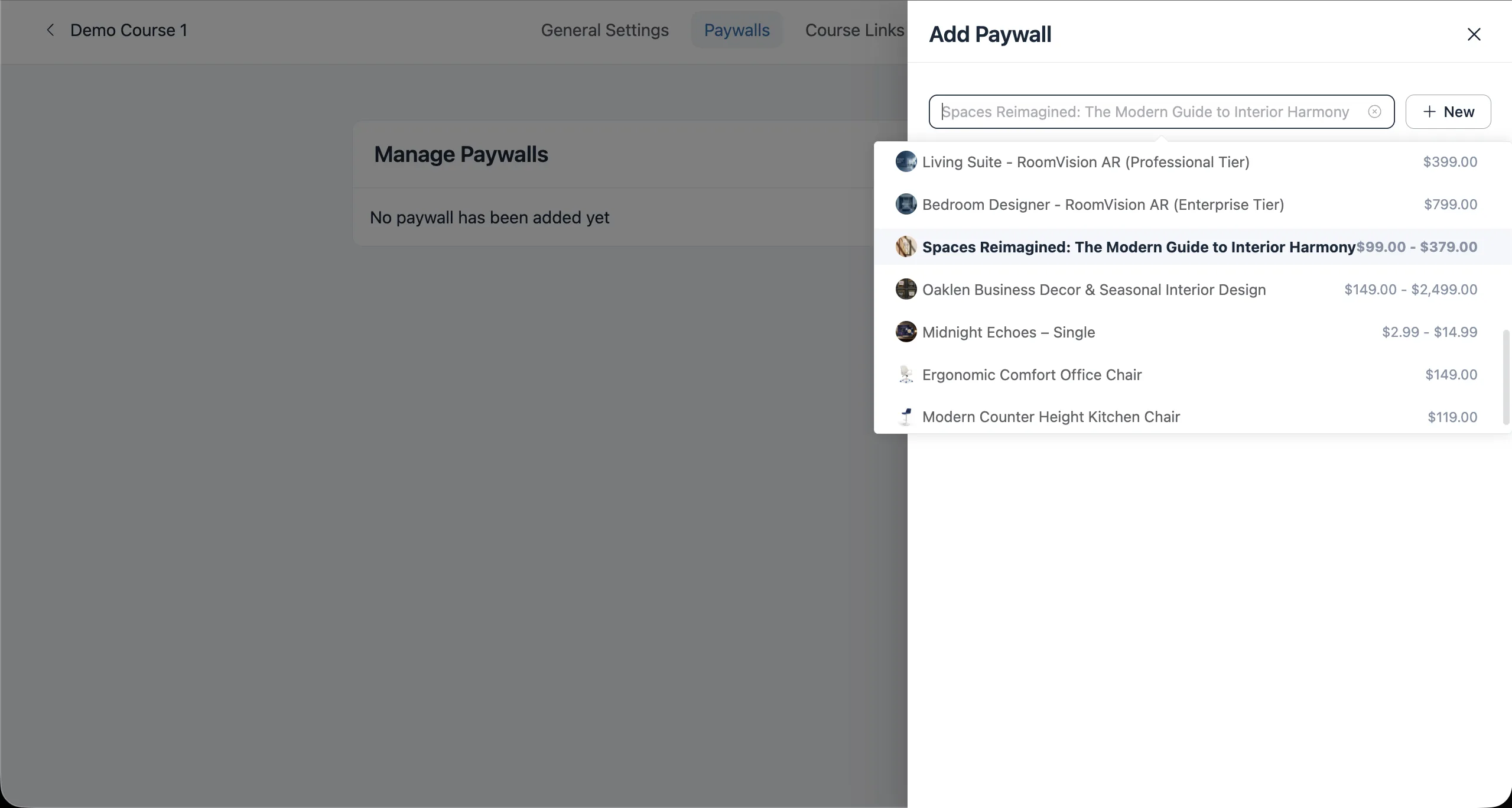
Add a paywall to the course inside FluentCommunity. That action creates the matching product inside FluentCart automatically. Use the drag-and-drop lock screen builder to design the buy-now view (banner, curriculum preview, pricing variations, social proof, call to action). Decide on one-time, monthly, quarterly, annual, or installment pricing depending on the offer.
6. Wire the access automation between purchase and enrollment
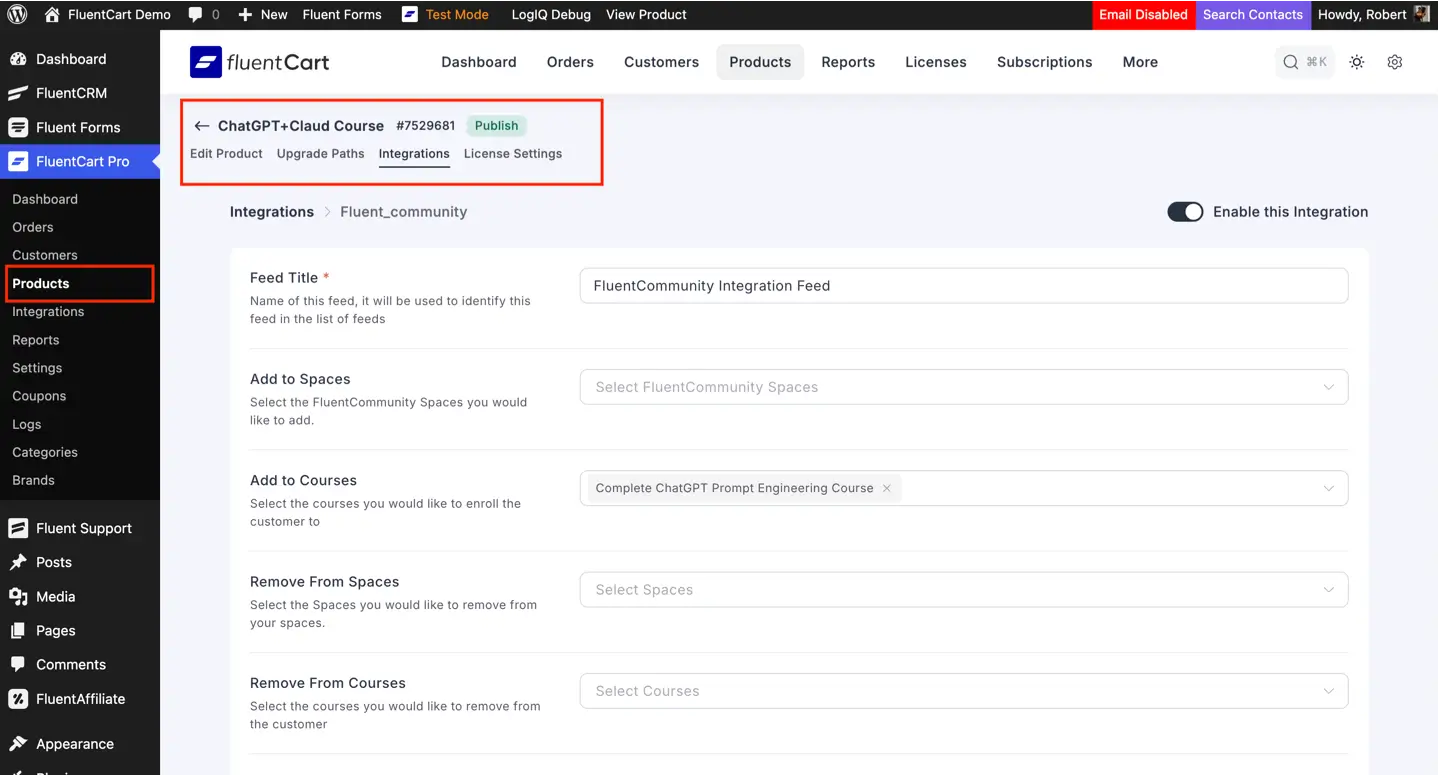
Set the integration feed on the FluentCart side that maps the new product to the right course and space on the FluentCommunity side. Pick what triggers access (paid order, subscription start, renewal) and what triggers removal (refund, cancellation, expired subscription). Turn the feed on. From here, every paid order enrolls the buyer in the same second the payment clears.
When to move off a legacy LMS stack
If the LMS you have been using just changed ownership, raised its prices, or quietly slowed its release cadence, this is the moment to count what your stack is actually costing you. The license fee is the smallest line on that ledger. The bigger costs are the bridge plugins, the third-party automation tools that hold the workflow together, the support hours spent on enrollment edge cases, and the trust hit every time a student emails to say they paid and never got in.
The case for moving is strongest when three things line up at once. The LMS is no longer the priority for its own team. The commerce plugin you paired it with wasn’t designed for courses. (It’s probably built to ship physical goods, and the course case has always felt like a workaround). The third-party bridge between them is now your single point of failure for revenue. When all three are true, the stack is taxing your business, and the tax keeps going up. FluentCommunity’s LTD is coming to a close. If you’re thinking of jumping ship (looking at you, Learndash guys!) this is the best time to get this.
What does migration look like?
The migration itself is bounded. Course creators moving over usually follow the same staged approach that digital product sellers use when they switch storefronts. Map your existing products to the new commerce engine, recreate course access in the new community plugin, set integration rules for each product, redirect old URLs in waves.
Most creators run the new stack alongside the old one for the next cohort, prove the access logic with real buyers, and only then move the back catalog over. There is no big-bang weekend where everything has to work at once.
The result on the other side of the move is one team responsible for the entire stack instead of three. The plugins ship updates together. The roadmap is one roadmap. The bug report goes to one place. None of that sounds exciting until you have spent a Sunday morning on the phone with a community member whose access broke because two unrelated plugins disagreed about whether a refund had happened.
The bottom line
You can sell online courses with WordPress without holding three plugins together with duct tape. The two-plugin pair we have walked through (FluentCart for the cart, the subscription, the refund, and the customer record. FluentCommunity for the course, the lesson, the space, and the access) does the four jobs a course business actually needs, in one install, with one team behind both products. A paid order grants access in the same second. A refund pulls it back in the same second. Nothing in the middle to fail.
If you are starting a course business on WordPress from scratch, this is the pair to start with. If you are running a legacy LMS plus a generic checkout and the bridge keeps breaking, this is the pair to move to on your next cohort. The fastest way to see whether it fits is to grab the lifetime license priced for solo creators and small teams and run one course through the full flow on a staging site. Once the access logic clicks for that first course, the rest of the catalog is a copy job.

Rasel leads the marketing function at FluentCart, driving both high-level strategy and ground-level execution across the product’s growth engine. He plays a central role in defining how FluentCart is positioned, how it enters the market, and how it evolves based on user behavior and feedback. His responsibilities span go-to-market planning, funnel architecture, conversion strategy, and narrative development. He works across teams to ensure that product decisions, marketing efforts, and customer experience stay tightly aligned.

Subscribe now
Related Articles and Topics
-
FluentCart Q3 2026: 12 Releases and the Problems They Solve
FluentCart Q3 2026: every release, the problem it solved, and why we built it.
-
Membership Affiliate Programs: The Cost-effective, Integrated Setup
Run membership affiliate programs on WordPress with one integrated stack.
-
Wholesale Pricing: A FluentCart Guide for WordPress Store Owners
Learn how to set up wholesale pricing. Using FluentCart for this, you get five practical methods, from simple…




Add your first comment to this post