
FluentCart 1.7.0 – reviews, built in
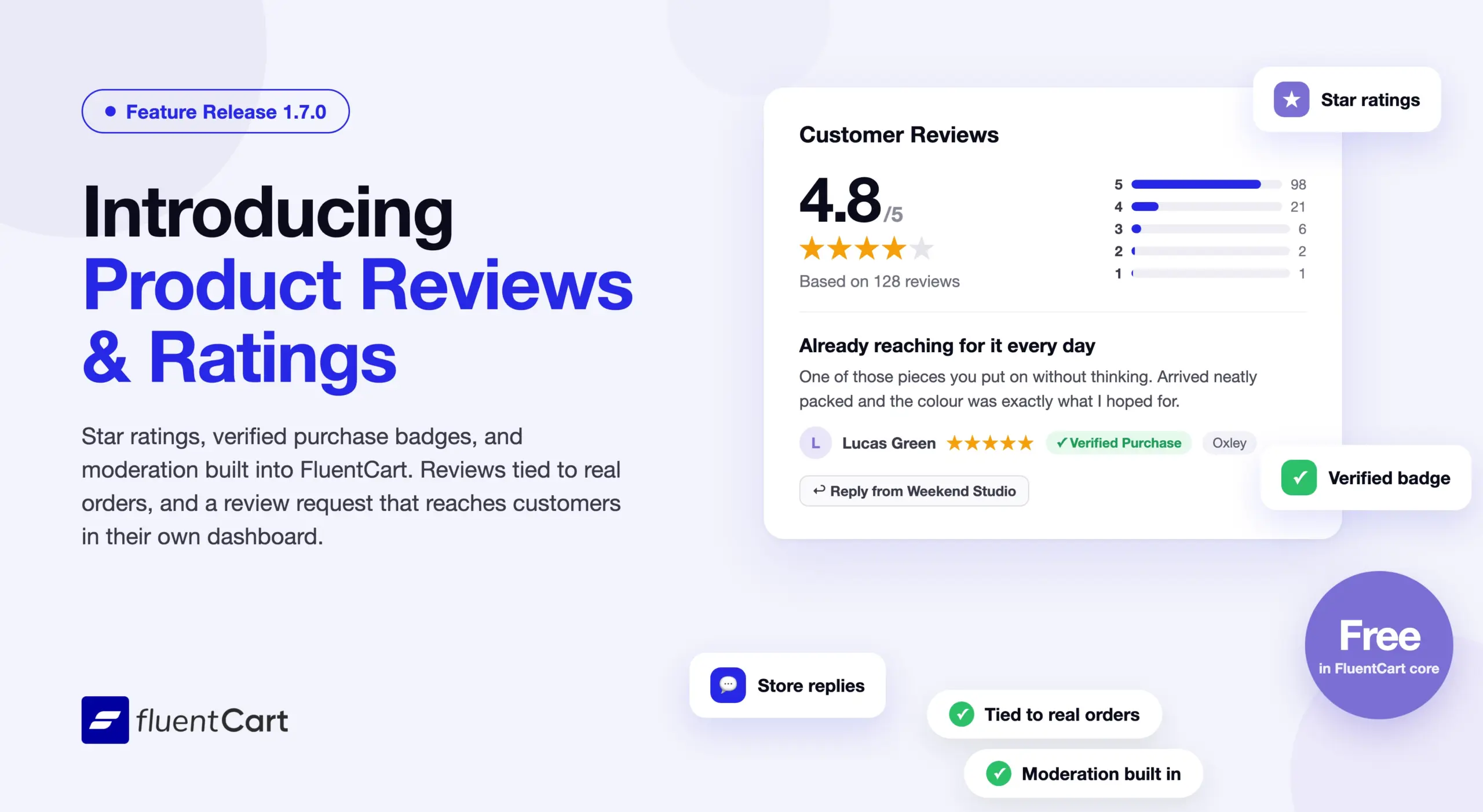
A product page carries two voices: the store’s, and the customers who already bought. Until now a FluentCart store had to borrow a separate plugin for the second one, with its own moderation queue and no idea which order a review came from. 1.7.0 brings product reviews and star ratings into FluentCart itself, tied to real purchases and moderated from the same admin as the orders. FluentCart Pro extends the system with photo reviews, helpful votes, threaded replies, and layout presets that turn a reviews section into a visual showcase.
It is a feature-led release with one subject: social proof that belongs to the store, trust that can be verified, and a review request that reaches customers where they already are.
Product reviews and ratings, tied to what was actually bought
A review is only worth as much as the trust behind it. FluentCart reviews are linked to the customer and the order, so a review from a confirmed buyer carries a Verified Purchase badge, and a review of a variation is a review of that variation, not of the whole product. Store owners decide who may review, whether reviews publish immediately or wait for moderation, whether the verified purchase badge shows, whether a star rating is on, off, or required, and how many reviews show per page. All of it lives under Store Settings.
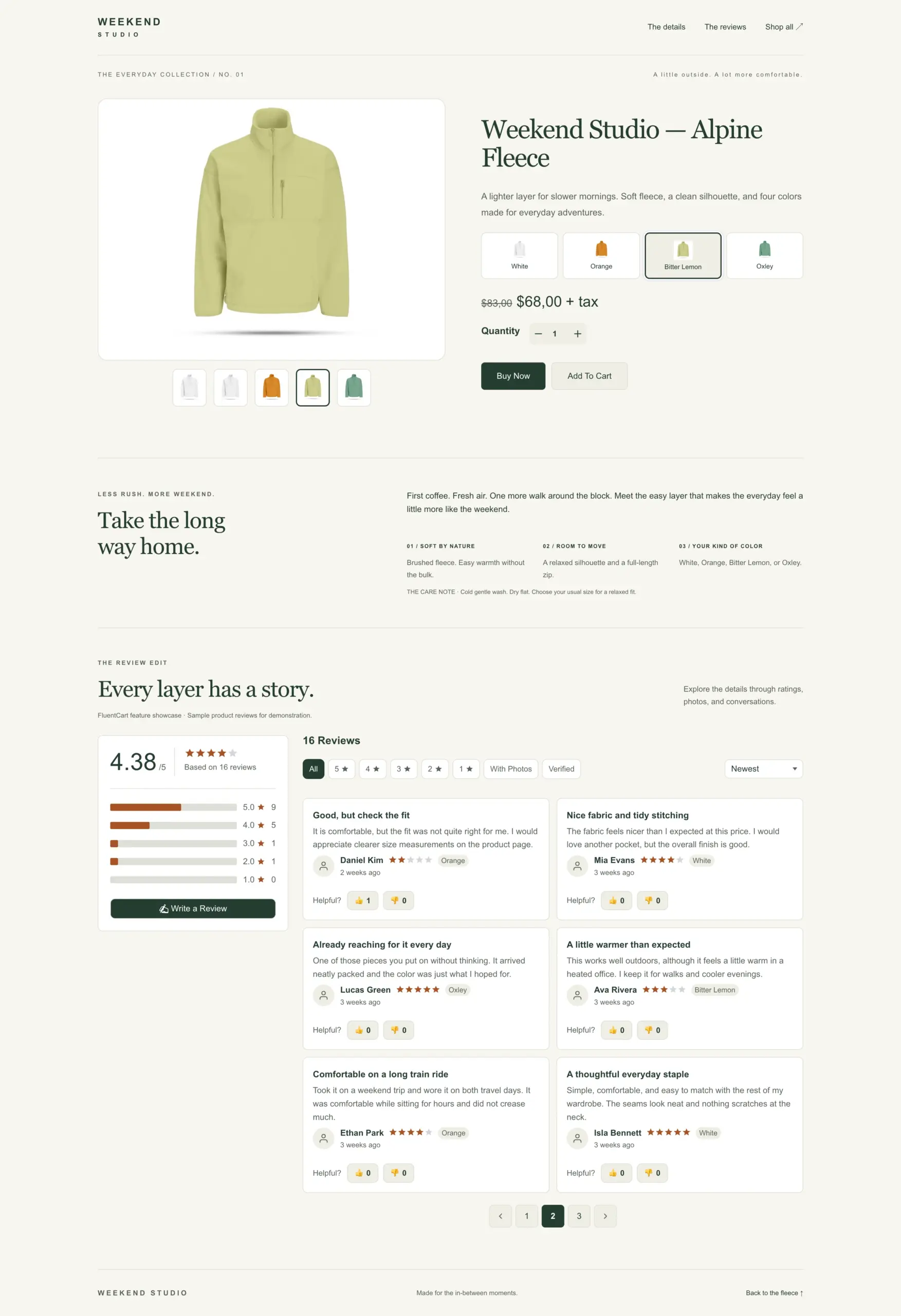
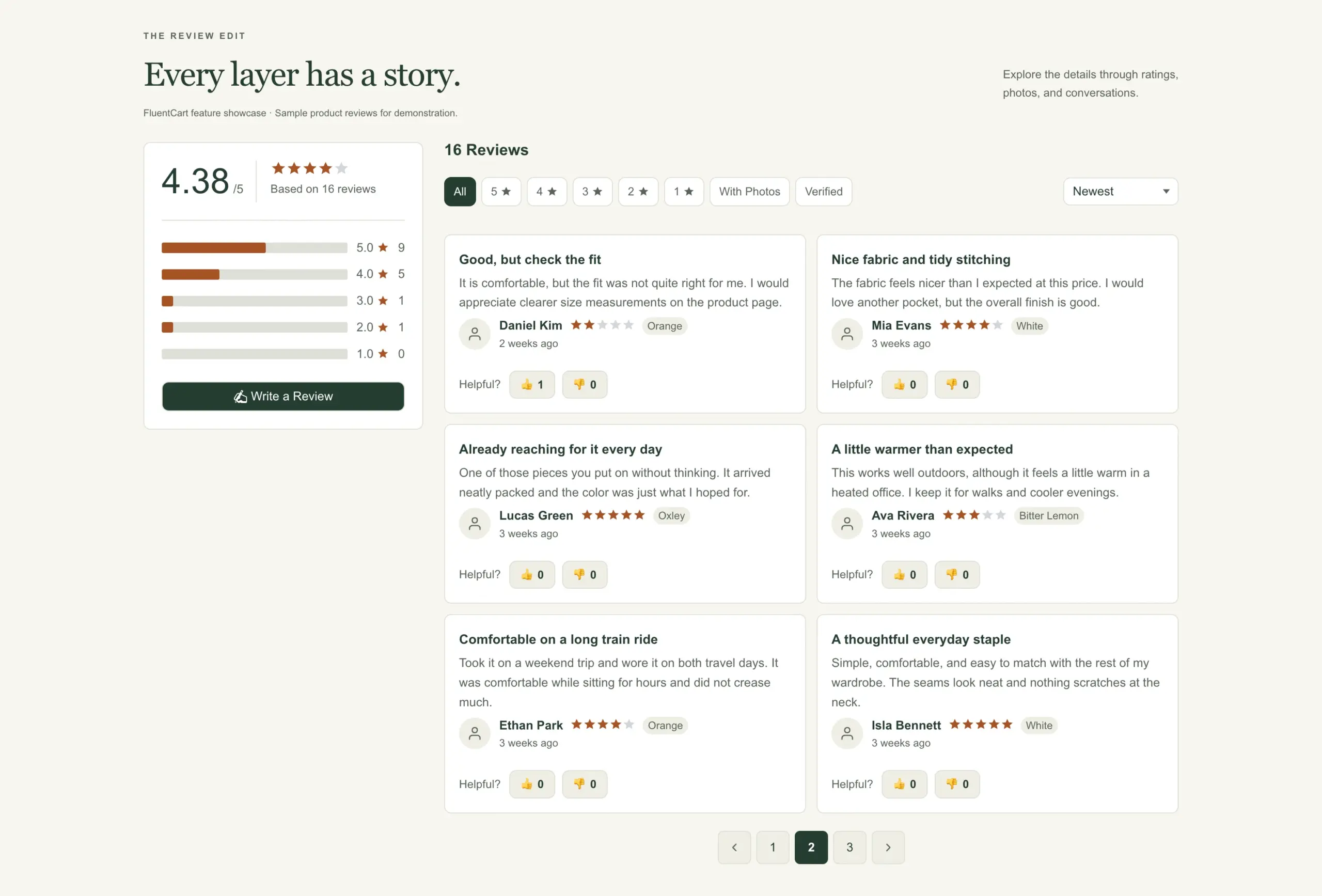
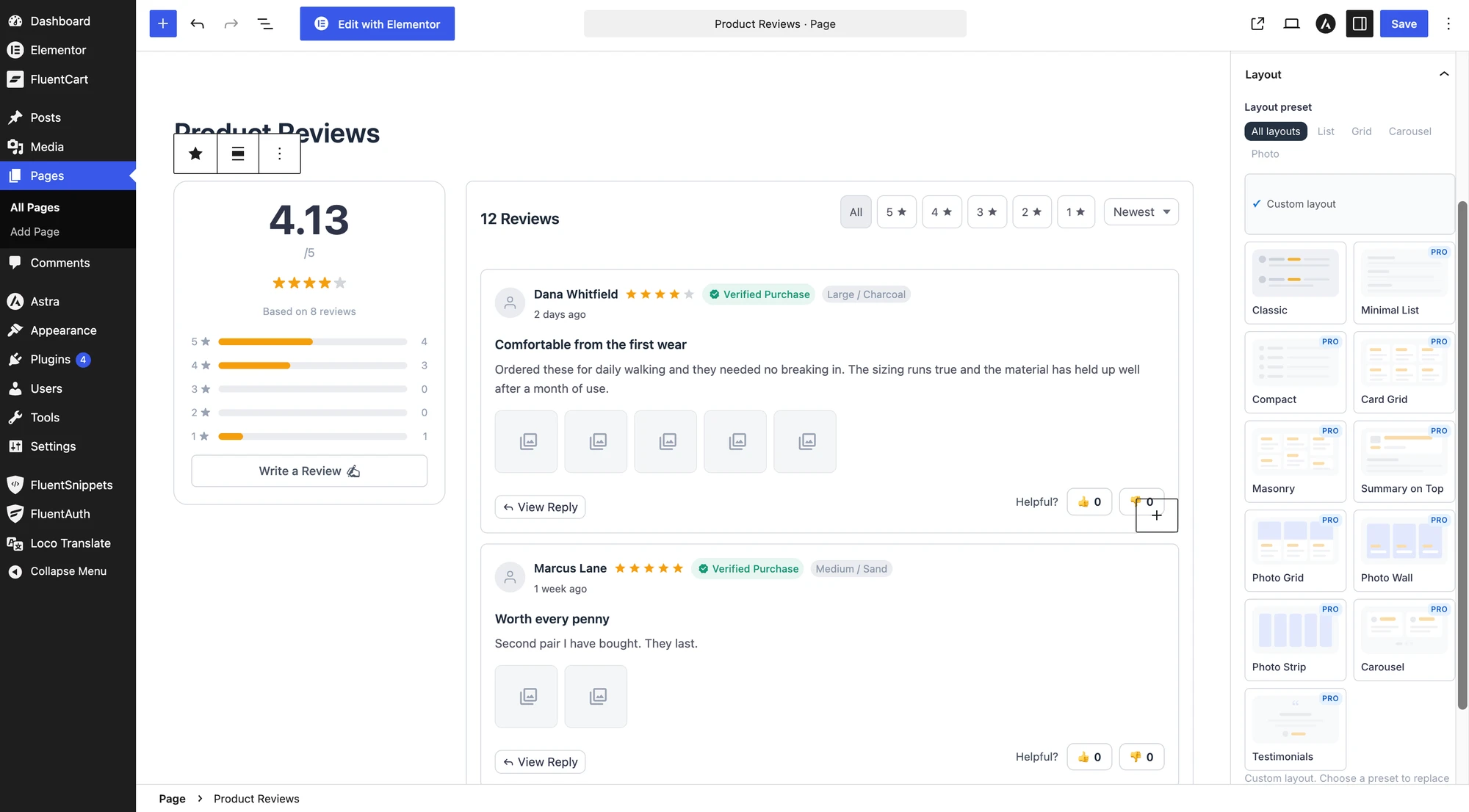
On the product page, shoppers see the star rating and the reviews behind it. Star filter chips let visitors show only five-star or three-star feedback, sorting puts the most relevant reviews first, and pagination keeps long lists manageable. Star ratings also appear on every product card in the shop, so the social proof is visible before anyone clicks through. The reviews section follows your storefront palette, matching the rest of the store without extra CSS.
In the admin, a moderation screen lists every review with its status and lets the store reply to each one. An Add Review action covers the review a customer emailed in or left on the phone, written on their behalf. The store is notified by email when a new review arrives, and the reviewer is told when their review is approved or when the store replies.
The practical effect: reviews that come from real purchases, moderated in the same admin as the orders they came from, with email notifications keeping both sides informed.
Reviews reach customers where they already are
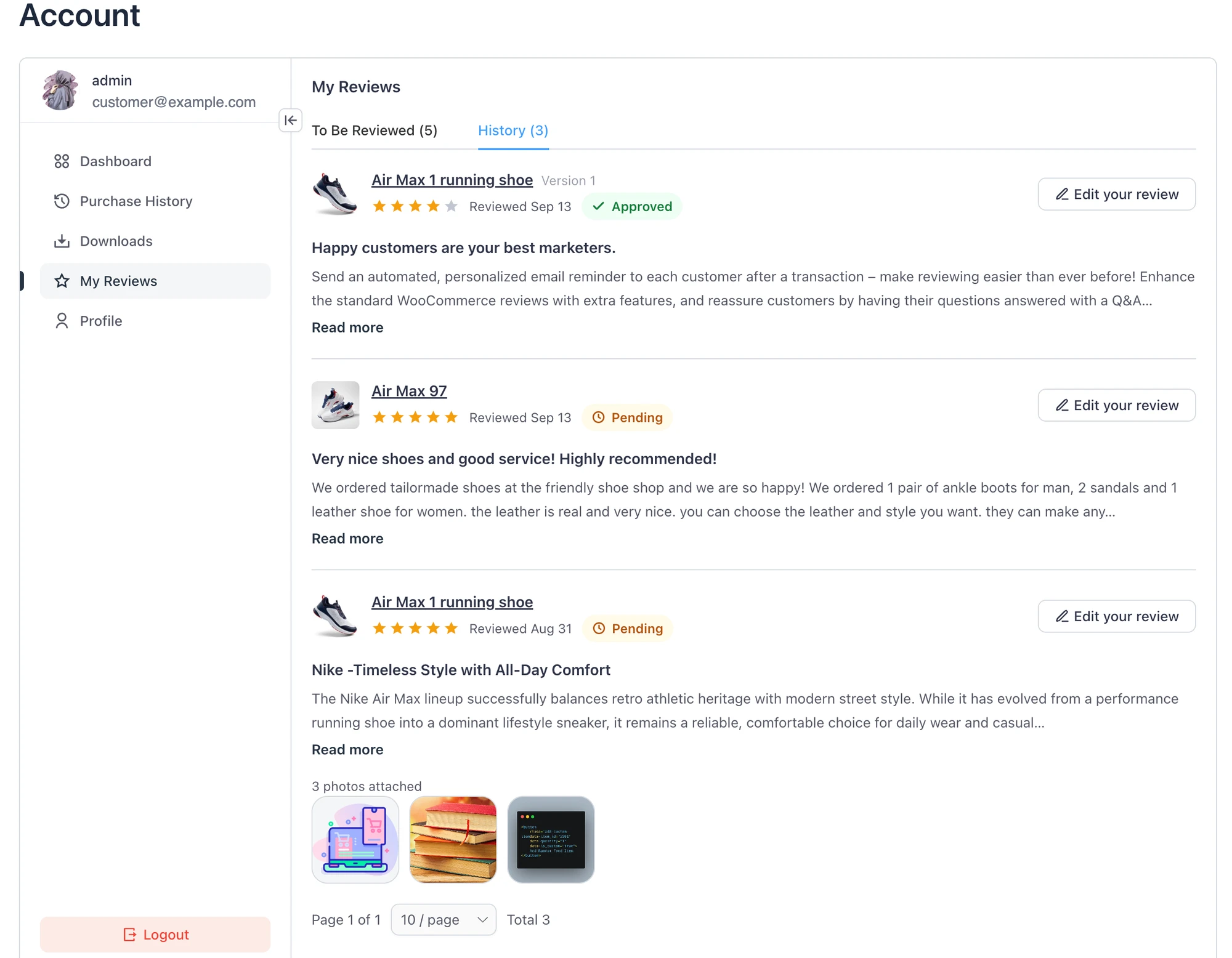
Most customers never come back to a product page after buying, so asking for a review there is asking the wrong place. 1.7.0 puts the request in the customer’s own path. The customer dashboard gains a My Reviews section, listing the reviews written so far, each one editable, and a to-review list of products bought but not yet reviewed. A Review Your Order page, on a page the store chooses, is reached by a link tied to the order and lists every item on it, each one reviewable on the spot. Customers open the Write a Review form from a button that slides out a drawer or a modal, with no page reload.
For a store that wants reviews without chasing them, the request now sits one click from the purchase.
Built in the editor, laid out in one click
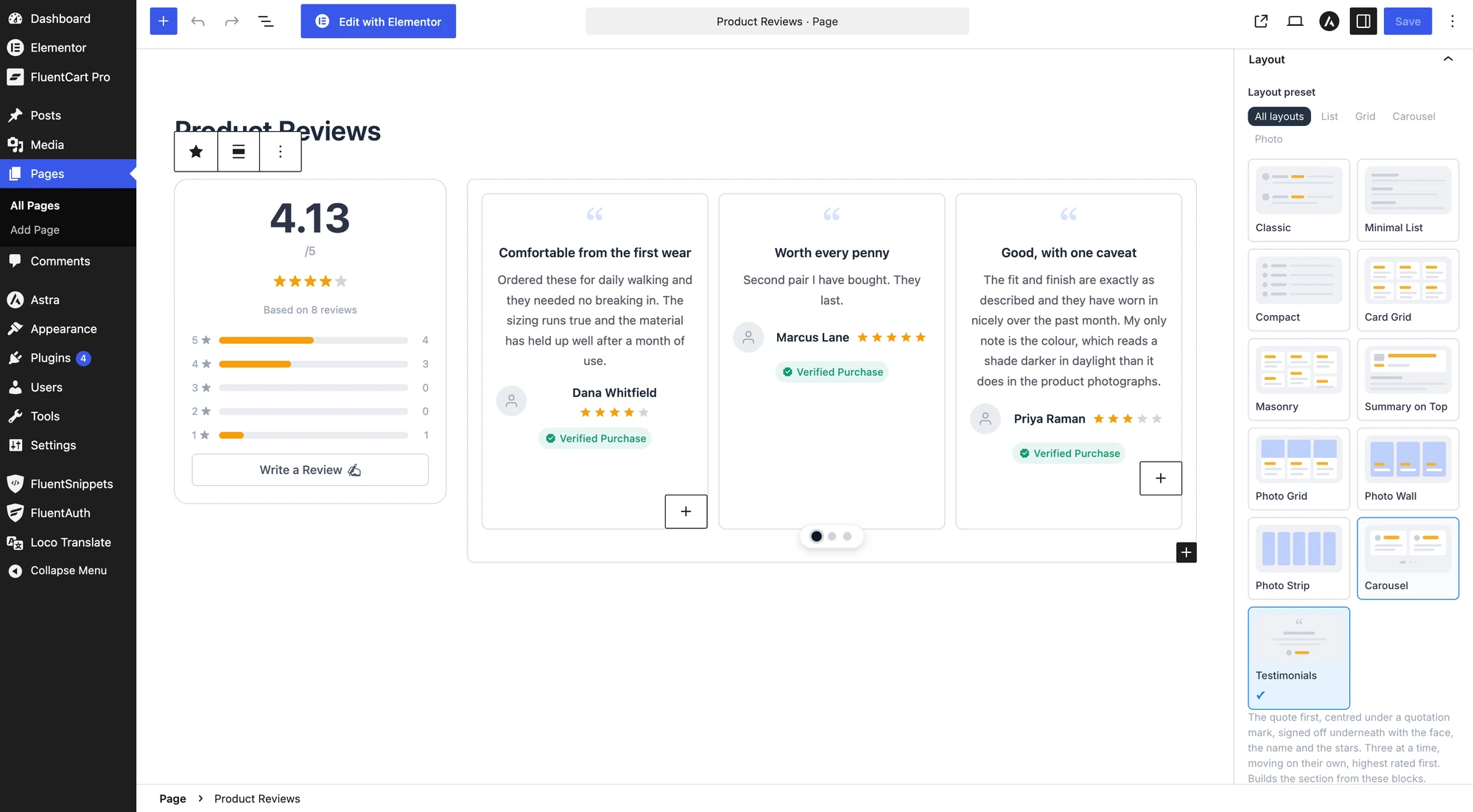
Six review blocks give you full control over where reviews appear: Product Reviews, Review List, Review Summary, Review Form, Write a Review Button, and Product Rating. Layout presets apply a whole arrangement in one click, and each part of a review card can be switched on or off. Classic ships in core; the other presets, from Minimal List and Card Grid to Carousel and Testimonials, come with Pro. The same settings are available through the [fluent_cart_product_reviews] shortcode, so classic editor pages get the same flexibility.
Product pages also output JSON-LD schema with offers, aggregate rating, and individual reviews. Search engines can show star ratings directly in the results, which means more clicks from the same ranking position.
Pro turns reviews into a visual showcase
The free reviews system covers everything a store needs to collect and display feedback. FluentCart Pro builds on top of it with the features that make reviews a selling tool.
Photo reviews. Customers can attach photos when writing a review, whether on the storefront, in the customer dashboard, or through the admin. Store settings control how many photos per review, the maximum file size, and which file types are accepted. A separate auto-approve switch decides whether photo reviews go live immediately or wait for moderation. Photos appear as tiles on the review card, with a counter on the last tile when a limit leaves some out.
Helpful votes. Logged-in customers can mark a review as helpful, and the reviews section can sort by Most Helpful so the best feedback rises to the top. A single switch turns voting on or off.
Threaded replies. The store can reply to any review, and the reviewer can reply back. Conversations stay threaded under the original review, keeping the context together instead of scattering it across separate entries.
View modes and layout presets. Beyond the default list view, Pro adds grid, masonry, and slider views for the review list. Layout presets go further with photo-first layouts, a carousel, and a testimonials style, each with full-width photo styling on the review card. Picking a layout is a one-click choice in the block editor.
Fixes & Stability
Storefront polish. The customer portal follows the storefront palette correctly. Price slider handles on the shop page sit flat against the track with clean, background-free price fields. The out-of-stock button keeps its light border when the active theme applies its own styles to the page. The Elementor product info widget fills its column width properly.
Checkout and subscriptions. Account linking during checkout is now atomic, so a failed payment mid-checkout cannot leave a customer record in a half-linked state. Subscriptions with a failed reactivation attempt stay visible to the customer in their dashboard instead of disappearing from the list, and the subscription display on the customer profile page is improved.
Admin. Integration feed breadcrumbs show the readable integration name instead of an internal identifier. The list footer follows its table correctly, and page buttons display their own number reliably.
Security and maintenance. This release includes ongoing security audits and routine hardening across FluentCart core and FluentCart Pro.
Getting 1.7.0
Update FluentCart and FluentCart Pro from your WordPress dashboard. Turn on Product Reviews under Store Settings, pick who may review and whether reviews wait for moderation, and choose a page for Review Your Order. The six review blocks are available in the block editor immediately after the update. Photo reviews, helpful votes, threaded replies, and the additional layout presets ship with the Pro update. Learn more on setting up reviews.
Full Changelog
Features
- Product Reviews with star ratings on the product page and product cards across the shop.
- Review settings under Store Settings: who may review, auto-approve, verified purchase badge, star ratings on or off and required, reviews per page.
- Review moderation screen in the admin with approve, reject, and reply from the store.
- Add Review in the admin to write a review on a customer’s behalf.
- My Reviews in the customer dashboard with editable reviews and a to-review list of purchased products.
- Review Your Order page reached by a link tied to the order, with every item reviewable.
- Reviews tied to the specific item or variation bought.
- Verified Purchase badge on reviews from confirmed buyers.
- Email notifications when a review arrives, is approved, or receives a reply.
- Six review blocks: Product Reviews, Review List, Review Summary, Review Form, Write a Review Button, and Product Rating.
- Layout presets for the reviews section, applied with one click in the editor.
- Star filter chips, sorting, and pagination on the reviews list.
- Write a Review button that opens a drawer or a modal.
- Attachment settings: how many to show, tile size, full width, and overflow counter.
- [fluent_cart_product_reviews] shortcode with every setting the block has.
- Product schema (JSON-LD) on the product page with offers, aggregate rating, and reviews for rich results.
- Product placeholder illustration for products without an uploaded image.
- Storefront appearance tokens for border radius, padding, and spacing.
- Photo reviews with store settings for count, size, file types, auto-approve, and moderation. (Pro)
- Helpful votes on reviews for logged-in customers with Most Helpful sort. (Pro)
- Threaded replies on reviews from the store and from the reviewer. (Pro)
- Grid, masonry, and slider view modes for the review list. (Pro)
- Layout presets beyond Classic: photo layouts, carousel, testimonials, with full-width photo styling. (Pro)
Improvements
- Customer email verification defaults to disabled on new installs.
- Existing customers from before 1.6.6 are not asked to verify their email again.
- Guest purchases link to the matching customer account when email verification is off.
- Subscription display improved on the customer profile page.
Fixes
- Customer portal following the storefront palette correctly.
- Price slider handles sitting flat and price fields without stray backgrounds on the shop page.
- Out-of-stock button losing its light border when the theme styles the page.
- Elementor product info widget not filling its column width.
- Checkout account linking not being atomic during payment failures.
- Subscriptions with a failed reactivation disappearing from the customer’s list.
- Integration feed breadcrumb showing an internal identifier instead of the readable name.
- Admin list footer not following the table, and page buttons not painting their own number.
In case you missed
1.6.5 (Sep 24, 2026)
- Adds Appearance tab under Store Settings with three color sources: FluentCart’s own colors, inherit from the active theme, or customize your own palette.
- Adds Theme-inherited storefront palettes for block themes, Astra, Kadence, and GeneratePress, with readable button text chosen automatically.
- Adds Customer email verification before the customer dashboard opens, with guest purchases recovered into the account after confirmation.
- Adds Store date format, time format, and timezone applied to every date in emails, invoices, shortcodes, admin, and the customer dashboard.
- Adds Full audit of Authorize.Net, Paddle, and Mollie subscription handling. (Pro)
1.6.4 (Sep 11, 2026)
- Adds FluentPlayer videos to product galleries with inline playback.
- Adds Upgrade option for eligible one-time purchases in the customer dashboard.
- Adds Test-mode protection to prevent billing, reconciliation, or emails for live subscriptions on staging sites.
- Adds Cart block with Cart Items, Cart Total, and Checkout Button blocks.
- Adds Three-stage overdue renewal reminder emails.
1.6.2 (Aug 20, 2026)
- Adds WooCommerce Migration support for products, orders, customers, coupons, tax rates, and subscriptions in the FluentCart migrator.
- Adds Data Export for orders, customers, subscriptions, and licenses in CSV or JSON, with export permissions by user role.
- Adds Transaction settlement time from payment providers.
- Adds Advanced filtering to the Order Sources report.
- Adds Signed release fields to product license settings.

I’m Jewel, founder of FluentCart and CEO at WPManageNinja, the team behind Fluent Forms, Fluent CRM, Fluent Support, FluentLogs and a handful of other WordPress plugins. I have been writing WordPress code since 2009 and still think of myself as a developer first and an entrepreneur second. Most of what I write on this blog comes from arguments we have had inside the team about how to build software people can actually depend on.

Subscribe now
Related Articles and Topics
-
FluentCart 1.6.5 – in your own colors
Storefront Appearance settings let your store inherit colors from the active theme or use a custom palette. Customer…
-

Introducing Product Videos – FluentCart 1.6.4
Most of what makes a store trustworthy happens when nobody is watching: the product page a shopper studies…
-
FluentCart 1.6.2 – Bring your WooCommerce store to FluentCart.
Switching platforms is the decision most store owners put off, not because the new platform is worse but…



Leave a Reply