
Tools to Make Your Black Friday Sale a Success: The Complete 2026 Guide for FluentCart Stores
The best Black Friday tools for a FluentCart store help you set up offers, bring in shoppers, convert them at checkout, and follow up after the sale. Many of them run on FluentCart Free. The rest are marked as FluentCart Pro or as integrations from the Fluent family and integration partners.
Black Friday falls on November 27, 2026, and Cyber Monday follows on November 30. Most of the setup below needs a few weeks to configure and test. The stakes are high.
According to Adobe’s 2025 holiday shopping recap, US shoppers spent $11.8 billion online on Black Friday 2025, and mobile devices drove 55.2% of those sales.
This guide walks through each stage of a Black Friday sale and the Black Friday tools that handle it, with the exact settings to check. Everything here runs on FluentCart Free unless it is labeled Pro or named as an integration.
So, let’s explore the tools.
TL;DR
- Black Friday falls on November 27, 2026, and Cyber Monday on November 30. Start setting up your Black Friday tools four to six weeks ahead.
- FluentCart Free covers scheduled coupons, usage limits, coupon links, Cloudflare Turnstile for checkout, and Store Digest sales emails.
- FluentCart Pro adds Dynamic Pricing for automatic, scheduled discounts, plus Order Bump, Product Bundles, and Advanced Inventory.
- Coupons and Dynamic Pricing discounts show in the cart. To show the sale on product pages, lower the selling price and set a Compare at price, or add a countdown bar.
- FluentCRM handles early-access emails, one-time coupons, and abandoned cart recovery for FluentCart stores.
- Keep caching on, but exclude the cart and checkout pages so every shopper sees their own cart.
- Test every coupon link, pricing rule, and checkout flow one week before the sale.
Black Friday Tools at a Glance
| Stage | Tool | What it does | Available in |
|---|---|---|---|
| Offers | FluentCart Coupons | Scheduled codes with usage limits | FluentCart Free |
| Offers | Dynamic Pricing | Automatic discounts with no code | FluentCart Pro |
| Urgency | Compare at price, sale badges, and stock status | Shows a reduced price and availability on product pages | FluentCart Free |
| Urgency | NotificationX | Sales pop-ups and countdown bars | NotificationX |
| Social proof | WP Social Ninja | Product reviews on product pages | WP Social Ninja Pro |
| Social proof | FluentPlayer | Product videos in product galleries | FluentCart Free with FluentPlayer |
| Traffic | FluentCRM | Campaigns and one-time coupons | FluentCRM integration |
| Traffic | Fluent Forms | Early-access signup forms | Fluent Forms with FluentCRM |
| Traffic | FluentAffiliate | Partner promotion with commissions | FluentAffiliate integration |
| Traffic | FluentSMTP | Reliable email delivery | FluentSMTP (free) |
| Order value | Order Bump | Discounted add-on at checkout | FluentCart Pro |
| Order value | Product Bundles | Related products sold as one offer | FluentCart Pro |
| Courses and services | FluentCommunity | Discounted paid access to community spaces | FluentCommunity integration |
| Courses and services | FluentBooking | Paid appointments through FluentCart checkout | FluentBooking integration |
| Checkout | Cloudflare Turnstile | Bot protection on checkout | FluentCart Free |
| Stock | Stock tracking | Product and variation stock counts | FluentCart Free |
| Stock | Advanced Inventory | Low-stock summaries and bulk adjustments | FluentCart Pro |
| Recovery | FluentCRM abandoned cart | Recovery emails for stalled carts | FluentCRM integration |
| Support | Fluent Support | Customer purchase details inside tickets | Fluent Support integration |
| After the sale | FluentCart Customer Rights | EU withdrawal requests | Free FluentCart addon |
| Reporting | Reports and order heatmap | Sales, revenue, and busiest days and hours | FluentCart Free (custom date ranges in Pro) |
| Reporting | Store Digest | Scheduled sales summary emails | FluentCart Free |
| Planning | FluentBoards | Launch tasks on a shared team board | FluentBoards |
*Table Powered by NinjaTables
Stage 1: Tools to Set Up Your Black Friday Offers
Your offer sits at the center of the sale, and every other Black Friday tool in this guide supports it. FluentCart gives you three ways to discount. You can lower the product price itself, give shoppers a code, or let a pricing rule apply the discount on its own.
Pick the Right Offer for Your Margins
A deeper discount is not always the better offer. Start from your contribution margin on each product, then choose an offer type that protects it.
- A visible price drop on selected products: lower the selling price and enter the previous price in the Compare at price field
- Sitewide percentage off: a coupon or a Dynamic Pricing checkout rule
- Free shipping above a set order value: a Dynamic Pricing shipping rule
- Bulk discount, such as 10% off five or more items: a Dynamic Pricing line item rule
- Gift sets at a combined price: Product Bundles
- A capped discount on high-value orders: the maximum discount setting on a percentage coupon
FluentCart Coupons (Free)
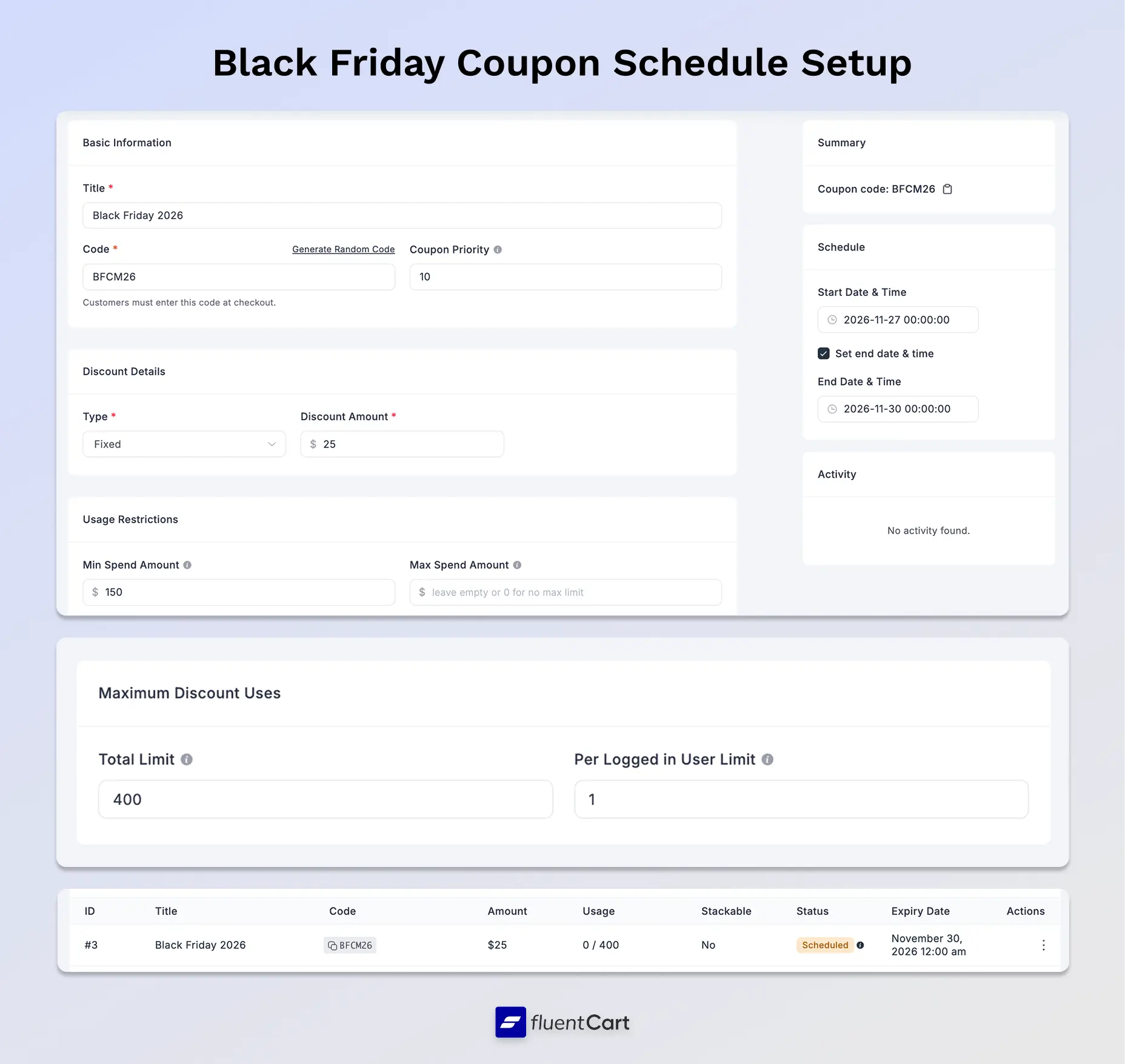
Every coupon setting in FluentCart is part of the free version, including the ones a Black Friday sale depends on. You can schedule a code to start on Friday morning and expire after Cyber Monday. Total and per-customer usage limits keep a public code within your budget.
- Fixed or percentage discounts, with an optional maximum discount amount for percentage coupons
- Minimum and maximum cart totals for the discount to apply
- Include or exclude specific products and categories
- Restrict a code to chosen email addresses
- Allow or block stacking with other codes
- Coupon links that apply the code automatically at checkout
A scheduled coupon leaves the price on product pages unchanged. Shoppers see the discount once they apply the code. Setting up WordPress coupons in FluentCart takes a few minutes from the Coupons screen.
Black Friday Coupon Setup Tips
Setup tip: Set Stackable to No on your main Black Friday code. The code then works on its own, and shoppers cannot pair it with any other coupon.
Setup tip: Build a coupon link for emails and ads in this format: yourstore.com/?fluent-cart=instant_checkout&item_id=209&quantity=1&coupons=BFCM26. Replace 209 with your product variation ID. The shopper lands on checkout with the code applied. If the code has expired or hit its limit, checkout shows a notice explaining why. Test the link and the coupon restrictions before sharing it.
Selling subscriptions or software licenses? Turn on Make this coupon recurring to discount eligible renewals as well. Leave it off for a non-recurring discount on the initial order. If your plans use trials or signup fees, configure and test renewal pricing on its own before the sale.
Launch Your Black Friday Coupons for Free
Download FluentCart Free to schedule coupons, set usage limits, and share coupon links, with zero FluentCart transaction fees.
FluentCart Dynamic Pricing (Pro)
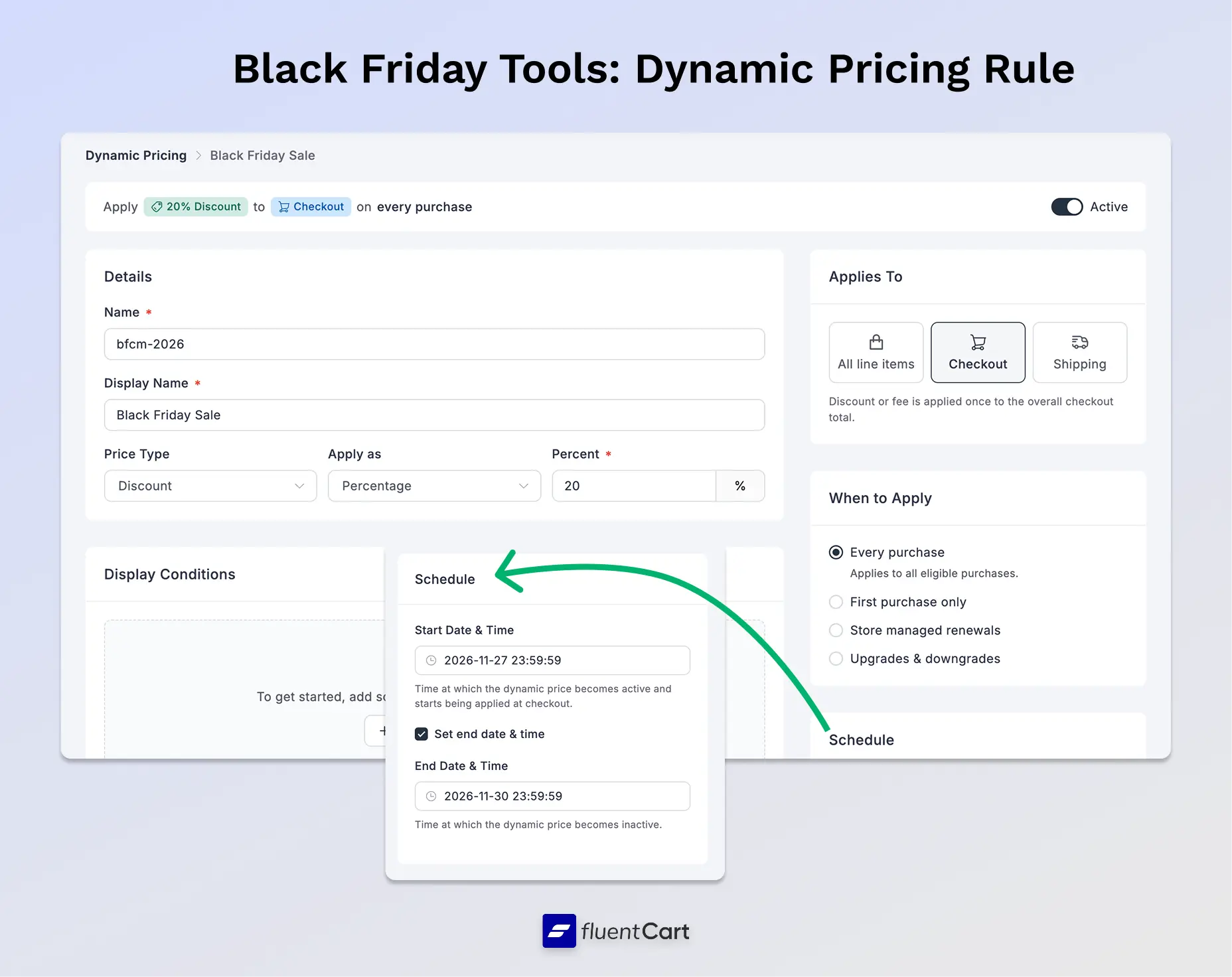
Dynamic Pricing in FluentCart Pro applies a Black Friday discount to every qualifying cart automatically, with no coupon code for shoppers to find or enter. You set the rule once, such as 20% off every order.
- Schedule a rule from Friday morning to Monday night
- Discount each cart item, the whole checkout, or the shipping cost
- Limit a rule to first-time buyers for a welcome offer
- Run rules alongside coupons in the same cart
- Show original prices struck through at checkout, on the thank-you page, and in order emails
Product page prices stay the same with Dynamic Pricing. To announce the sale before checkout, add a countdown bar from the next stage.
Setup tips: Dynamic Pricing ships switched off. Turn it on under FluentCart > Settings > Features & Addon. The Free-shipping minimum template defaults to First purchase only. Switch it to Every purchase for a Black Friday offer. Every active rule that qualifies applies to the cart, oldest first. Review older rules before the sale and turn off any that should not stack.
Stage 2: Tools to Build Black Friday Urgency and Social Proof
Coupons and Dynamic Pricing apply their discount in the cart. Shoppers decide much earlier, on the shop and product pages. Those pages need their own signal that a sale is live and ending soon.
Compare at Price, Sale Badges, and Stock Status (Free on FluentCart)
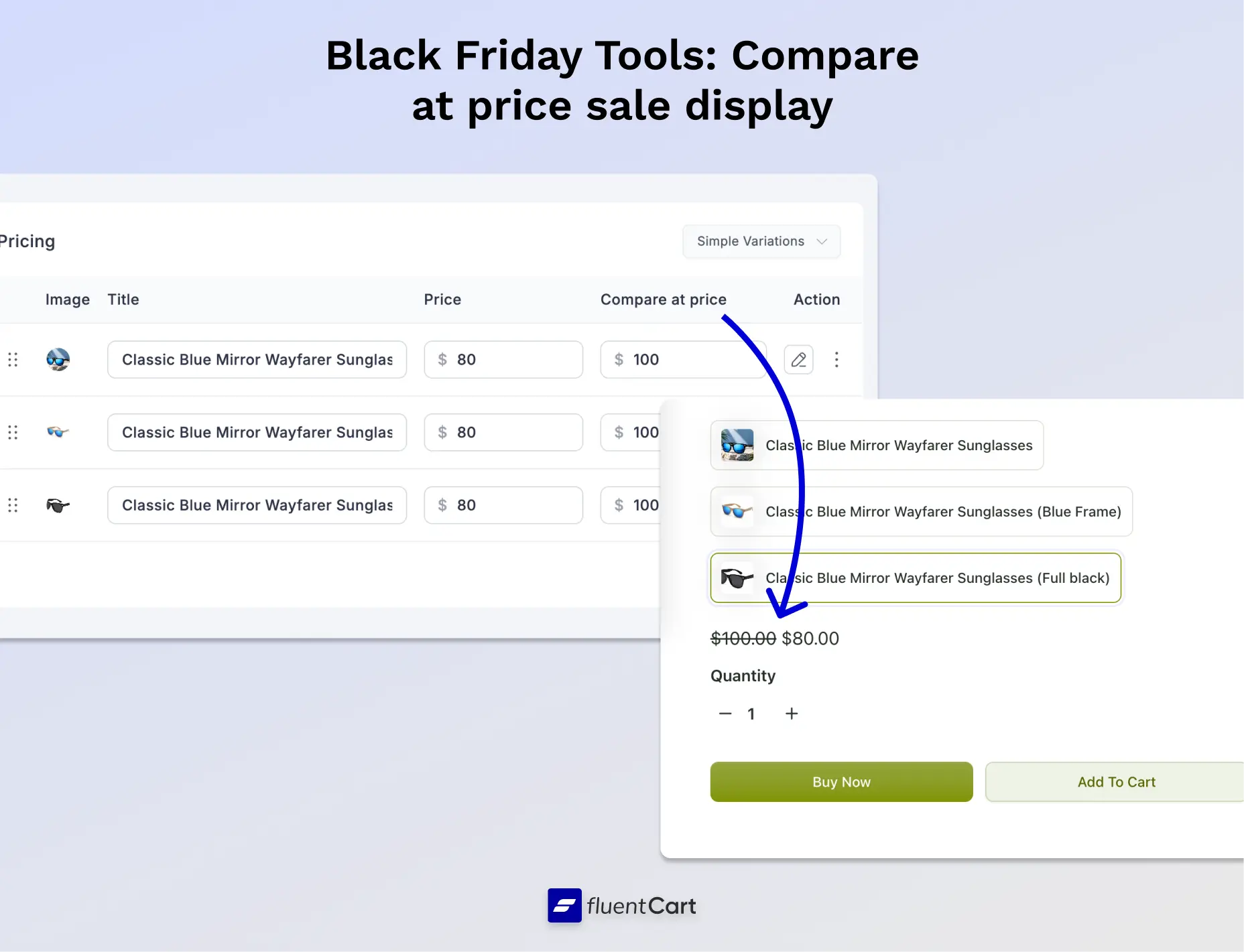
To show a sale price on a product page, lower the selling price of the product or variation and enter the previous price in the Compare at price field. FluentCart shows the previous price with a strikethrough next to the new one. The selling price sets what shoppers pay, and the Compare at price only changes how the price displays.
This suits a handful of hero products you want to feature. Set a reminder to restore the regular selling prices after Cyber Monday. FluentCart Free also includes sale badges and stock status displays, which render in Gutenberg and Bricks layouts. Some Bricks layouts can also show low-stock messages.
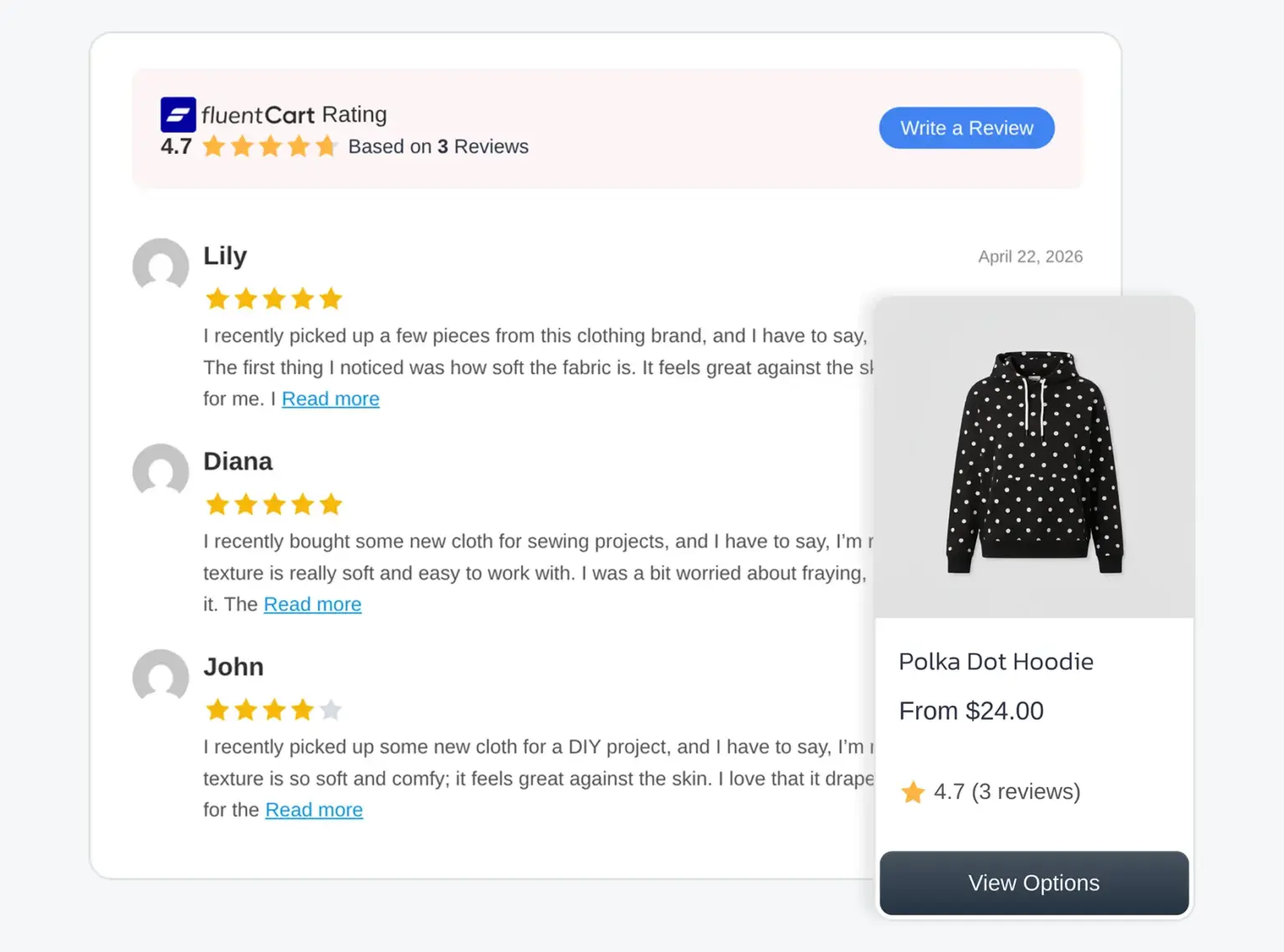
Product Reviews with WP Social Ninja
Reviews answer the question every deal hunter asks: is this product worth buying, even at a discount? FluentCart includes product reviews, with photo reviews and helpful votes. WP Social Ninja is a reviews and social feed plugin for WordPress, and it has an integration with FluentCart. It works with FluentCart Free and needs WP Social Ninja Pro.
- Sync FluentCart products and collect product reviews
- Pick a review template for each product page
- Customize review forms to match your store
- Use WP Social Ninja as the main hub for all your reviews
Setup tip: Assign your strongest review template to the products you feature in Black Friday emails and ads. Shoppers who click through from a promotion land on a page that already shows proof.
Product Videos with FluentPlayer
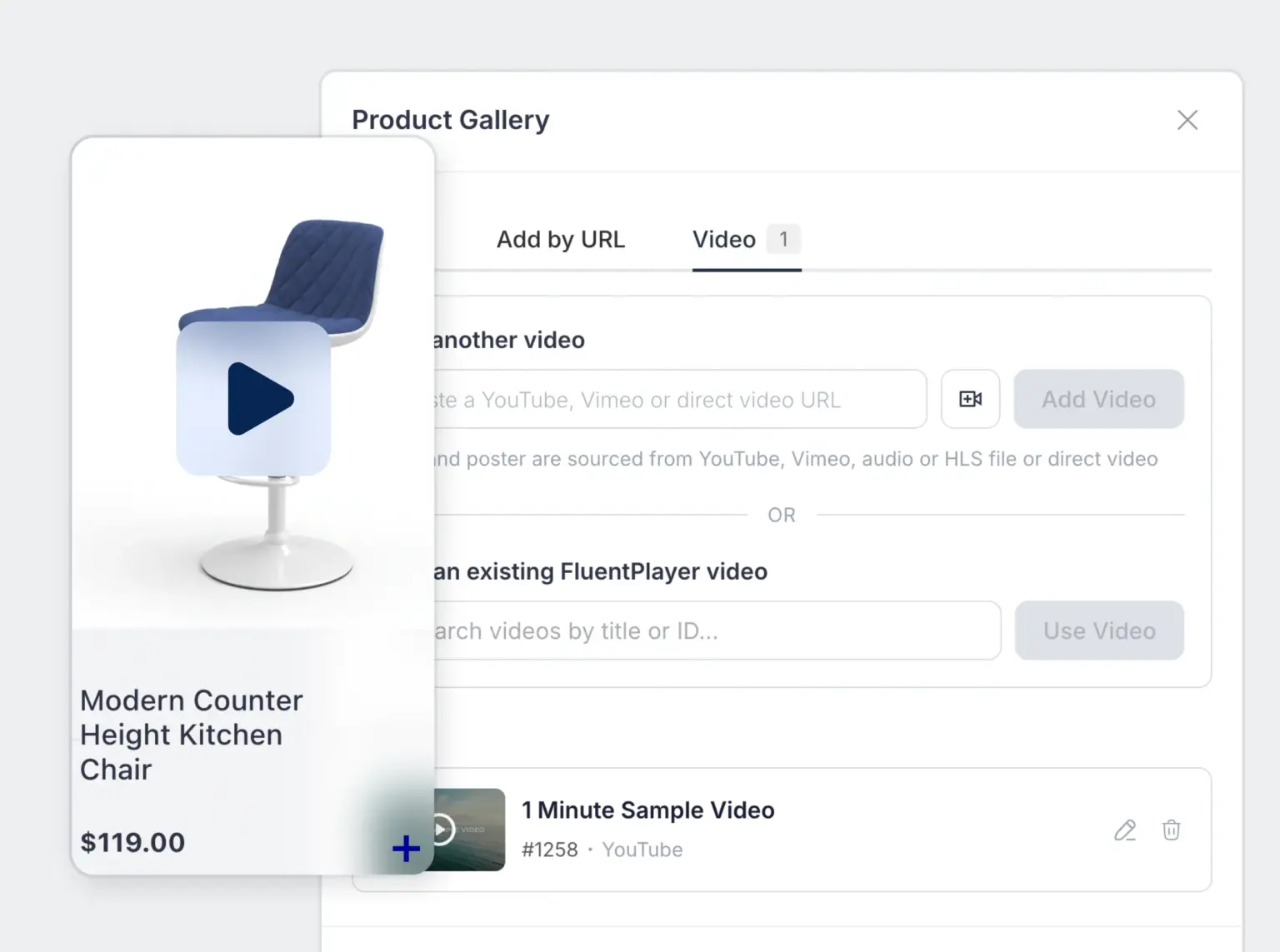
A short demo video answers questions a photo cannot, such as size, texture, or how a product works. FluentPlayer is a video player plugin for WordPress, and its integration with FluentCart is part of FluentCart Free. FluentPlayer’s own premium features may need FluentPlayer Pro.
- Add videos to FluentCart product galleries
- Select an existing video or create a new one from the product editor
NotificationX
NotificationX is a social proof plugin for WordPress, and it has an integration with FluentCart. You set it up inside NotificationX and select FluentCart as the source. Each step is covered in this walkthrough on live sales notifications.
- Sales notifications show recent FluentCart purchases as pop-ups, with 12 ready-made templates
- Growth Alerts show sales counts and stock-out messages and need NotificationX Pro
Add a Countdown Bar to Your Sale
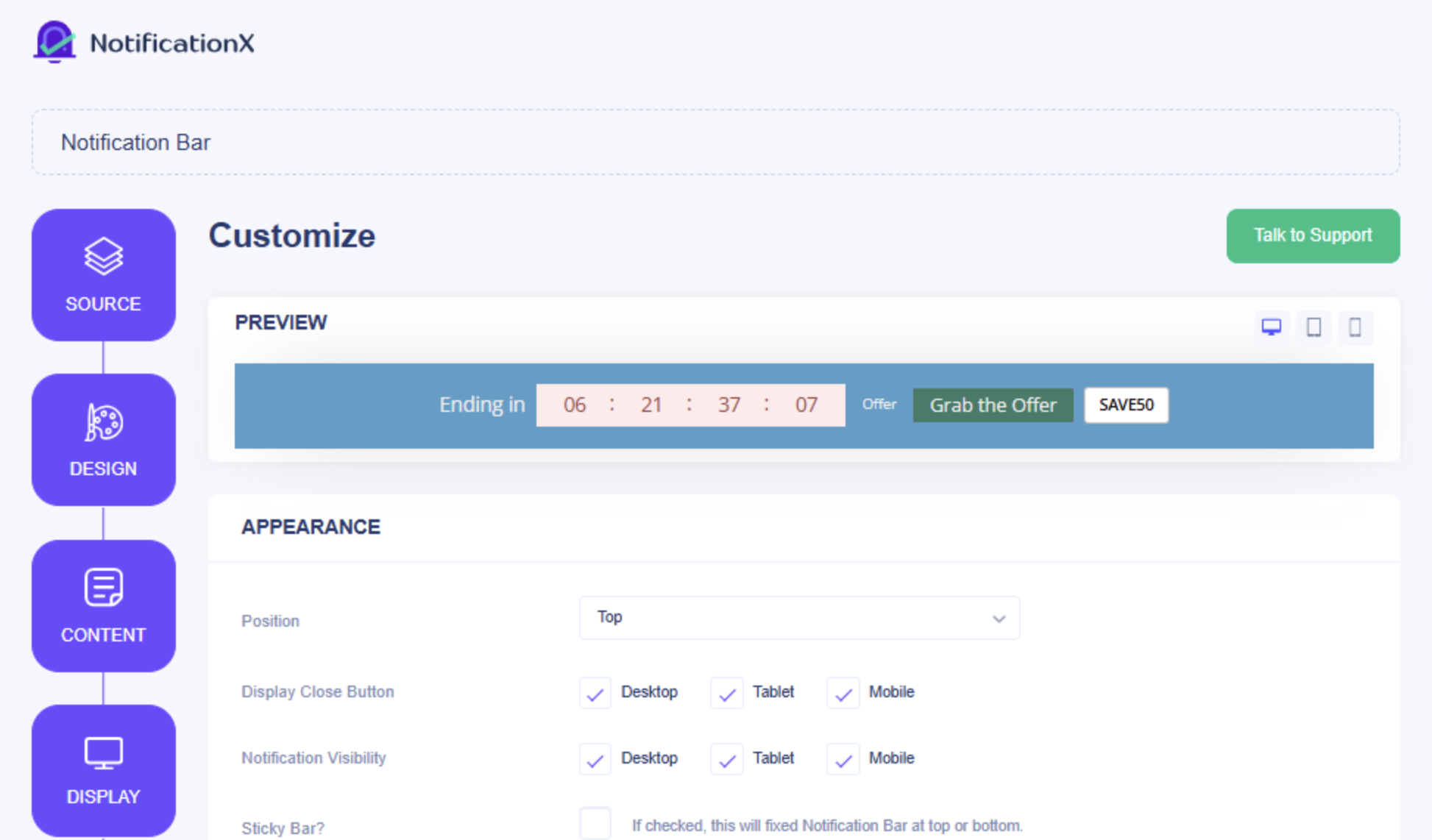
A countdown gives shoppers a clear deadline. The NotificationX notification bar includes a built-in countdown, and it works on any WordPress site, including a FluentCart store.
- Set your own countdown text and end time
- Add a coupon button that copies the code when clicked
- Target the bar by page, user role, or country
Point the bar at your Black Friday code or your Dynamic Pricing offer. It announces the sale on every page, including product pages, before shoppers see the discount in their cart.
Stage 3: Tools to Bring Black Friday Shoppers to Your Store
Ad costs typically rise during Black Friday week, and that makes owned channels the most cost-effective Black Friday tools you have. Your email list and your affiliate partners reach shoppers who already know your store, and both connect to FluentCart.
FluentCRM Campaigns and One-Time Coupons
FluentCRM is an email marketing plugin for WordPress. It connects to FluentCart orders, and you can run Black Friday campaigns from your dashboard. Public codes also tend to spread to deal sites. FluentCRM’s Create Coupon action helps limit the impact of code sharing by generating a unique FluentCart coupon for each contact. Email restrictions, usage limits, and expiration dates add further control. Tags and lists also support customer segmentation, and past buyers can receive a different offer from new subscribers.
- Send early access to subscribers before the public launch
- Give each contact a code with its own expiry date and usage limit
- Reward repeat customers with a code tied to their email
Setup tip: Each Create Coupon action generates its own SmartCode. Place that SmartCode in your email body, and every contact receives a different code. You can also pick an existing FluentCart coupon as the template for the generated codes.
Fluent Forms for a VIP Early-Access List
An early-access list is one of the simplest Black Friday tools to set up, and it rewards your most interested shoppers. Fluent Forms is a form builder plugin for WordPress, and it connects with FluentCRM. Each form submission can add a contact to FluentCRM, with form fields mapped to contact properties.
- Publish a short signup form on a Black Friday landing page two to three weeks before the sale
- Tag every signup as VIP in FluentCRM
- Send the VIP list a one-time code a day before the public launch
FluentAffiliate Partners
FluentAffiliate runs an affiliate program inside WordPress and integrates with FluentCart. Partners promote your Black Friday sale to their own audiences and earn a commission on each referred order.
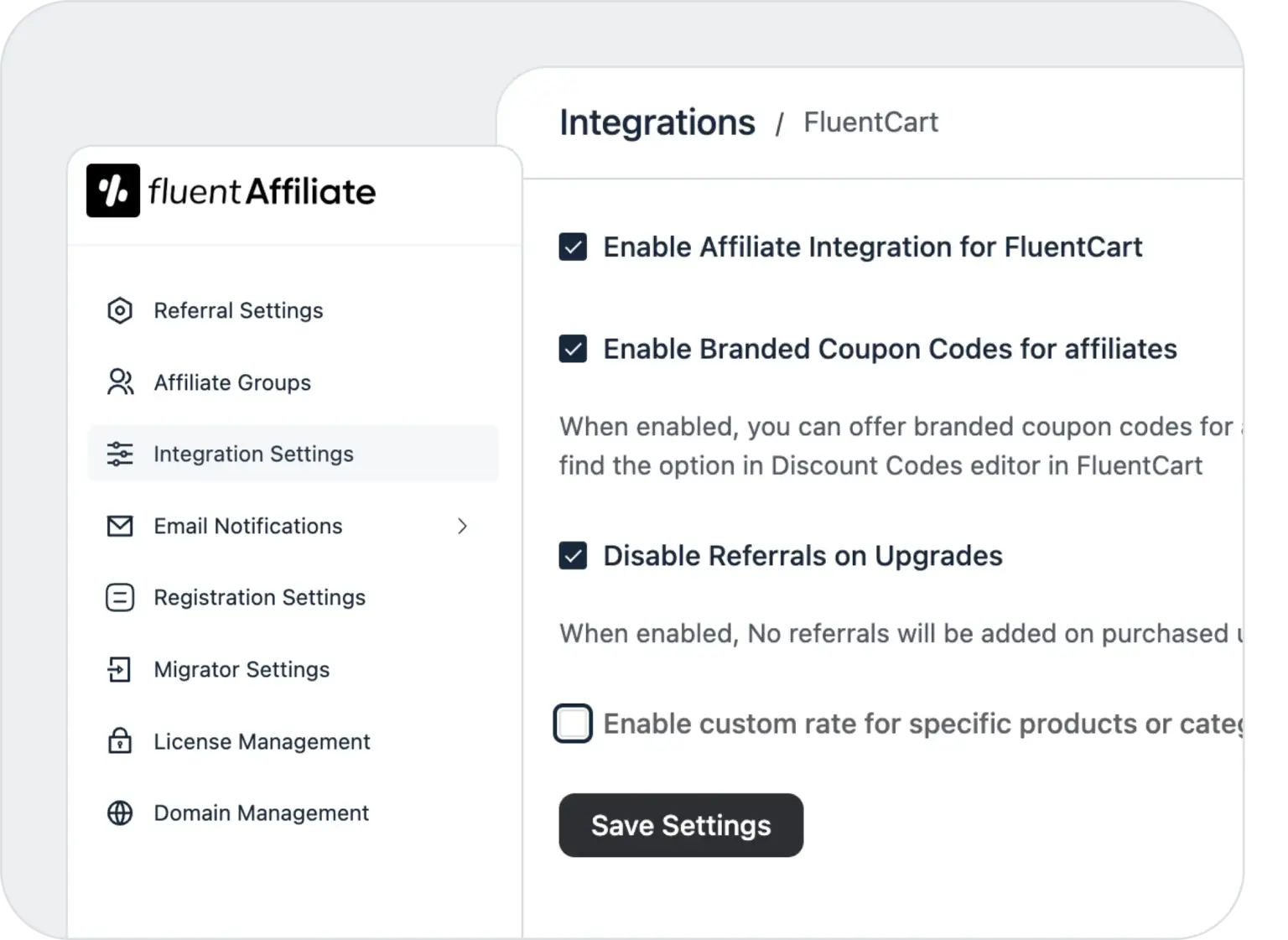
- Onboard affiliates and track their visits
- Pay commissions on referred sales
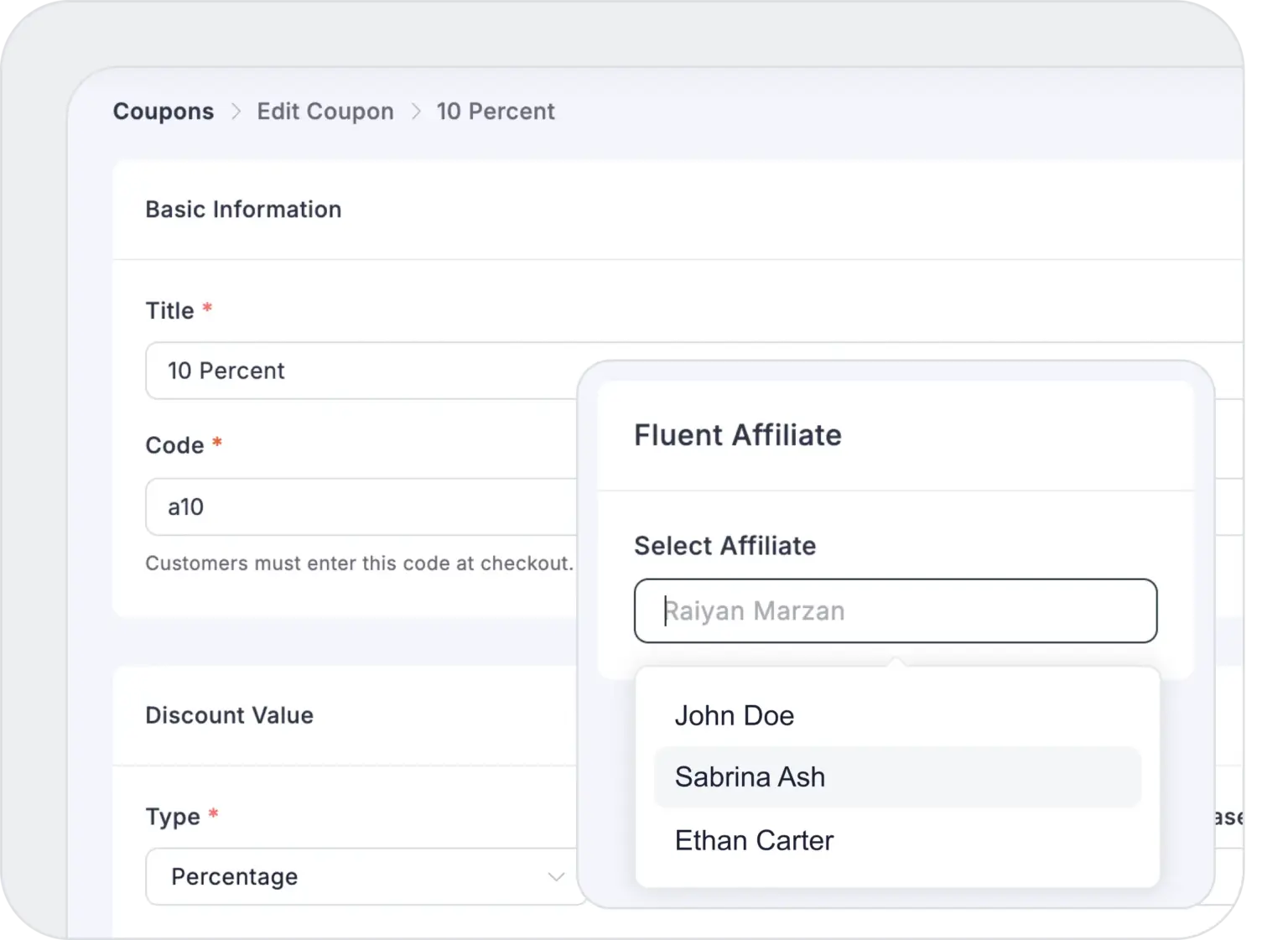
- Assign a FluentCart coupon to an affiliate, so orders using that code count as their referral
FluentSMTP for Reliable Email Delivery
Black Friday week sends a large volume of email from your store. Order confirmations, recovery emails, and Store Digest reports all depend on WordPress email working. FluentSMTP is a free plugin that sends your site’s email through a dedicated email delivery service instead of your web server.
- Connect a dedicated email service provider
- Send a test email before the sale starts
- Check the email logs during the sale
How early should your Black Friday emails start, and how many reminders are too many? Store owners in the FluentCart community have run Black Friday campaigns, and you can ask them what timing worked for their lists.
Real store owners. Real problems. Real answers. Join the FluentCart Community.
Stage 4: Tools to Raise Your Black Friday Order Value
A higher value per order adds revenue without adding traffic. Decide first how these offers interact with your Black Friday code. Stacked discounts reduce margin quickly.
Order Bump (Pro)
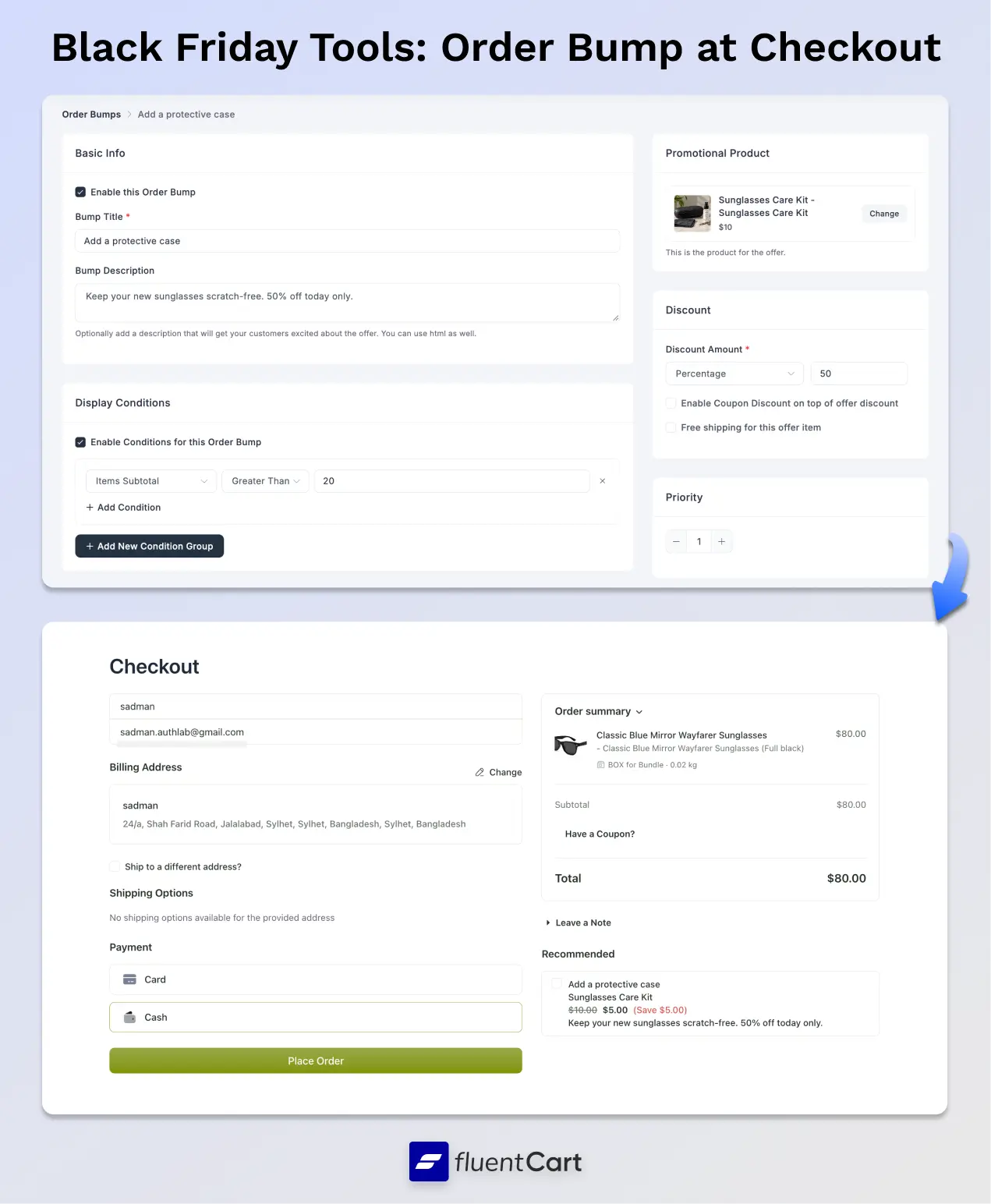
An order bump (available on FluentCart pro) shows one extra offer on the checkout page. Shoppers add it with a single click before paying. The idea works like upselling, placed at the moment of purchase.
- A fixed or percentage discount on the bump product
- Display conditions, such as a cart subtotal above $50
- Free shipping on the bump item
- Priority ranking when you run several bumps
Setup tip: Check the Enable Coupon Discount on top of offer discount setting on each bump. Leave it off to stop your Black Friday code from stacking on the bump’s own discount. For priority, a lower number shows first.
Product Bundles (Pro)
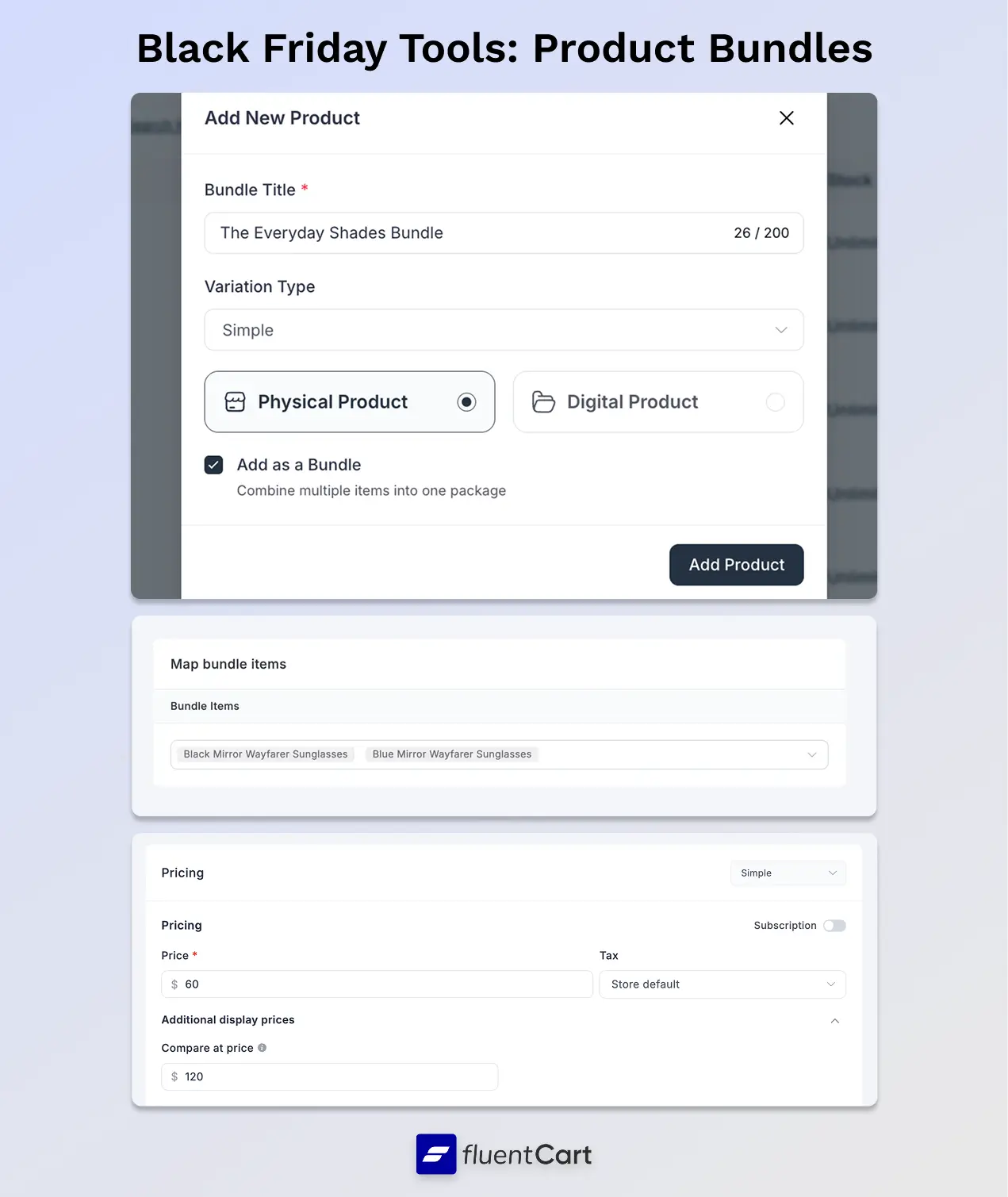
Bundles group related products into one offer. They suit holiday gift sets, and they give shoppers a reason to buy more than one item. Ideas from bundle marketing can help you price each set.
Bundles work in the same cart as coupons and Dynamic Pricing. Each discount still follows its own eligibility rules. Test your exact combination before you advertise it.
Black Friday Tools for Courses and Services
FluentCart also integrates with FluentCommunity and FluentBooking. These Black Friday tools extend a sale beyond physical and digital products.
- Course and membership sellers can discount paid access to a FluentCommunity space, as covered in this guide to the FluentCart and FluentCommunity integration
- Service businesses can connect FluentBooking appointments to FluentCart checkout, where payment is collected and each booking is linked to its order
Stage 5: Tools to Keep Your Black Friday Checkout Fast and Protected
Black Friday traffic arrives in spikes, often right after an email goes out. Fix speed and checkout issues before that first send.
Hosting That Handles Traffic Spikes
Your host sets the limit on how many shoppers your store can serve at once. On shared hosting, compare eCommerce hosting options well before November. A plan upgrade needs time to test.
Caching Without Breaking Checkout
Caching makes your store faster, and you can keep it on during Black Friday. The key is to exclude the pages that change for each shopper. FluentCart’s documentation lists the exact caching and optimization exclusions to add.
- Exclude your cart and checkout pages from the page cache
- Exclude any URL that contains fct_cart_hash
- Bypass the cache when the fct_cart_hash cookie is present
- Keep logged-in customers uncached
Two less obvious fixes: The FluentCart caching documentation lists two more. If your optimization plugin delays or combines JavaScript, exclude the fct-checkout and fct-orderbump scripts, or the checkout form and order bump may not load. WordPress security tokens on cached pages also expire, after 12 to 24 hours by default. If your cache keeps pages longer, shorten the cache lifetime or clear the cache, or shoppers may see “Invalid nonce” errors when they add to cart or apply a coupon.
After any change, clear every cache layer on your plugin, server, and CDN. Then test the cart in a private browser window. Each layer of WordPress cache behaves differently, and all of them need clearing.
Cloudflare Turnstile for Checkout (Free on FluentCart)
Bot traffic tends to rise during big sales. FluentCart Free includes Cloudflare Turnstile protection for checkout. You configure it with your Cloudflare site key and secret key. Turnstile checks each checkout submission without asking shoppers to solve image puzzles.
FluentCart Stock Tracking
Overselling a sold-out product leads to refunds and support tickets. When stock management is enabled and configured, FluentCart Free tracks product and variation quantities and checks stock availability before purchase. Confirm stock counts on every Black Friday product before the sale. Advanced Inventory in FluentCart Pro adds a dedicated inventory workspace.
- In-stock, low-stock, and out-of-stock summaries
- Bulk stock adjustments
- A reason and history record for each adjustment
Test Your Black Friday Tools Before Launch
Run a full test of your Black Friday tools one week before the sale. A fix on a quiet Thursday costs far less than a fix during Friday’s rush.
- Place a test order with each payment method
- Open every coupon link and confirm the discount applies
- Check that each Dynamic Pricing rule starts and stops on schedule
- Test each bundle, coupon, and pricing rule combination
- Trigger an abandoned cart and confirm the recovery email arrives
- Complete a checkout on a phone, where more than half of Black Friday online sales now happen
Measure your eCommerce website performance on key pages during the same test.
Stage 6: Tools to Recover Abandoned Black Friday Carts
Many Black Friday shoppers add items and leave to compare prices. A short recovery sequence brings a share of them back. FluentCRM handles cart recovery for FluentCart through a built-in Cart Abandoned trigger, and the FluentCart driver is part of FluentCRM’s free core.
- Send a reminder a few hours after the cart stalls
- Add a time-limited coupon to a later email in the sequence
- Stop the sequence automatically once the order is paid
- Follow recovery rates in the Abandoned Carts report
Setup tip: In FluentCRM’s Abandoned Cart Settings, turn on the Abandoned Cart Module and the FluentCart option, then check which order statuses mark a cart as recovered, such as Paid, Processing, and Completed. Recovery emails stop as soon as the order reaches one of those statuses.
Tracking needs the shopper’s email address and the right consent settings for your region. Checkout changes also help you reduce cart abandonment before a recovery email is needed.
Stage 7: Tools for Black Friday Support, Refunds, and Withdrawals
More orders bring more questions. Plan the week after Black Friday as carefully as the sale itself.
Fluent Support Integration
Fluent Support is a helpdesk plugin for WordPress, and it has an integration with FluentCart. With the integration configured, support agents can view relevant customer purchase information while handling tickets. The Fluent Support integration docs cover each feature below.
- A Purchases widget in the ticket sidebar shows lifetime value, purchase count, and recent purchases
- FluentCart products and orders can be added as custom ticket fields
- The Fluent Support customer portal can be embedded in the FluentCart customer dashboard
Processing Refunds
Supported payment gateways allow full or partial refunds from the FluentCart order screen. Offline payments may require returning funds separately. Refund activity appears in its own report. Update your return policy before the sale. Clear terms reduce disputes after it.
EU Withdrawal Requests with FluentCart Customer Rights
Shoppers in the EU have a legal right to withdraw from many online purchases. The free FluentCart Customer Rights addon lets customers submit withdrawal requests and gives you an admin review workflow.
- Customers start a request from their orders, or from a public page without logging in
- Verified customers can select specific items and quantities
- You accept or decline each request from the admin
Refunds stay a step you control. Once you approve a request, process the refund from the order.
Stage 8: Tools to Measure Black Friday Results and Plan Cyber Monday
Decide which eCommerce KPIs will judge the sale before it starts. You then have two ways to track them in FluentCart.
Reports and Order Heatmap
FluentCart Free reports cover a rolling recent-month window. Review your Black Friday results while those dates remain within that window. FluentCart Pro supports custom historical date ranges, such as this year’s sale against last year’s.
- Sales, revenue, orders, and refunds
- Average order value and customer lifetime value
- An order heatmap showing your busiest days and hours (Free)
Store Digest (Free)
Store Digest emails a sales summary to your inbox on a schedule. Turn on the daily digest for Black Friday week, and each morning starts with the previous day’s results.
- Gross sales, net revenue, orders, items sold, and refunds
- The change compared with the previous period
- Your top products for the period
Setup tip: Only the weekly digest is on by default. Turn on the daily digest under Email Configuration > Store Digest, and use Send test email to confirm delivery before the sale. Send times follow your store timezone. Delivery depends on working WordPress email and scheduled tasks, and FluentSMTP from Stage 3 covers the email side.
Use Saturday’s digest to plan Cyber Monday. A strong seller can carry a second offer. A slow product may need a deeper discount or a place in a bundle.
Your Black Friday Tools Timeline
A launch with this many moving parts needs one shared plan. FluentBoards, a project management plugin for WordPress, can hold each task below as a card with an owner and a due date.
| When | What to do | Tools |
|---|---|---|
| 6 weeks out | Choose your offers, check your margins, and map launch tasks on a team board | Reports, FluentBoards |
| 4 weeks out | Build coupons, pricing rules, order bumps, and bundles | Coupons, Dynamic Pricing, Order Bump, Product Bundles |
| 3 weeks out | Review hosting, add caching exclusions, turn on checkout protection, and add reviews and videos to sale products | Hosting, caching rules, Cloudflare Turnstile, WP Social Ninja, FluentPlayer |
| 2 weeks out | Publish the early-access signup form, and set up emails, affiliate links, and cart recovery | Fluent Forms, FluentCRM, FluentAffiliate, FluentSMTP |
| 1 week out | Run the full test, confirm stock counts, turn on the daily digest, and publish the countdown bar | Test checklist, Stock tracking, Store Digest, NotificationX |
| The day before (Nov 26) | Send one-time early-access codes to your VIP list, then lower selling prices and set Compare at prices on featured products | FluentCRM, Compare at price |
| Black Friday (Nov 27) | Watch orders, tickets, and the daily digest | Fluent Support, Store Digest |
| Cyber Monday (Nov 30) | Extend or adjust your offers based on the weekend’s results | Coupons, Dynamic Pricing, Store Digest |
| The week after | Process refunds and withdrawal requests, restore regular selling prices, then review results | Refunds, Customer Rights, Compare at price, Reports |
*Table Powered by NinjaTables
Black Friday Tools on FluentCart Free vs. Pro
You can run a complete Black Friday sale with the free Black Friday tools in FluentCart. FluentCart also charges zero transaction fees on both Free and Pro, and that keeps more of every sale in your account. Standard payment-provider fees still apply.
FluentCart Free covers:
- Scheduled coupons with usage limits and coupon links
- Cloudflare Turnstile protection for checkout
- Compare at price, sale badges, and basic stock tracking
- Recent-month reports and the order heatmap
- Store Digest emails
FluentCart Pro adds:
- Dynamic Pricing for automatic, scheduled discounts
- Order Bump offers at checkout
- Product Bundles
- Advanced Inventory
- Reports for any date range
FluentCart also connects with FluentCRM, Fluent Support, FluentAffiliate, FluentCommunity, FluentBooking, FluentPlayer, and WP Social Ninja. The Customer Rights addon is free.
Wrapping Up
Start with the offer, using a scheduled coupon in FluentCart Free or a Dynamic Pricing rule in Pro. Then make the sale visible on product pages with Compare at prices, reviews, and a countdown bar.
Bring shoppers in through FluentCRM and your affiliates, and protect checkout with caching exclusions and Cloudflare Turnstile. Recover stalled carts with FluentCRM, and turn on the daily Store Digest before November 27.
Set up your offers a month ahead, run the full test the week before, and keep the daily digest running through Cyber Monday.
Should your Black Friday offer run as a coupon or a Dynamic Pricing rule, and how do you stop discounts from stacking too deep? Store owners in the FluentCart community have Black Friday experience on their own stores, and you can ask them which setup protected their margins.
Real store owners. Real problems. Real answers. Join the FluentCart Community.
Frequently Asked Questions About Black Friday Tools

Hi, this is Sajid, a Marketing Strategist who creates content and visuals designed for maximum audience engagement. I also love exploring different tech tools, always curious to see what’s out there.

Subscribe now
Related Articles and Topics
-

Bundle Marketing: An eCommerce Guide for Store Owners
Bundle marketing guide: types, pricing math, examples, and a FluentCart setup.
-
Membership Affiliate Programs: The Cost-effective, Integrated Setup
Run membership affiliate programs on WordPress with one integrated stack.
-

Best Membership WordPress Plugin: 8 Options Compared for 2026
Compare the best membership WordPress plugin options for 2026 by use case.



Add your first comment to this post