
WordPress vs Website Builder: What Actually Fits Your Business in 2026
Choosing between WordPress and a website builder is one of the first real decisions a growing business makes online. That choice shapes cost, design freedom, and how much control you keep for years afterward. Both options can produce a professional website, but they solve the problem in very different ways.
In this blog, we will break down the proper differences between WordPress and a website builder. That includes cost, ease of use, design, SEO, ecommerce, security, long term ownership, and more.
TL;DR
- WordPress gives full ownership and unlimited customization, while a website builder trades some control for speed and simplicity.
- A website builder is usually faster to launch, while WordPress takes more setup time up front.
- WordPress tends to cost less over several years once matching features are compared.
- Website builders work well for small catalogs and simple sites, while WordPress scales further for content and ecommerce growth.
- Moving away from a website builder later usually means rebuilding your site, while WordPress stays portable between hosts.
The Basics: WordPress vs Website Builder
WordPress is free, open source software that you install on your own hosting to build and manage a website. It gives you full access to the underlying code, along with a plugin and theme library that covers almost any feature a business might need.
A website builder works differently. Platforms like Wix and Squarespace bundle hosting, design, and security into one subscription, and you manage everything from a single dashboard without touching code.
WordPress powers roughly 43 percent of all websites, which makes it the most widely used option by a wide margin.
Website builders remain popular for a different reason. They remove technical setup completely, which appeals to business owners who want a working site without hiring a developer. A website builder works like a stall inside someone else’s market. You get foot traffic and a ready made space, but you follow the market’s rules and lose the stall if you ever want to move.
WordPress works more like buying the plot next door. Setup takes longer, but everything built on it stays yours.
With the basics covered, here is how the two actually compare on ease of use, cost, design, and everything else that shapes a real decision.
Ease of Use: Which Is Faster to Launch?
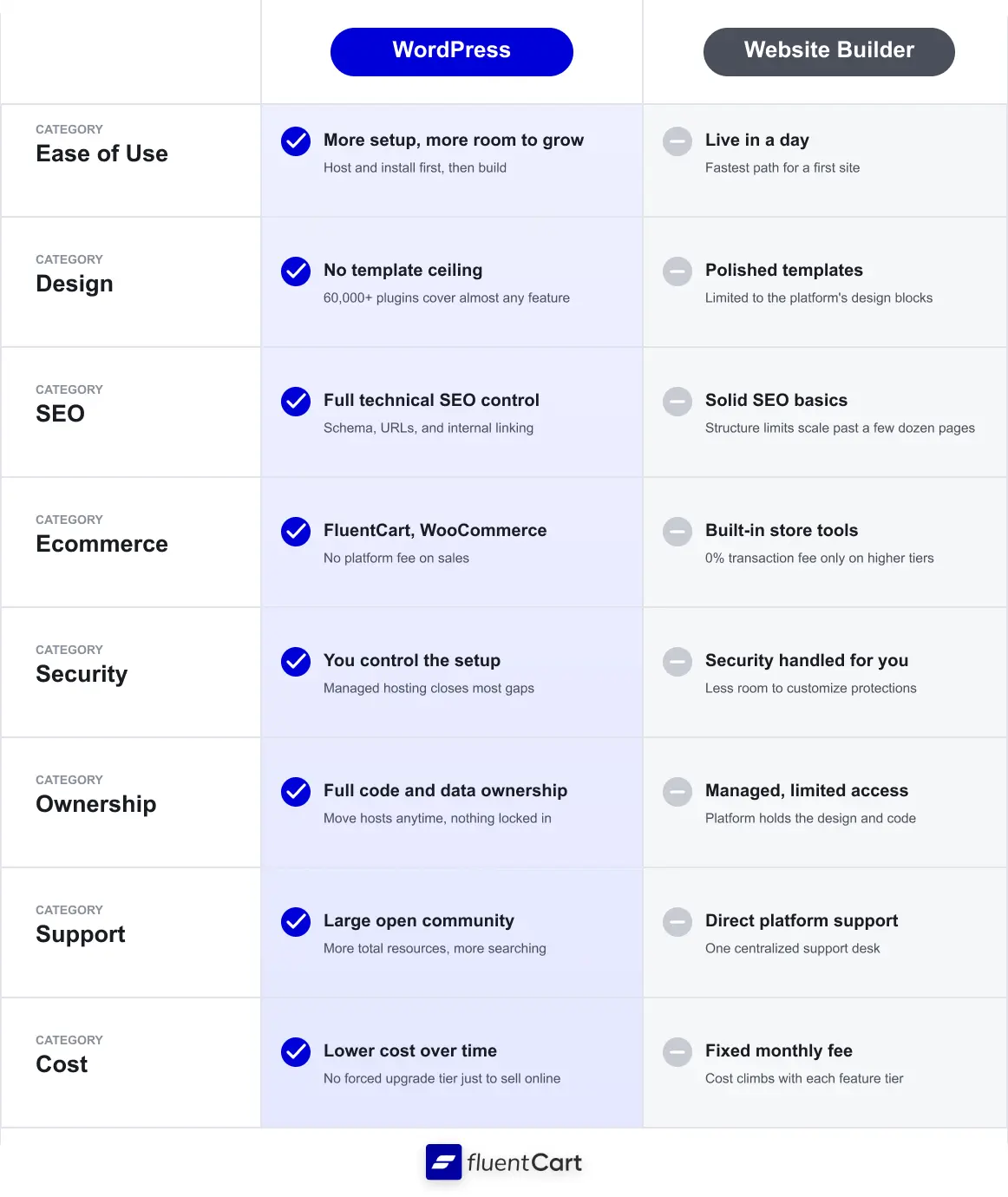
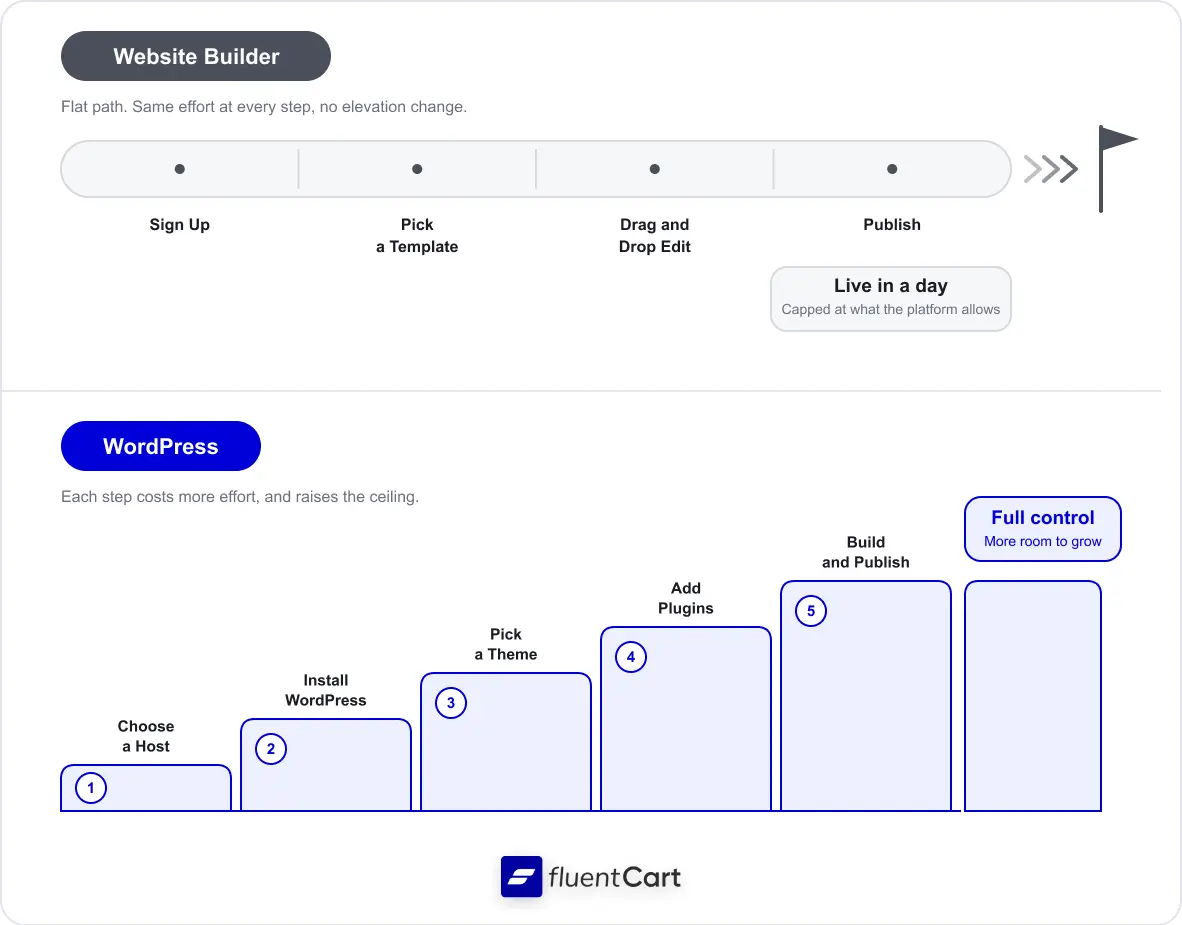
Wix and Squarespace use drag and drop editors that let a beginner publish a working site within a day.
WordPress asks for more setup before that first draft. You choose a host and install the software before you reach the editor. Page builder plugins have closed much of that gap. They let non technical users assemble complex pages inside WordPress without writing code.
Even so, a business that needs a live site immediately usually reaches for a builder first. One developer who works primarily with small businesses notes that WordPress fits most small to medium sized companies best once a professional sets it up correctly, since the platform rewards proper setup with more flexibility later (setup tradeoffs).
That tradeoff between launch speed and long term flexibility runs through almost every comparison in this guide.
Design and Customization Differences
Website builder templates are built by professional designers, which makes them hard to make ugly by accident. That consistency suits a portfolio or a brand that leans heavily on visuals.
WordPress removes that ceiling entirely. Its plugin library covers checkout flows, membership access, and fully custom layouts, and a developer can rebuild any part of the site without waiting on a platform update.
The tradeoff runs in both directions.
A builder keeps design choices simple and safe, while WordPress opens up nearly unlimited options at the cost of a steeper learning curve for anyone building the site themselves.
SEO and Long Term Growth
Both platforms handle basic SEO well for a small site. The real gap shows up once a site grows past a few dozen pages.
WordPress gives full control over site structure, schema markup, and internal linking, all of which support a long term content strategy built around search traffic.
Website builders rely on fixed template structures that can limit scale as content volume increases, especially for a business publishing several posts every week. A business planning to invest in content marketing for years usually notices this gap within the first twelve months.
Ecommerce and Selling Online
Selling online works differently depending on the platform.
Builders like Shopify and Wix bundle store tools directly into the dashboard, with payments, shipping, and checkout preconfigured from day one.
WordPress splits that job across two real paths instead: WooCommerce, the long-standing default, and newer all-in-one plugins built to cover more of that ground natively.
WooCommerce runs on more of the web than Shopify, at 6.64 percent versus 4.76 percent of measurable sites (ecommerce reach), and its core stays free. That scale comes with a tradeoff. Subscriptions, license delivery, and other advanced checkout needs usually mean adding separate paid extensions on top of the core plugin, and stitching several of them together as a store’s needs grow.
Plenty of WooCommerce alternatives exist for stores that would rather skip that extension-stacking from the start.
FluentCart takes a different approach on the same WordPress foundation. It bundles a modern checkout, subscription billing, and license management into one plugin instead of splitting them across separate add-ons, so a store’s core setup covers more of what a growing catalog needs on day one.
- Catalog size: WooCommerce and FluentCart both support unlimited products. Wix caps every plan at 50,000 products, and ecommerce is not available at all on its cheapest tier.
- Payment gateways: WooCommerce connects to hundreds of gateways through its extension ecosystem. FluentCart supports major global gateways natively, including Stripe, PayPal, Paddle, Mollie, Square, and Razorpay, plus custom gateways through webhooks.
- Subscriptions and licensing: WooCommerce needs a separate paid extension for this. FluentCart includes it in the core plugin.
- Checkout customization: Both WordPress options let a store rebuild checkout logic freely, while a builder keeps checkout inside its own fixed template.
A small catalog that will not grow past a few dozen products is often easiest to run on a builder’s built-in store tools. A store planning to add subscriptions, sell digital licenses, or scale past a few hundred products typically outgrows that setup fast. WooCommerce with the right extensions or an all-in-one plugin like FluentCart both work as the next step, and neither charges a platform fee on top of hosting.
Moving a store means more than exporting products. Tax records, shipping settings, customer data, and DNS or email routing all have to move without breaking anything. This checklist covers the entire handoff, not just the parts that are easy to remember.
Get the free printable migration checklist.
Nothing missed, nothing left to chance.
Print 3 copies and check them off by hand.
Every store’s real cost looks a little different once hosting, plugins, and add-ons are factored in. The FluentCart community is where you can compare notes with other store owners on what they actually spent.
Real store owners. Real problems. Real answers. Join the FluentCart Community.
Security and Maintenance
A website builder handles updates, patching, and uptime as part of the subscription price.
WordPress puts that responsibility on the site owner or their host instead. Most WordPress security incidents trace back to outdated or poorly maintained plugins rather than a flaw in WordPress core itself. A managed WordPress host, along with a small number of well maintained plugins, closes most of that gap and keeps ongoing maintenance manageable for a solo business owner.
Ownership: Who Really Controls Your Site?
This is where the two options differ the most.
A site built on a closed website builder lives inside that company’s system, and moving off it later usually means rebuilding the site rather than exporting it.
WordPress sites can move between hosts with far less friction, since the software and the content stay separate from any single company’s servers. Ownership stays fully in your hands either way, but WordPress makes it far easier to act on that ownership if your business or your priorities change later.
The deeper question of who owns a website goes beyond hosting alone, since it shapes data portability and long term brand control too.
Support: What Happens When You Get Stuck
A website builder offers direct support through chat or email, since one company controls the entire platform from top to bottom.
WordPress support comes from a mix of hosting providers, plugin developers, and a large open source community built around forums and documentation. That community has grown large enough to have already answered most common setup and troubleshooting questions in public.
The tradeoff is that WordPress support takes more effort to find than a single support ticket, since you are often piecing together an answer from more than one source.
Cost Breakdown: Website Builder vs WordPress
Cost is usually the last factor worth comparing, since the cheapest platform on paper is not always the cheapest platform for your specific site. The real total depends on whether you need a simple brochure site or a full online store, and on which hosting tier you actually pick for WordPress.
Brochure Site Pricing
Squarespace’s entry Basic plan runs $16 to $19 per month on annual billing, and Wix’s entry Light plan runs $17 per month, with both prices covering hosting, a template, and basic apps.
WordPress software is free, but budget shared hosting from a mainstream provider typically averages around $96 to $120 per year, or roughly $290 to $360 over three years once the domain is included.
That gap narrows on a mid-range host and widens on managed WordPress hosting, which can run closer to $900 to $1,300 over the same three years for a starter plan. Budget hosting plans are also worth double checking before you commit, since many advertise a low introductory rate that increases noticeably at renewal, which is exactly why the three-year figure runs higher than the first-year sticker price.
Ecommerce Pricing
Selling products changes the math on every platform.
Wix requires its Core plan at $29 per month to unlock a store, and does not add its own transaction fee on top of standard payment processing, which runs roughly 2.9 percent plus 30 cents per sale on most platforms. Squarespace’s Core plan sits at the same $29 per month with 0 percent platform transaction fees on that tier and above, though its cheapest entry plan still charges a transaction fee per sale if a business tries to sell there instead.
WordPress with WooCommerce has no core platform fee, but WooCommerce itself does not include subscription billing or license management out of the box. Matching that functionality means adding the official WooCommerce Subscriptions extension, which runs about $279 per year on its own, plus a separate extension for license delivery on top of that.
FluentCart bundles subscription billing and license management natively. A store does not need to stack extra paid extensions to get the same functionality. A well known theme option like Astra Pro runs around $69 per year and applies to either setup. The pricing below reflects running a single online business, since license tiers for multiple sites add a layer of complexity beyond the scope of this comparison.
| Site Type / Platform | Yearly Price | Rough 3-Year Total | Platform Fee |
|---|---|---|---|
| Brochure: Squarespace Basic | $192 – $228 | $576 – $684 | None |
| Brochure: Wix Light | $204 | $612 | None |
| Brochure: WordPress (budget host) | $96 – $120 | $288 – $360 | None |
| Store: Squarespace Core | $348 | ~$1,044 | 0% |
| Store: Wix Core | $348 | ~$1,044 | 0% |
| Store: WordPress + WooCommerce (+ Subscriptions/license add-ons) | $475 – $500 | $1,425 – $1,500 | None |
| Store: WordPress + FluentCart | $295 – $320 | $885 – $960 | None |
Note: FluentCart’s standard annual license is $199 per year for a single site, and it currently also offers a lifetime option that unlocks every premium feature, including subscriptions and license management, for a one-time payment starting around $249 instead of paying that fee every year. That lifetime option can push the real 3-year cost of a WordPress plus FluentCart store well below the annual pricing shown above while it remains available.
Which One Fits Your Business?
Match the platform to your business stage rather than to what feels easiest today.
Choose a Website Builder If You…
Choose WordPress If You…
A one-person consulting business that posts a new case study every few months rarely outgrows a website builder. A brand selling 300 products today and planning a subscription box within the year almost always does. Even a business that is genuinely well served by a builder today may outgrow it as content, traffic, or product catalogs expand. The right platform depends less on which one feels easiest right now and more on what your business needs twelve months from now.
Wrapping Up
WordPress and website builders both work well when matched to the right business. A builder suits a small site that needs to launch fast with minimal setup. WordPress suits a business planning to grow content, traffic, or product catalogs over time, along with one that wants full ownership of its platform.
WordPress vs Website Builder: Common Questions
Not sure whether WordPress or a website builder is right for your store? The FluentCart community is a place to ask other store owners how they made that call.
Real store owners. Real problems. Real answers. Join the FluentCart Community.

Hi, this is Sajid, a Marketing Strategist who creates content and visuals designed for maximum audience engagement. I also love exploring different tech tools, always curious to see what’s out there.

Subscribe now
Related Articles and Topics
-
6 Best WordPress eCommerce Plugins for Store Owners
WooCommerce still leads, but it’s not the only real option anymore. Here’s an honest look at 6 WordPress…
-
eCommerce Migration Best Practices: A Complete Checklist for 2026
Follow these ecommerce migration best practices to protect your data and switch platforms without losing customers or revenue.
-

Subscriptions on WordPress: The Complete Guide for Sellers
Set up subscriptions on WordPress and own every renewal, not just rent it.




Add your first comment to this post