
FluentCart vs PrestaShop: Honest Comparison for Store Owners
In the FluentCart vs PrestaShop comparison, FluentCart is the stronger choice for businesses building their store.
It is a performance-focused ecommerce plugin for WordPress whose free core supports physical products, digital downloads, simple subscriptions, and a streamlined checkout, while FluentCart Pro adds software licensing, advanced subscription management, installments, and order bumps.
PrestaShop is a standalone shop application that relies on paid modules for many of those features, and it remains a solid pick for a self-contained shop run by a technical team.
Both platforms are open source, both are free to start, and both let you own your store. The gap opens up once you look at how each one handles recurring revenue, checkout, digital delivery, and the tools you need around the store.
This guide compares both platforms feature by feature, with a full section on what FluentCart offers that PrestaShop leaves to modules.
Alright, let’s go deeper into the comparison.
TL;DR
- FluentCart is the stronger choice for businesses building their store on WordPress, with products, content, and customer tools on one site.
- FluentCart Free covers physical products, digital downloads, simple subscriptions, instant checkout, EU VAT validation with reverse charge, and Amazon S3 file delivery.
- FluentCart Pro adds software licensing, advanced subscription management, order bumps, and installment plans, with annual plans from $199/year.
- PrestaShop is a standalone ecommerce application, available as the free Classic edition on your own hosting or as PrestaShop Hosted from €24/month excl. VAT on annual billing. Many advanced features come from paid third-party modules.
- Adding subscriptions, license keys, upsells, abandoned cart emails, EU VAT handling, and similar features to PrestaShop with modules costs about €665 plus $285 in one-time licenses, before installation and support renewals.
- PrestaShop fits standalone shops that need many storefront languages and currencies from launch, with a technical team on hand.
Quick Verdict
Choose FluentCart if you want your store to run inside WordPress. It fits businesses that sell physical goods, digital products, subscriptions, courses, or software, and that want checkout, CRM, affiliates, and support working together on one site.
Choose PrestaShop if you want a standalone ecommerce platform that runs as its own application, either self-hosted or on PrestaShop Hosted. It fits a shop that is the entire website, with a developer or agency on hand to manage the platform and its modules.
FluentCart vs PrestaShop at a Glance
| Area | FluentCart | PrestaShop |
|---|---|---|
| Platform type | Ecommerce plugin for WordPress | Standalone ecommerce application |
| Free version | Yes, on WordPress.org | Yes, Classic edition (self-hosted) |
| Paid option | Pro from $199/year | Hosted from €24/month excl. VAT |
| Platform transaction fees | 0% on Free and Pro | None from PrestaShop |
| Subscriptions | Simple subscriptions in Free, advanced management in Pro | Third-party modules |
| Software license keys | Pro | Third-party modules |
| Instant checkout popup | Built in | Checkout page in a one-page or four-step layout |
| Order bumps and upgrade paths | Pro | Third-party modules |
| Cloud file delivery | Amazon S3 in Free, Cloudflare R2 in Pro | Files stored on your server |
| CRM, affiliates, support | Integrations with separate Fluent plugins | Separate modules or services |
| Page builders | Gutenberg, Elementor, Bricks, Divi | Theme templates and module positions |
| Languages and currencies | Translation-ready through WordPress tools; no native multi-currency storefront | 75+ languages, multiple currencies |
| Best for | WordPress stores selling physical, digital, hybrid, and subscription products | Standalone shops with a technical team to run them |
*Table Powered by NinjaTables
What Exactly Is FluentCart?
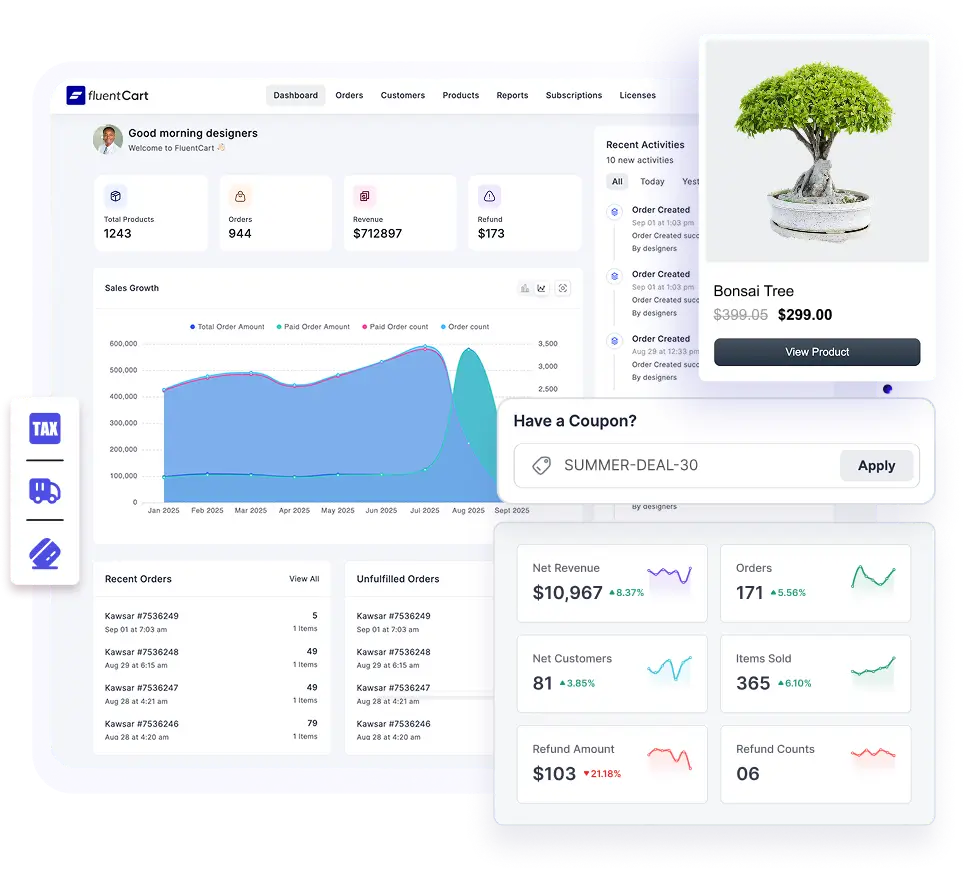
FluentCart is an ecommerce plugin for WordPress. It turns a WordPress site into a store that sells physical goods, digital downloads, and subscriptions from a single dashboard, with software licensing available in Pro.
The free version is listed on WordPress.org with more than 9,000 active installations as of October 2026, and FluentCart Pro unlocks advanced features under one license.
FluentCart is designed for performance. It keeps orders, customers, and transactions in dedicated commerce tables instead of the shared WordPress post tables. The plugin also ships updates at a fast pace, with recent releases adding EU VAT reverse charge, an advanced variations builder, expanded subscription management, product videos, and product reviews with rich-result schema.
Since the store runs inside WordPress, your products, blog, landing pages, courses, and community can share one site and one login. FluentCart stores order and customer records in your own WordPress database, which is the foundation of data ownership in ecommerce, while configured payment gateways and integrations receive the customer and transaction information they need.
Want to see FluentCart in action before reading the full comparison? The free version is one click away in the WordPress Plugins screen.
Try FluentCart Free on WordPress
Set up your store and publish your first product at no cost, with instant checkout and Stripe and PayPal payments built in.
What Exactly Is PrestaShop?
PrestaShop is a free, open-source ecommerce platform written in PHP on the Symfony framework. It started in Paris in 2005 as a student project, and the company behind it was founded in 2007.
PrestaShop is a complete application with its own admin panel (the Back Office), its own storefront (the Front Office), its own themes, and its own extensions, which it calls modules.
The current stable release is PrestaShop 9.2, launched on 30 September 2026. It added a native one-page checkout option, a built-in Ask AI assistant for the Back Office, and Extra Properties for custom fields. Version 9.1 had already made Hummingbird the default theme.
In February 2026, the Polish hosting group cyber_Folks completed its acquisition of PrestaShop together with Sylius and BitBag. According to the acquisition announcements, PrestaShop powers around 230,000 active stores, with its strongest base in Europe and Latin America.
You can run PrestaShop as the free Classic edition on your own hosting, or choose PrestaShop Hosted from €24 per month excluding VAT on annual billing, which includes hosting, installation, and support.
FluentCart vs PrestaShop: A Feature-by-Feature Comparison
With the basics covered, here is how FluentCart and PrestaShop compare across eight areas, from setup to pricing. Each area covers FluentCart first, then PrestaShop, for a clear view of where the two differ.
Setup and Ease of Use
FluentCart
You install FluentCart from the WordPress Plugins screen, and a guided setup wizard configures the store basics, including a dedicated tax step, in minutes.
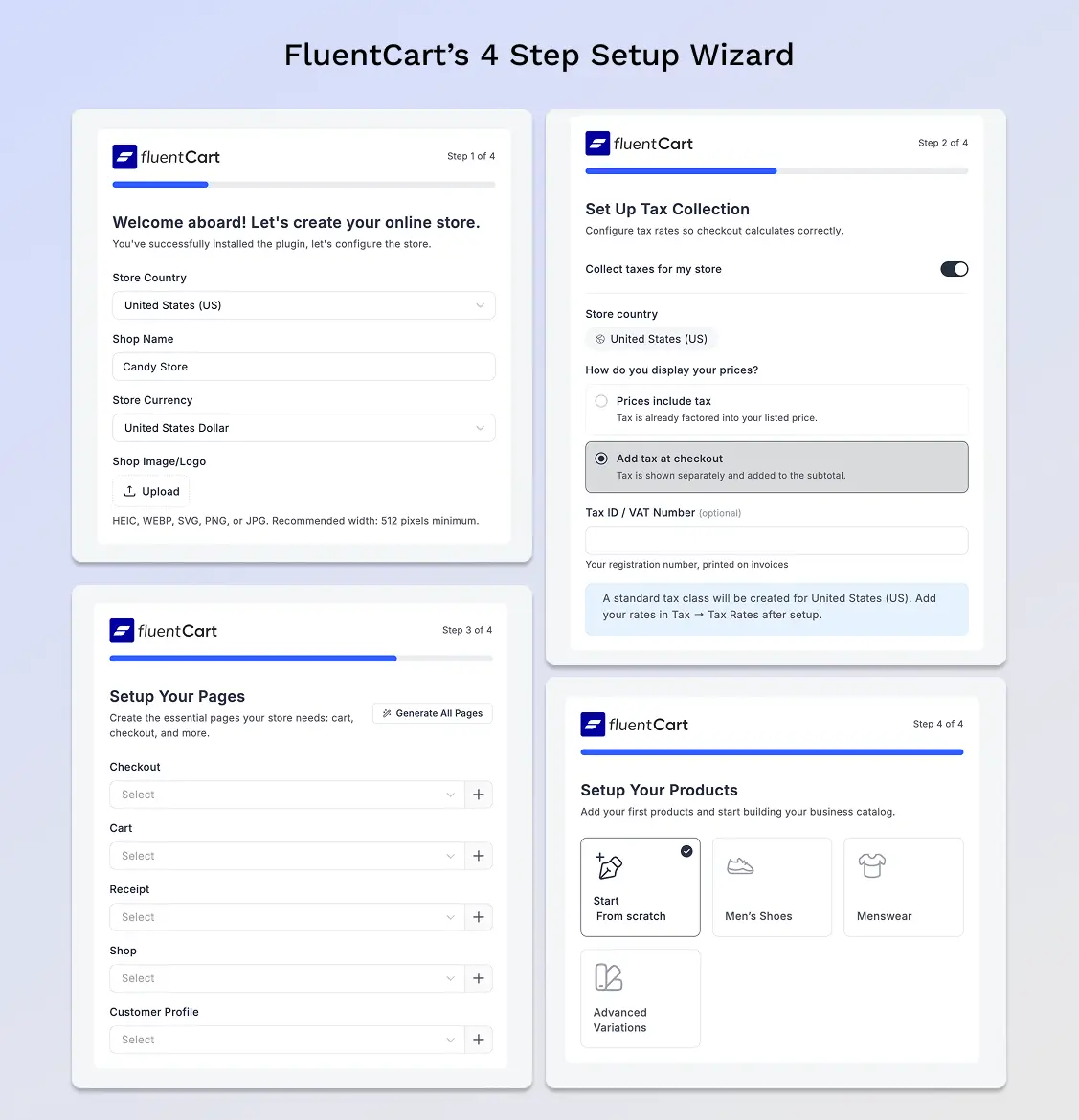
If you already run a WordPress site, the store goes live on your existing hosting, and anyone who knows WordPress finds the dashboard familiar from day one.
PrestaShop
The Classic edition needs hosting and a domain first. You upload the files, create a database, and run the installer, which also renames the admin folder for security. PrestaShop 9 requires PHP 8.1 or newer, MySQL 5.7 or MariaDB 10.2, and a recommended PHP memory limit of 512 MB. After installation, store setup spreads across separate Back Office menus for localization, taxes, carriers, and payment modules.
Products and Catalog Management
FluentCart
FluentCart sells simple products, variable products, digital products, and hybrid products from the same editor, with product bundles available in Pro.
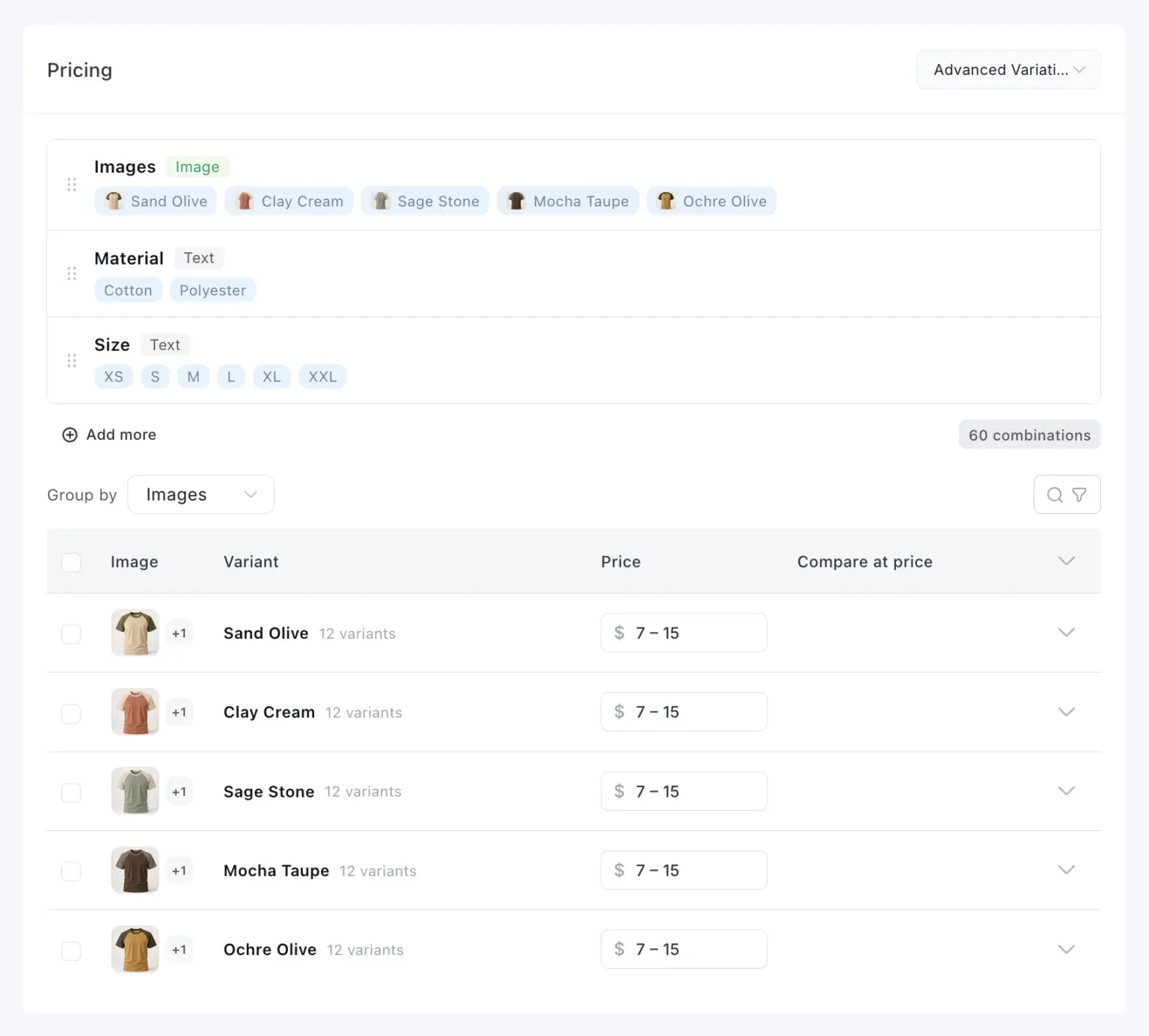
The advanced variations builder generates combinations automatically, adds color and image swatches, and lets you reuse attribute sets across products.
- Inventory tracking and stock adjustments through the order lifecycle, with SKU tracking per variation
- An advanced inventory workspace (Pro) with bulk stock updates and an audit trail that logs the old value, new value, reason, and user for every change
- Categories, brands, custom slugs, and product labels
- CSV import and CSV or JSON data export
- Product reviews with verified-purchase badges and rich-result schema
PrestaShop
PrestaShop offers standard products, products with combinations, packs, and virtual products. It separates attributes that shoppers choose from features that describe fixed specifications, and the current product page includes a combination generator with bulk editing.
Payments and Transaction Fees
FluentCart
The free core includes Stripe, PayPal, and manual or offline payments such as cash on delivery.
Free official add-ons connect Razorpay, Paystack, Mercado Pago, Flutterwave, and SSLCommerz. Pro includes Mollie, Authorize.Net, and Paddle, while Square and Airwallex are separate add-ons that require Pro.
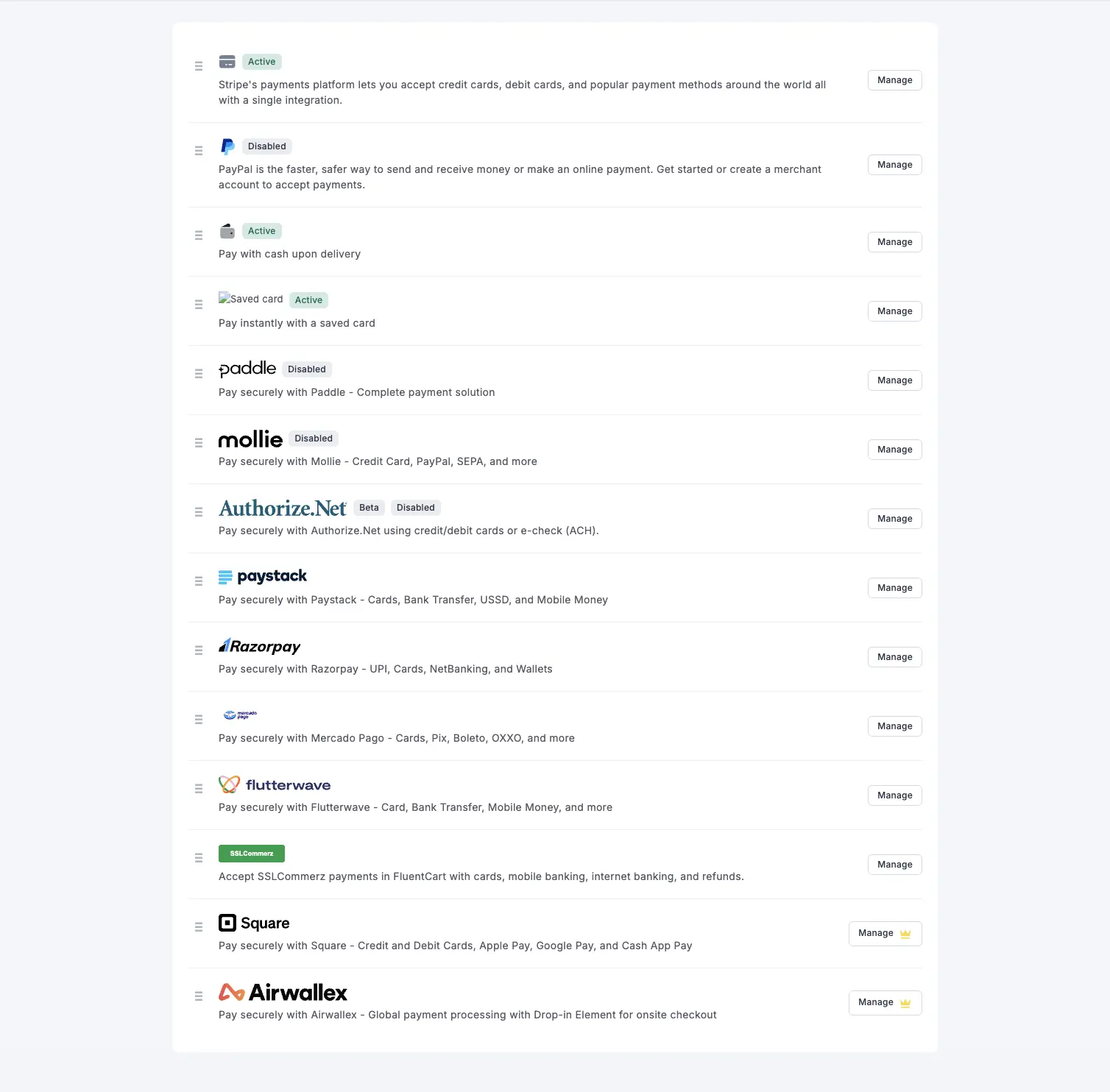
FluentCart takes 0% of your sales on both Free and Pro, payment processing fees still apply, and developers can connect a custom gateway through FluentCart’s gateway classes and hooks.
PrestaShop
A fresh install ships with cheque, bank transfer, and cash on delivery modules. Many merchants add PrestaShop Checkout, a free module built with PayPal that covers cards, PayPal, Apple Pay, Google Pay, and local methods, and Stripe or Klarna can be added as modules. PrestaShop takes no platform fee either, and you can restrict each payment method by country, currency, customer group, or carrier.
Tax, Shipping, and Selling Internationally
FluentCart
FluentCart handles tax rules and classes, shipping zones and classes, and per-item tax breakdowns, with EU VAT validation and eligible B2B reverse-charge handling included in the free version. Tax overrides can target a city or postcode, and the store is translation-ready with standard WordPress tools such as Loco Translate. A native multi-currency storefront is not part of FluentCart today.
PrestaShop
International selling is PrestaShop’s strongest area. It supports 75+ languages with free official translations, multiple currencies, and country localization packs that load taxes and units in one step. Carriers price shipping by weight or order total ranges for each geographic zone.
Design and Customization
FluentCart
FluentCart is designed to work with WordPress themes and offers styling integration with them, which gives a store access to the wider WordPress theme ecosystem. As with any plugin, compatibility with a specific theme is worth testing. FluentCart supports four page builders for designing product grids, product pages, checkout, and the customer dashboard.
The Appearance settings can pull store colors from the active theme or apply a custom palette with a live preview, and developers can override store templates without editing core files.
PrestaShop
PrestaShop uses Hummingbird as its default theme, built on Bootstrap 5 and designed with the European Accessibility Act in mind. Premium themes are available on the PrestaShop marketplace. Layout changes happen in Smarty template files, and content blocks from modules are arranged through hooks in Design > Positions. Drag-and-drop page building needs a paid module such as Creative Elements, which costs €79.99 to €109.99 per site.
Extensions and the True Cost of Features
FluentCart
FluentCart puts products, simple subscriptions, coupons, invoices, refunds, tax, shipping, and core reports in the free plugin, and a single Pro license unlocks the Pro features. For developers, it adds a REST API, developer hooks and webhook integrations, template overrides, headless support, and an ecommerce MCP server for AI assistants.
PrestaShop
PrestaShop’s marketplace lists more than 4,000 modules and services. The free core covers the essentials, and advanced features usually come from paid modules that commonly cost €50 to €300 each. Each module adds its own updates and compatibility checks, and the cost table later in this guide shows how quickly they add up.
Performance, Maintenance, and Security
FluentCart
FluentCart uses dedicated commerce tables and is designed for performance, and the right ecommerce hosting with a CDN helps a store handle traffic spikes. Results depend on hosting, configuration, extensions, and workload. Built-in functionality can reduce the number of separate commerce extensions to maintain, although WordPress, FluentCart Pro, integrations, and other plugins still need regular updates.
PrestaShop
On the Classic edition, you handle updates, backups, and server security, with help from the built-in Update Assistant. Many security incidents in the PrestaShop ecosystem trace back to outdated or vulnerable third-party modules, and a long module list adds to that exposure.
Pricing Compared
FluentCart
FluentCart Free costs nothing and runs a complete store.
At the time of writing, FluentCart Pro annual plans cost $199 for 1 site, $499 for 5 sites, $699 for 15 sites, and $899 for 50 sites, renewed each year. Add WordPress hosting and a domain to complete the budget.
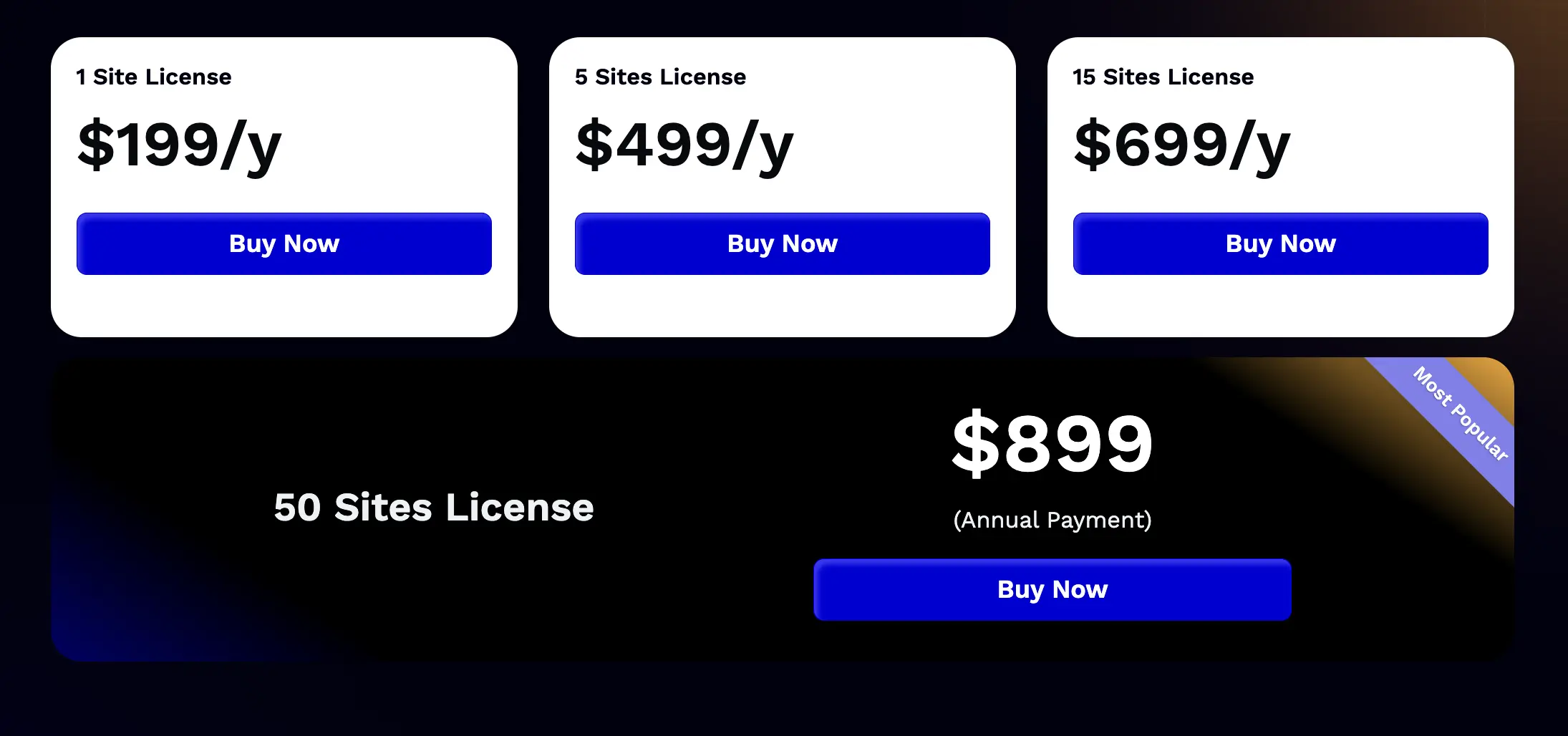
See which plan matches your store’s size and growth on FluentCart’s pricing plans page.
PrestaShop
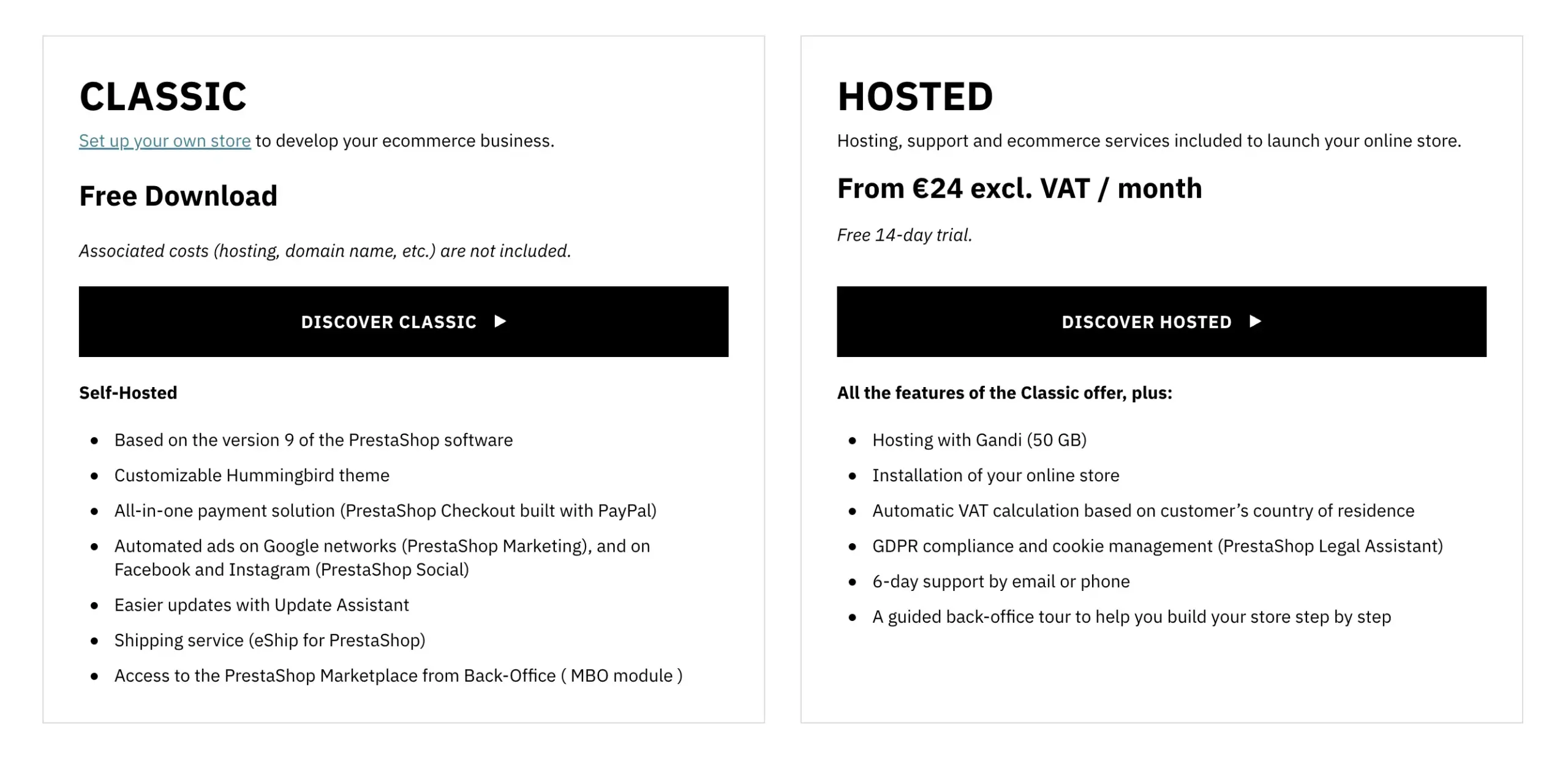
The Classic edition is a free download, with hosting, a domain, any premium theme, and paid modules on top. PrestaShop Hosted costs €24 per month excluding VAT on annual billing or €29 on monthly billing, and module purchases still apply.
13 Things FluentCart Offers That PrestaShop Leaves to Modules
Side by side, the two platforms can look similar on paper. Many of the capabilities below can be added to PrestaShop through third-party modules, and the difference lies in what comes bundled, what needs FluentCart Pro or a separate Fluent plugin, and what it costs. Here is what FluentCart offers that a standard PrestaShop install leaves to modules or does not include in its core.
1. Your Store and Your Website on One Platform
FluentCart lives inside WordPress, the platform that powers blogs, landing pages, and content sites. Product pages sit next to the articles that rank for your keywords, and your team manages everything from one dashboard with one set of user accounts.
In PrestaShop: The store is a separate application. A content-heavy site usually means running WordPress alongside it, or adding a blog module to the shop.
2. Native Subscriptions With Advanced Management in Pro
Simple subscriptions are supported in FluentCart Free, with monthly, yearly, or custom billing intervals and free or discounted trials. Advanced subscription management and lifecycle controls are available through FluentCart Pro, with capabilities depending on the payment gateway and billing model. Learn more about how subscriptions on WordPress work with FluentCart.
In PrestaShop: There is no native subscription feature. A third-party setup such as Webkul’s Subscription Products module ($59) also needs a compatible recurring gateway module, for example their Stripe Recurring Payment module ($99).
3. Sell Plugins for WordPress With Licensing and Updates
FluentCart Pro covers the licensing workflow for software sellers. License keys generate the moment an order completes, and you can offer one site, five sites, or unlimited activations for each product variation. For WordPress plugins, a built-in update server delivers new versions, changelogs, and packages to your customers’ WordPress dashboards through the updater integration, with no separate update service to run.
Together, these tools let you sell plugins for WordPress from your own site.
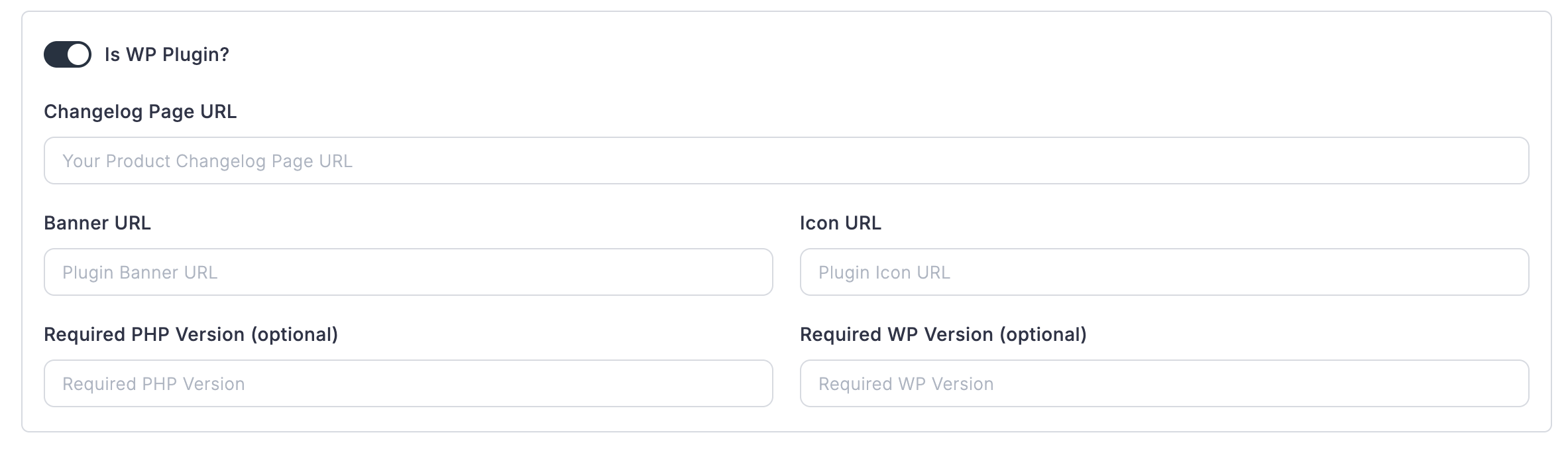
To use them, you integrate the licensing and updater SDK into each plugin and configure its release packages. The licensing server can also manage license keys for themes, although theme update delivery requires a theme-specific integration.
In PrestaShop: Virtual products deliver a file but have no concept of a unique key per order, and there is no update server for software sellers. License keys and version management come from modules such as Digital Revolution (€299).
4. Upgrade Paths Across Subscriptions, Licenses, and One-Time Purchases
FluentCart Pro lets customers move to a higher plan without starting over. Basic, Pro, and Team tiers sit under one product, and an Upgrade button in the customer dashboard moves a buyer up a level in a few clicks. The same option also works for paid one-time purchases, for example an eligible one-time software license or another configured one-time purchase.
In PrestaShop: There is no native upgrade path. Subscription modules may handle plan changes for recurring products, but license and one-time purchase upgrades need separate work.
5. Instant Checkout on the Product Page
With FluentCart, a Buy Now button can open a secure checkout popup on the product page, with no separate cart page to visit first, although redirects or additional authentication may still be required by the selected payment method. Payment links can be shared for eligible orders that require payment, and guest-accessible links work without a customer login.
In PrestaShop: Since version 9.2, merchants can switch between a native one-page checkout and the classic four-step checkout. The one-page layout works out of the box with Hummingbird-based themes, while Classic-based themes may need template work. In both layouts, checkout runs on a dedicated page after the cart, and a checkout popup on the product page is not part of the core options.
6. Built-In Revenue Tools
FluentCart Pro includes order bumps and installment plans designed to support upselling and flexible payment options without separate third-party commerce extensions. Order bumps offer a conditional add-on at checkout, and installment plans split larger purchases into scheduled payments.
In PrestaShop: Cart rules and catalog price rules handle discounts well. Upsell offers come from modules such as HiPresta’s Upsell & Cross-selling Pro (€97.99), which shows a pre-checkout upsell page.
7. Abandoned Cart Recovery With Free FluentCRM
The abandoned cart driver for FluentCart ships with the free FluentCRM core. With FluentCRM installed and an abandoned cart automation configured, eligible abandoned carts can trigger recovery emails that contain a link back to checkout, and a cart switches to recovered once the order completes. Tracking depends on the shopper providing an email, your consent settings, and how you configure the automation.
In PrestaShop: PrestaShop’s official reminder module has not had a release since 2017 and is marked as abandoned. Merchants use third-party modules such as Knowband’s Abandoned Cart ($47.99).
8. EU VAT Validation and Reverse Charge in the Free Version
FluentCart rebuilt its tax engine for European sellers, and the free version includes EU VAT validation through VIES, eligible B2B reverse-charge handling, and item-level tax breakdowns. VAT numbers are checked against the EU VIES service, reverse charge applies when a sale meets the eligibility rules you configure, and every order stores the tax decision behind it for audits and refunds. Read the full story of the EU VAT rebuild.
In PrestaShop: The official EU VAT number module had its last release in 2019 and is now maintained by the Friends of Presta community. VIES validation with reverse charge usually means a paid module such as Automatic EU VAT Checker (€129).
9. EU Withdrawal Request Workflows
EU Directive 2023/2673 introduced a digital withdrawal function for many online consumer contracts from 19 June 2026. FluentCart’s free, first-party Customer Rights add-on supports withdrawal-request workflows for applicable EU and German consumer contracts. Merchants should confirm their legal obligations and configure the add-on to match.
The add-on keeps the merchant in control: it records each request for review and does not cancel subscriptions or issue refunds automatically.
In PrestaShop: Withdrawal request functionality comes from third-party modules such as Silbersaiten’s EU Withdrawal Button (€29).
10. Cloud Delivery for Digital Products
FluentCart supports digital delivery through your own configured Amazon S3 account, with Cloudflare R2 support in Pro. Large files such as software, video, and design assets are served from cloud storage instead of your web server, and storage and bandwidth charges depend on the provider.
In PrestaShop: Virtual product files live in the store’s download folder on your server, capped by its PHP upload limits. Cloud delivery takes a module such as Webkul’s Amazon S3 module ($79).
11. Hybrid Products
A single FluentCart product can offer a digital version and a physical version side by side, for example an ebook and a printed copy. The customer picks the format they want on the same product page, without the store having to list two separate products.
In PrestaShop: A product is either physical or virtual, and virtual products cannot carry combinations without an extra module.
12. A Connected Business Stack
FluentCart integrates with the other plugins built by WPManageNinja, and those integrations share relevant purchase and customer information. Each integration requires the corresponding plugin to be installed and configured, and some capabilities need that plugin’s paid edition.
In PrestaShop: CRM, affiliate, helpdesk, and community features come from separate modules or external services, each with its own vendor, data sync, and update cycle.
13. Recurring Revenue Analytics
FluentCart reports go beyond sales totals. Core reporting covers sales, refunds, revenue by payment gateway, and subscription metrics such as renewals and churn, while license reports and date ranges beyond the default 30 days require Pro. An order heatmap shows your busiest hours, Store Digest emails send a daily, weekly, or monthly summary to your inbox, and AI-assisted search helps administrators find orders, customers, and subscriptions.
In PrestaShop: The Stats menu covers sales, visitors, catalog, and customers, but recurring revenue metrics depend on whichever subscription module you install.
What It Costs to Match FluentCart on PrestaShop
Here is what it takes to add similar capabilities to a PrestaShop store with popular third-party modules. Prices are one-time licenses for a single site with each vendor’s included support period, as listed in October 2026.
| Feature | FluentCart | PrestaShop module example |
|---|---|---|
| Subscriptions | Simple in Free, advanced in Pro | Webkul Subscription Products ($59) + Stripe Recurring ($99) |
| License keys and update delivery | Pro | Digital Revolution (€299) |
| Upsell offers | Order bumps in Pro | HiPresta Upsell & Cross-selling Pro (€97.99) |
| Abandoned cart emails | With free FluentCRM | Knowband Abandoned Cart ($47.99) |
| EU VAT validation and reverse charge | Free | Automatic EU VAT Checker (€129) |
| Withdrawal requests | Free Customer Rights add-on | Silbersaiten EU Withdrawal Button (€29) |
| Cloud file delivery | Amazon S3 support in Free | Webkul Amazon S3 ($79) |
| Visual page builder | Gutenberg in Free | Creative Elements (€109.99) |
| Approximate total | Pro from $199/year | About €665 plus $285 |
*Table Powered by NinjaTables
Just a heads up: this is a feature-cost comparison, not a full cost of ownership. The module prices exclude installation and support renewals, and the FluentCart column excludes Pro renewals, paid editions of other Fluent plugins, and cloud storage fees. Hosting applies to both. Before you compare platforms, list every feature your store needs on day one and check which ones come built in.
Reading through thirteen features is one thing, but which of them changed how a store runs after launch? The FluentCart community is where you can talk directly with store owners who use these tools every day.
Real store owners. Real problems. Real answers. Join the FluentCart Community.
Where PrestaShop Has the Edge
A fair comparison names PrestaShop’s strengths. It is the stronger fit for a catalog shop that must open in many languages and currencies on day one, since translations, currencies, and localization packs are native. Multistore runs several storefronts from one Back Office, and customer group pricing supports large B2B catalogs. Its community and agency network are strongest in Europe and Latin America.
Who Should Choose FluentCart
FluentCart fits businesses that want their store, content, and customer tools on one WordPress site, whether they sell physical goods, digital products, subscriptions, or software. These are the store owners who get the most out of it.
Who Should Choose PrestaShop
PrestaShop suits merchants whose shop is the entire website and whose first priority is reaching several countries in local languages. It works best with a developer or agency on hand to manage hosting, modules, and updates.
Switching From PrestaShop to FluentCart
Moving platforms takes planning, and a clear sequence protects your search rankings. FluentCart does not offer a dedicated PrestaShop migration tool, and the product CSV import is the main route for catalog data. Export your catalog from the PrestaShop Back Office as a CSV file, transform its columns to match FluentCart’s product import format, and bring the products in through the CSV import.
Customer, order, subscription, and license history may need separate tooling or custom work, and exporting those records as a backup is not the same as importing them. Then map every old product and category URL to its new address with 301 redirects through a redirect plugin or server rules, and test checkout end to end before you point your domain at the new store. These ecommerce migration best practices cover each step in detail.
Want every migration step on one page? Grab the free printable checklist and track each task from export to launch.
Get the free printable migration checklist.
Nothing missed, nothing left to chance.
Print 3 copies and check them off by hand.
How to Choose Between FluentCart and PrestaShop
Start with where your website lives today. If your business already runs on WordPress, FluentCart adds a full store without a second platform. If you are building from scratch, these questions settle it.
Torn between a WordPress store and a standalone platform? The FluentCart community is where store owners talk through this exact decision and share how their switch went.
Real store owners. Real problems. Real answers. Join the FluentCart Community.
See the difference for yourself. Install FluentCart Free and publish your first product today.
Start Selling on WordPress With FluentCart Free
Turn your WordPress site into a complete store. Sell physical goods, digital downloads, and subscriptions, and get paid through Stripe or PayPal with no paid modules required.
FluentCart vs PrestaShop: FAQs
Final Verdict
The FluentCart vs PrestaShop decision comes down to how your business makes money and where your website lives. PrestaShop is a capable standalone platform for shops that have technical help on hand. FluentCart is the stronger choice for businesses building on WordPress, from physical and hybrid product stores to subscription, course, and software sellers. Its free core covers the store, simple subscriptions, instant checkout, EU VAT handling, and cloud delivery, and Pro adds licensing, advanced subscription management, and revenue tools on top.

Hi, this is Sajid, a Marketing Strategist who creates content and visuals designed for maximum audience engagement. I also love exploring different tech tools, always curious to see what’s out there.

Subscribe now
Related Articles and Topics
-

Credit Card Payment Plugins Compared: Which Should You Choose?
Compare 10 credit card payment plugins for 2026. See the hidden 1.9% to 3% fees on free plans,…
-
Best Membership Website Hosting in 2026
Membership website hosting isn’t a separate kind of hosting. It’s regular managed cloud or VPS hosting that happens…
-

Best Membership WordPress Plugin: 8 Options Compared for 2026
Compare the best membership WordPress plugin options for 2026 by use case.




Add your first comment to this post